CodingDocumented overviewLast checked Oct 2, 2026

Cline: Pricing, Features & Best Use Cases

Open-source coding agent for VS Code, JetBrains, terminal and desktop, with bring-your-own-model support.
Who should use Cline

Cline suits developers who want an open-source coding agent in VS Code, JetBrains, the terminal or a desktop app and prefer to bring their own model keys. Based on the vendor's documentation, not on a hands-on test.

Best for: Individual developers

Also a good fit for

  • Teams wanting model choice
  • Enterprises needing SSO and audit logs

Consider another tool if you pay for model inference separately

Or if

  • Desktop app version listed as 0.0.41
  • JetBrains extension, SSO and team features need Enterprise

Cline in the news

Headlines from US outlets, selected automatically — not endorsements. Updated Oct 2, 2026

Cline pricing and usage limits

Prices checked Oct 2, 2026 on the official US pricing page. Official pricing ↗ Prices and limits change often.

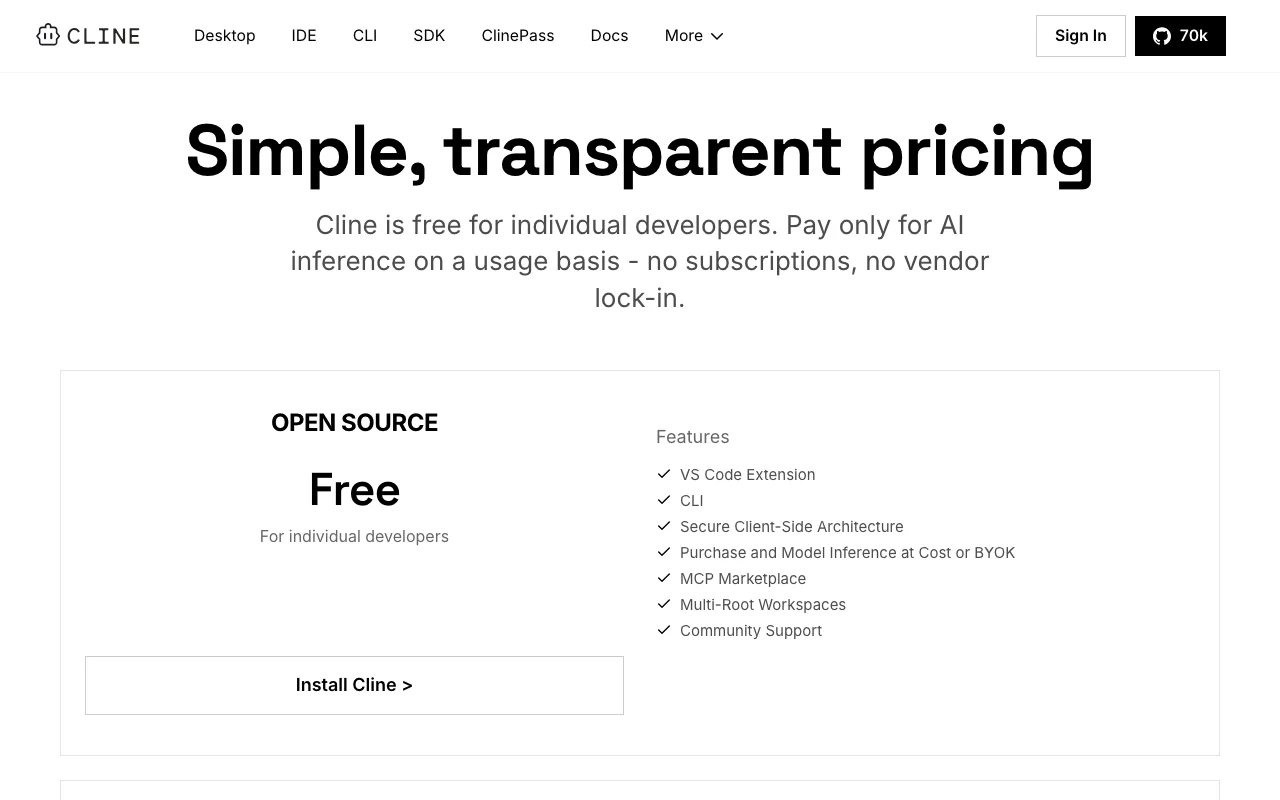
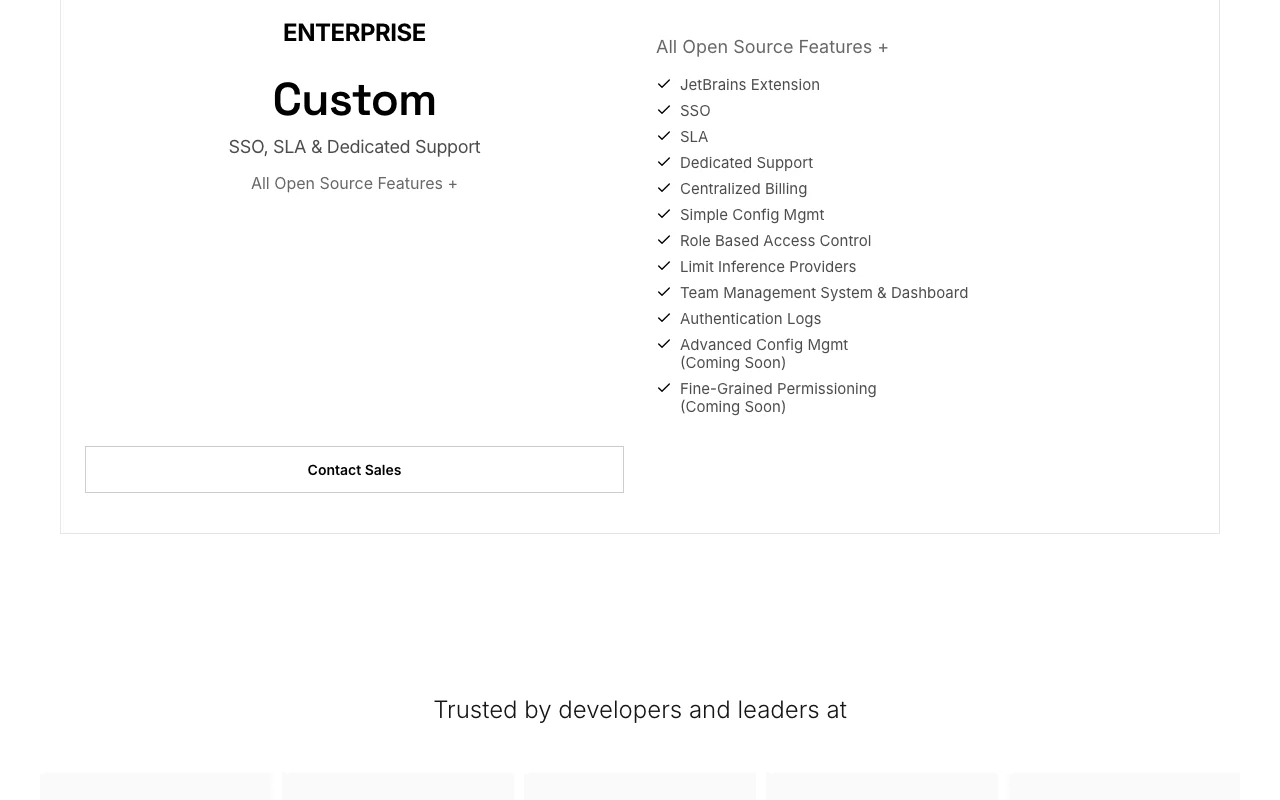
Cline pricing page with plans and prices — screenshot of the coding AI tool, Oct 2, 2026
The official Cline pricing page as we saw it. cline.bot, captured Oct 2, 2026

Free access and trial conditions

The open-source extension is free for individual developers

Not stated on the fetched pages

Paid plans: what changes as you upgrade

Open Source Direct

Free source (opens in a new tab)

Month, annual commitment

For: Individual developers

Limits

  • Inference billed at cost or via your own API keys

Includes

  • VS Code extension and CLI
  • MCP Marketplace
1 more
  • Community support

ClinePass Direct

$9.99/mo source (opens in a new tab)

Month, annual commitment

For: Developers wanting predictable open-model usage

Limits

  • 2-5x the usage on popular open coding models compared to standard API rates

Includes

  • Flat monthly subscription

Enterprise Direct

Custom pricing source (opens in a new tab)

Month, annual commitment

For: Organizations needing governance

Limits

  • Contact sales

Includes

  • JetBrains extension
  • SSO, RBAC and audit logs
1 more
  • SLA and dedicated support

Usage caps, credits and extra costs

Model inference is billed per use by the provider or the Cline provider

Not stated on the fetched pages

What is Cline, and how does it work?

Cline is an open-source (Apache 2.0) coding agent available as a desktop app, CLI, IDE extension and SDK. It edits files across a project, runs terminal commands and uses a Plan and Act workflow. It works with many model providers or your own API keys, so you pay for model inference rather than a subscription.

Cline homepage — screenshot of the coding AI tool, Oct 2, 2026
Cline's official site: how the product presents itself. cline.bot, captured Oct 2, 2026

What you provide and what you get back

How Cline works: what you provide, where it runs and what you get backYOU PROVIDEYour inputNatural-language task descriptionsProject files and rulesYour own model API keysCODINGClineDesktopfrom $9.99/mo (ClinePass)free tier availableaccount requiredchecked Oct 2, 2026YOU GET BACKThe resultMulti-file edits with diffsTerminal command resultsCheckpoints you can undoinput → Cline → output · from the vendor's own pages, no hands-on test unless stated
What you give Cline and what comes back, from its documentation

You provide

  • Natural-language task descriptions
  • Project files and rules
  • Your own model API keys

You get back

  • Multi-file edits with diffs
  • Terminal command results
  • Checkpoints you can undo

Where you can use it

Platforms
Desktop
Account
Required
Models / versions
BYO provider: Anthropic, OpenAI, Google, Bedrock, Azure, Vertex, Ollama, DeepSeek, xAI
Surfaces
Desktop app, CLI, VS Code extension, JetBrains plugin, SDK source (opens in a new tab)
Other editors
Cursor, Windsurf, Zed, Neovim via ACP source (opens in a new tab)
Workflow
Plan and Act modes with per-step approval source (opens in a new tab)
Customization
Rules via .clinerules, skills, MCP servers source (opens in a new tab)

What people use Cline for

Scenarios are worked out by our editors from the documentation; the actual result depends on your input and plan.

Understand and explain codebases

Who
Developers new to a repo
You provide
A question about files and dependencies
Expected result
An explanation of how the codebase is structured
Plan needed
Open Source
Limitation
Quality depends on the model you connect source (opens in a new tab)

Refactor across many files

Who
Engineers doing large changes
You provide
A refactoring request across many files
Expected result
Coordinated edits that keep imports and types consistent
Plan needed
Open Source
Limitation
Every action needs approval unless auto-approve is on source (opens in a new tab)

Automate tasks via CLI in scripts and CI

Who
DevOps and platform engineers
You provide
CLI commands run from scripts, cron or CI
Expected result
Recurring checks and updates run headlessly
Plan needed
Open Source
Limitation
Inference costs apply for every run source (opens in a new tab)

What Cline does, and where it stops

Multi-file edits with diffs and checkpoints

Edits several files at once and shows diffs with checkpoints and one-click undo. Lets you review and reverse each step.

Access: All plansLimit: Model quality determines edit accuracy. source (opens in a new tab)

Terminal command execution

Runs bash commands and reacts to the output as it appears. Handles tests, dev servers and deploys from the chat.

Access: All plans, with approval per commandLimit: Auto-approve removes the safety check. source (opens in a new tab)

Plan and Act modes

Lets you agree on a strategy in Plan mode and then execute it in Act mode. Reduces wrong-direction edits.

Access: All plansLimit: Planning quality depends on the model. source (opens in a new tab)

Rules via .clinerules and Skills

Reads .clinerules files and skills to follow your coding standards. Keeps output consistent with repo conventions.

Access: All plansLimit: Rules must be written and maintained by your team. source (opens in a new tab)

Cline pros and cons

Where Cline is strong

Limitations to check before paying

How to use Cline for refactoring a function across a repo

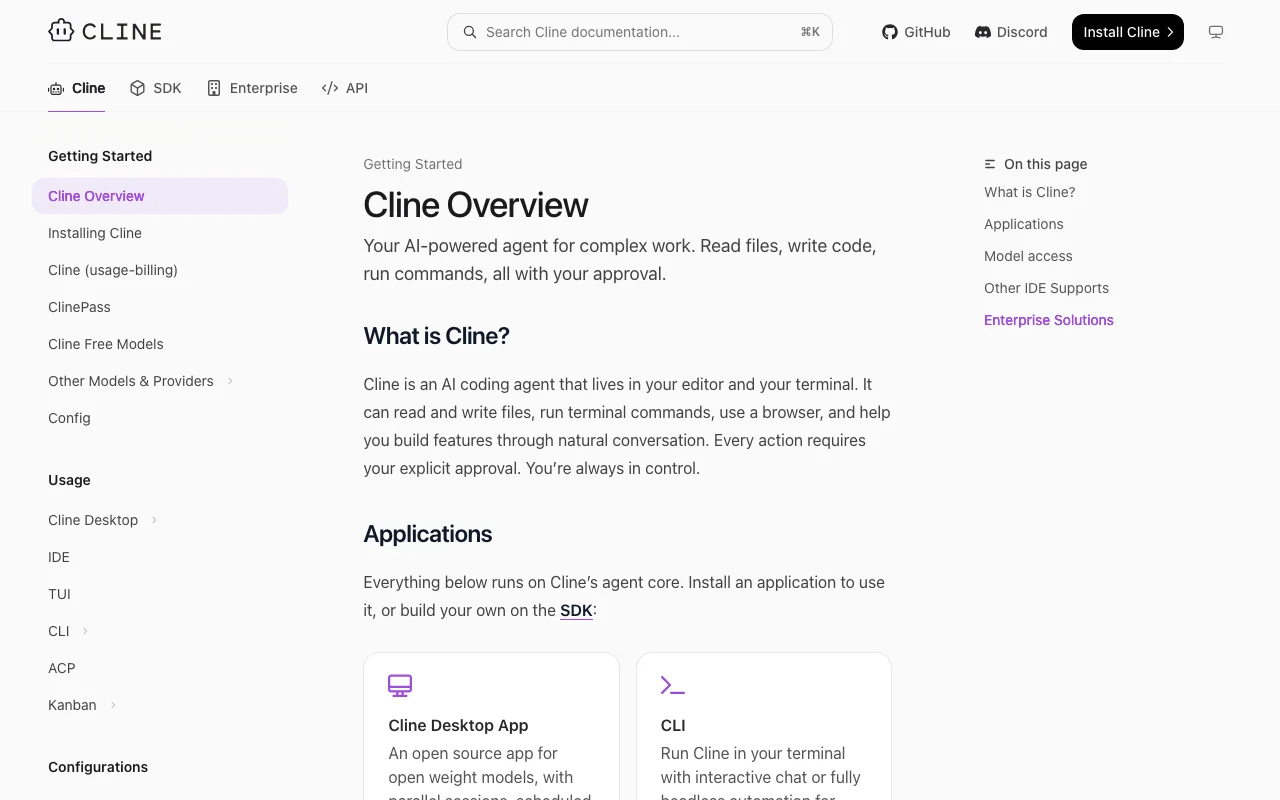
Cline documentation — screenshot of the coding AI tool, Oct 2, 2026
Cline documentation: where the steps below come from. docs.cline.bot, captured Oct 2, 2026

Set up Cline

  1. Install the Cline extension in VS Code or run npm i -g cline
  2. Sign in or add your own API key
  3. Pick a model
  4. Open your project folder

Example: refactoring a function across a repo

  1. Switch to Plan mode and describe the refactor
  2. Review the plan and switch to Act mode
  3. Approve each file edit and command
  4. Run the test command

Review and export the result

  1. Read each diff before approving
  2. Run your test suite
  3. Use a checkpoint to restore if a step went wrong
Example prompt suggested by our editors (not a recorded output of the product)
Rename the fetchUser helper to getUser across the repo, update imports, and run the tests.

Cline API

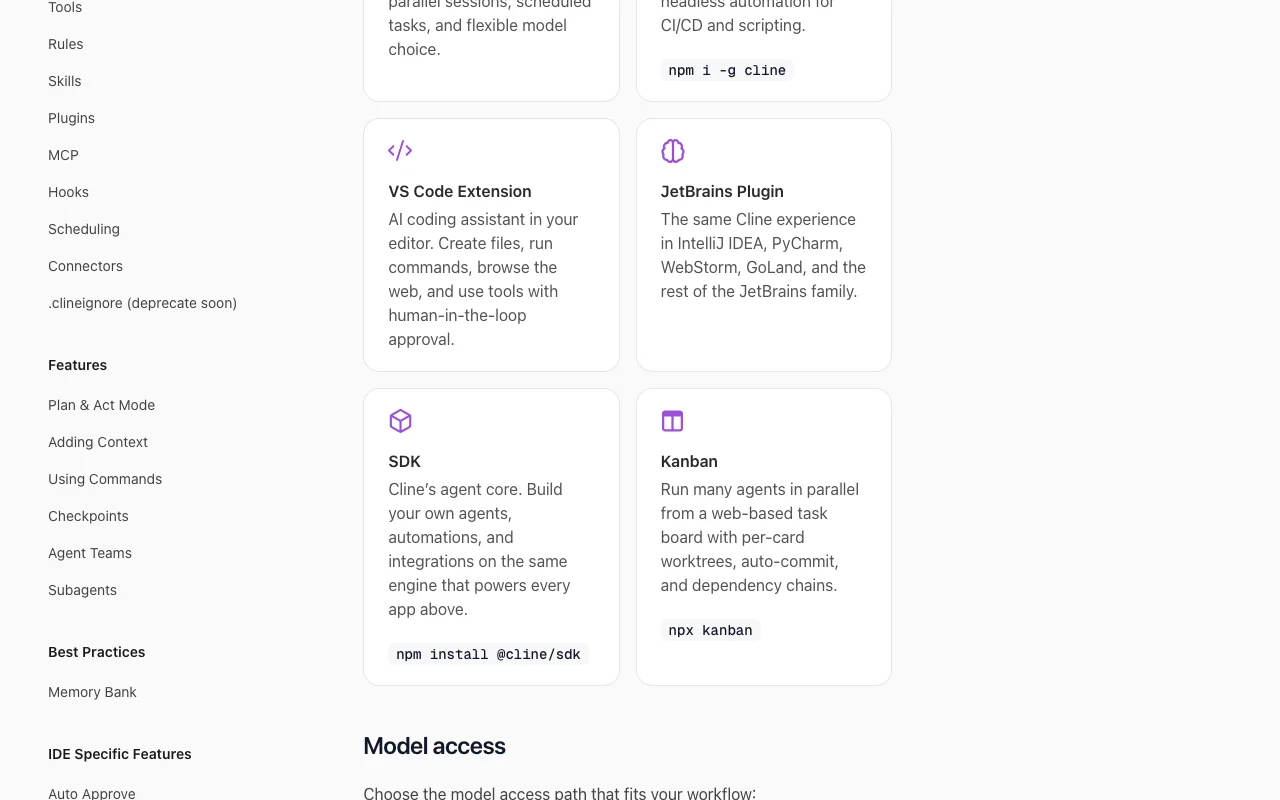
Cline documentation — screenshot of the coding AI tool, Oct 2, 2026
Cline documentation (continued). docs.cline.bot, captured Oct 2, 2026

API access and separate billing

An API is available, billed separately from the app subscription. An SDK (@cline/sdk) is documented; inference is billed by the model provider API documentation ↗

Privacy, data use and commercial rights

Summarized from the vendor's current policies; this is not legal advice and a vendor's badge is not an independent audit.

How your inputs and outputs are handled

Prompts and files go to the model provider you select; with your own API keys, content goes to that provider rather than Cline

Not stated on the fetched pages

Not stated on the fetched pages

Commercial use and plan restrictions

Apache 2.0 open source

Enterprise adds SSO, audit logs and provider limits

Controls for business users

  • Client-side architecture
  • Limit inference providers (Enterprise)
  • Authentication logs (Enterprise)

Policies: cline.bot/privacy

Other tools to consider instead of Cline

"Better suited" is based on documented features and pricing, not on a head-to-head test.

Cursor: better suited to

GitHub Copilot: better suited to

Devin Desktop (formerly Windsurf): better suited to

Claude: better suited to

Alternatives
AlternativeWhen to choose itPricingLimitation
Cursor——Compare
GitHub Copilot——Compare
Devin Desktop (formerly Windsurf)——Compare
Claude——

Explore Cline further

Tools and guides near Cline

Cline user reviews

No user reviews yet.

Used Cline? Be the first to share your experience.

Write a review

Reviews are checked by a moderator before they appear. Your email is never published. Plain text only.

Your rating (required)

Show what you made or what went wrong. Images are published only if the review is approved; location data is removed.

    Cline FAQ

    Is Cline open source?

    Yes, Cline is released under the Apache 2.0 license. source (opens in a new tab)

    What does Cline Enterprise add?

    Enterprise adds the JetBrains extension, SSO, role-based access control, centralized billing, audit logs and dedicated support. source (opens in a new tab)

    What is ClinePass?

    ClinePass is a flat $9.99 per month subscription giving 2-5x the usage on popular open coding models compared to standard API rates. source (opens in a new tab)

    Which models does Cline work with?

    Anthropic, Gemini, OpenAI, OpenRouter, AWS Bedrock, GCP Vertex, DeepSeek and local runtimes such as Ollama and LM Studio. source (opens in a new tab)

    Sources and review methodology

    Official sources and verification dates

    Not verified: Data retention and training use not stated in fetched text; Desktop app is version 0.0.41.

    How we documented and maintain this page

    Every fact about Cline above comes from the 5 official pages listed here, last compared on Oct 2, 2026; we have not run Cline ourselves, so it has no editorial score. How we check and re-check pages.

    Article updated Oct 2, 2026; prices checked Oct 2, 2026. Outbound links to vendors are plain links; we do not earn commissions. How we review · Report an error