CodingDocumented overviewLast checked Oct 1, 2026

Code Input: Pricing, Features & Best Use Cases

Web-based developer platform for merge conflicts, merge queue, CODEOWNERS, workflow automation and engineering metrics.

Who Code Input fits

Code Input suits developers and teams who want a browser tool for resolving merge conflicts, with a merge queue and CODEOWNERS tools on the Team plan. Based on the vendor's documentation, not on a hands-on test.

Best for: Engineering teams on GitHub

Also a good fit for

  • Maintainers of large monorepos with CODEOWNERS

Consider another tool if free plan limited to 1 user and 5 workflows

Or if

  • Private repositories need a paid plan
  • Merge queue and advanced CODEOWNERS are on Team plan

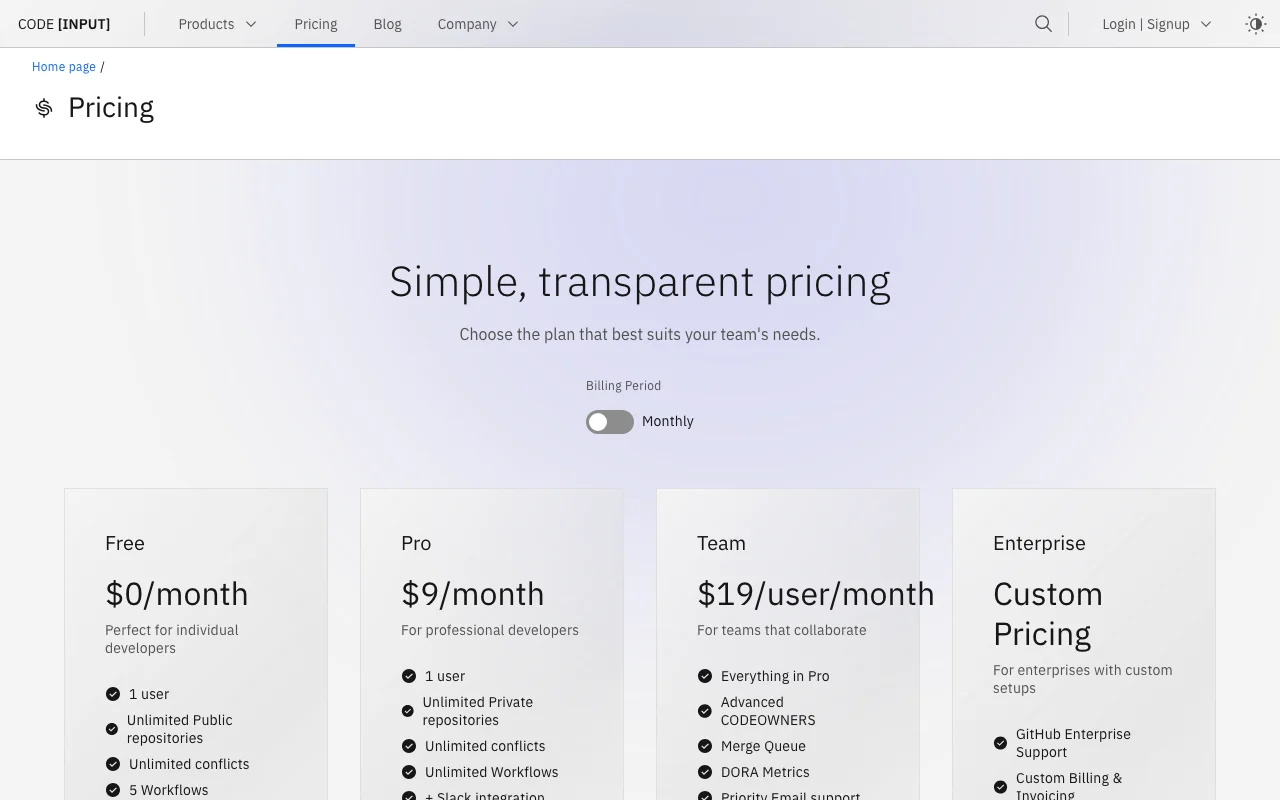
Code Input pricing and usage limits

Prices checked Oct 1, 2026 on the official US pricing page. Official pricing ↗ Prices and limits change often.

Code Input pricing page with plans and prices — screenshot of the coding AI tool, Oct 1, 2026
The official Code Input pricing page as we saw it. codeinput.com, captured Oct 1, 2026

Free access and trial conditions

Free plan for 1 user with unlimited public repos

FAQ states a free 1-month trial, card added only to continue

Paid plans: what changes as you upgrade

Free web

Free source (opens in a new tab)

Monthly

For: Open-source solo developers

Limits

  • 1 user
  • 5 workflows
1 more
  • Public repositories only

Includes

  • Unlimited public repositories
  • Unlimited conflicts
1 more
  • GitHub and email integration

Pro web

$9 source (opens in a new tab)

Monthly

For: Professional solo developers

Limits

  • 1 user

Includes

  • Unlimited private repositories
  • Unlimited workflows
2 more
  • Slack integration
  • DORA metrics

Team web

$19 per user per month source (opens in a new tab)

Monthly

For: Teams collaborating on PRs

Limits

  • Unlimited seats
  • 1 million invocations per seat

Includes

  • Merge Queue
  • Advanced CODEOWNERS
2 more
  • DORA metrics
  • Priority email support

Enterprise web

Custom pricing source (opens in a new tab)

Custom

For: Enterprises with custom setups

Limits

  • SSO and SAML
  • On-premise deployment

Includes

  • GitHub Enterprise support
  • Custom billing and invoicing
2 more
  • 24/7 support
  • API access

Usage caps, credits and extra costs

Team workflow invocations beyond 1 million per seat cost $3 per million

Not stated

What is Code Input, and how does it work?

Code Input is a browser-based platform for development teams that connects to GitHub, GitLab and Bitbucket. It offers a side-by-side merge conflict editor with AI suggestions, a merge queue, advanced CODEOWNERS handling, workflow automation and DORA-style insights. The site says no installation is needed and that source code is not stored, with processing done in GitHub Actions runners. AI features use bring-your-own-key on the listed plans.

Code Input homepage — screenshot of the coding AI tool, Oct 1, 2026
Code Input's official site: how the product presents itself. codeinput.com, captured Oct 1, 2026

What you provide and what you get back

How Code Input works: what you provide, where it runs and what you get backYOU PROVIDEYour inputGit repository via GitHub, GitLab…Conflicting branchesYour own AI API key (BYOK)CODINGCode InputWebfrom $9 (Pro)free tier availableaccount requiredchecked Oct 1, 2026YOU GET BACKThe resultResolved merge commitsMerge queue orderingDORA metrics and PDF reports (Tea…input → Code Input → output · from the vendor's own pages, no hands-on test unless stated
What you give Code Input and what comes back, from its documentation

You provide

  • Git repository via GitHub, GitLab or Bitbucket login
  • Conflicting branches
  • Your own AI API key (BYOK)

You get back

  • Resolved merge commits
  • Merge queue ordering
  • DORA metrics and PDF reports (Team)

Where you can use it

Platforms
Web
Account
Required
Hosts
GitHub, GitLab, Bitbucket source (opens in a new tab)
Interface
Browser, plus CLI and Chrome/Firefox extension source (opens in a new tab)
Invocations
10,000 Free; 1 million Pro; 1 million per seat Team source (opens in a new tab)
Install
None required source (opens in a new tab)

Where Code Input is most useful

Scenarios are worked out by our editors from the documentation; the actual result depends on your input and plan.

Resolve merge conflicts in the browser

Who
Developers on GitHub, GitLab or Bitbucket
You provide
A conflicting pull request
Expected result
Resolved conflict via 3-way diff editor
Plan needed
Free for public repos
Limitation
Private repos need Pro source (opens in a new tab)

Queue pull requests for ordered merging

Who
Engineering teams
You provide
Open PRs on GitHub
Expected result
Ordered, parallelism-controlled merges
Plan needed
Team
Limitation
Merge queue is Team only source (opens in a new tab)

Manage CODEOWNERS across a large repo

Who
Maintainers of big monorepos
You provide
CODEOWNERS file and repo
Expected result
Interface and CLI to edit ownership rules
Plan needed
Team
Limitation
Advanced interface is Team source (opens in a new tab)

Code Input features and their limits

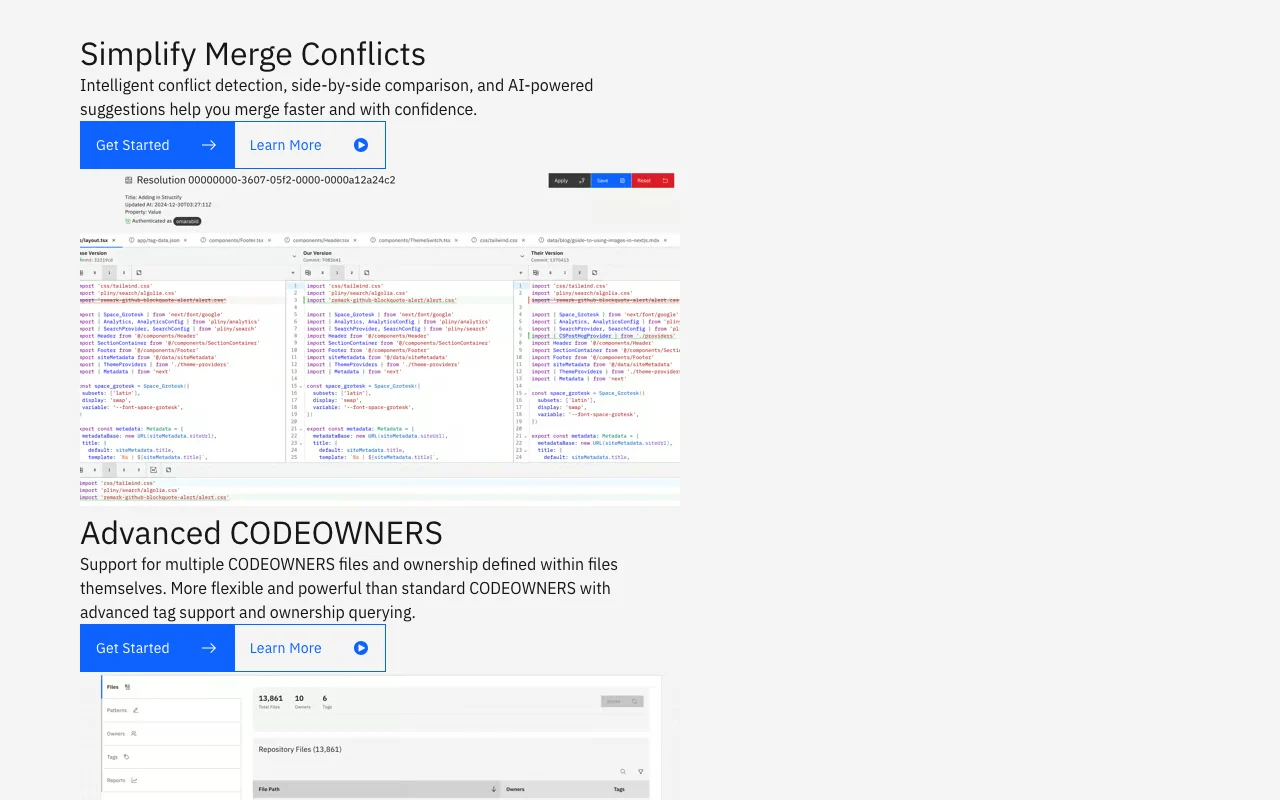
Code Input homepage — screenshot of the coding AI tool, Oct 1, 2026
Feature overview on the official site. codeinput.com, captured Oct 1, 2026

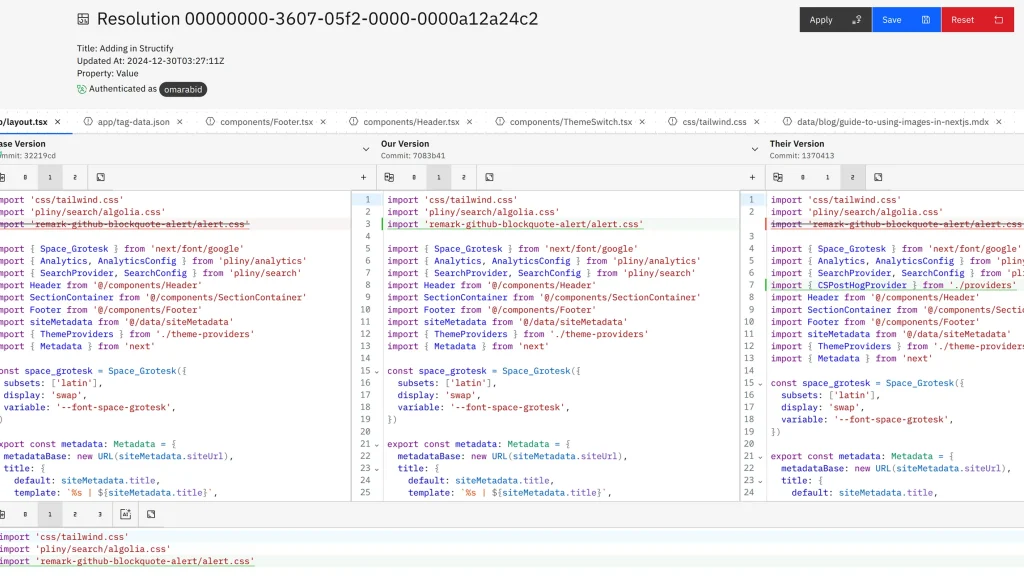
3-way diff conflict editor

Shows base, ours and theirs side by side to resolve conflicts Clearer than inline markers

Access: All plansLimit: Runs in the browser, not your IDE source (opens in a new tab)

AI-assisted conflict suggestions

Suggests resolutions using your own AI key Speeds up routine conflicts

Access: BYOK on Free, Pro, Team; custom on EnterpriseLimit: You pay your AI provider separately source (opens in a new tab)

Merge queue with parallelism controls

Queues PRs and merges them in order with configurable parallelism Prevents broken main branches

Access: Team and EnterpriseLimit: GitHub integration only listed source (opens in a new tab)

Advanced CODEOWNERS interface and CLI

Provides UI and command line for ownership rules Easier ownership maintenance

Access: Interface on Team; CLI on all plansLimit: Pricing table lists CLI on all, interface on Team source (opens in a new tab)

Code Input: strengths and limits

Reasons to choose Code Input

Check before paying for Code Input

How to use Code Input for resolving a merge conflict in the browser

Set up Code Input

  1. Open codeinput.com and log in with GitHub, GitLab or Bitbucket
  2. Authorize access to the repository
  3. Optionally add your AI API key for suggestions

Example: resolving a merge conflict in the browser

  1. Open the pull request with the conflict
  2. Review base, ours and theirs in the 3-way editor
  3. Accept AI suggestion or edit manually
  4. Commit the resolved result

Review and export the result

  1. Confirm CI passes on the resolved pull request
  2. Check the merged file for leftover markers

Code Input API

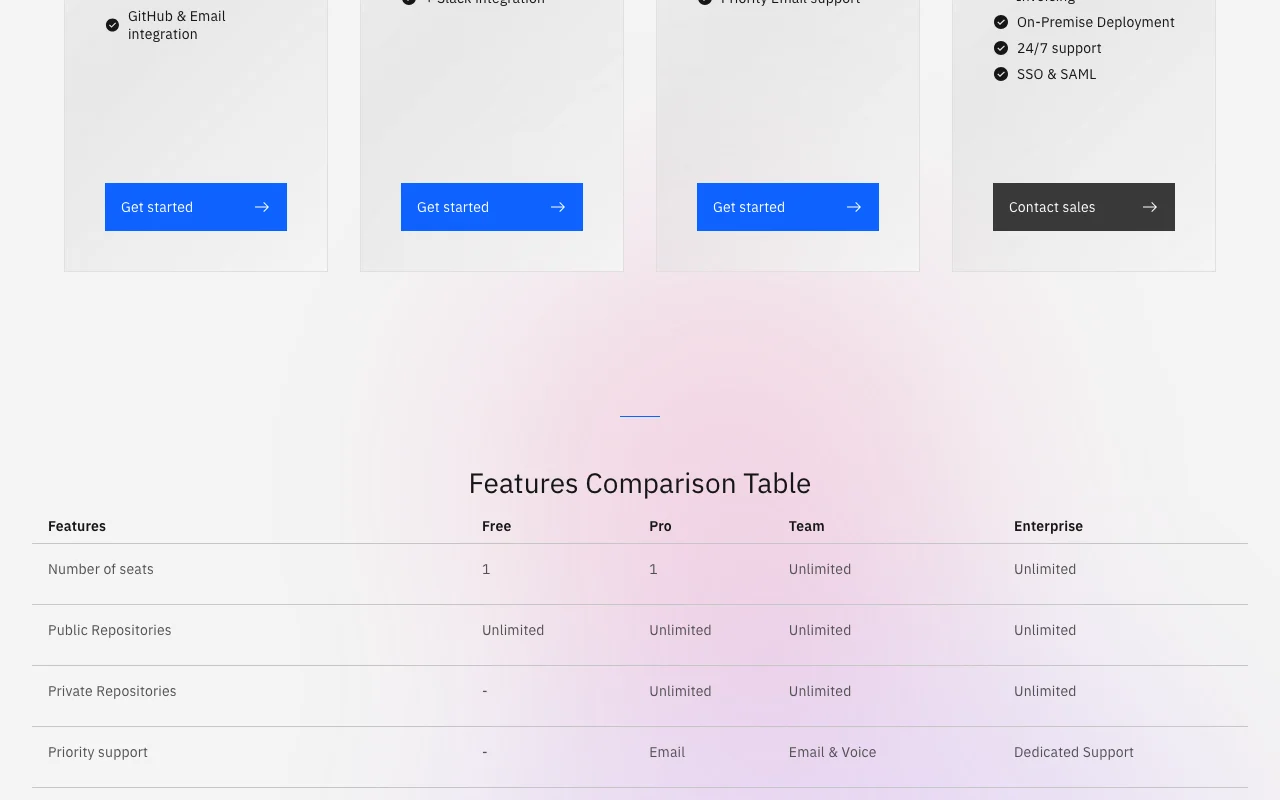
Code Input pricing page with plans and prices — screenshot of the coding AI tool, Oct 1, 2026
Plan comparison on the official pricing page. codeinput.com, captured Oct 1, 2026

API access and separate billing

Code Input has no public API in its official documentation. API access is listed only for Enterprise

Privacy, data use and commercial rights

Summarized from the vendor's current policies; this is not legal advice and a vendor's badge is not an independent audit.

How your inputs and outputs are handled

Source code is not stored; processed in GitHub Actions runners per site FAQ

Code Input alternatives by need

"Better suited" is based on documented features and pricing, not on a head-to-head test.

GitHub Copilot: better suited to

Cursor: better suited to

Alternatives
AlternativeWhen to choose itPricingLimitation
GitHub Copilot——Compare
Cursor——Compare

Explore Code Input further

Related to Code Input

Code Input user reviews

No user reviews yet.

Used Code Input? Be the first to share your experience.

Write a review

Reviews are checked by a moderator before they appear. Your email is never published. Plain text only.

Your rating (required)

Show what you made or what went wrong. Images are published only if the review is approved; location data is removed.

    Code Input FAQ

    Is Code Input free?

    Yes for one user with unlimited public repositories and 5 workflows; private repositories need Pro at $9/month. source (opens in a new tab)

    Does Code Input store my source code?

    The FAQ says it never stores or accesses your source code; it is processed in GitHub's Actions runners. source (opens in a new tab)

    Which platforms does it support?

    GitHub, GitLab and Bitbucket. source (opens in a new tab)

    How is Team priced?

    $19 per user per month, with merge queue, advanced CODEOWNERS and DORA metrics. source (opens in a new tab)

    Does it include AI?

    AI conflict help is bring-your-own-key on Free, Pro and Team. source (opens in a new tab)

    Sources and review methodology

    Official sources and verification dates

    Not verified: Supported programming languages; Data retention details; Enterprise price; Page not available: https://codeinput.com/docs.

    How we documented and maintain this page

    Every fact about Code Input above comes from the 3 official pages listed here, last compared on Oct 1, 2026; we have not run Code Input ourselves, so it has no editorial score. How we check and re-check pages.

    Article updated Oct 10, 2026; prices checked Oct 1, 2026. Outbound links to vendors are plain links; we do not earn commissions. How we review · Report an error