Free web
Free source (opens in a new tab)
Month
For: Trying Town
Limits
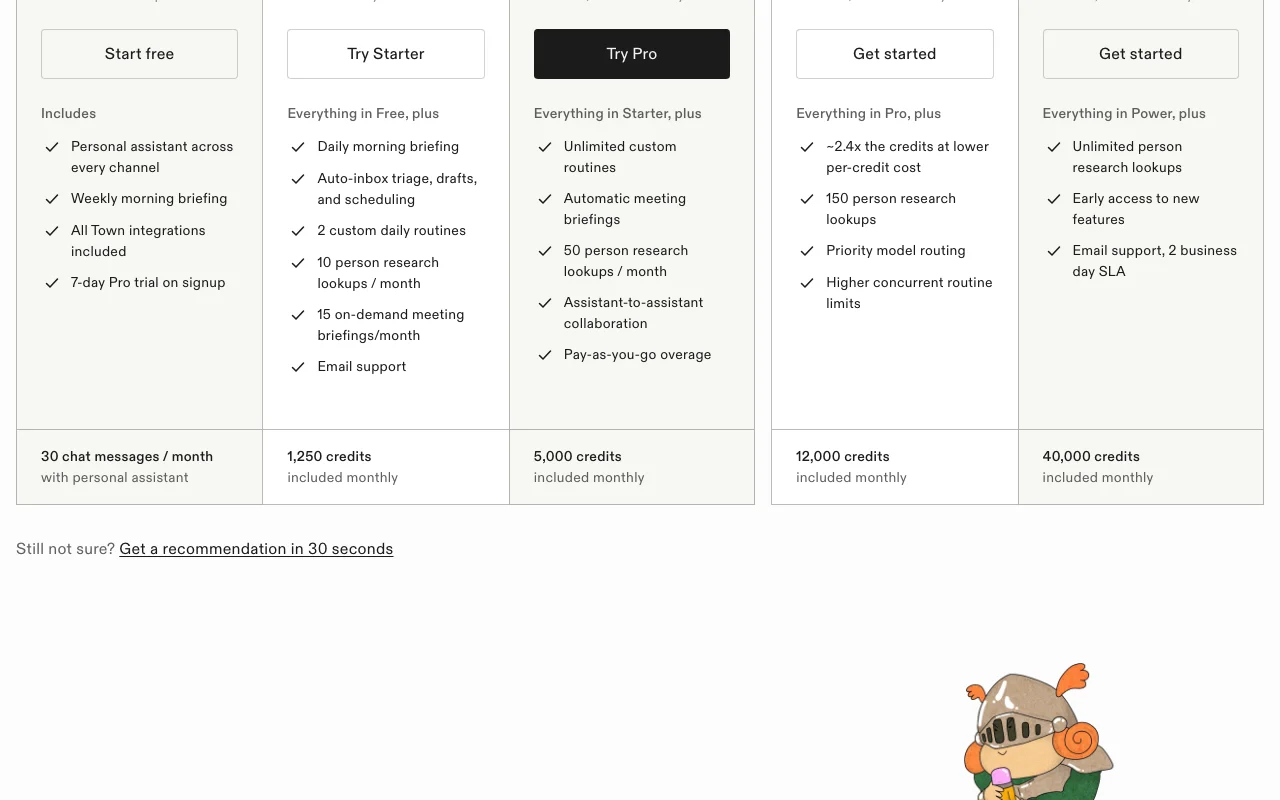
- 30 chat messages per month
- Weekly morning briefing
Includes
- Personal assistant across channels
- All integrations
1 more
- 7-day Pro trial on signup

Productivity & writingDocumented overviewLast checked Sep 29, 2026
AI assistant ('Townie') that learns how you work and handles inbox triage, briefings, scheduling and recurring routines.

 (open full size in a new tab)
 (open full size in a new tab)
 (open full size in a new tab)
 (open full size in a new tab)
Our take: Town suits busy individuals and small teams who want an AI assistant to handle inbox triage, briefings and routines, starting free and metering usage in credits.
Main limitation: Free plan allows only 30 chat messages per month, and usage beyond a plan's credits is billed as overage.
Town suits busy individuals and small teams who want an AI assistant to handle inbox triage, briefings and routines, starting free and metering usage in credits. Based on the vendor's documentation, not on a hands-on test.
Also a good fit for
Or if
Headlines from US outlets, selected automatically — not endorsements. Updated Oct 2, 2026
 If an obscure 1980s paradox is any guide, AI may be about to hit a huge tipping point (opens in a new tab)
 America’s new AI map shows something surprising: ‘A lot of normal people are adopting AI’ (opens in a new tab)The AI productivity playbook with Harry McCracken and Jared Newman (opens in a new tab)
Prices checked Sep 29, 2026 on the official US pricing page. Official pricing ↗ Prices and limits change often.
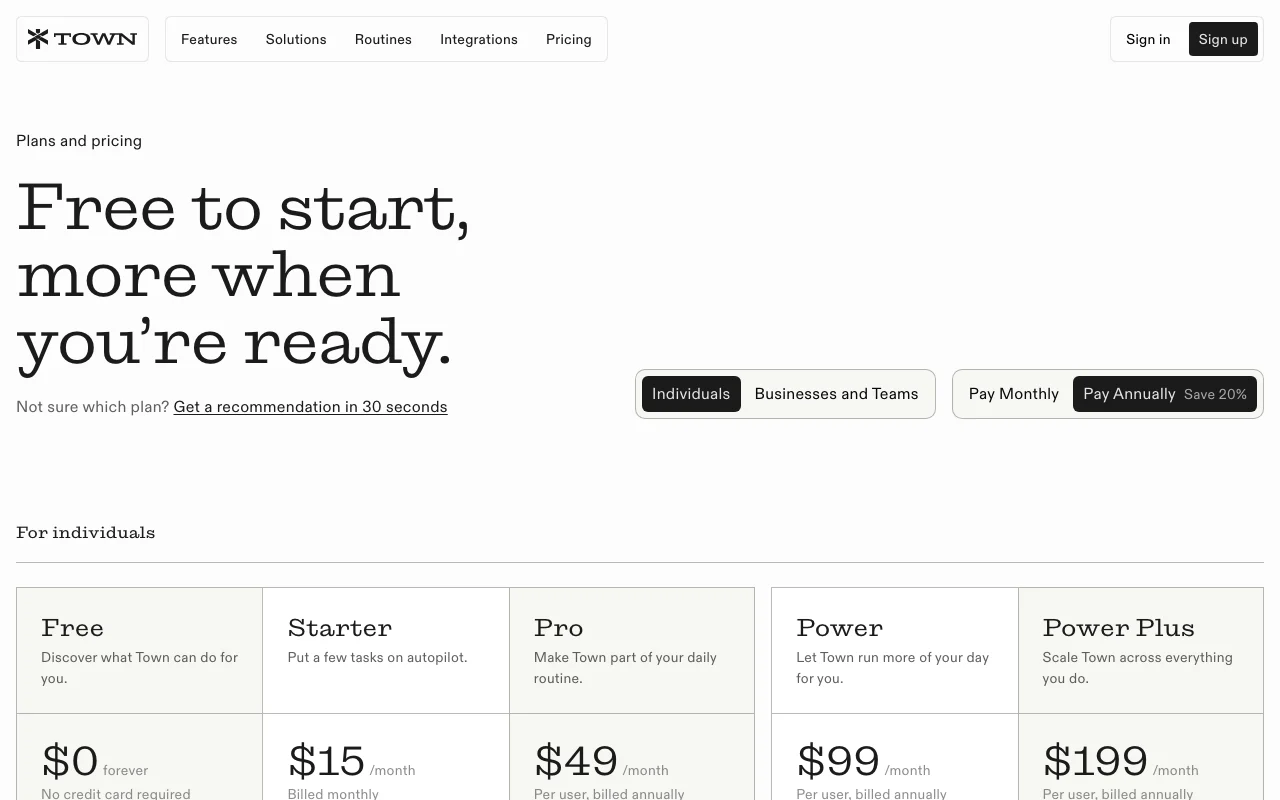
Free plan at $0 forever, no credit card.
7-day Pro trial on signup.
Free source (opens in a new tab)
Month
For: Trying Town
Limits
Includes
$15/mo source (opens in a new tab)
Month
For: Light daily use
Limits
Includes
$49/mo per user per month, billed annually source (opens in a new tab)
Month, annual commitment
For: Daily users
Limits
Includes
$99/mo per user per month, billed annually source (opens in a new tab)
Month, annual commitment
For: Heavy users
Limits
Includes
$199/mo per user per month, billed annually source (opens in a new tab)
Month, annual commitment
For: Teams scaling usage
Limits
Includes
Credits beyond the monthly allotment bill at the plan's flat per-credit rate on the monthly invoice.
Not stated.
Town gives each user an AI assistant called a Townie that learns from the user's existing work and keeps a wiki on how they operate. It drafts documents, works through to-do lists and prepares briefings. The assistant is reachable by chat, email, Slack, WhatsApp and Telegram, runs custom routines, and offers team plans with pooled credits.
You provide
You get back
Scenarios are worked out by our editors from the documentation; the actual result depends on your input and plan.
Gives each user a personal assistant (Townie) reachable across channels. Centralizes delegation.
Keeps a wiki of how you work so drafts match your style. Reduces repeated instructions.
Runs recurring routines on a schedule. Automates repeated work.
Meters work in monthly credits with flat per-credit overage. Scales with usage.
Each morning, summarize my unread email, flag anything urgent and draft replies for routine requests.
Town has no public API in its official documentation. Not listed on fetched pages.
Summarized from the vendor's current policies; this is not legal advice and a vendor's badge is not an independent audit.
Assistant processes your email and calendar to act.
On cancellation the account moves to Free and data is preserved.
"Better suited" is based on documented features and pricing, not on a head-to-head test.
| Alternative | When to choose it | Pricing | Limitation | |
|---|---|---|---|---|
| ChatGPT | — | — | ||
| Claude | — | — | ||
| Microsoft Copilot | — | — |
No user reviews yet.
Used Town? Be the first to share your experience.
It moves to the Free plan; data, history and settings are preserved and paid-only features are switched off. source (opens in a new tab)
Pro is $49 per user per month billed annually with 5,000 credits included monthly. source (opens in a new tab)
Credits past the allotment bill at the plan's flat per-credit rate on the monthly invoice. source (opens in a new tab)
30 chat messages per month, a weekly morning briefing, all integrations and a 7-day Pro trial. source (opens in a new tab)
Not verified: Privacy policy; Training use; Per-credit overage rates; Business plan prices.
Every fact about Town above comes from the 2 official pages listed here, last compared on Sep 29, 2026; we have not run Town ourselves, so it has no editorial score. How we check and re-check pages.
Article updated Oct 10, 2026; prices checked Sep 29, 2026. Outbound links to vendors are plain links; we do not earn commissions. How we review · Report an error
compare>