Productivity & writingDocumented overviewLast checked Sep 29, 2026

Toki: Pricing, Features & Best Use Cases

AI executive assistant that coordinates meetings, plans your day, syncs calendars and sends reminders via chat, voice or phone call.


Is Toki right for you?

Choose Toki if you want a chat-based AI assistant that books meetings with attendees, plans your day across Google, iCloud and Outlook calendars and phones you for critical reminders. Based on the vendor's documentation, not on a hands-on test.

Best for: Busy professionals managing multiple calendars

Also a good fit for

  • People who want reminders by phone call
  • Users wanting one assistant across phone, desktop and web

Consider another tool if free plan has a basic usage quota and 3-calendar limit

Or if

  • Paid plans cap calendar sync at 5 calendars
  • Free trial only for first-time subscribers

Toki in the news

Headlines from US outlets, selected automatically — not endorsements. Updated Oct 2, 2026

Toki pricing and usage limits

Prices checked Sep 29, 2026 on the official US pricing page. Official pricing ↗ Prices and limits change often.

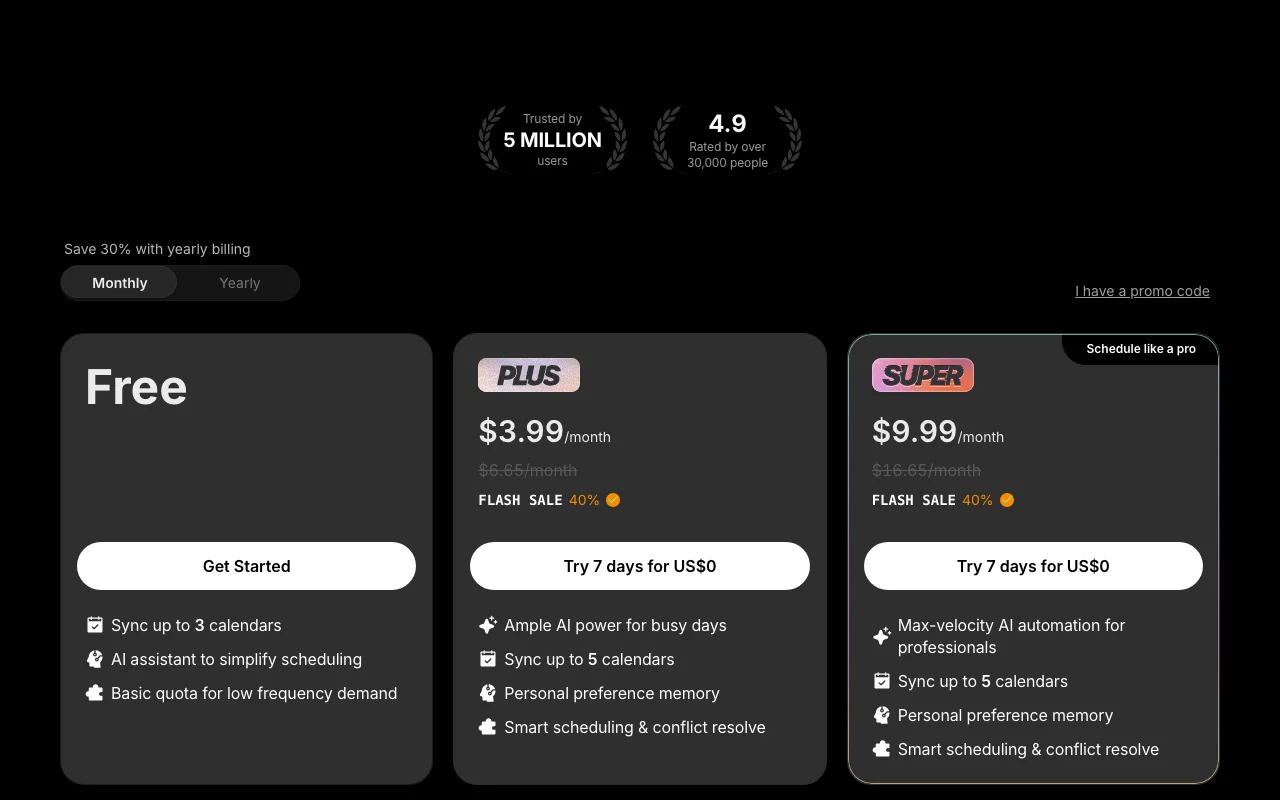
Toki pricing page with plans and prices — screenshot of the productivity & writing AI tool, Oct 1, 2026
The official Toki pricing page as we saw it. toki.com, captured Oct 1, 2026

Free access and trial conditions

Free plan with a basic quota.

7 days for US$0 for first-time subscribers only.

Paid plans: what changes as you upgrade

Free Web

Free source (opens in a new tab)

Monthly

For: Light use

Limits

  • Basic usage quota
  • Sync up to 3 calendars

Includes

  • AI assistant for scheduling

Paid tier 1 Web

$3.99 source (opens in a new tab)

Monthly

Displayed with 40% flash sale; $6.65/month also shown; billing period not clearly labelled

For: Individuals

Limits

  • Sync up to 5 calendars

Includes

  • Personal preference memory
  • Smart scheduling & conflict resolve
1 more
  • 7-day trial

Paid tier 2 Web

$9.99 source (opens in a new tab)

Monthly

Displayed with 40% flash sale; $16.65/month also shown; billing period not clearly labelled

For: Professionals

Limits

  • Sync up to 5 calendars
  • Higher AI usage

Includes

  • Personal preference memory
  • Smart scheduling & conflict resolve
1 more
  • 7-day trial

Usage caps, credits and extra costs

Not stated.

What is Toki, and how does it work?

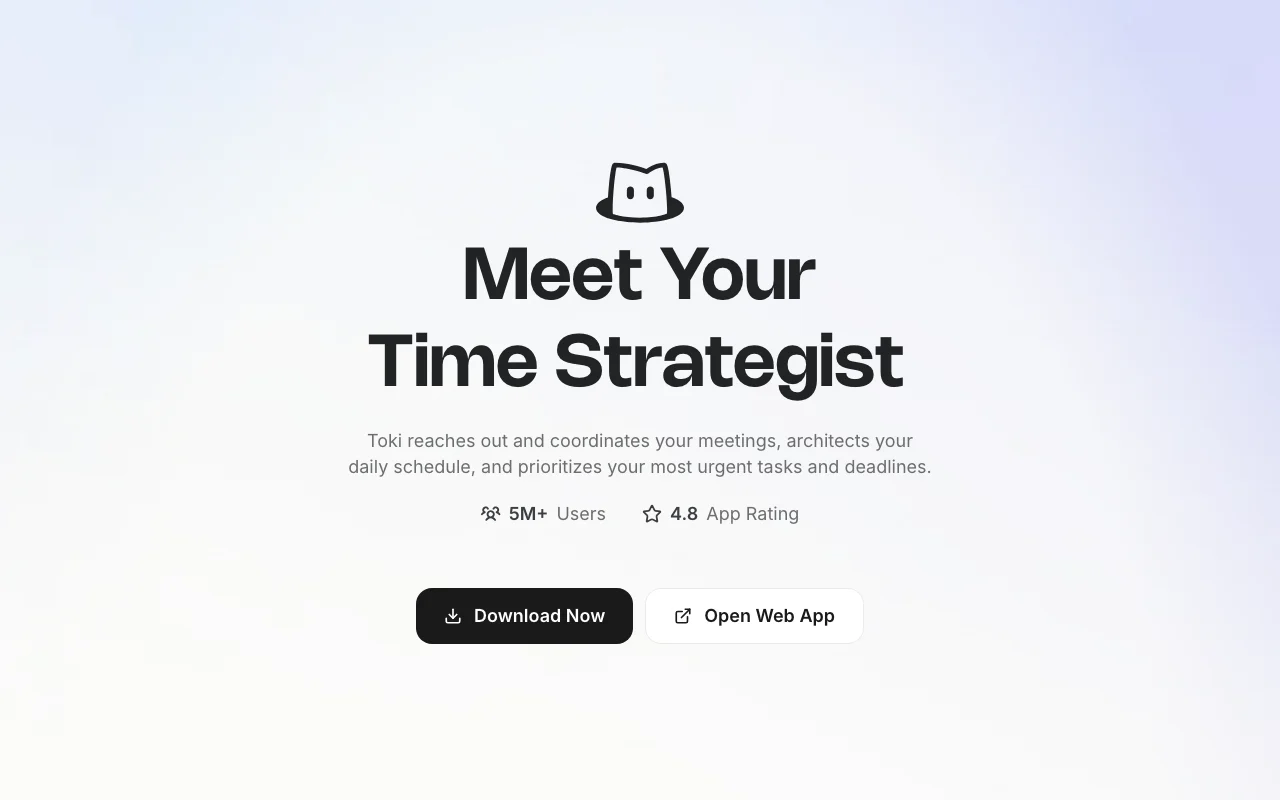
Toki is an AI scheduling assistant that turns texts, voice notes, screenshots and emails into calendar events, to-dos and reminders. It coordinates meetings by reaching out to attendees to find shared availability, offers scheduling links, plans the daily schedule around deep work and urgent tasks, resolves conflicts, and can phone the user for reminders that must not be missed. It syncs Google Calendar, iCloud and Outlook calendars, supports Apple Watch and Siri, and learns personal preferences over time. 'Triggers' let it watch for prices, deadlines or release dates and notify the user. Toki is available as a web app and as native apps for iOS, Android, macOS, Windows and Linux; the company behind it is Orion Arm Pte. Ltd.

Toki homepage — screenshot of the productivity & writing AI tool, Oct 1, 2026
Toki's official site: how the product presents itself. toki.com, captured Oct 1, 2026

What you provide and what you get back

How Toki works: what you provide, where it runs and what you get backYOU PROVIDEYour inputTexts, voice notes, screenshots a…Synced Google, iCloud and Outlook…Personal preferences learned over…PRODUCTIVITY & WRITINGTokiWeb, Desktop, Mobilefrom $3.99 (Paid tier 1)free tier availableaccount requiredchecked Sep 29, 2026YOU GET BACKThe resultCalendar events, to-dos and remin…Meeting scheduling messages and l…Phone-call remindersTrigger notificationsinput → Toki → output · from the vendor's own pages, no hands-on test unless stated
What you give Toki and what comes back, from its documentation

You provide

  • Texts, voice notes, screenshots and emails
  • Synced Google, iCloud and Outlook calendars
  • Personal preferences learned over time

You get back

  • Calendar events, to-dos and reminders
  • Meeting scheduling messages and links
  • Phone-call reminders
  • Trigger notifications

Where you can use it

Platforms
Web, Desktop, Mobile
Account
Required
Calendars
Google, iCloud, Outlook
Platforms
Web, iOS, Android, macOS, Windows, Linux
Languages
9 interface languages
Trial
7 days

Best use cases for Toki

Scenarios are worked out by our editors from the documentation; the actual result depends on your input and plan.

Booking meetings without back-and-forth emails

Who
Busy professionals
You provide
A request to meet three people next week
Expected result
Toki contacts attendees and books a shared time
Plan needed
Paid plans for fuller usage
Limitation
Attendees must respond source (opens in a new tab)

Turning voice notes or screenshots into calendar events and to-dos

Who
People who forget appointments
You provide
A voice note or screenshot of an invitation
Expected result
A calendar event or to-do with reminders, including a phone call
Plan needed
Free for light use
Limitation
Basic quota on Free source (opens in a new tab)

Getting phone-call reminders for critical appointments

Who
Shoppers and planners
You provide
A trigger for a price, deadline or release date
Expected result
A notification when the condition occurs
Plan needed
Per feature access
Limitation
Plan access to Triggers not detailed source (opens in a new tab)

What Toki does, and where it stops

Toki homepage — screenshot of the productivity & writing AI tool, Oct 1, 2026
Feature overview on the official site. toki.com, captured Oct 1, 2026

Meeting coordination with attendees plus scheduling links

Reaches out to attendees to find shared availability and offers scheduling links. Avoids email back-and-forth.

Access: AccountLimit: Needs attendee replies source (opens in a new tab)

Proactive daily schedule planning and conflict resolution

Plans the daily schedule around deep work and urgent tasks and resolves conflicts. Proactive day planning.

Access: Paid tiers list smart scheduling & conflict resolveLimit: Free is basic quota source (opens in a new tab)

Multi-calendar sync (Google, iCloud, Outlook)

Syncs Google Calendar, iCloud and Outlook calendars. One view of commitments.

Access: 3 calendars Free, 5 paidLimit: Capped at 5 source (opens in a new tab)

Call Me phone reminders

Call Me rings your phone for reminders you cannot miss. Hard-to-ignore alerts.

Access: AccountLimit: Requires phone number source (opens in a new tab)

Toki: strengths and limits

Where Toki is strong

Limitations to check before paying

How to use Toki for booking a meeting through an AI assistant

Set up Toki

  1. Download Toki for your device or open the web app.
  2. Sign up with Google or Apple.
  3. Connect your Google, iCloud or Outlook calendar.
  4. Set your working hours and preferences.

Example: booking a meeting through an AI assistant

  1. Message Toki: set up a 30-minute call with Alex next week.
  2. Let it contact Alex and propose shared times.
  3. Confirm the proposed slot.
  4. Ask for a Call Me reminder before the meeting.

Review and export the result

  1. Check the event appears in your connected calendar.
  2. Confirm the reminder channel works.
  3. Review remaining free quota.
Example prompt suggested by our editors (not a recorded output of the product)
Set up a 30-minute call with Alex next week and call me 10 minutes before it starts.

Toki API

Toki pricing page with plans and prices — screenshot of the productivity & writing AI tool, Oct 1, 2026
Plan comparison on the official pricing page. toki.com, captured Oct 1, 2026

API access and separate billing

Toki has no public API in its official documentation. Docs returned 404.

Privacy, data use and commercial rights

Summarized from the vendor's current policies; this is not legal advice and a vendor's badge is not an independent audit.

How your inputs and outputs are handled

Account info, user content, and usage/device data are collected; location and health info only with explicit consent.

Policies: toki.com/privacy

Best Toki alternatives for different needs

"Better suited" is based on documented features and pricing, not on a head-to-head test.

Notion AI: better suited to

Microsoft Copilot: better suited to

ChatGPT: better suited to

Otter.ai: better suited to

Alternatives
AlternativeWhen to choose itPricingLimitation
Notion AI——Compare
Microsoft Copilot——
ChatGPT——
Otter.ai——

Explore Toki further

If you are looking at Toki

Toki user reviews

No user reviews yet.

Used Toki? Be the first to share your experience.

Write a review

Reviews are checked by a moderator before they appear. Your email is never published. Plain text only.

Your rating (required)

Show what you made or what went wrong. Images are published only if the review is approved; location data is removed.

    Toki FAQ

    Is there a trial?

    First-time subscribers get a 7-day free trial; repeat trials are not allowed. source (opens in a new tab)

    How many calendars can I sync?

    Up to 3 on Free and up to 5 on paid tiers. source (opens in a new tab)

    Which platforms does Toki run on?

    Web app plus native iOS, Android, macOS, Windows and Linux apps. source (opens in a new tab)

    Can Toki phone me?

    Yes, Call Me gives phone-call reminders. source (opens in a new tab)

    Does it learn my preferences?

    Paid tiers list personal preference memory. source (opens in a new tab)

    Sources and review methodology

    Official sources and verification dates

    Not verified: Tier names; Which price is monthly vs yearly; Data retention; Training use.

    How we documented and maintain this page

    Every fact about Toki above comes from the 3 official pages listed here, last compared on Sep 29, 2026; we have not run Toki ourselves, so it has no editorial score. How we check and re-check pages.

    Article updated Oct 10, 2026; prices checked Sep 29, 2026. Outbound links to vendors are plain links; we do not earn commissions. How we review · Report an error