
VideoDocumented overviewLast checked Sep 30, 2026

Runway: Pricing, Features & Best Use Cases

Runway generates and edits video, images and audio from text, image or video inputs in one cloud workspace, using its own Gen-4.5/Aleph 2.0 models plus third-party models (Kling, Seedance, Veo, Nano Banana and others) under a single credit system.

Who Runway fits

Pick Runway if you want one credit balance and one workspace covering many video/image models, with an editor-facing agent, MCP access and Adobe/Resolve plugins; budget credits carefully because 5 s of Gen-4.5 costs 60 credits. Based on the vendor's documentation, not on a hands-on test.

Best for: Solo creators producing short AI video clips and stills for social or ads

Also a good fit for

  • Marketing and agency teams needing pooled credits, Brand Kits and frame-level comments
  • Developers building media-generation features via a single API across many models
  • Editors wanting AI generation inside Premiere Pro, After Effects or DaVinci Resolve

Consider another tool if you need a free tier with recurring monthly generations

Or if

  • You only need one specific model and want its cheapest direct price
  • You need long-form video in one pass (per-generation caps are seconds, e.g. 15 s for recipes)
  • You require a guarantee that inputs/outputs are never used for model training on a self-serve plan
Scenario fit
ScenarioFitWhyPlan
Trying AI video for the first timeFits with conditionsFree gives 125 one-time credits (about 25 s of Gen-4 Turbo), enough to test but not to workFree
Weekly short clips and images for socialGood fitStandard has 625 credits/month, all models, no watermark, 4K upscalingStandard
Heavy solo production with ProRes/HDR deliverablesGood fitMax adds studio-grade formats, 9,500 credits/month with 1-month rolloverMax
Team of 2-9 sharing one credit pool and Brand KitsGood fitTeam pools 6,900 credits per seat, 1TB storage, comments, API accessTeam
Programmatic generation inside your own productGood fitRunway Dev API bills $0.01 per credit with per-model rates and a Model RouterRunway Dev (API)
Need SSO, no-training guarantee and indemnificationFits with conditionsOnly Enterprise lists SSO, SOC 2, no training on your data and legal indemnification; custom pricingEnterprise

Runway in the news

Headlines from US outlets, selected automatically — not endorsements. Updated Oct 12, 2026

Runway pricing and usage limits

Prices checked Sep 30, 2026 on the official US pricing page. Official pricing ↗ Prices and limits change often.

Vendor pricing page re-checked automatically 3 days ago: no changes detected.

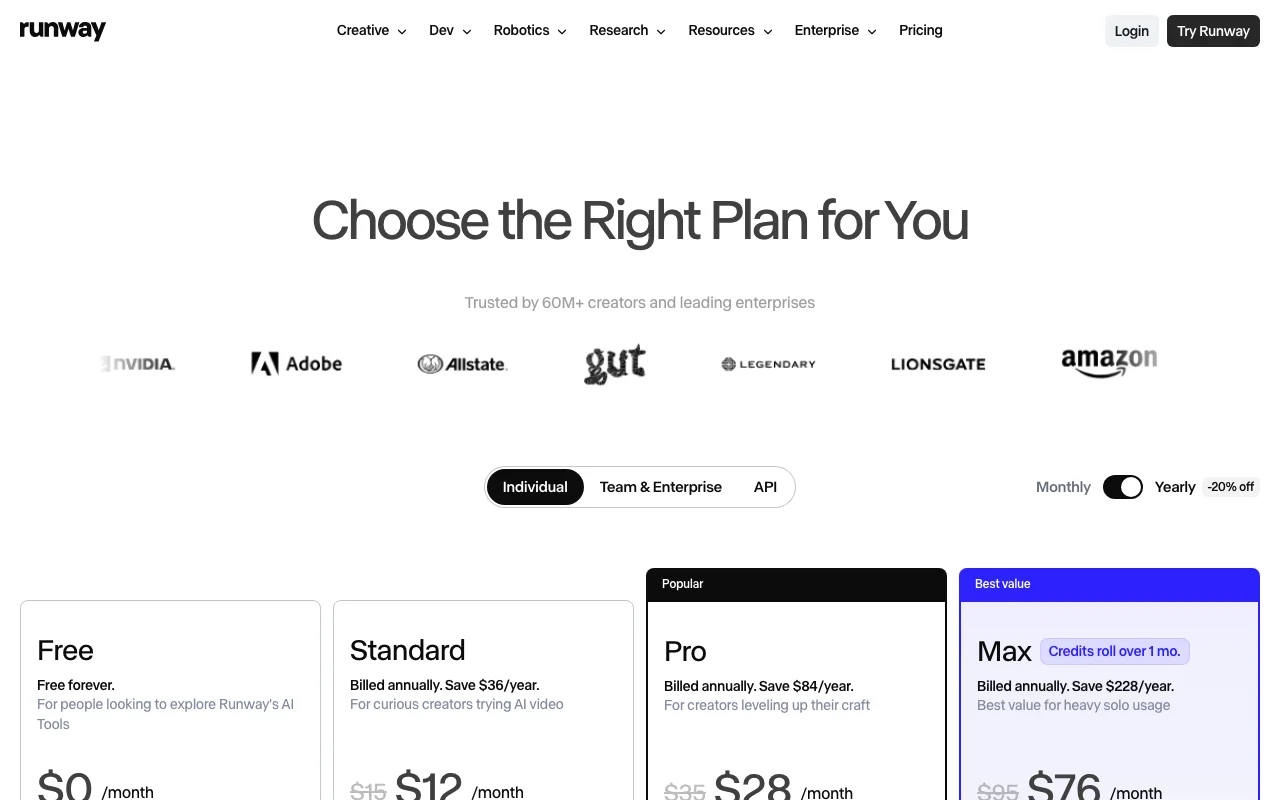
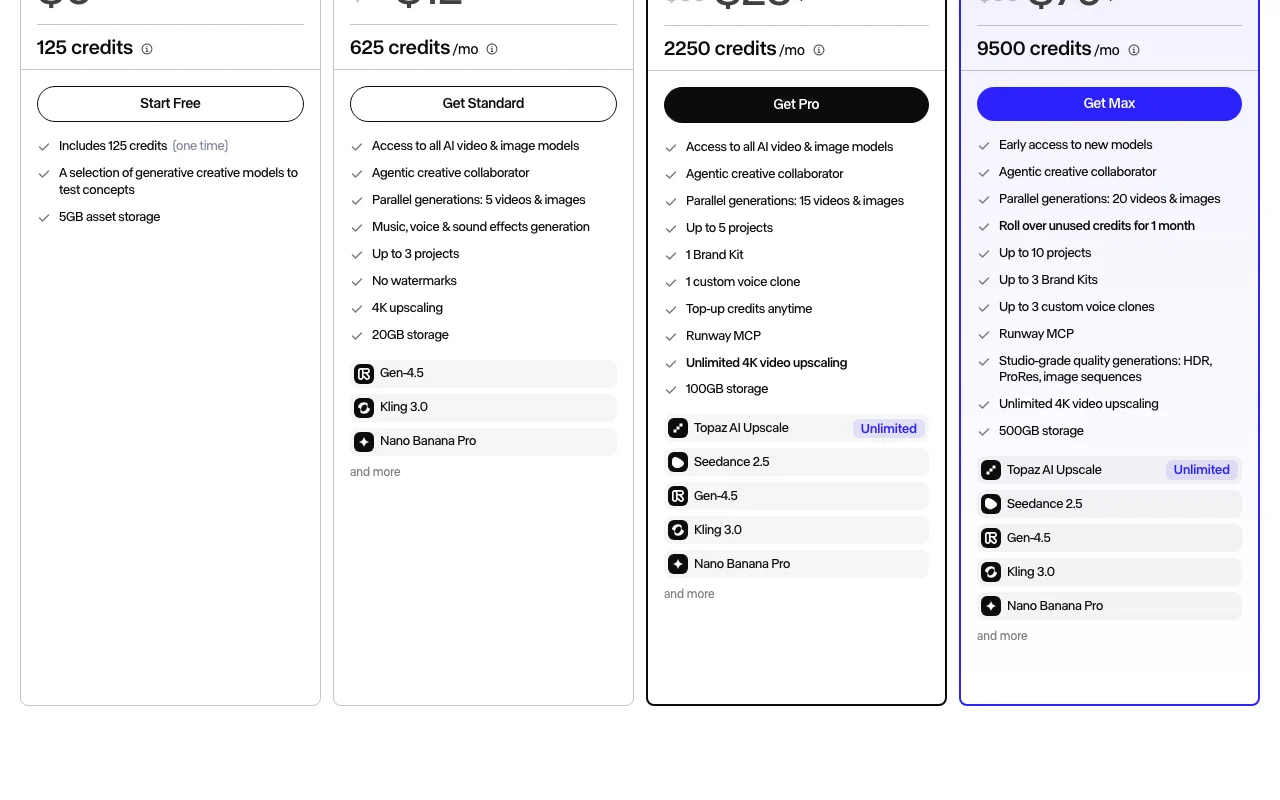
Runway pricing page with plans and prices — screenshot of the video AI tool, Oct 1, 2026
The official Runway pricing page as we saw it. runway.com, captured Oct 1, 2026

Free access and trial conditions

Free plan: 125 one-time credits that do not expire, 5GB storage, a selection of models; no recurring monthly credits.

No separate trial documented; Free plan serves as the trial.

Paid plans: what changes as you upgrade

Free

Free source (opens in a new tab)

For: Testing the product before paying (consumer channel)

Limits

  • 125 one-time credits (do not expire)
  • 5GB asset storage
1 more
  • A selection of generative models to test concepts

Includes

  • Explore Runway's AI tools

No API

Standard

$15/mo per user source (opens in a new tab)

Month

$12/month billed annually (save $36/year)

For: Curious creators trying AI video (consumer channel)

Limits

  • 625 credits monthly, no rollover
  • Parallel generations: 5
2 more
  • Up to 3 projects
  • 20GB storage

Includes

  • Access to all AI video & image models
  • Agentic creative collaborator
3 more
  • Music, voice & sound effects generation
  • No watermarks
  • 4K upscaling

No API

Pro

$35/mo per user source (opens in a new tab)

Month

$28/month billed annually (save $84/year)

For: Creators leveling up their craft (consumer channel)

Limits

  • 2,250 credits monthly, no rollover
  • Parallel generations: 15
4 more
  • Up to 5 projects
  • 1 Brand Kit
  • 1 custom voice clone
  • 100GB storage

Includes

  • All models
  • Top-up credits anytime
3 more
  • Runway MCP
  • Unlimited 4K video upscaling
  • Topaz AI Upscale

No API

Max

$95/mo per user source (opens in a new tab)

Month

$76/month billed annually (save $228/year)

For: Heavy solo usage (consumer channel)

Limits

  • 9,500 credits monthly
  • Unused credits roll over 1 month
5 more
  • Parallel generations: 20
  • Up to 10 projects
  • Up to 3 Brand Kits
  • Up to 3 custom voice clones
  • 500GB storage

Includes

  • Early access to new models
  • Studio-grade generations: HDR, ProRes, image sequences
3 more
  • Runway MCP
  • Unlimited 4K video upscaling
  • Topaz AI Upscale

No API

Team

$69/mo per seat source (opens in a new tab)

Month

$55 per seat per month billed yearly (20% off)

For: Small teams creating together in one workspace (team channel)

Limits

  • 6,900 credits per seat per month, pooled across workspace
  • One month of credit rollover
6 more
  • 2 to 9 seats per workspace
  • Up to 100 shared projects
  • 1TB workspace storage
  • Up to 100 Brand Kits
  • 24 parallel generations
  • 20 shared agent skills

Includes

  • Everything in Max
  • Frame-accurate commenting with @mentions
3 more
  • Agent Connectors for Figma, Dropbox and Notion
  • API access
  • Priority support

API included

Enterprise

Custom pricing source (opens in a new tab)

For: Organizations needing security, admin controls and SSO (enterprise channel)

Limits

  • Custom pricing and credits sized to your organization
  • Unlimited members and workspaces (vendor wording)

Includes

  • Everything in Team
  • Unlimited shared projects, Brand Kits and agent skills
5 more
  • User roles, permissions and sharing policies
  • Custom SSO, SOC 2 and ISO/IEC 27001
  • No training on your data
  • Enterprise legal indemnification
  • Dedicated support, training and onboarding

Runway Dev (API)

$0.01 per credit source (opens in a new tab)

Usage

For: Developers building AI media at scale (API channel)

Limits

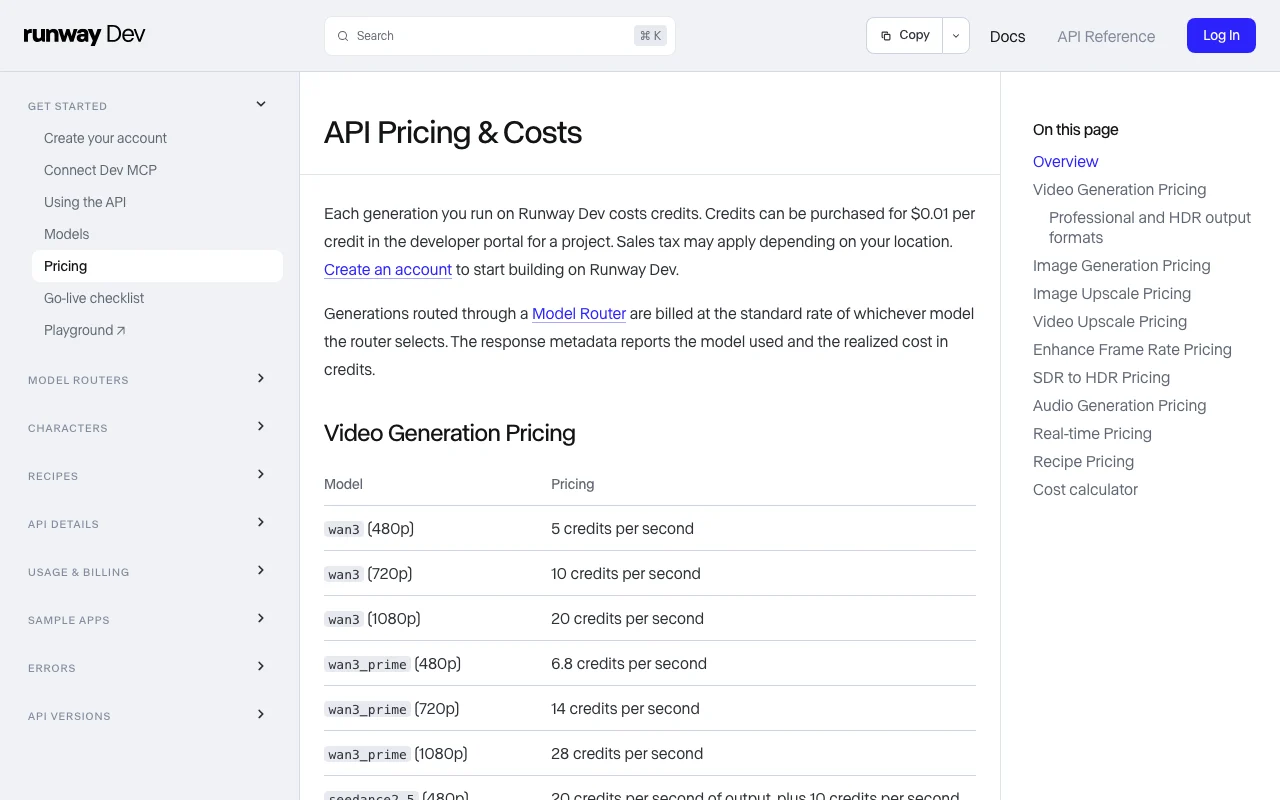
  • Per-model credit rates, e.g. gen4.5 12 credits/s, gen4_turbo 5 credits/s, aleph2 28 credits/s (56 min), gen4_image 5-8 credits/image
  • Minimum charges apply on some models
1 more
  • Sales tax may apply

Includes

  • Video, image, audio, upscale, HDR and real-time avatar endpoints
  • Model Router at no additional cost
2 more
  • Recipes (product ad, product swap, UGC, multi-shot)
  • ProRes/PNG sequence/HDR output surcharges

API included

Runway Dev Enterprise

Custom pricing source (opens in a new tab)

For: Large-scale API deployments (enterprise API channel)

Limits

  • Contact sales

Includes

  • For companies deploying AI media at scale

API included

Usage caps, credits and extra costs

Top-up credits from Plans & Billing (minimum purchase 1,000 credits; purchased credits never expire). API credits $0.01 each. Professional/HDR output formats add 5-40 credits per second on Gen-4.5 and Aleph 2.0.

API docs state sales tax may apply depending on location; consumer pricing page does not state tax treatment.

What is Runway, and how does it work?

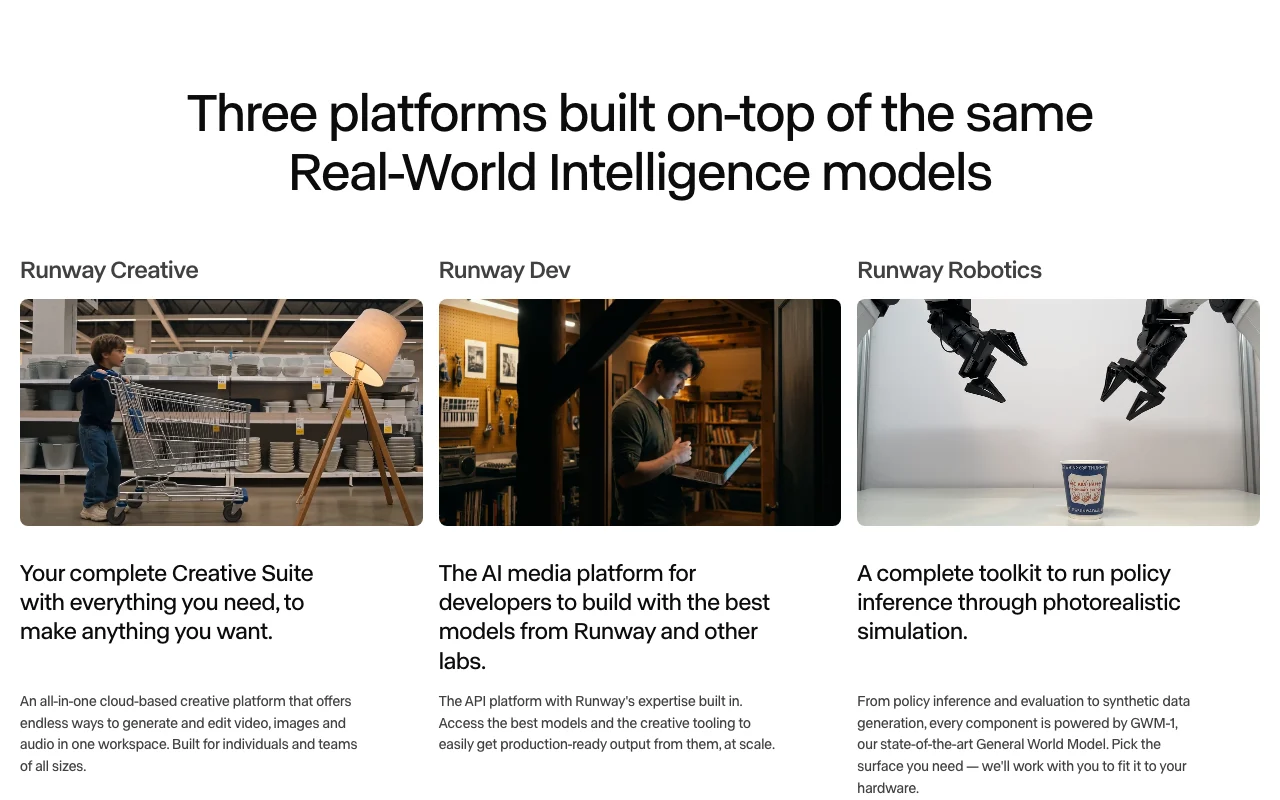
Runway is a cloud creative platform (Runway Creative) and API (Runway Dev) for generating and editing video, images and audio with Runway's own models (Gen-4.5, Aleph 2.0, Act-Two, Ruby) and licensed third-party models, plus an agent, MCP server, Brand Kits and editor plugins.

Runway homepage — screenshot of the video AI tool, Oct 1, 2026
Runway's official site: how the product presents itself. runway.com, captured Oct 1, 2026

What you provide and what you get back

How Runway works: what you provide, where it runs and what you get backYOU PROVIDEYour inputText promptsImagesVideo (for video-to-video, Aleph…Audio/voice referencesVIDEORunwayWeb, Mobile, APIfrom $15/mo (Standard)free tier availableaccount requiredchecked Sep 30, 2026YOU GET BACKThe resultVideo (H.264 mp4; ProRes, PNG seq…Images up to 4K depending on modelAudio: music, speech, sound effec…Upscaled video up to 4Kinput → Runway → output · from the vendor's own pages, no hands-on test unless stated
What you give Runway and what comes back, from its documentation

You provide

  • Text prompts
  • Images
  • Video (for video-to-video, Aleph 2.0, Act-Two performance capture)
  • Audio/voice references
  • Brand Kit assets

You get back

  • Video (H.264 mp4; ProRes, PNG sequences, 10-bit SDR and HDR on Gen-4.5/Aleph 2.0)
  • Images up to 4K depending on model
  • Audio: music, speech, sound effects
  • Upscaled video up to 4K

Where you can use it

Platforms
Web, Mobile, API
Account
Required
Works offline
No
Models / versions
Gen-4.5 (12 credits/s), Gen-4 Turbo (5 credits/s), Aleph 2.0 (28 credits/s), Act-Two, Ruby (SDR to HDR); third-party: Kling 3.0/O3, Seedance 2.0/2.5, Veo 3.1, Nano Banana Pro, Hailuo 3, Wan 3, Grok Imagine, GPT Image
Video output formats
H.264 .mp4 default; ProRes .mov (profiles 422 Proxy to 4444 XQ), PNG sequence zip, HEVC 10-bit SDR, HDR10/HLG, 12-bit PQ master, EXR sequences on Gen-4.5 (API, and Max+ in app) source (opens in a new tab)
Resolution
Per model: 480p to 4K for video (e.g. Seedance 2.0 4K at 150 credits/s); images 720p/1080p (Gen-4 Image), up to 4K (Gemini Image, GPT Image); 4K video upscaling on paid plans source (opens in a new tab)
Clip duration / caps
Billed per second; caps documented per feature, e.g. recipes 4-15 s, Seedance 2.5 combined input video capped at 30 s, Enhance Frame Rate up to 5 minutes source (opens in a new tab)
Credits
Gen-4.5 = 60 credits per 5 s; Gen-4 Image 1080p = 8 credits; Nano Banana Pro 2K = 20 credits; Text to Speech 1 credit per 50 characters source (opens in a new tab)
Watermark
Standard and above list 'No watermarks'; Free plan watermark status not stated on pricing page source (opens in a new tab)
Commercial terms
Terms: Runway does not claim ownership of Inputs or Outputs and does not restrict commercial use of Outputs, subject to compliance with the Agreement source (opens in a new tab)
Content credentials
Runway implements C2PA provenance signals on generated content source (opens in a new tab)
Storage
Free 5GB, Standard 20GB, Pro 100GB, Max 500GB, Team 1TB source (opens in a new tab)

Best use cases for Runway

Scenarios are worked out by our editors from the documentation; the actual result depends on your input and plan.

Text/image-to-video short clip

Who
Solo creators
You provide
Text prompt or a still image
Expected result
A short clip from Gen-4.5 or another selected model, downloadable without watermark
Plan needed
Standard
Limitation
60 credits per 5 s of Gen-4.5; 625 credits/month on Standard source (opens in a new tab)

Restyle existing footage

Who
Editors
You provide
A video plus text or image reference
Expected result
Edited/restyled video via Aleph 2.0, placeable directly into Premiere Pro, After Effects or Resolve via plugins
Plan needed
Paid plans
Limitation
Aleph 2.0 costs 140 credits per 5 s in app source (opens in a new tab)

On-brand campaign assets across formats

Who
Marketing teams and agencies
You provide
Brand Kit assets, references, prompts
Expected result
Consistent ads, variants and localized versions with team comments and a pooled credit balance
Plan needed
Team
Limitation
2-9 seats; beyond that Enterprise source (opens in a new tab)

Embed generation in your own app

Who
Developers
You provide
API calls with prompt/image/video, optional Model Router
Expected result
Generated media returned with realized cost in response metadata
Plan needed
Runway Dev (API)
Limitation
Usage billed at $0.01 per credit; minimums on some models source (opens in a new tab)

What Runway does, and where it stops

Runway homepage — screenshot of the video AI tool, Oct 1, 2026
Feature overview on the official site. runway.com, captured Oct 1, 2026

Multi-model access

One workspace and credit balance across Runway's Gen-4.5/Aleph 2.0 and third-party models (Kling, Seedance, Veo, Nano Banana, etc.) Compare models without separate subscriptions

Access: Standard and aboveLimit: Free plan gets 'a selection' of models source (opens in a new tab)

Agentic creative collaborator

An agent that generates, edits Brand Kits and can be @mentioned in asset comments Iterate conversationally rather than tool by tool

Access: All paid plans (comments mention on Enterprise per changelog)Limit: Agent in asset comments listed for Enterprise source (opens in a new tab)

Runway MCP and plugins

Generate from ChatGPT, Claude, Cursor, Grok Bot or any MCP client; native panels in Premiere Pro, After Effects and DaVinci Resolve Use Runway inside existing tools

Access: MCP on Pro/Max/Team; Adobe/Resolve plugins on paid plansLimit: Brand Kits read-only via MCP source (opens in a new tab)

Studio-grade output

ProRes, PNG/EXR sequences, 10-bit SDR and true HDR on Gen-4.5; Ruby converts SDR to HDR Fits post-production and grading pipelines

Access: Max and Team in app; API with per-second surchargeLimit: Aleph 2.0 has no native HDR source (opens in a new tab)

Team workspace

Pooled credits, shared projects, frame-accurate comments, shared agent skills, connectors for Figma/Dropbox/Notion Agencies manage clients and reviews in one place

Access: TeamLimit: Up to 9 seats source (opens in a new tab)

Model Router (API)

Routes each request to the best available model by cost, latency or quality preference Avoid hard-coding a model choice

Access: Runway DevLimit: Billed at the selected model's standard rate source (opens in a new tab)

Runway pros and cons

Where Runway is strong

  • Broad model catalog under one credit system One subscription covers Runway and many third-party video/image/audio models documented source (opens in a new tab)
  • Commercial use of outputs not restricted and no ownership claim by Runway Suitable for client and ad work, subject to terms compliance documented source (opens in a new tab)
  • Deep editor integration (Adobe, Resolve, MCP) Fits existing post-production workflows documented source (opens in a new tab)
  • Transparent per-model API pricing at $0.01 per credit Costs are predictable per second or per image documented source (opens in a new tab)
  • C2PA content credentials Outputs carry provenance signals documented source (opens in a new tab)

Limitations to check before paying

  • Credits do not roll over on Standard and Pro Unused monthly allowance is lost; only Max/Team roll over one month documented source (opens in a new tab)
  • Free plan is a one-time 125-credit deposit No ongoing free usage documented source (opens in a new tab)
  • Terms allow Runway to use Inputs and Outputs to train and improve its models Self-serve users have no documented opt-out; no-training is an Enterprise feature documented source (opens in a new tab)
  • Flagship models are credit-hungry Gen-4.5 is 60 credits/5 s, Aleph 2.0 140 credits/5 s, so Standard yields roughly 52 s of Gen-4.5 per month documented source (opens in a new tab)
  • Fees are non-refundable except as required by law Cancelling mid-cycle gives no prorated refund documented source (opens in a new tab)

How to use Runway for generate a short video clip from a text prompt or image

Set up Runway

  1. Create a Runway account at runway.com (Free plan gives 125 one-time credits)
  2. Choose a plan if you need more credits or all models
  3. Open a project in the Runway Creative workspace

Example: generate a short video clip from a text prompt or image

  1. Select a video model (e.g. Gen-4.5 or Gen-4 Turbo)
  2. Enter a text prompt and optionally upload a start image
  3. Set duration and resolution, then generate
  4. Optionally upscale to 4K or export in ProRes on Max/Team
  5. Download or send to Premiere Pro/After Effects/Resolve via the plugin

Review and export the result

  1. Confirm credits deducted match the model's per-second rate on the pricing page
  2. Check the output has no watermark on paid plans
  3. Verify content credentials if provenance matters
Example prompt suggested by our editors (not a recorded output of the product)
A slow dolly shot of a ceramic coffee mug on a wooden table at golden hour, steam rising, shallow depth of field, cinematic lighting

Runway integrations, API and team features

Runway API documentation — screenshot of the video AI tool, Oct 1, 2026
Runway API documentation. docs.dev.runwayml.com, captured Oct 1, 2026

Native integrations and export formats

Integrations
IntegrationTypeNotes
Adobe Premiere Pro and After Effects pluginsNativePanel inside the editors; free download for macOS/Windows, uses existing paid plan credits source (opens in a new tab)
DaVinci Resolve pluginNativeRunway available directly inside Resolve (paid plans) source (opens in a new tab)
Runway MCPNativeWorks with ChatGPT, Claude, Cursor, Grok Bot and MCP-compatible agents source (opens in a new tab)
Agent Connectors: Figma, Dropbox, NotionNativeTeam plan source (opens in a new tab)
iOS and Android appsNativeListed in site footer source (opens in a new tab)
MCP-compatible agentsVia third-party automationRequires that platform's own plan.
SDKs on GitHubVia third-party automationRequires that platform's own plan.
AWS Marketplace listing (docs nav)Via third-party automationRequires that platform's own plan.

Export: mp4 (H.264), ProRes .mov, PNG sequence, HEVC 10-bit SDR, HDR10 / HLG mp4, 12-bit PQ master .mov, 16-bit PNG / OpenEXR sequences (Gen-4.5)

API access and separate billing

An API is available, billed separately from the app subscription. Runway Dev bills $0.01 per credit, separate from consumer plans; Team plan lists API access as included API documentation ↗

Team controls and collaboration

Privacy, data use and commercial rights

Summarized from the vendor's current policies; this is not legal advice and a vendor's badge is not an independent audit.

How your inputs and outputs are handled

Terms define Inputs (prompts, media) and Outputs; Runway may review or monitor them with automated and manual tools; user is responsible for their content.

Terms of Use: Inputs and Outputs may be used by Runway to train and improve its AI models. Enterprise pages state 'we don't train on your data'.

Privacy Policy: retained as long as necessary for the Service and legitimate purposes; face scans and voiceprints retained no longer than three years after last interaction or once the purpose is met.

Commercial use and plan restrictions

Runway does not claim ownership of Inputs/Outputs and does not restrict commercial use of Outputs, subject to compliance with the Agreement.

No-training commitment, SSO, SOC 2 and ISO/IEC 27001 are listed only for Enterprise.

Controls for business users

  • SOC 2 Type 2
  • ISO/IEC 27001 (Enterprise)
  • Custom SSO
  • User roles, permissions and sharing policies
  • Control over which third-party models a team can use
  • C2PA provenance

Policies: runway.com/privacy-policy runway.com/terms-of-use runway.com/safety runway.com/enterprise

Other tools to consider instead of Runway

"Better suited" is based on documented features and pricing, not on a head-to-head test.

Kling AI: better suited to using Kling models directly from their vendor

Veo 3.1: better suited to veo-only generation inside Google's ecosystem

Hailuo AI: better suited to low-cost Hailuo/MiniMax clips

Midjourney: better suited to still-image-first workflows

Adobe Firefly: better suited to teams standardized on Creative Cloud

Alternatives
AlternativeWhen to choose itPricingLimitation
Kling AIYou only want Kling generations and their native pricingSee catalog entry source (opens in a new tab)Single-vendor model lineupCompare
Veo 3.1You already pay for Google AI plansSee catalog entry source (opens in a new tab)No multi-vendor model switchingCompare
Hailuo AIBudget per clip matters more than format optionsSee catalog entry source (opens in a new tab)Fewer professional export formatsCompare
MidjourneyImages are the main output and video is secondarySee catalog entry source (opens in a new tab)Not an editor-integrated video suite
Adobe FireflyYou want generation bundled with Adobe apps rather than a pluginSee catalog entry source (opens in a new tab)Model catalog differs

Explore Runway further

Related to Runway

Runway user reviews

No user reviews yet.

Used Runway? Be the first to share your experience.

Write a review

Reviews are checked by a moderator before they appear. Your email is never published. Plain text only.

Your rating (required)

Show what you made or what went wrong. Images are published only if the review is approved; location data is removed.

    Runway FAQ

    Is Runway free?

    Partly: the Free plan gives 125 one-time credits and 5GB storage that never expire, but no recurring monthly credits; paid plans start at $15/month ($12 billed annually). source (opens in a new tab)

    How much video do the credits buy?

    Gen-4.5 costs 12 credits per second, so Standard's 625 credits is about 52 s of Gen-4.5 or 104 s of Gen-4 Turbo per month; Pro gives 187 s and Max 791 s of Gen-4.5. source (opens in a new tab)

    Do unused credits roll over?

    Not on Standard or Pro (they reset each billing cycle); on Max and Team up to one month rolls over, and purchased top-up credits never expire. source (opens in a new tab)

    Can I use Runway outputs commercially?

    Yes, the Terms say Runway does not claim ownership of Outputs and does not restrict their commercial use, provided you comply with the Agreement and Usage Policy. source (opens in a new tab)

    Does Runway train on my content?

    The Terms state Inputs and Outputs may be used to train and improve Runway's models; Enterprise is marketed with 'we don't train on your data'. source (opens in a new tab)

    What does the API cost?

    Credits cost $0.01 each in the developer portal; e.g. Gen-4.5 is 12 credits/s ($0.12/s), Gen-4 Turbo 5 credits/s, Gen-4 Image 5-8 credits per image, plus sales tax where applicable. source (opens in a new tab)

    Is there a team plan?

    Yes, Team is $69 per seat monthly or $55 billed yearly for 2-9 seats, each adding 6,900 credits to a shared pool; larger groups need Enterprise. source (opens in a new tab)

    What changed at Runway recently

    : DaVinci Resolve plugin released (paid plans); Runway MCP listed on Cursor Marketplace

    Official announcement (opens in a new tab)

    : Enhance Frame Rate: convert videos to 25-120 fps up to 4K and 5 minutes (Max+ plans); Runway MCP available in Grok Bot

    Official announcement (opens in a new tab)

    : Runway plugins for Adobe Premiere Pro and After Effects launched

    Official announcement (opens in a new tab)

    : Team plan introduced: 6,900 pooled credits per seat, up to nine people, 1TB storage

    Official announcement (opens in a new tab)

    Sources and review methodology

    Official sources and verification dates

    Not verified: Free plan watermark status: pricing page lists 'No watermarks' only from Standard; Free card is silent; Whether self-serve users can opt out of model training (help center blocked; Terms give no opt-out); Maximum clip duration per generation in the Creative app per model (not stated on pricing page); Consumer-plan tax treatment (only API docs mention sales tax); Whether Team plan's 'API access' shares the consumer credit pool or bills separately at $0.01/credit; Desktop app availability (only Web, iOS/Android and plugins are documented).

    How we documented and maintain this page

    Every fact about Runway above comes from the 10 official pages listed here, last compared on Sep 30, 2026; we have not run Runway ourselves, so it has no editorial score. How we check and re-check pages.

    Article updated Sep 28, 2026; prices checked Sep 30, 2026. Outbound links to vendors are plain links; we do not earn commissions. How we review · Report an error