Image generationDocumented overviewLast checked Sep 29, 2026

CNAPS: Pricing, Features & Best Use Cases

No-code builder that chains 70+ image, video, audio and text AI models into one workflow.
Who should use CNAPS

Try CNAPS if you want to chain image, video and text models into repeatable no-code flows, starting on the Free plan where every model is available. Based on the vendor's documentation, not on a hands-on test.

Best for: Creators building multi-model media pipelines

Also a good fit for

  • Teams wanting no-code AI workflows

Consider another tool if free plan carries a watermark (removed on Starter)

Or if

  • Batch Run requires a paid plan
  • Plan prices load dynamically and were not visible

CNAPS pricing and usage limits

Prices checked Sep 29, 2026 on the official US pricing page. Official pricing ↗ Prices and limits change often.

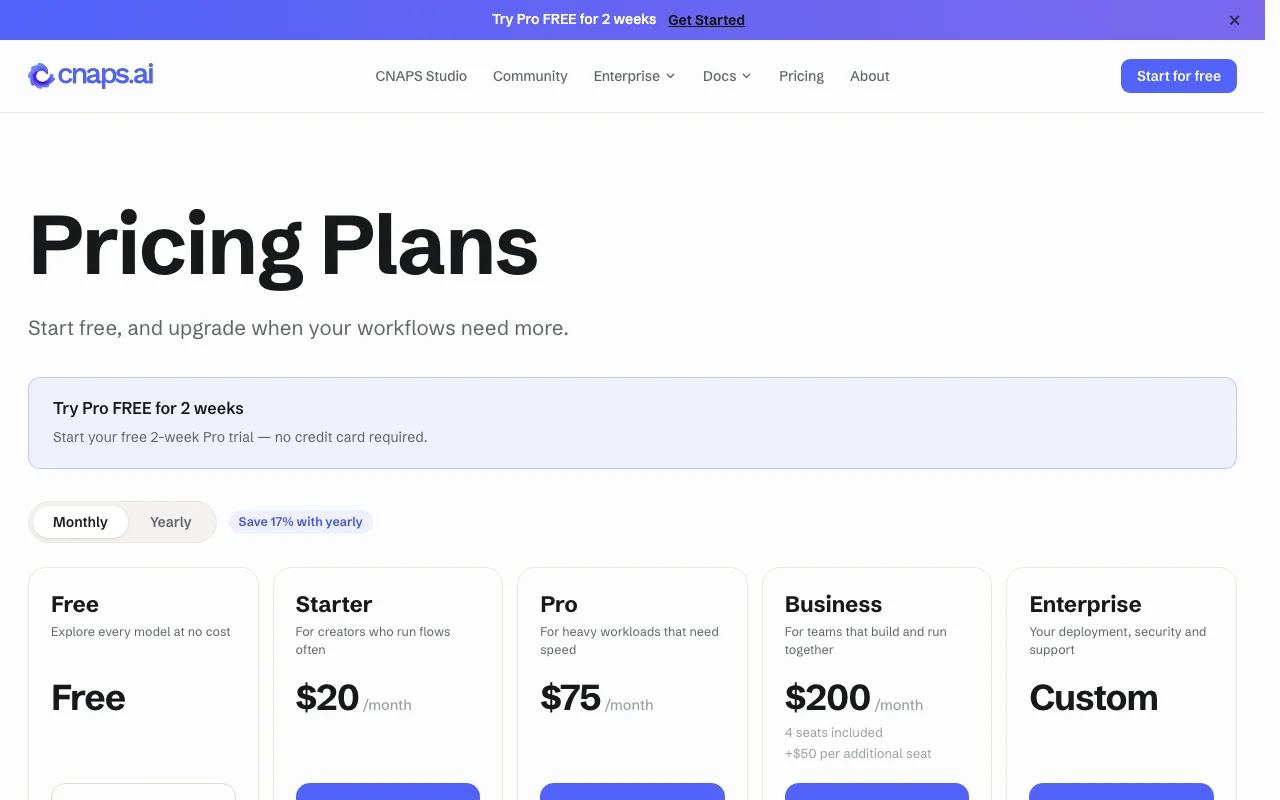
CNAPS pricing page with plans and prices — screenshot of the image generation AI tool, Oct 2, 2026
The official CNAPS pricing page as we saw it. cnaps.ai, captured Oct 2, 2026

Free access and trial conditions

Free plan with all models and watermark

Pro free for 2 weeks, no card, once per workspace

Paid plans: what changes as you upgrade

Free web

Free source (opens in a new tab)

Month, annual commitment

For: Trying the models

Limits

  • Watermark on outputs
  • GPU time allowance refilling every few hours

Includes

  • All AI models
  • Unlimited flows
1 more
  • API key and MCP

API included

Starter web

See official pricing source (opens in a new tab)

Month, annual commitment

Yearly billing is paid 12 months up front

For: Individual creators

Limits

  • Larger GPU allowance than Free

Includes

  • No watermark
  • Batch Run

API included

Pro web

See official pricing source (opens in a new tab)

Month, annual commitment

For: Heavy workloads

Includes

  • Parallel GPU processing
  • Larger batches
1 more
  • 2-week free trial

API included

Business web

See official pricing source (opens in a new tab)

Month, annual commitment

For: Teams

Limits

  • Separate team workspace

Includes

  • Shared team workspace
  • Seats

API included

Enterprise web

Custom pricing source (opens in a new tab)

Month, annual commitment

For: Large organisations

Includes

  • Own deployment
  • SSO
1 more
  • Dedicated support

API included

Usage caps, credits and extra costs

None stated beyond plan; payments via Stripe

Not stated

What is CNAPS, and how does it work?

CNAPS is a no-code workflow builder that connects image, video and text AI models. Users can pick a goal and let models chain automatically, or wire nodes on a canvas in CNAPS Studio and swap models at any time. The homepage lists categories such as video generation, image generation, upscaling, editing, background removal, sound and music, and reasoning models. The pricing page describes Free, Starter, Pro, Business and Enterprise plans.

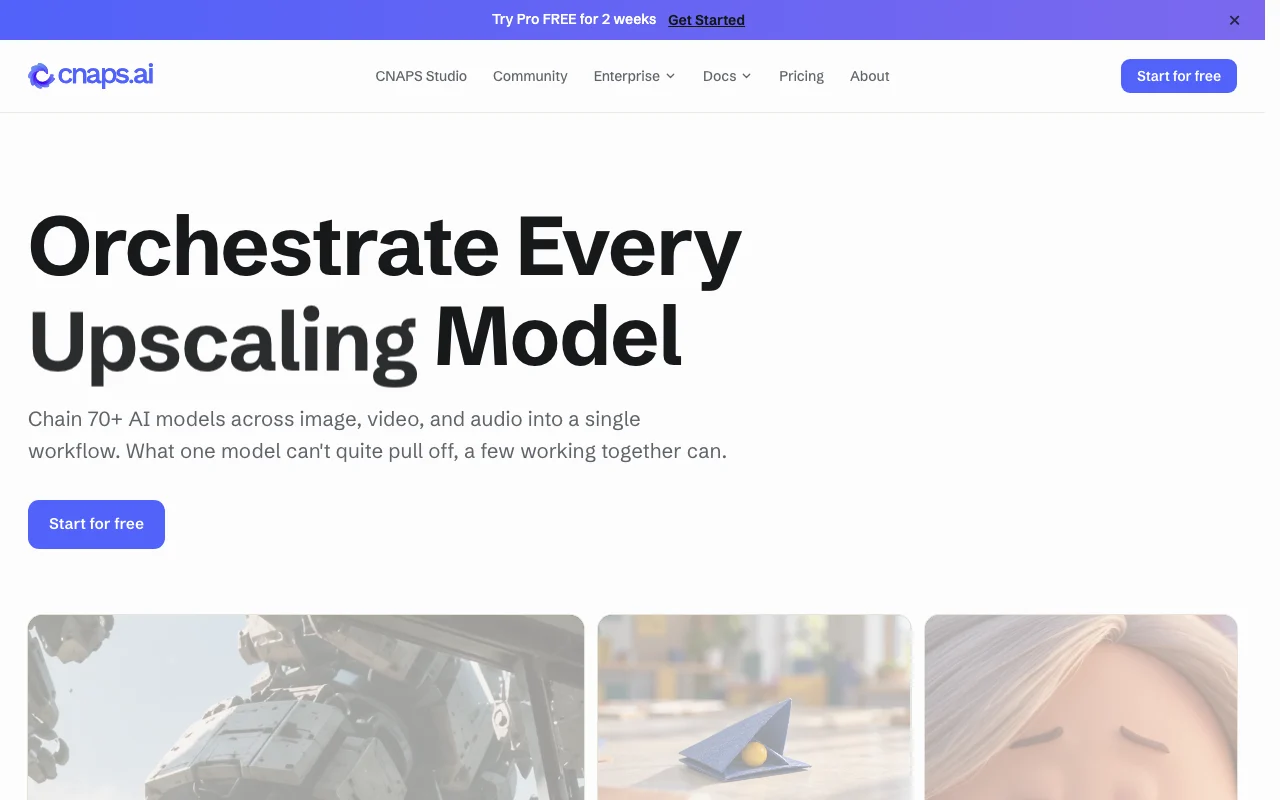
CNAPS homepage — screenshot of the image generation AI tool, Oct 2, 2026
CNAPS's official site: how the product presents itself. cnaps.ai, captured Oct 2, 2026

What you provide and what you get back

How CNAPS works: what you provide, where it runs and what you get backYOU PROVIDEYour inputImagesVideoAudioText promptsIMAGE GENERATIONCNAPSWebfree tier, paid price not publish…free tier availableaccount requiredchecked Sep 29, 2026YOU GET BACKThe resultGenerated or edited imagesVideoAudioTextinput → CNAPS → output · from the vendor's own pages, no hands-on test unless stated
What you give CNAPS and what comes back, from its documentation

You provide

  • Images
  • Video
  • Audio
  • Text prompts

You get back

  • Generated or edited images
  • Video
  • Audio
  • Text

Where you can use it

Platforms
Web
Account
Required
Models
70+ across image, video, audio, text
Watermark
Free plan only
Limit
GPU time allowance per window

What people use CNAPS for

Scenarios are worked out by our editors from the documentation; the actual result depends on your input and plan.

Chain image and video models in one pipeline

Who
Creators and marketers
You provide
A goal or prompt plus source media
Expected result
A flow that passes outputs between image, video and text models
Plan needed
Free to try, Pro for heavy use
Limitation
GPU time allowance refills in windows and does not carry over source (opens in a new tab)

Upscale images or video

Who
Ecommerce and design teams
You provide
Low-resolution images or clips
Expected result
Upscaled versions through an upscaling model
Plan needed
Any plan
Limitation
4x upscaling uses far more GPU time than lighter models source (opens in a new tab)

Remove backgrounds in batch

Who
Product photographers and sellers
You provide
A set of product photos
Expected result
Backgrounds removed across the whole set with Batch Run
Plan needed
Starter and above
Limitation
Batch Run is not on Free source (opens in a new tab)

Key features and their practical limits

70+ connectable AI models

Connects 70+ image, video, audio and text models in one workflow Avoids switching between separate tools

Access: All models on every plan, Free includedLimit: Output limited by GPU time per window source (opens in a new tab)

Pick-and-go goal mode

Lets you pick a goal and have models chain automatically Speeds up a first working flow

Access: All plansLimit: Automatic choices may need manual tuning on the canvas source (opens in a new tab)

Node canvas in CNAPS Studio

Provides a node canvas in CNAPS Studio for wiring flows by hand Gives control over each step

Access: All plans, unlimited flowsLimit: Learning curve for complex graphs source (opens in a new tab)

Swappable model nodes

Lets you swap the model in any node at any time Compare models without rebuilding the flow

Access: All plansLimit: Results differ per model and cost differs in GPU time source (opens in a new tab)

CNAPS: strengths and limits

Reasons to choose CNAPS

Check before paying for CNAPS

How to use CNAPS for chaining AI models into a media workflow

Set up CNAPS

  1. Create an account and start on the Free plan
  2. Open CNAPS Studio or pick a goal in goal mode
  3. Select the models to use for each step
  4. Optionally create an API key to call flows from n8n or Zapier

Example: chaining AI models into a media workflow

  1. Drop an image into the input node
  2. Add a background removal node then an upscaling node
  3. Run the flow and inspect the output
  4. Swap the upscaler model and run again to compare

Review and export the result

  1. Check that the output has no watermark if on a paid plan
  2. Watch the GPU time use in the run to size a plan

CNAPS API

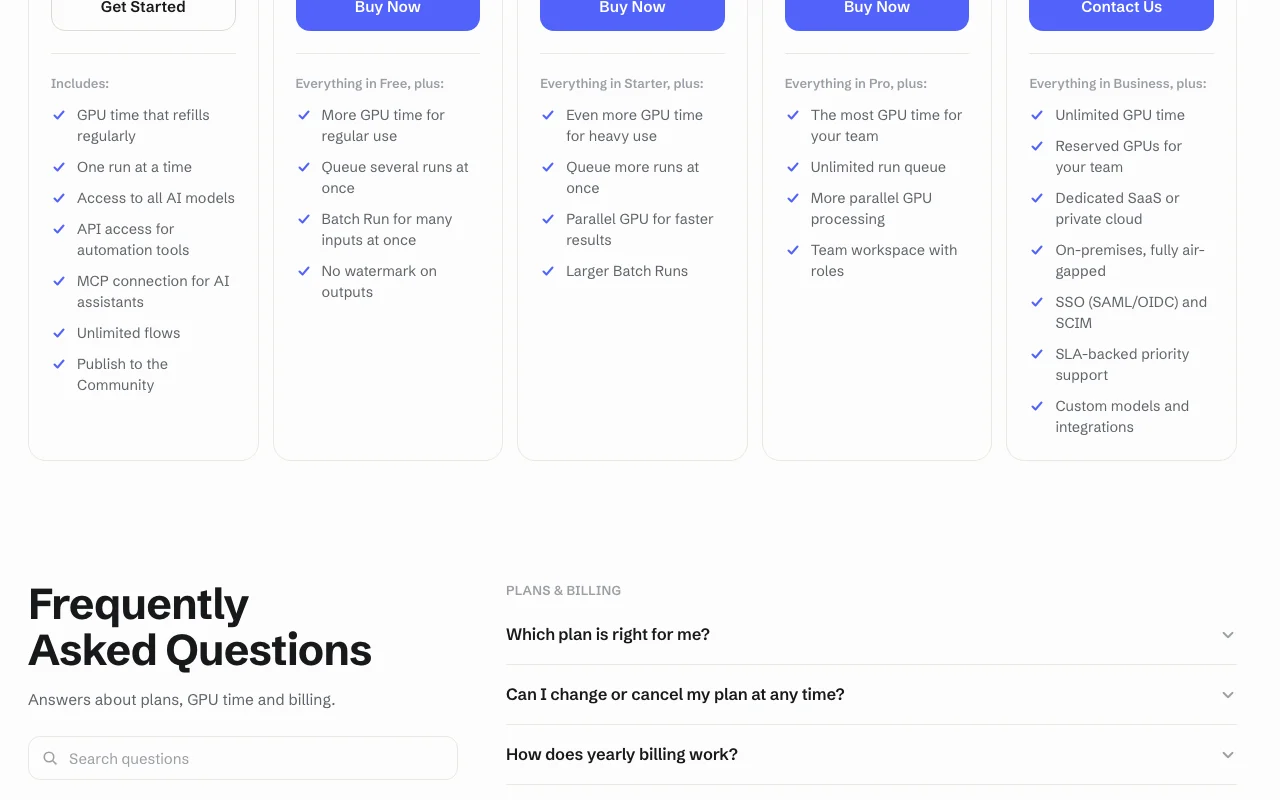
CNAPS pricing page with plans and prices — screenshot of the image generation AI tool, Oct 2, 2026
Plan comparison on the official pricing page. cnaps.ai, captured Oct 2, 2026

API access and separate billing

CNAPS has no public API in its official documentation. API key and MCP on every plan

Privacy, data use and commercial rights

Summarized from the vendor's current policies; this is not legal advice and a vendor's badge is not an independent audit.

How your inputs and outputs are handled

Not stated in fetched pages

Not stated

Not stated

Commercial use and plan restrictions

Not stated

Watermark on Free outputs

Controls for business users

  • SSO (Enterprise)

CNAPS alternatives by need

"Better suited" is based on documented features and pricing, not on a head-to-head test.

Make: better suited to

n8n: better suited to

Zapier: better suited to

Runway: better suited to

Alternatives
AlternativeWhen to choose itPricingLimitation
Make——
n8n——
Zapier——
Runway——

Explore CNAPS further

Tools and guides near CNAPS

CNAPS user reviews

No user reviews yet.

Used CNAPS? Be the first to share your experience.

Write a review

Reviews are checked by a moderator before they appear. Your email is never published. Plain text only.

Your rating (required)

Show what you made or what went wrong. Images are published only if the review is approved; location data is removed.

    CNAPS FAQ

    Which models can I use on the Free plan?

    All of them; plans differ in GPU time and speed, not model access. source (opens in a new tab)

    What is GPU time?

    The processing time models spend on your inputs; each plan has an allowance that refills every few hours and does not carry over. source (opens in a new tab)

    Do Free outputs have a watermark?

    Yes, and every paid plan removes it. source (opens in a new tab)

    Can I use CNAPS from Claude?

    Yes, through MCP on every plan, and via API keys from tools such as n8n or Zapier. source (opens in a new tab)

    What is Batch Run?

    It sends many inputs through one flow, from Starter; Pro and above handle larger batches. source (opens in a new tab)

    Sources and review methodology

    Official sources and verification dates

    Not verified: Plan prices; Privacy and training terms; Output resolution limits.

    How we documented and maintain this page

    Every fact about CNAPS above comes from the 2 official pages listed here, last compared on Sep 29, 2026; we have not run CNAPS ourselves, so it has no editorial score. How we check and re-check pages.

    Article updated Oct 2, 2026; prices checked Sep 29, 2026. Outbound links to vendors are plain links; we do not earn commissions. How we review · Report an error