Our take: Best for developers needing unlimited users and workflows with pay-per-execution billing and native code steps.
Main limitation: Cloud plans capped by monthly executions (e.g. 2.5K on Starter); Business plan self-hosted only.
By the AI Tool Atlas editors.
Based on the vendor's official documentation; we have not tested this product hands-on. What “documented overview” means
Is n8n right for you?
Best for developers needing unlimited users and workflows with pay-per-execution billing and native code steps. Based on the vendor's documentation, not on a hands-on test.
Best for: Developers and technical teams
Also a good fit for
Companies needing self-hosted automation
Teams building AI agent workflows
Consider another tool if monthly execution limits are too restrictive for high-volume workflows
Or if
Need cloud-based Business plan features (currently self-hosted only)
Require fewer than 3–4 concurrent workflow executions
n8n in the news
Headlines from US outlets, selected automatically — not endorsements. Updated Oct 12, 2026
For: Large organizations with strict compliance, governance, and dedicated support requirements
Limits
Custom number of monthly workflow executions
200+ concurrent executions
2 more
Unlimited shared projects
365+ days of execution history
Includes
Everything in Business, plus:
Dedicated support with SLA
2 more
External secret store integration
Log streaming to SIEM (Datadog, etc.)
API included
Usage caps, credits and extra costs
Assistant credits included monthly; no additional credit purchases available yet; self-hosted n8n uses BYOK (bring your own key) for AI models, no credit model
not documented
What is n8n, and how does it work?
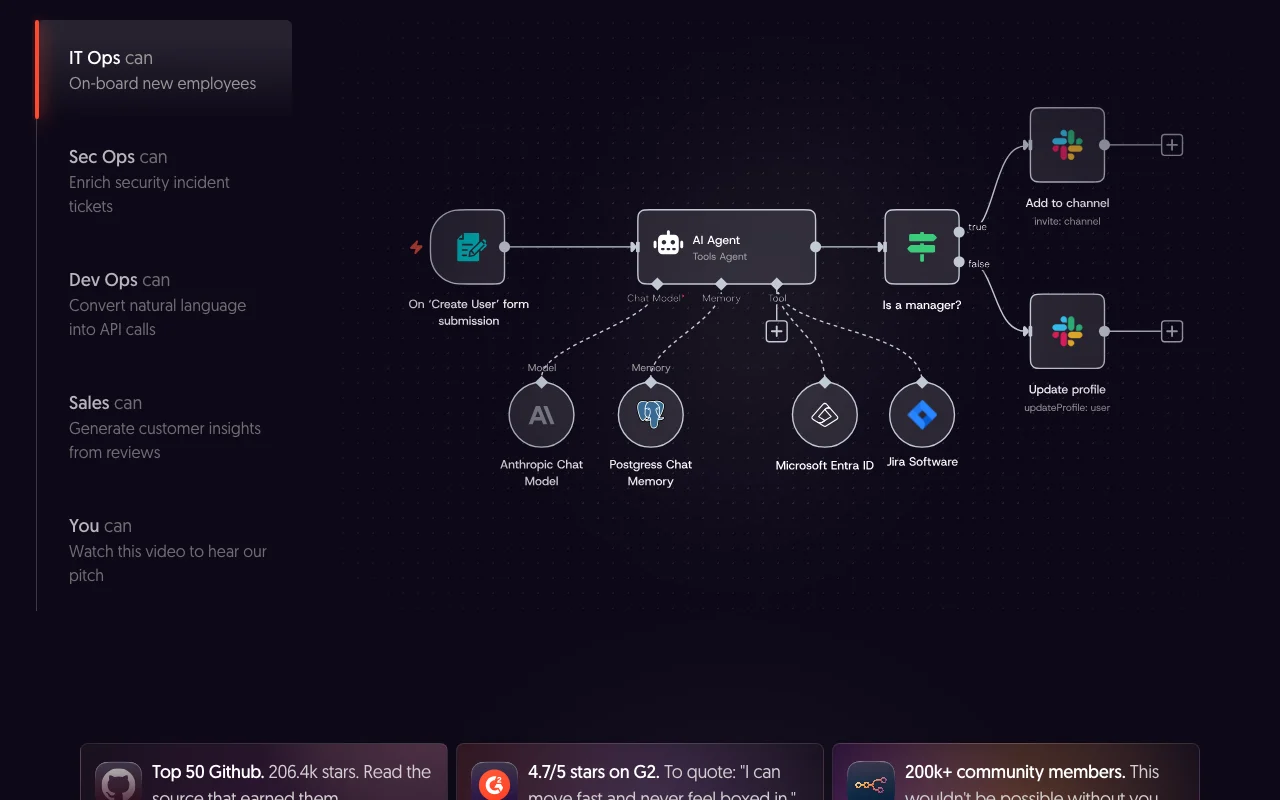
n8n is a workflow automation tool aimed at technical teams. Its visual editor connects apps and services, and supports code steps in JavaScript or Python, custom HTTP/GraphQL requests, webhooks and AI agent building, including RAG use cases. It can be run on n8n's cloud or self-hosted; a free Community Edition is on GitHub. Paid plans charge per full workflow execution rather than per step, and all plans include unlimited users, workflows and integrations.
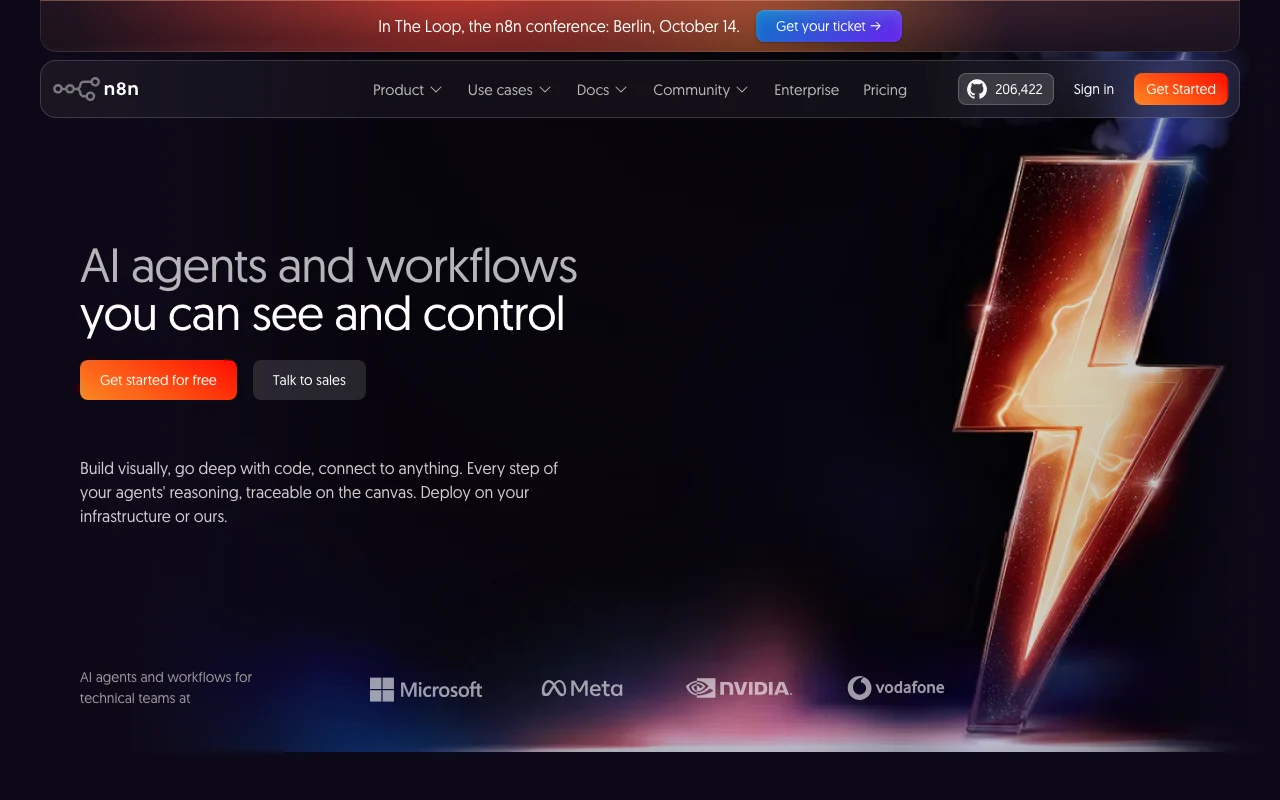
n8n's official site: how the product presents itself. n8n.io, captured Oct 1, 2026
What you provide and what you get back
What you give n8n and what comes back, from its documentation
You provide
Webhook triggers and queue events
Scheduled workflow runs (5-minute intervals up to daily)
Data from 1000+ integrated applications
You get back
Workflow execution results via API
Data sent to connected apps and services
Execution logs and audit records
Where you can use it
Platforms
Web (cloud-hosted), Self-hosted (Docker, npm), API, CLI
Account
Required
What people use n8n for
Scenarios are worked out by our editors from the documentation; the actual result depends on your input and plan.
Building AI agents and RAG pipelines
Who
Technical teams and developers
You provide
Data sources, AI model endpoints, user queries
Expected result
Automated AI workflows executing multi-step tasks with real-time responses
Plan needed
Pro or Business (40K+ executions monthly for production)
Feature overview on the official site. n8n.io, captured Oct 1, 2026
Visual workflow editor with 1000+ integrations
Connects applications, services, and data sources via a low-code drag-and-drop interface Reduces time to build and deploy workflows without coding experience
Enables building AI agents with AI steps, human approval, and Model Context Protocol (MCP) server support Teams can create agentic workflows with guardrails and autonomous tool calling
Access: Starter and above (preview); includes Assistant creditsLimit: Assistant credits consumed based on usage complexity; overages not purchasablesource (opens in a new tab)
Pros, cons and deal-breakers
Where n8n is strong
Free self-hosted Community Edition with full source code on GitHub No cost for self-hosting; allows custom modifications and air-gapped deploymentsdocumentedsource (opens in a new tab)
Billing per workflow execution, not per step or user Costs are predictable and scale linearly with usage, not exponentially as step counts increasedocumentedsource (opens in a new tab)
Unlimited users, workflows, and integrations on all plans Teams can collaborate without per-seat licensing or integration limitsdocumentedsource (opens in a new tab)
Free trial with no credit card required (Cloud); 14-day trial for Business plan Low friction to evaluate Starter/Pro before committing to paid plansdocumentedsource (opens in a new tab)
Limitations to check before paying
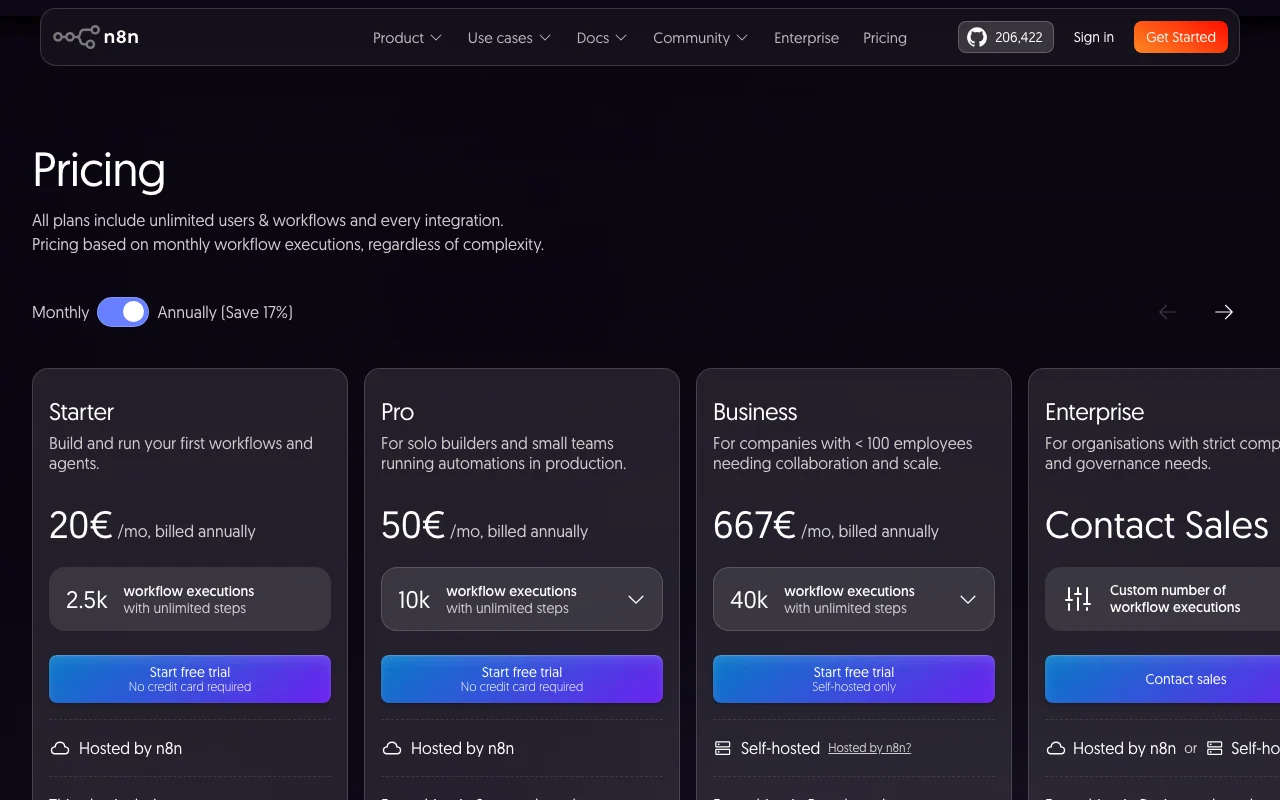
Cloud plans capped by monthly executions (2.5K Starter, 10K Pro, 40K Business) High-volume workflows may exceed limits and require upgrade or self-hostingdocumentedsource (opens in a new tab)
Business plan (667€/mo) available for self-hosted deployment only, not cloud-hosted Teams wanting advanced features must self-host and manage infrastructuredocumentedsource (opens in a new tab)
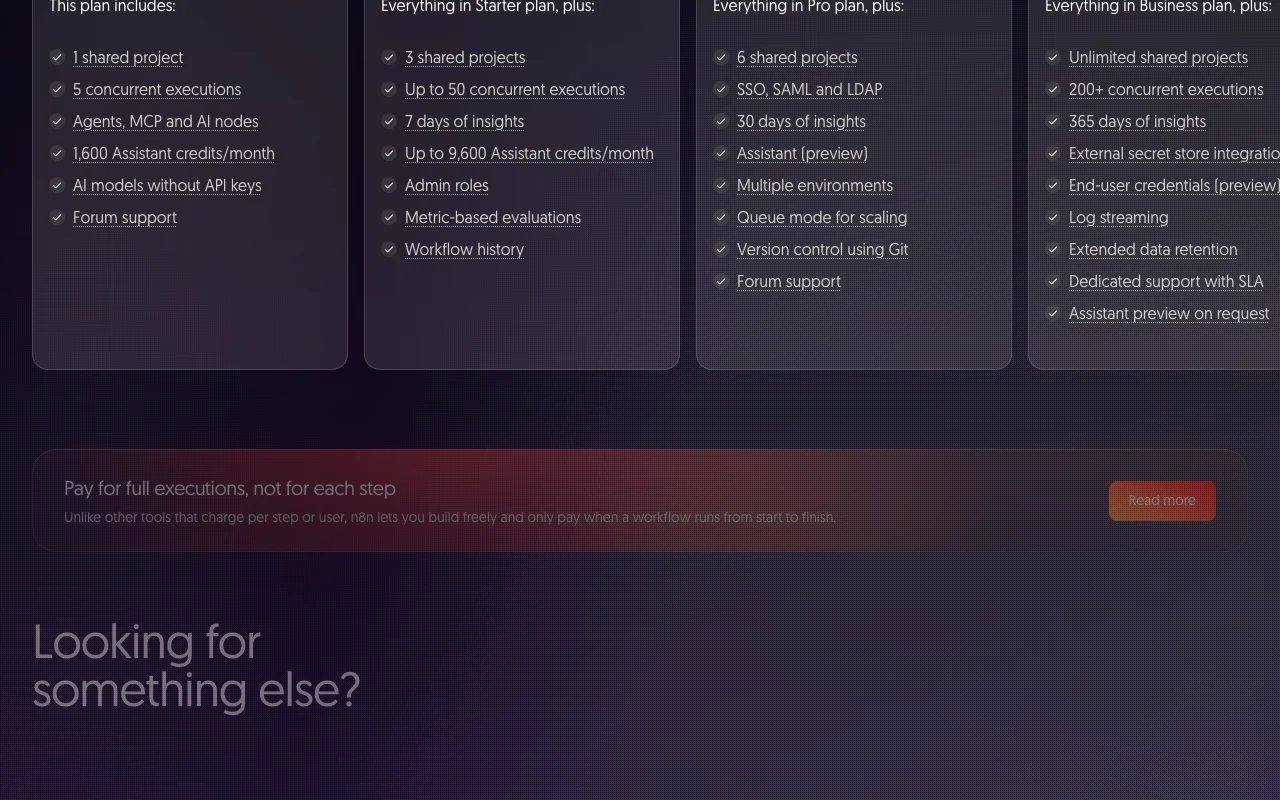
SSO/SAML, LDAP, Git version control, and multi-environment features require Business or Enterprise plans Starter/Pro cloud users cannot use enterprise security and governance featuresdocumentedsource (opens in a new tab)
Self-hosting requires technical expertise (Docker, npm, or server setup) Non-technical teams must hire DevOps resources or use managed hostingdocumentedsource (opens in a new tab)
How to use n8n for building and deploying AI agent workflows
Set up n8n
Sign up for free n8n Cloud trial (no credit card required) at https://n8n.io/
Create a new workflow and select a trigger (Webhook, Schedule, or AI Agent node)
Add nodes for integrations (e.g., Slack, GitHub, OpenAI) by searching the node library
Add code steps in JavaScript or Python if custom logic is needed
Test the workflow with real data before deploying to production
Example: building and deploying AI agent workflows
Create a webhook trigger to receive customer support requests
Use an OpenAI AI Agent node to classify the issue and generate a response
Route the response to different team members via Slack based on priority
Log the interaction to a Google Sheet for record-keeping
Set automatic retries for failed steps and monitor via the Insights dashboard
Review and export the result
Verify the workflow executes successfully using the Test button and inspect the full execution logs
Monitor execution count in the Insights dashboard to ensure you stay within your monthly plan limit
Review saved executions (up to 7–365 days depending on plan) to debug failures
n8n integrations and API
Plan comparison on the official pricing page. n8n.io, captured Oct 1, 2026
Native integrations and export formats
Export: JSON workflow export/import, Data tables CSV export, Execution logs (via API or dashboard)
API access and separate billing
n8n has no public API in its official documentation. Full API for workflow CRUD, execution control, credentials, and audit logs; rate limits not documented API documentation ↗
Privacy, data use and commercial rights
Summarized from the vendor's current policies; this is not legal advice and a vendor's badge is not an independent audit.
How your inputs and outputs are handled
User workflow data, execution logs, and third-party integration credentials are stored; encrypted credential store available on all plans
Data not used to train n8n or third-party ML models
Execution history retained per plan (7–365+ days); user data retained per data processing agreement
Commercial use and plan restrictions
Workflows run by users for commercial purposes; n8n retains the right to use anonymized telemetry
Execution data redaction and external secret store integration available on Pro and Enterprise respectively
An execution is a single run of your entire workflow from start to finish, regardless of the number of steps or data processed. Unlike other tools that charge per step or task, n8n charges per execution, making costs more predictable. source (opens in a new tab)
How do Assistant credits work?
Assistant credits (in preview) are included monthly in all n8n Cloud plans except Enterprise. Each plan has a monthly allowance (1,600 on Starter, 9,600 on Pro). Credits are consumed based on usage complexity and refresh monthly; unused credits do not roll over. Additional credits cannot yet be purchased. source (opens in a new tab)
Is the Business plan available on n8n Cloud?
Not yet. The Business plan is currently self-hosted only. n8n is working on a cloud-hosted Business plan; interested users can join the waitlist. source (opens in a new tab)
How many executions do I need for my use case?
Usage depends on your workflows. Scheduled workflows count by frequency (e.g., daily = 30 executions/month). Webhook-triggered workflows count by event frequency. Chatbot use cases multiply weekly conversations by average messages per conversation. Check your existing execution logs or estimate based on these formulas. source (opens in a new tab)
Does n8n train on my data?
No. n8n does not use personal data or workflow data processed in connection with the Services to train n8n or third-party machine learning models. source (opens in a new tab)
Sources and review methodology
Official sources and verification dates
n8n Plans and Pricing - n8n.iopricing · checked Oct 1, 2026 · Starter plan (2.5K executions, 20€/mo), Pro plan (10K executions, 50€/mo), Business plan (40K executions, 667€/mo, self-hosted only), Enterprise plan (custom, contact sales), Community Edition (free, self-hosted), Execution definition and billing model, Assistant credits and monthly allowances, Trial terms and conditions, Feature comparison table
AI Workflow Automation Platform - n8nhomepage · checked Oct 1, 2026 · Product description and use cases, Code and UI workflow capabilities, AI agent and MCP integration, Self-hosted and cloud deployment options
Privacy Policypolicy · checked Oct 1, 2026 · Data not used to train ML models, Personal data categories and retention, International data transfers, Contact for data subject rights
Not verified: USD equivalent pricing (pages show EUR only: 20€/mo Starter, 50€/mo Pro, 667€/mo Business); Execution rate limits or throttling per workflow; Maximum concurrent requests per webhook trigger; SLA response times for non-Enterprise support; Data retention and backup SLAs for cloud deployments; Exact AI model options available in Assistant (preview).
How we documented and maintain this page
Every fact about n8n above comes from the 3 official pages listed here, last compared on Oct 1, 2026; we have not run n8n ourselves, so it has no editorial score. How we check and re-check pages.
Article updated Oct 2, 2026; prices checked Oct 1, 2026. Outbound links to vendors are plain links; we do not earn commissions. How we review · Report an error