Our take: Choose Muse if you want a Meta personal agent that completes multi-step web and app tasks, accepting a usage limit and an unpublished price for the paid tier.
Main limitation: The free tier has a usage limit, and the price of the paid subscription is not stated on the pages we could read.
By the AI Tool Atlas editors.
Based on the vendor's official documentation; we have not tested this product hands-on. What “documented overview” means
Who should use Muse
Choose Muse if you want a Meta personal agent that completes multi-step web and app tasks, accepting a usage limit and an unpublished price for the paid tier. Based on the vendor's documentation, not on a hands-on test.
Best for: People who want an assistant to run everyday tasks for them
Also a good fit for
Mac and mobile users who want it connected to Messages, Calendar and Notes
Consider another tool if free tier has a usage limit
Or if
Paid subscription price not stated on the pages read
Can take real actions, so permissions need careful setup
Muse in the news
Headlines from US outlets, selected automatically — not endorsements. Updated Oct 2, 2026
Muse is Meta's personal AI agent. Unlike a chatbot that answers one question at a time, it can browse the web, make purchases, generate images, create documents and connect to apps through Connectors, working through multi-step tasks and continuing in the background after the app is closed.
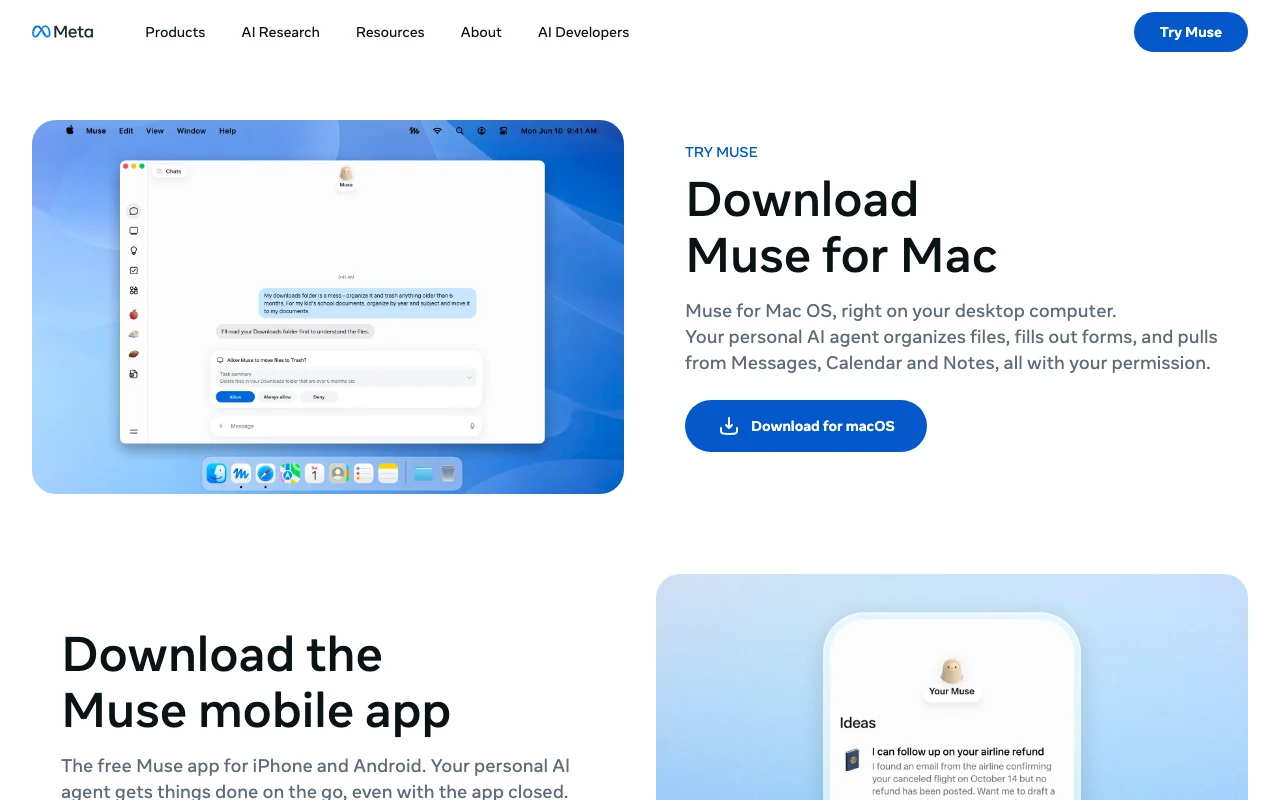
The official pages describe a Mac and mobile app that can organize files, handle tasks and connect Messages, Calendar and Notes. Muse asks permission before actions such as sending messages or making purchases, and you can allow once, always allow or deny. It is free with a usage limit; a paid subscription is offered if you reach it, with no price stated on the pages read.
Muse's official site: how the product presents itself. ai.meta.com, captured Oct 2, 2026
What you provide and what you get back
What you give Muse and what comes back, from its documentation
You provide
Task instructions
Connected apps and permissions
You get back
Completed multi-step tasks
Generated documents and images
Where you can use it
Platforms
Desktop, Mobile
Account
Required
Platforms
Mac, mobile
Permissions
Allow once, always, deny
Connectors
Third-party apps
Background
Yes
What people use Muse for
Scenarios are worked out by our editors from the documentation; the actual result depends on your input and plan.
Booking reservations and managing reminders
Who
Busy individuals
You provide
A booking request
Expected result
Muse completes the reservation and reminder you asked for after you approve the action.
Plan needed
Free
Limitation
Muse asks permission before acting, so you must approve the booking step yourself. source (opens in a new tab)
Monitoring prices or weather in the background
Who
Shoppers
You provide
A price to track
Expected result
Muse keeps watching the price or weather you named and sends alerts without you reopening the app.
Plan needed
Free
Limitation
The app must stay allowed to run in the background, and the work counts toward the free usage limit. source (opens in a new tab)
Creating documents and generating images
Who
Workers
You provide
A document brief
Expected result
Muse produces a document from your brief, and can generate images, which you then review before using.
Plan needed
Free
Limitation
The quality of generated documents and images is unverified in the pages we could read. source (opens in a new tab)
Key features and their practical limits
Feature overview on the official site. ai.meta.com, captured Oct 2, 2026
Browses the web and completes multi-step tasks
Browses sites, buys and creates content on your behalf. People who delegate errands can hand over a task with several steps, such as browsing and buying, instead of doing each step by hand.
Access: Not statedLimit: Muse takes real actions on your behalf, so the results depend on the permissions you grant and should be checked.source (opens in a new tab)
Connectors to third-party apps and services
Links your other apps so it can act inside them. Users can let Muse work inside their other apps, so a task does not stop at the edge of one service.
Access: Not statedLimit: Each app needs its own permission, and the list of supported apps is not stated in the pages we could read.source (opens in a new tab)
Background work after the app is closed
Keeps working after you close the app. Users can start a long task and leave, since Muse keeps working without the app open.
Access: FreeLimit: Background work counts toward the usage limit that applies to the free tier.source (opens in a new tab)
Permission prompts: allow once, always or deny
Asks before sensitive actions; you choose allow once, always or deny. Users keep control over sensitive steps because Muse asks first and they choose allow once, always allow or deny.
Access: Not statedLimit: The prompts are manual, so a user who picks always allow gives up that check for that action.source (opens in a new tab)
Muse: strengths and limits
Reasons to choose Muse
Free to use with a usage limit You can start without paying, though a usage limit applies, so you can judge whether the agent handles your tasks before any upgrade.documentedsource (opens in a new tab)
Asks permission before sending messages or purchases Muse asks before actions such as sending messages or making purchases, so it should not complete those steps without your approval.documentedsource (opens in a new tab)
Keeps working in the background Tasks can continue in the background after you close the app, so longer jobs do not need you to keep the window open.documentedsource (opens in a new tab)
You can review its activity and manage permissions You can review what Muse did and manage its permissions, so you can check its actions and change what it is allowed to do.documentedsource (opens in a new tab)
Check before paying for Muse
Free tier has a usage limit The free tier has a usage limit, so heavy users may run into it and be offered a paid subscription.documentedsource (opens in a new tab)
Paid subscription price not stated on the pages read The paid subscription price is not stated on the pages we could read, so you cannot work out the cost before reaching the limit.documentedsource (opens in a new tab)
Can take real actions, so permissions need careful setup Because Muse can take real actions such as purchases and messages, you need to set permissions carefully to avoid unwanted results.documentedsource (opens in a new tab)
How to use Muse for delegating multi-step tasks to an agent
Set up Muse
Download the Muse app for Mac or mobile.
Sign in.
Connect apps.
Example: delegating multi-step tasks to an agent
Describe a task.
Approve prompts.
Review results.
Review and export the result
Check actions in activity.
Revoke permissions.
Example prompt suggested by our editors (not a recorded output of the product)
Find a table for two on Friday and add it to my calendar.
Muse API
API access and separate billing
Muse has no public API in its official documentation.
Privacy, data use and commercial rights
Summarized from the vendor's current policies; this is not legal advice and a vendor's badge is not an independent audit.
How your inputs and outputs are handled
Tasks and connected app data
Not stated
Not stated
Commercial use and plan restrictions
Not stated
Not stated
Other tools to consider instead of Muse
"Better suited" is based on documented features and pricing, not on a head-to-head test.
Not verified: Paid price; Mobile OS; Privacy terms; Official pages could not be read as text (client-rendered or empty fetch); facts come from the verified seed research.
How we documented and maintain this page
Every fact about Muse above comes from the 2 official pages listed here, last compared on Oct 4, 2026; we have not run Muse ourselves, so it has no editorial score. How we check and re-check pages.
Article updated Oct 10, 2026; prices checked Oct 4, 2026. Outbound links to vendors are plain links; we do not earn commissions. How we review · Report an error