Productivity & writingDocumented overviewLast checked Oct 1, 2026

VisionRenamer: Pricing, Features & Best Use Cases

Web tool that batch-renames images with AI-generated descriptive filenames, with review before ZIP/CSV download.

Who VisionRenamer fits

Use VisionRenamer to turn generic camera or export filenames into content-based names in bulk, paying only for images that rename successfully. Based on the vendor's documentation, not on a hands-on test.

Best for: Marketplace sellers with large product photo sets

Also a good fit for

  • Photographers and designers organizing asset libraries
  • Marketing teams managing creative assets

Consider another tool if requires creating an account

Or if

  • Subscription credits reset monthly and do not roll over
  • No desktop or mobile app; web only

VisionRenamer pricing and usage limits

Prices checked Oct 1, 2026 on the official US pricing page. Official pricing ↗ Prices and limits change often.

Vendor pricing page re-checked automatically 11 days ago: no changes detected.

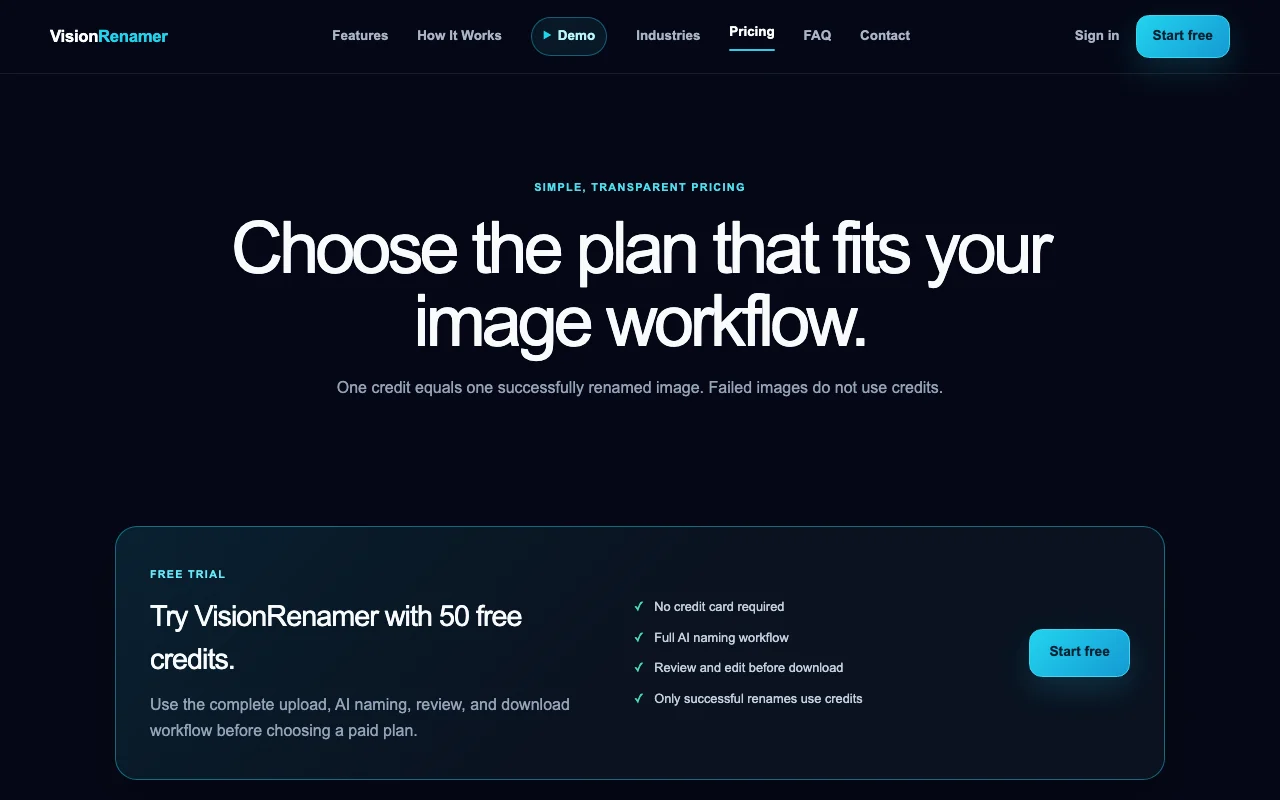
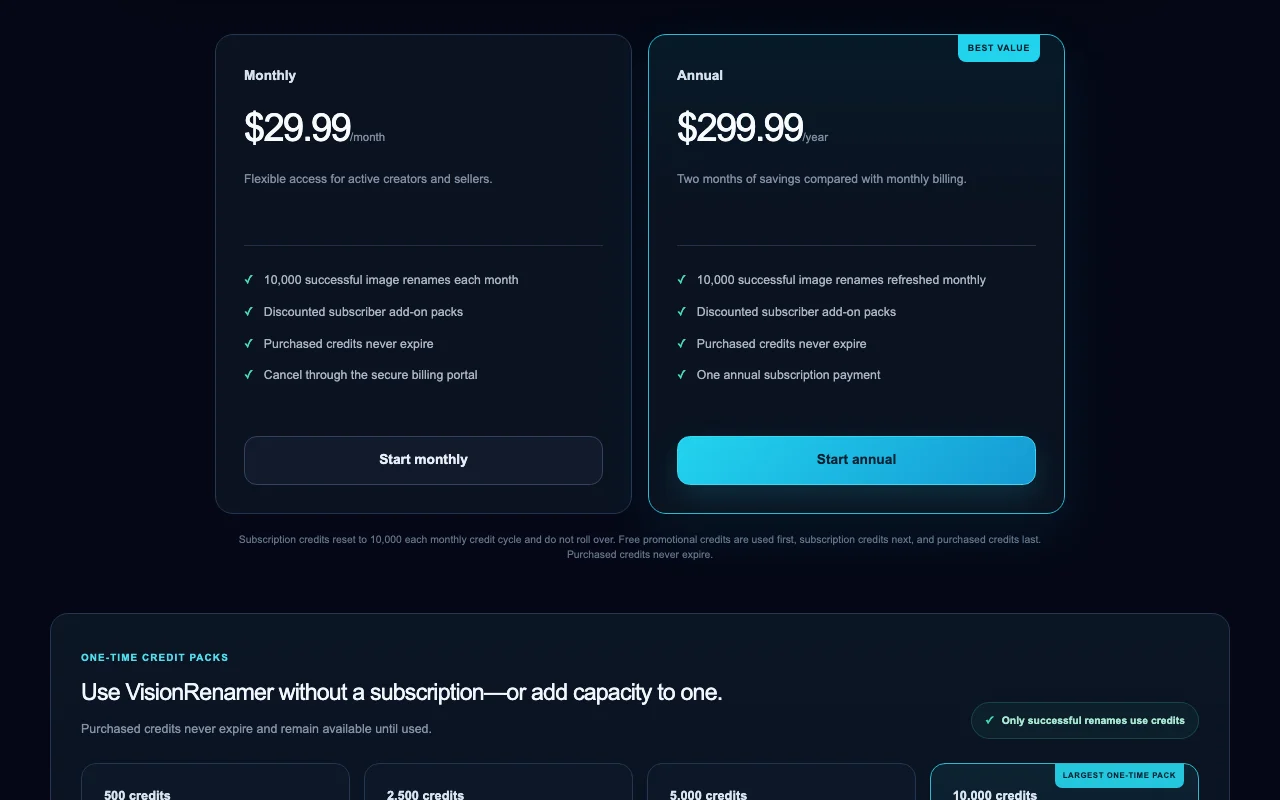
VisionRenamer pricing page with plans and prices — screenshot of the productivity & writing AI tool, Oct 1, 2026
The official VisionRenamer pricing page as we saw it. visionrenamer.com, captured Oct 1, 2026

Free access and trial conditions

One-time 50-credit trial, no credit card.

50 free credits cover the full workflow.

Paid plans: what changes as you upgrade

Free trial web

Free source (opens in a new tab)

One-time

For: Testing the workflow on a small batch

Limits

  • 50 free credits
  • One-time trial, not an ongoing plan

Includes

  • Full upload, AI naming, review and download workflow
  • ZIP and CSV downloads

Monthly web

$29.99/mo source (opens in a new tab)

Month

For: Active sellers and creators

Limits

  • 10,000 successful renames per month
  • Credits reset monthly, no rollover

Includes

  • Discounted subscriber add-on packs
  • Purchased credits never expire

Annual web

$299.99/yr source (opens in a new tab)

Year, annual commitment

$299.99 charged once per year (about $25 per month)

For: Steady high-volume use

Limits

  • 10,000 renames refreshed monthly

Includes

  • Two months of savings versus monthly
  • One annual payment
1 more
  • Discounted subscriber add-on packs

Credit packs web

$9.99 source (opens in a new tab)

One-time

For: Occasional batches

Limits

  • 500 credits $9.99; 2,500 $24.99; 5,000 $39.99; 10,000 $49.99

Includes

  • No subscription required
  • Credits never expire
1 more
  • Subscriber prices lower (e.g. 10,000 for $39.99)

Enterprise web

Custom pricing source (opens in a new tab)

Custom

For: Agencies and marketplaces

Includes

  • Team billing and shared workspaces
  • Centralized billing and higher-volume processing

Usage caps, credits and extra costs

Credit packs for extra capacity; failed images are not charged.

Not stated.

What is VisionRenamer, and how does it work?

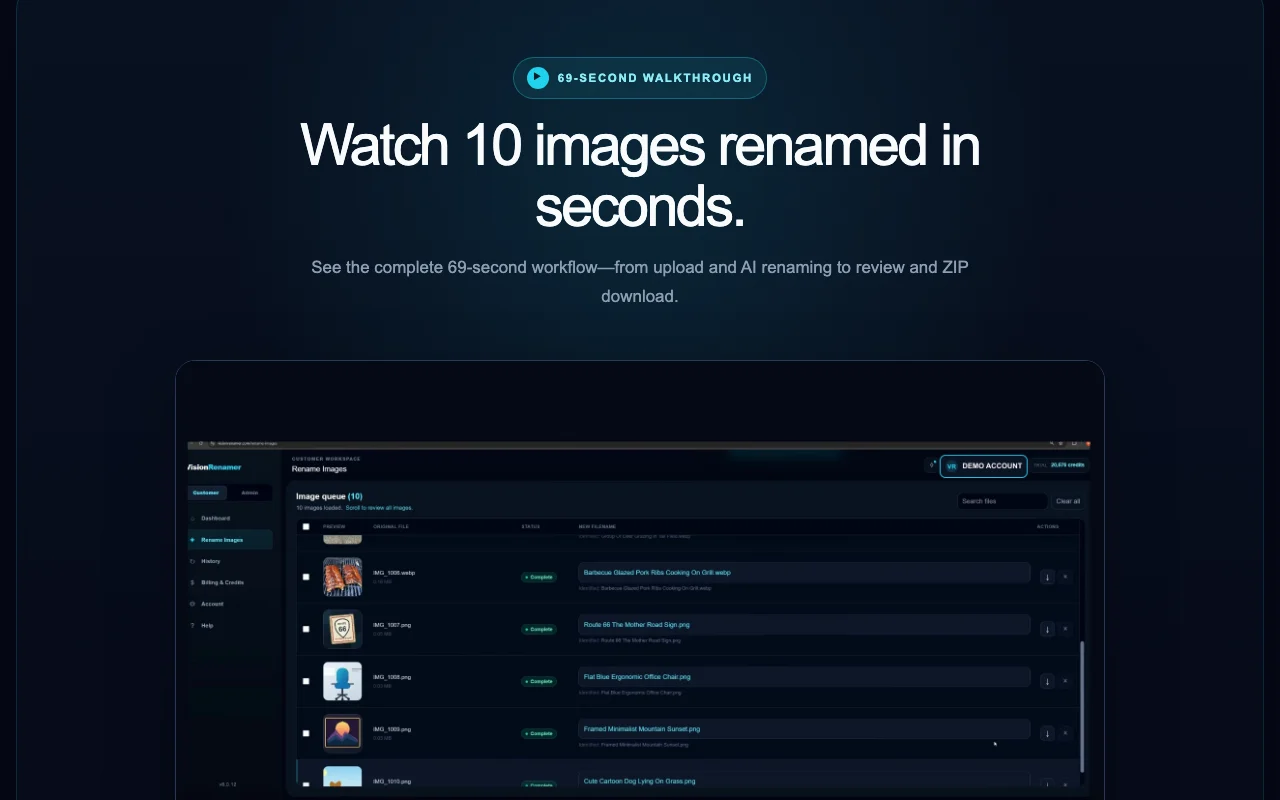
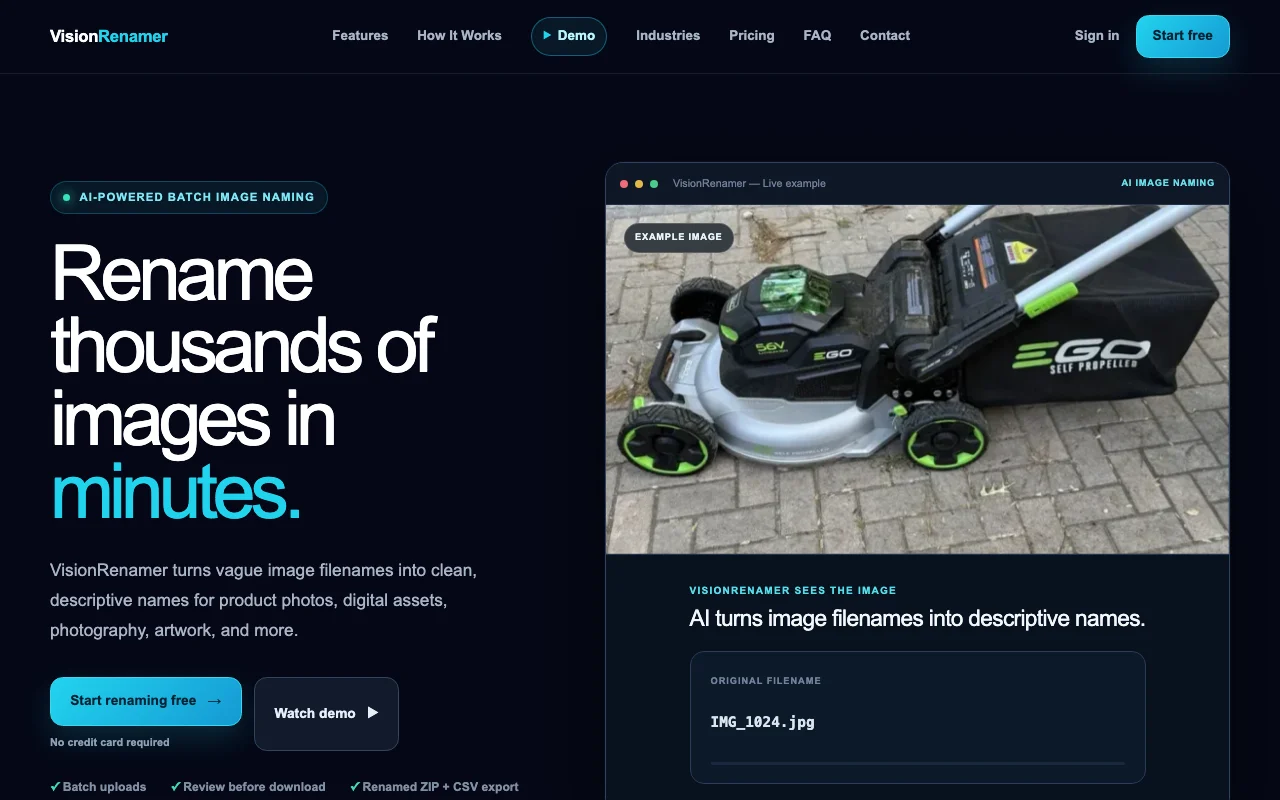
VisionRenamer is a browser-based batch image renaming service. You upload images or a folder, pick a naming style (separators, capitalization, prefixes, suffixes, custom instructions), and the AI analyzes each picture to propose a descriptive filename based on its visible content. Results can be reviewed and edited before downloading the renamed files as a ZIP together with a CSV filename record. Usage is credit-based: one credit per successfully renamed image, with a 50-credit free trial, a monthly or annual subscription, and one-time credit packs.

VisionRenamer homepage — screenshot of the productivity & writing AI tool, Oct 1, 2026
VisionRenamer's official site: how the product presents itself. visionrenamer.com, captured Oct 1, 2026

What you provide and what you get back

How VisionRenamer works: what you provide, where it runs and what you get backYOU PROVIDEYour inputImages or whole foldersNaming style: separators, capital…Custom instructionsPRODUCTIVITY & WRITINGVisionRenamerWebfrom $29.99/mo (Monthly)free tier availableaccount requiredchecked Oct 1, 2026YOU GET BACKThe resultRenamed images in a ZIPCSV filename recordEditable filename suggestionsinput → VisionRenamer → output · from the vendor's own pages, no hands-on test unless stated
What you give VisionRenamer and what comes back, from its documentation

You provide

  • Images or whole folders
  • Naming style: separators, capitalization, prefix, suffix
  • Custom instructions

You get back

  • Renamed images in a ZIP
  • CSV filename record
  • Editable filename suggestions

Where you can use it

Platforms
Web
Account
Required
Output
ZIP of renamed images plus CSV
Naming controls
Separators, capitalization, prefixes, suffixes, custom instructions
Monthly allowance
10,000 renames on subscription
Retention
ZIP downloadable up to 48 hours
Image formats
JPG, PNG, JPEG shown in examples; full list not stated

What people use VisionRenamer for

Scenarios are worked out by our editors from the documentation; the actual result depends on your input and plan.

Renaming product photos for marketplace listings

Who
Marketplace sellers
You provide
Product photos named IMG_4382.jpg
Expected result
Descriptive filenames ready for eBay, Amazon or Etsy listings
Plan needed
Free trial
Limitation
Names are suggestions; check brand or SKU rules source (opens in a new tab)

Cleaning up filenames in large design or artwork packs

Who
Designers selling asset packs
You provide
A folder of artwork exports
Expected result
Consistently named files in a downloadable ZIP
Plan needed
Monthly
Limitation
Each image uses one credit source (opens in a new tab)

Making photography libraries searchable by content

Who
Photographers
You provide
Shoot folders with camera-numbered files
Expected result
Content-based names plus a CSV record for cataloging
Plan needed
Credit packs
Limitation
ZIPs stay downloadable only for a limited time source (opens in a new tab)

What VisionRenamer does, and where it stops

VisionRenamer homepage — screenshot of the productivity & writing AI tool, Oct 1, 2026
Feature overview on the official site. visionrenamer.com, captured Oct 1, 2026

Content-aware AI filename generation

Analyzes each picture and proposes a name from what is visible Replaces manual typing of thousands of filenames

Access: All plansLimit: Accuracy depends on image content source (opens in a new tab)

Batch upload of images or whole folders

Accepts many images or an entire folder in one batch Speeds up large libraries

Access: All plansLimit: Credit use scales with image count source (opens in a new tab)

Review and manual editing before download

Lets you edit or fix any suggested name before download Prevents wrong names reaching your library

Access: All plansLimit: Manual edits take time on large batches source (opens in a new tab)

Naming controls: separators, capitalization, prefixes, suffixes, custom instructions

Sets separators, capitalization, prefixes, suffixes and custom instructions Matches existing naming conventions

Access: All plansLimit: No template variables such as SKU are documented source (opens in a new tab)

VisionRenamer: strengths and limits

Where VisionRenamer is strong

Limitations to check before paying

  • Requires creating an account You must sign up before testing, which slows a quick check documented source (opens in a new tab)
  • Subscription credits reset monthly and do not roll over Light users lose unused subscription credits monthly documented source (opens in a new tab)
  • No desktop or mobile app; web only Renaming happens in a browser tab, so there is no folder-watching automation documented source (opens in a new tab)
  • Team/enterprise plans require contacting sales Agencies need to negotiate before sharing a workspace documented source (opens in a new tab)

How to use VisionRenamer for renaming a folder of product photos

Set up VisionRenamer

  1. Create a VisionRenamer account (50 free credits, no card)
  2. Open the upload page
  3. Choose a naming style: separator, capitalization, prefix and suffix
  4. Add any custom instructions such as including the color

Example: renaming a folder of product photos

  1. Drag in the folder of images
  2. Start AI renaming and wait for suggestions
  3. Edit any weak names in the review table
  4. Download the renamed ZIP and the CSV record

Review and export the result

  1. Compare a sample of renamed files against the originals using the CSV
  2. Check the credit balance in the job history to confirm only successful renames were charged
Example prompt suggested by our editors (not a recorded output of the product)
Name each image with the product type, color and material, in lowercase with hyphens.

Privacy, data use and commercial rights

Summarized from the vendor's current policies; this is not legal advice and a vendor's badge is not an independent audit.

How your inputs and outputs are handled

Images are uploaded to private temporary storage; an optimized copy is analyzed to suggest names while the original is used for downloads.

Not stated.

Source images and ZIPs are temporary; ZIPs may stay downloadable up to 48 hours; account, billing and job records are retained as needed.

Commercial use and plan restrictions

None stated.

Controls for business users

  • Private file storage
  • Protected downloads
  • Role-based administration

Policies: visionrenamer.com/privacy

Other tools to consider instead of VisionRenamer

"Better suited" is based on documented features and pricing, not on a head-to-head test.

Canva: better suited to

Adobe Firefly: better suited to

Notion AI: better suited to

Alternatives
AlternativeWhen to choose itPricingLimitation
Canva——Compare
Adobe Firefly——
Notion AI——Compare

Explore VisionRenamer further

If you are looking at VisionRenamer

VisionRenamer user reviews

No user reviews yet.

Used VisionRenamer? Be the first to share your experience.

Write a review

Reviews are checked by a moderator before they appear. Your email is never published. Plain text only.

Your rating (required)

Show what you made or what went wrong. Images are published only if the review is approved; location data is removed.

    VisionRenamer FAQ

    How does VisionRenamer count credits?

    One credit equals one successfully renamed image, and failed images do not use credits. source (opens in a new tab)

    Do VisionRenamer credits expire?

    Purchased credits never expire, but subscription credits reset to 10,000 each monthly cycle and do not roll over. source (opens in a new tab)

    In what order are VisionRenamer credits spent?

    Free promotional credits first, subscription credits next and purchased credits last. source (opens in a new tab)

    How long does VisionRenamer keep my images?

    Source images and generated ZIPs are temporary working files; ZIPs may stay downloadable for up to 48 hours. source (opens in a new tab)

    What do I download from VisionRenamer?

    A ZIP of the renamed images and a CSV of the filenames, after you have reviewed and edited the suggestions. source (opens in a new tab)

    Sources and review methodology

    Official sources and verification dates

    Not verified: Maximum batch size and image size; Supported image formats list; Training-use statement; API availability.

    How we documented and maintain this page

    Every fact about VisionRenamer above comes from the 4 official pages listed here, last compared on Oct 1, 2026; we have not run VisionRenamer ourselves, so it has no editorial score. How we check and re-check pages.

    Article updated Oct 10, 2026; prices checked Oct 1, 2026. Outbound links to vendors are plain links; we do not earn commissions. How we review · Report an error