Productivity & writing · pricing

screenpipe pricing in 2026: Free, Basic, Business and Enterprise explained

Screenpipe suits knowledge workers, founders and teams who want screen, audio and meeting history captured locally and exposed to Claude, Codex or other approved agents for summaries, follow-ups and automations.

Starting price
$21/mo (Basic)
Free option
Yes
Free tier cap
Not stated
Plans
4
Price confirmed
Oct 1, 2026
Pricing page last read
Nov 13, 2026
Business$42.00
Basic$21.00

screenpipe pricing page, captured

Our own captures of each vendor's public pages. Click a frame for the full-size image.

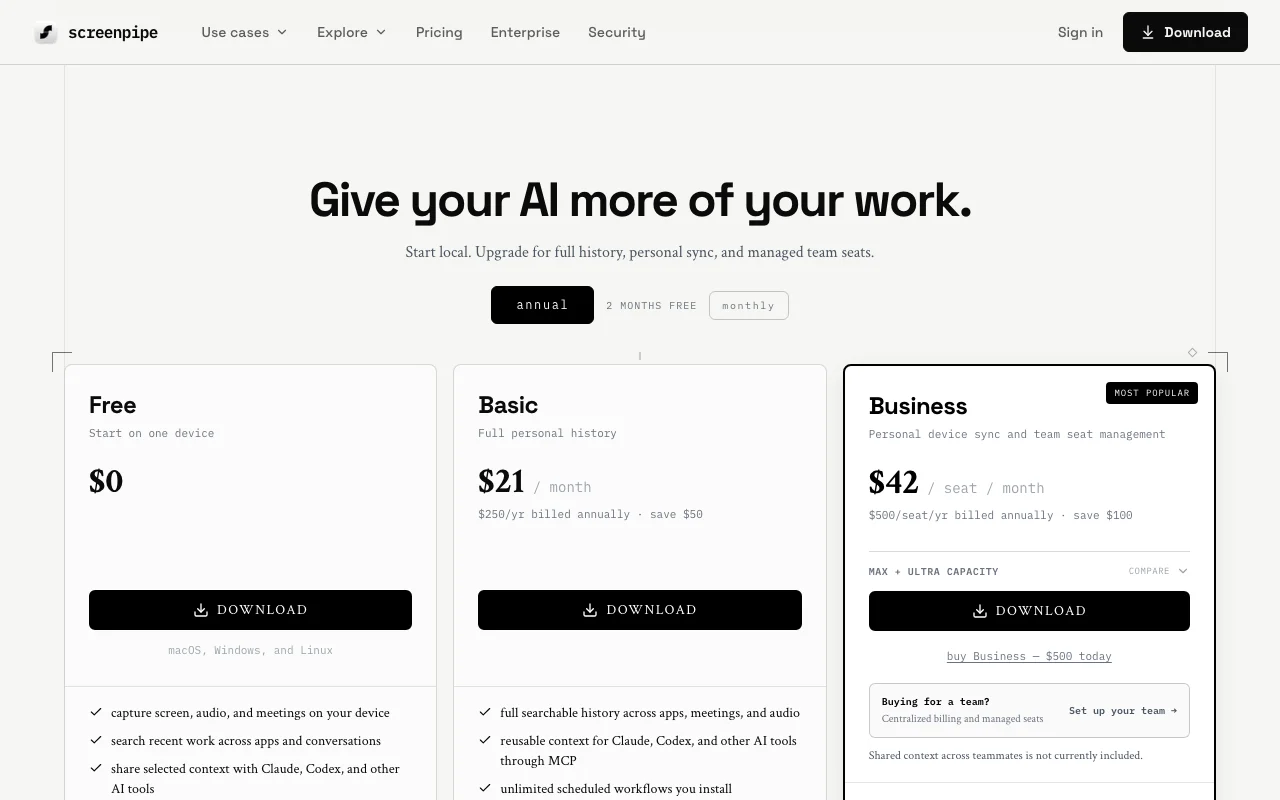
screenpipe pricing page with plans and prices, screenshot of the productivity & writing AI tool, Oct 1, 2026
screenpipe plans as listed on its pricing page. screenpipe.com, captured Oct 1, 2026
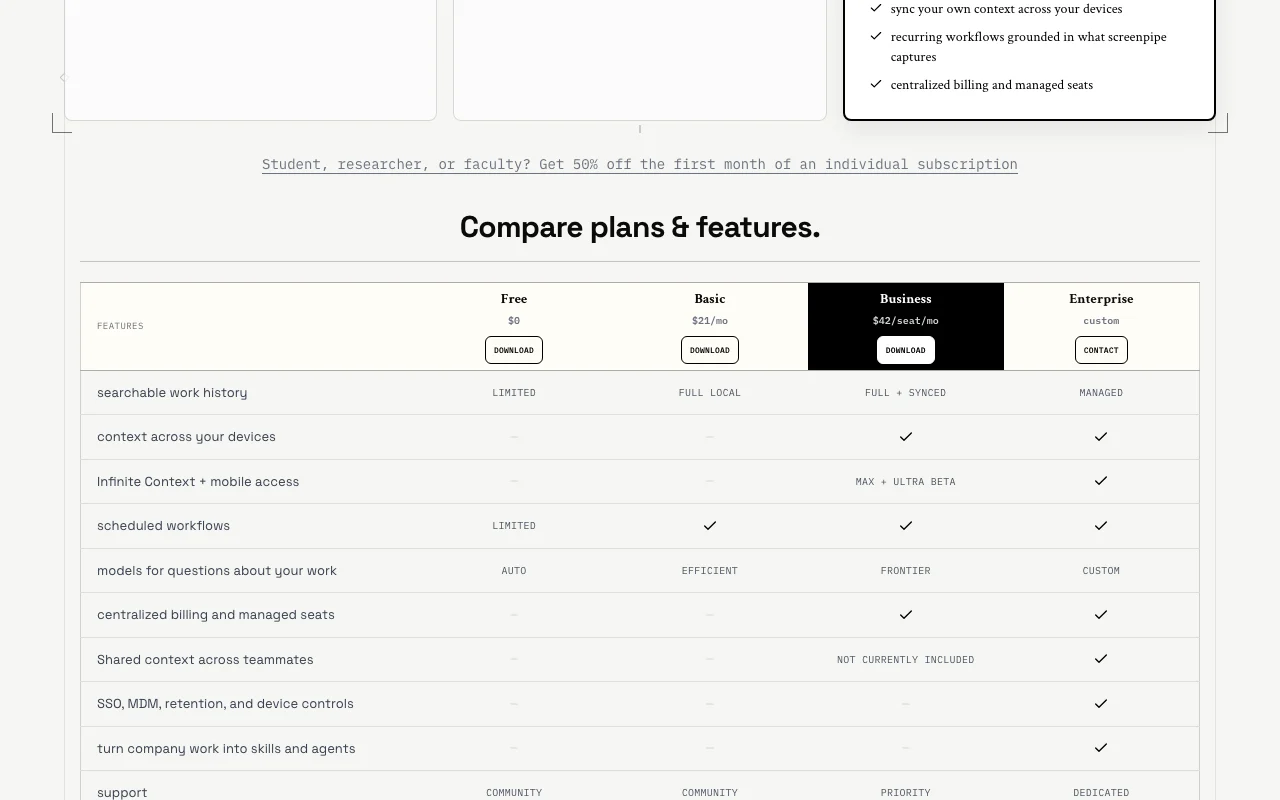
screenpipe pricing page with plans and prices, screenshot of the productivity & writing AI tool, Oct 1, 2026
More of the screenpipe pricing page. screenpipe.com, captured Oct 1, 2026
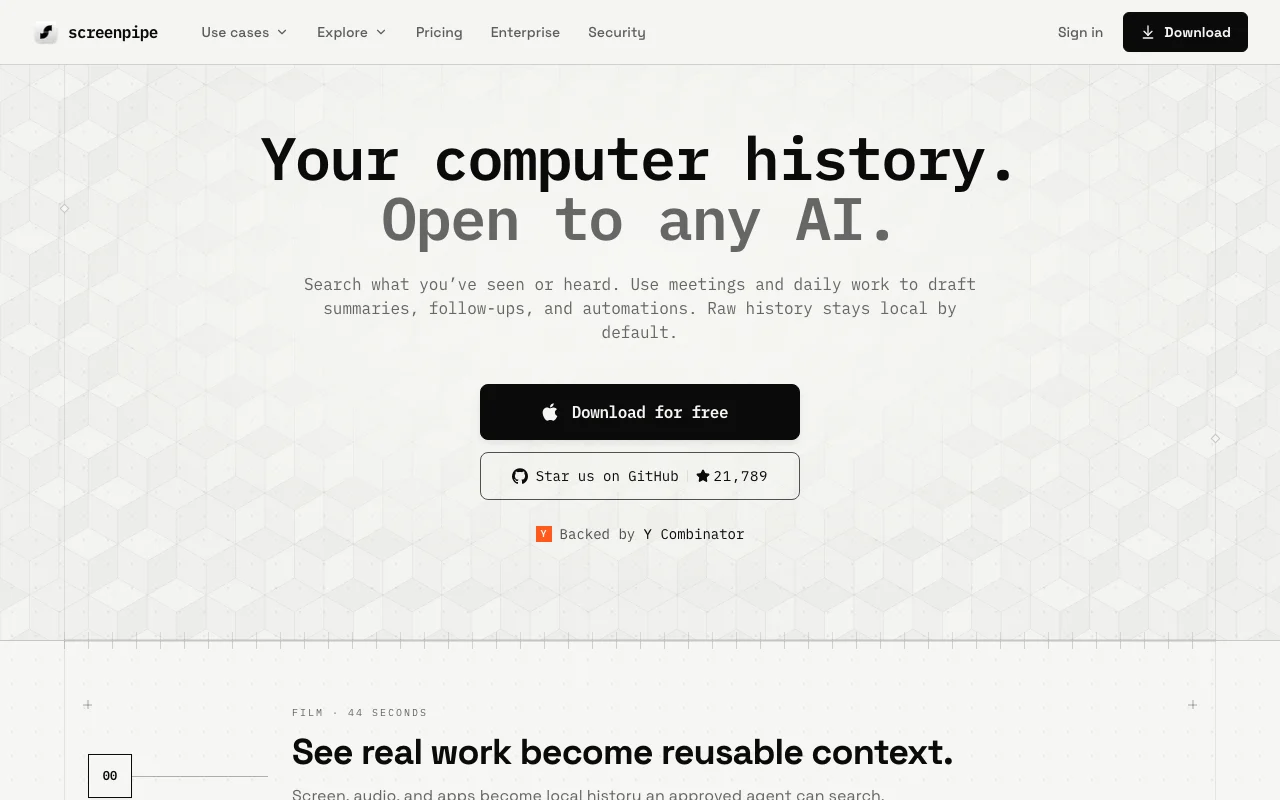
screenpipe homepage, screenshot of the productivity & writing AI tool, Oct 1, 2026
screenpipe homepage. screenpipe.com, captured Oct 1, 2026

screenpipe plans and what they include

screenpipe records your screen and audio locally, so its plans mostly decide how much of that history you can search and how many workflows you can run. Free covers one device with limited searchable history and limited scheduled workflows, and still lets you share selected context with AI tools. Basic is 21 USD per month, or $250 per year billed annually (saving $50), and unlocks the full local searchable history, reusable context via MCP and unlimited scheduled workflows you install.

Business is 42 USD per seat per month, or $500 per seat per year billed annually (saving $100). It adds personal device sync, centralized billing, managed seats, recurring workflows and Max and Ultra capacity options. Enterprise is custom-priced, with SSO, MDM, retention and device controls and dedicated support. Prices checked on 2026-10-01.

screenpipe plans compared

Plans and prices
PlanPriceBillingWho it is forKey limitsAPI
Free
desktop
Free Monthly Starting on one device Limited searchable history; Limited scheduled workflows; One device Included
Basic
desktop
$21/mo Monthly Individuals wanting full history Full local searchable history Included
Business
desktop
$42/mo per seat per month Monthly Teams with managed seats Max and Ultra capacity options Included
Enterprise
desktop
Custom pricing Custom Companies rolling out across devices Not stated Included

screenpipe usage limits by plan

What the vendor publishes about usage caps on each plan, quoted as published. Where the vendor gives no figure, we say so rather than guess.

Usage limits by plan
PlanPricePublished limitsSource
FreeFree
  • Limited searchable history
  • Limited scheduled workflows
  • One device
screenpipe.com
Basic$21/mo
  • Full local searchable history
screenpipe.com
Business$42/mo per seat per month
  • Max and Ultra capacity options
screenpipe.com
EnterpriseCustom pricing Not stated screenpipe.com

Limits checked Oct 1, 2026 on the official pages. Compare limits across AI subscriptions

Which screenpipe plan to pick

Which plan to pick
If youPickWhy
you want to try local capture on one machineFreeLimited searchable history and limited scheduled workflows on one device.
you rely on your full history and install your own workflowsBasic, 21 USD/moFull local searchable history, MCP context and unlimited scheduled workflows; $250 per year if billed annually.
you manage a team with centralized billingBusiness, 42 USD per seat per monthManaged seats, device sync and recurring workflows; $500 per seat per year if billed annually.
you are rolling it out company-wide on controlled devicesEnterprise (custom)Adds SSO, MDM, retention and device controls and dedicated support.

What is free, what costs extra

Free access and trial

Free plan for one device.

Students, researchers and faculty get 50% off the first month of an individual subscription.

Extra costs and taxes

Business Max and Ultra add capacity; details are not priced on the page.

Not stated.

Costs that are easy to miss

  • Capture uses about 30 GB of storage per month by default, so disks fill up unless retention is configured.
  • It needs 600 MB to 4 GB of RAM depending on settings, which older machines may feel.
  • Business Max and Ultra add capacity, but the page does not price them.
  • Students, researchers and faculty get 50% off the first month of an individual subscription; taxes are not stated.

screenpipe pricing and usage limits

Prices checked Oct 1, 2026 on the official US pricing page. Official pricing ↗ Prices and limits change often.

Vendor pricing page re-checked automatically 16 days ago: no changes detected.

Free access and trial conditions

Free plan for one device.

Students, researchers and faculty get 50% off the first month of an individual subscription.

Paid plans: what changes as you upgrade

screenpipe · desktop

Free

Free

Limited searchable historyAPI includedMonth

For: Starting on one device

Includes

  • Capture of screen, audio and meetings on device
  • Share selected context with AI tools

Limits

  • Limited searchable history
  • Limited scheduled workflows
  • One device

checked Oct 1, 2026 source (opens in a new tab)

screenpipe · desktop

Basic

$21/mo

$250 per year billed annually, saving $50.

Full local searchable historyAPI includedMonth

For: Individuals wanting full history

Includes

  • Reusable context via MCP
  • Unlimited scheduled workflows you install

Limits

  • Full local searchable history

checked Oct 1, 2026 source (opens in a new tab)

screenpipe · desktop

Business

$42/mo per seat per month

$500 per seat per year billed annually, saving $100.

Max and Ultra capacity optionsAPI includedMonth

For: Teams with managed seats

Includes

  • Personal device sync
  • Centralized billing and managed seats
  • Recurring workflows

Limits

  • Max and Ultra capacity options

checked Oct 1, 2026 source (opens in a new tab)

screenpipe · desktop

Enterprise

Custom pricing

API includedCustom

For: Companies rolling out across devices

Includes

  • SSO, MDM, retention and device controls
  • Dedicated support
  • Turn company work into skills and agents

checked Oct 1, 2026 source (opens in a new tab)

Usage caps, credits and extra costs

Business Max and Ultra add capacity; details are not priced on the page.

Not stated.

How much screenpipe costs per year

At the listed prices, a single user pays between $252 and $504 a year on the fixed-price plans, or nothing on the free tier within its limits. Annual billing discounts, taxes and usage-based extras are listed per plan above where the vendor publishes them.

screenpipe FAQ

What does screenpipe cost?

Free is $0, Basic $21 per month ($250 per year), Business $42 per seat per month ($500 per seat per year), and Enterprise is custom.

source (opens in a new tab)

Is shared team context available?

Not currently; the Business plan lists shared context across teammates as not currently included.

source (opens in a new tab)

Is screenpipe free?

Yes, there is a Free plan for one device with limited searchable history and scheduled workflows.

How much is screenpipe Basic?

21 USD per month, or $250 per year billed annually, which saves $50.

How much is screenpipe Business?

42 USD per seat per month, or $500 per seat per year billed annually, saving $100.

Is there a discount for students?

Students, researchers and faculty get 50% off the first month of an individual subscription.

How much storage does screenpipe use?

About 30 GB per month by default, plus 600 MB to 4 GB of RAM depending on settings.

screenpipe price and plan changes

No price or plan changes recorded since our check on Oct 1, 2026. We re-read the official pricing page regularly and note changes here.

More about screenpipe