Productivity & writingDocumented overviewLast checked Oct 1, 2026

DataLayer: Pricing, Features & Best Use Cases

Turns e-commerce sales spreadsheets and store exports into dashboards, with AI insights and chat on paid plans.

Who should use DataLayer

Choose DataLayer if you run a small store and want dashboards from Shopify, WooCommerce, Excel or Google Sheets exports without a data team, starting free and moving to Starter at $29 per month for PDF/Excel export and AI insights. Based on the vendor's documentation, not on a hands-on test.

Best for: Small e-commerce sellers

Also a good fit for

  • Shopify/WooCommerce store owners without a BI tool

Consider another tool if free plan limited to 1 CSV upload per week and 30-day history

Or if

  • AI insights capped (3/mo Starter, 20/mo Growth); AI chat 10 messages/mo on Growth
  • AI chat not included below Growth ($69/mo)

DataLayer pricing and usage limits

Prices checked Oct 1, 2026 on the official US pricing page. Official pricing ↗ Prices and limits change often.

Vendor pricing page re-checked automatically 12 days ago: no changes detected.

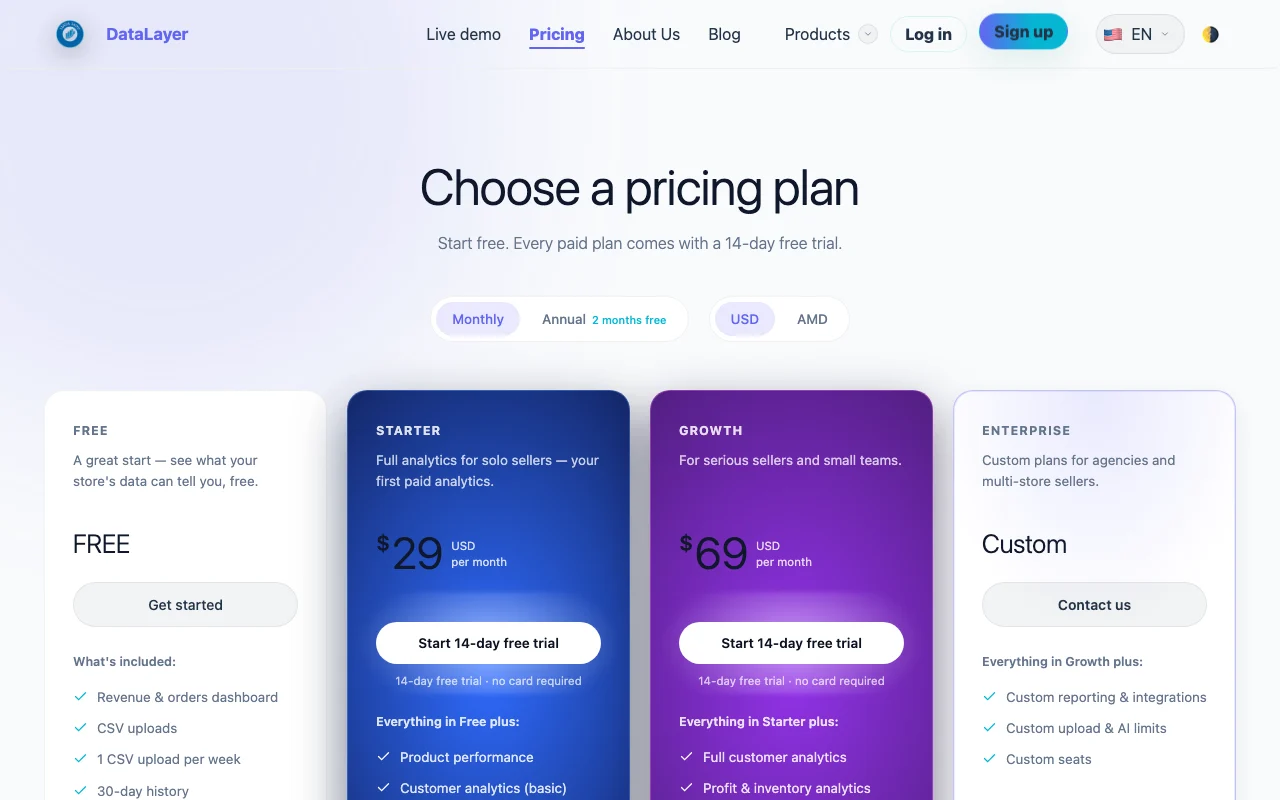
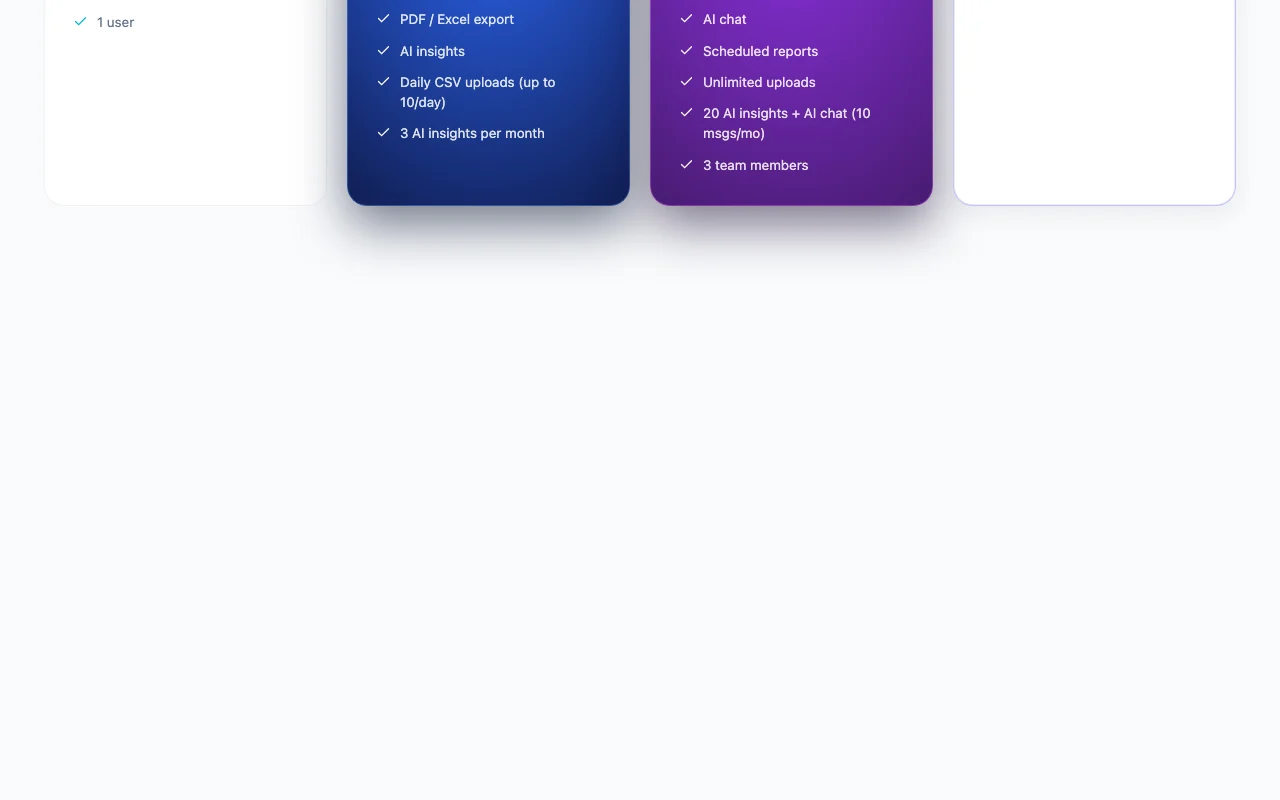
DataLayer pricing page with plans and prices — screenshot of the productivity & writing AI tool, Oct 1, 2026
The official DataLayer pricing page as we saw it. usedatalayer.com, captured Oct 1, 2026

Free access and trial conditions

Free plan: revenue and orders dashboard, 1 CSV upload per week, 30-day history, 1 user.

14-day free trial on Starter and Growth, no card required.

Paid plans: what changes as you upgrade

Free web

Free source (opens in a new tab)

For: Trying the dashboard on one store

Limits

  • 1 CSV upload per week
  • 30-day history
1 more
  • 1 user

Includes

  • Revenue & orders dashboard
  • CSV uploads

Starter web

$29/mo source (opens in a new tab)

Month

Annual billing shows 2 months free; seed lists $24/month billed annually

For: Solo sellers

Limits

  • Daily CSV uploads, up to 10/day
  • 3 AI insights per month

Includes

  • Product performance
  • Basic customer analytics
2 more
  • PDF / Excel export
  • AI insights

Growth web

$69/mo source (opens in a new tab)

Month

Annual billing shows 2 months free; seed lists $58/month billed annually

For: Serious sellers and small teams

Limits

  • 20 AI insights per month
  • AI chat 10 messages/month
1 more
  • 3 team members

Includes

  • Full customer analytics
  • Profit & inventory analytics
2 more
  • Scheduled reports
  • Unlimited uploads

Enterprise web

Custom pricing source (opens in a new tab)

For: Agencies and multi-store sellers

Limits

  • Custom upload and AI limits
  • Custom seats

Includes

  • Custom reporting and integrations

Usage caps, credits and extra costs

Not stated beyond plan prices; Enterprise is custom.

Not stated.

What is DataLayer, and how does it work?

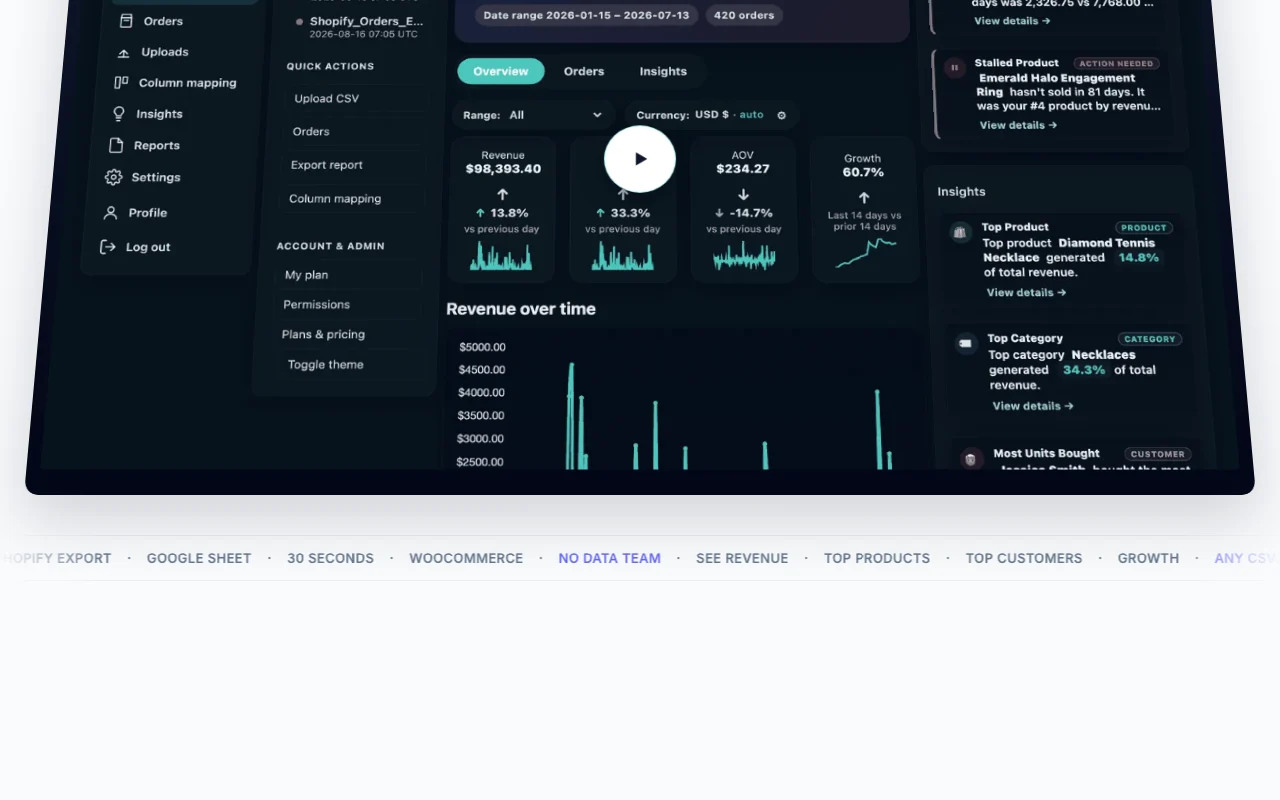
DataLayer is a web dashboard for e-commerce sellers that ingests CSV, Excel, Google Sheets and Shopify/WooCommerce exports, maps columns automatically and produces revenue, product and customer analytics. Paid plans add PDF/Excel export, scheduled reports, AI-generated insights and an AI chat for asking questions about the data in plain language. A free plan allows one weekly upload with 30 days of history.

DataLayer homepage — screenshot of the productivity & writing AI tool, Oct 1, 2026
DataLayer's official site: how the product presents itself. usedatalayer.com, captured Oct 1, 2026

What you provide and what you get back

How DataLayer works: what you provide, where it runs and what you get backYOU PROVIDEYour inputCSV or Excel exportShopify or WooCommerce exportPublic Google Sheets linkGoogle Drive file via pickerPRODUCTIVITY & WRITINGDataLayerWebfrom $29/mo (Starter)free tier availableaccount requiredchecked Oct 1, 2026YOU GET BACKThe resultRevenue and orders dashboardProduct and customer analyticsPDF/Excel export (paid)AI insightsinput → DataLayer → output · from the vendor's own pages, no hands-on test unless stated
What you give DataLayer and what comes back, from its documentation

You provide

  • CSV or Excel export
  • Shopify or WooCommerce export
  • Public Google Sheets link
  • Google Drive file via picker

You get back

  • Revenue and orders dashboard
  • Product and customer analytics
  • PDF/Excel export (paid)
  • AI insights

Where you can use it

Platforms
Web
Account
Required
Import sources
CSV, Excel, Google Sheets link, Drive picker; Shopify and WooCommerce exports
Free history
30 days
Export
PDF and Excel on Starter and above
Seats
1 / 1 / 3 / custom

Where DataLayer is most useful

Scenarios are worked out by our editors from the documentation; the actual result depends on your input and plan.

Building sales dashboards from store exports

Who
Shopify or WooCommerce store owners
You provide
Orders CSV export
Expected result
Revenue and orders dashboard in about 30 seconds
Plan needed
Free
Limitation
Free keeps only 30 days of history source (opens in a new tab)

Tracking top products and revenue trends

Who
Solo sellers
You provide
Product-level sales export
Expected result
Top products ranked by performance
Plan needed
Starter
Limitation
Product performance is not on Free source (opens in a new tab)

Basic customer analytics

Who
Small teams
You provide
Customer-level order data
Expected result
Full customer analytics, profit and inventory views, scheduled reports
Plan needed
Growth
Limitation
Only 3 team members source (opens in a new tab)

DataLayer features and their limits

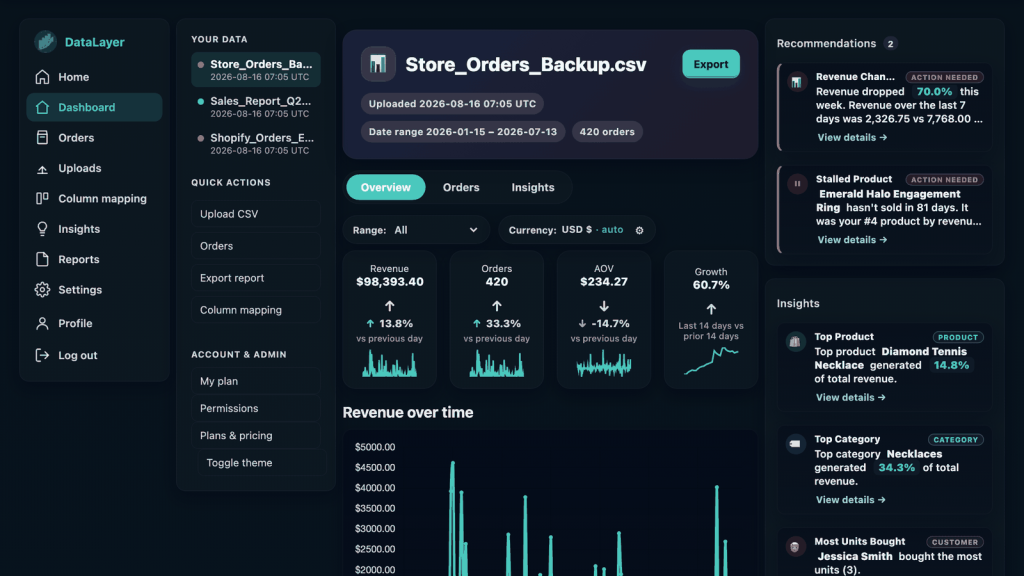
DataLayer homepage — screenshot of the productivity & writing AI tool, Oct 1, 2026
Feature overview on the official site. usedatalayer.com, captured Oct 1, 2026

Automatic column mapping

Reads the header row of an uploaded CSV, Excel or Sheet and matches columns such as date, product and amount to its data model, so you do not build a schema. Skips manual setup

Access: All plansLimit: Unusual column names may need checking source (opens in a new tab)

Revenue, product and customer dashboards

Aggregates imported orders into revenue, orders, product and customer views; scope widens from basic on Starter to full customer plus profit and inventory on Growth. Replaces spreadsheet math

Access: Free: revenue and orders; more on paidLimit: Free is 30-day history source (opens in a new tab)

AI insights (capped per month)

Generates written findings from your imported data, counted against a monthly quota. Surfaces trends without analysis

Access: Starter 3/mo, Growth 20/moLimit: Capped monthly source (opens in a new tab)

AI chat (Growth plan)

Lets you ask plain-language questions about your imported store data and returns answers. Ad hoc questions

Access: Growth onlyLimit: 10 messages per month source (opens in a new tab)

DataLayer: strengths and limits

Reasons to choose DataLayer

  • Free plan available You can test the dashboard on one store at no cost. documented source (opens in a new tab)
  • 14-day trial on paid plans without a card You can try Starter or Growth without entering payment details. documented source (opens in a new tab)
  • USD pricing published clearly You can budget without a sales call, except Enterprise. documented source (opens in a new tab)
  • Imports data by CSV or Excel upload, a shared Google Sheets link, or a Google Drive picker limited to the one file you select Store exports can be analysed without granting access to the rest of a Drive. documented source (opens in a new tab)
  • Growth plan adds profit and inventory analytics, scheduled reports and unlimited uploads A seller can get recurring reports on profit and stock without manual uploads limits. documented source (opens in a new tab)

Check before paying for DataLayer

How to use DataLayer for building a sales dashboard from a store export

Set up DataLayer

  1. On usedatalayer.com click Upload your first sheet and create a free account (email and password, or Continue with Google)
  2. Export your orders from Shopify or WooCommerce as CSV, or open your Excel or Google Sheet
  3. Choose an import path: file upload, paste a Google Sheets link shared as Anyone with the link can view, or Choose from Google Drive
  4. Confirm the automatically mapped columns

Example: building a sales dashboard from a store export

  1. Upload the orders CSV and wait for the dashboard to build
  2. Open the Revenue & orders dashboard and set the date range within your plan's history
  3. On Starter or above, open Product performance to see top products
  4. Export a PDF or Excel report, or run an AI insight

Review and export the result

  1. Compare total revenue on the dashboard with your store admin total for the same dates
  2. Check that the number of orders imported matches your export row count
  3. Confirm you have not exceeded the weekly (Free) or daily 10-upload (Starter) limit

DataLayer integrations and API

DataLayer pricing page with plans and prices — screenshot of the productivity & writing AI tool, Oct 1, 2026
Plan comparison on the official pricing page. usedatalayer.com, captured Oct 1, 2026

Native integrations and export formats

Export: PDF, Excel

API access and separate billing

DataLayer has no public API in its official documentation. /docs returned 404; no API documented

Privacy, data use and commercial rights

Summarized from the vendor's current policies; this is not legal advice and a vendor's badge is not an independent audit.

How your inputs and outputs are handled

Imported sales rows are retained so dashboards and reports keep working; no copy of Drive files is kept beyond imported data.

Imported data kept while the account uses it; individual uploads, stores and reports can be deleted in the app; account deletion by email request, processed manually.

Controls for business users

  • Drive access limited to one selected file
  • Google Drive token never sent to DataLayer servers

Policies: usedatalayer.com/privacy

DataLayer alternatives by need

"Better suited" is based on documented features and pricing, not on a head-to-head test.

ChatGPT: better suited to

Notion AI: better suited to

Make: better suited to

Alternatives
AlternativeWhen to choose itPricingLimitation
ChatGPT——
Notion AI——Compare
Make——Compare

Explore DataLayer further

Related to DataLayer

DataLayer user reviews

No user reviews yet.

Used DataLayer? Be the first to share your experience.

Write a review

Reviews are checked by a moderator before they appear. Your email is never published. Plain text only.

Your rating (required)

Show what you made or what went wrong. Images are published only if the review is approved; location data is removed.

    DataLayer FAQ

    How many uploads does each DataLayer plan allow?

    Free allows 1 CSV upload per week, Starter up to 10 uploads per day, and Growth unlimited uploads. source (opens in a new tab)

    How many AI insights and chat messages do I get?

    Starter has 3 AI insights per month; Growth has 20 AI insights plus AI chat at 10 messages per month. Free has none. source (opens in a new tab)

    Does DataLayer need access to my Google Drive?

    Only if you choose to. The Drive picker uses the drive.file scope for the single file you select, and the Sheets link path needs no sign-in but the sheet must be shared as Anyone with the link can view. source (opens in a new tab)

    Is a card required for the trial?

    No. The 14-day trial on Starter and Growth requires no card. source (opens in a new tab)

    How do I delete my data?

    Delete uploads, stores and reports inside the app; to delete the whole account email the address in the privacy policy and it is processed manually. source (opens in a new tab)

    Sources and review methodology

    Official sources and verification dates

    Not verified: API availability; Model training use of uploaded data; Native Shopify/WooCommerce connectors beyond file exports; Taxes.

    How we documented and maintain this page

    Every fact about DataLayer above comes from the 3 official pages listed here, last compared on Oct 1, 2026; we have not run DataLayer ourselves, so it has no editorial score. How we check and re-check pages.

    Article updated Oct 10, 2026; prices checked Oct 1, 2026. Outbound links to vendors are plain links; we do not earn commissions. How we review · Report an error