Head-to-head · profiles checked Nov 1, 2026

Cursor vs v0 in 2026: code editor or app builder

Pick Cursor to work inside an existing codebase and v0 to generate a new Next.js app from a prompt. Both have a free plan: Cursor Free has limited usage, v0 Free allows 7 messages per day. Paid entry is Cursor Plus at $8/mo (Grok and Cursor models only; Premium at $30/mo adds Cloud Agents and Bugbot) and v0 Plus at $30 per user per month. Retention terms for both tools are not stated.

We based this comparison on our Cursor profile verified 2026-11-01 and our v0 profile verified 2026-10-31, both built from official vendor pages; it uses no third-party benchmarks and no vendor paid for placement.

Starting priceFree; Plus $8/mo; Premium $30/mo · Free; Plus $30/user/moCursor · v0
Free tierYes · YesCursor · v0
Plans documented7 · 4Cursor · v0
PlatformsDesktop, CLI, Slack, GitHub · Web, APICursor · v0

Is Cursor better than v0? The short answer

Cursor is the choice when you already have a codebase: it is a desktop code editor with a coding agent, a CLI, Slack and GitHub surfaces, and Teams privacy mode. v0 is the choice when you want to start from a prompt, mockup or Figma file: it generates Next.js apps with a live preview and publishes them to Vercel. Both have a free plan, but Cursor Free has limited usage and v0 Free caps you at 7 messages per day. Paid prices differ in shape: Cursor starts at $8/mo (Plus, Cursor and Grok models only) and Premium at $30/mo is the first plan with Cloud Agents, Bugbot and third-party models, while v0 Plus is $30 per user per month with dollar credits.

Based on our Cursor profile verified 2026-11-01 and v0 profile verified 2026-10-31, both built from official vendor pages; Cursor's Teams annual price and exact retention periods and v0's retention terms were not confirmed, and no benchmark was run.

Cursor and v0, as their sites look today

Our own captures of each vendor's public pages. Click a frame for the full-size image.

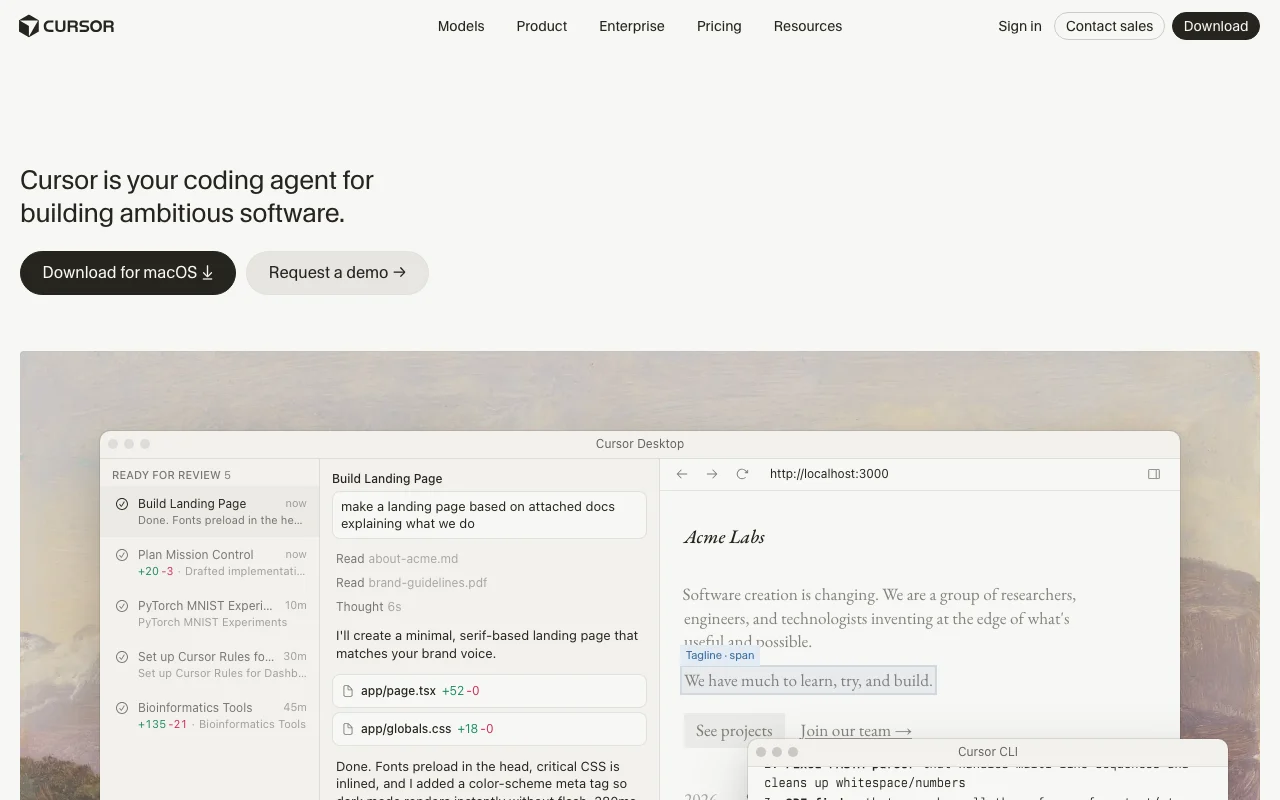
Cursor homepage, screenshot of the coding AI tool, Oct 1, 2026
Cursor homepage. cursor.com, captured Oct 1, 2026
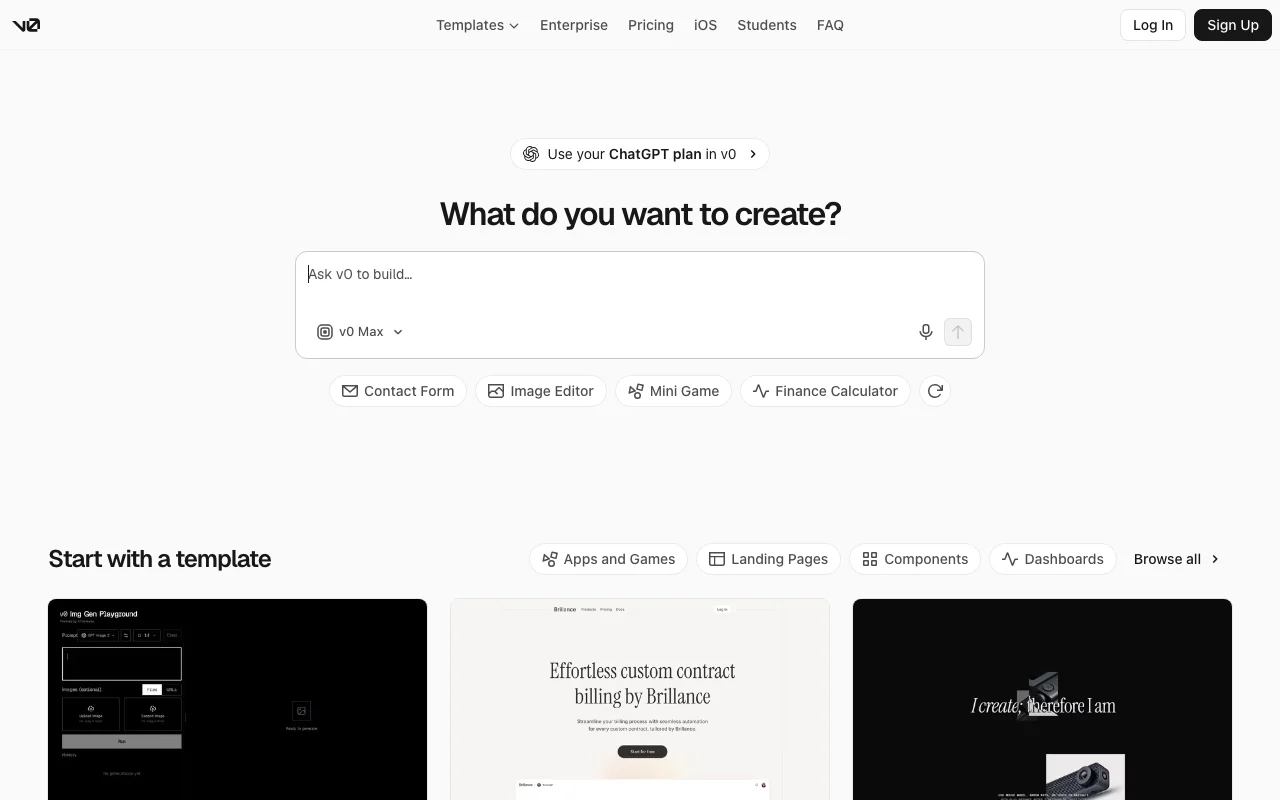
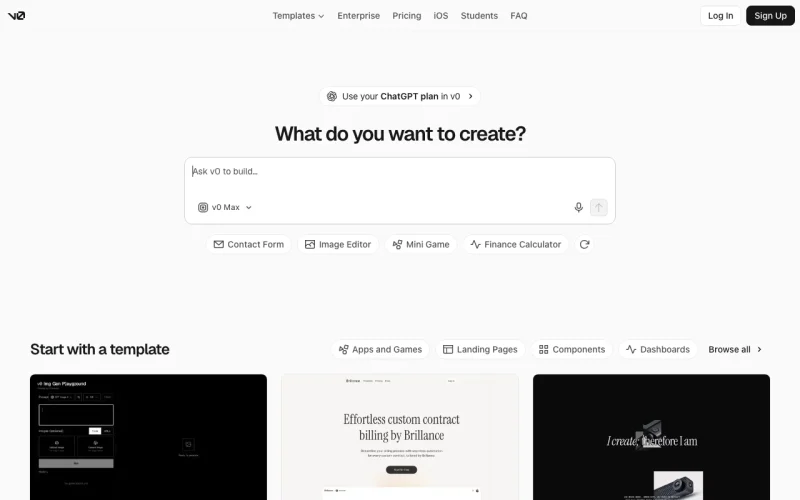
v0 homepage, screenshot of the coding AI tool, Oct 31, 2026
v0 homepage. v0.app, captured Oct 31, 2026
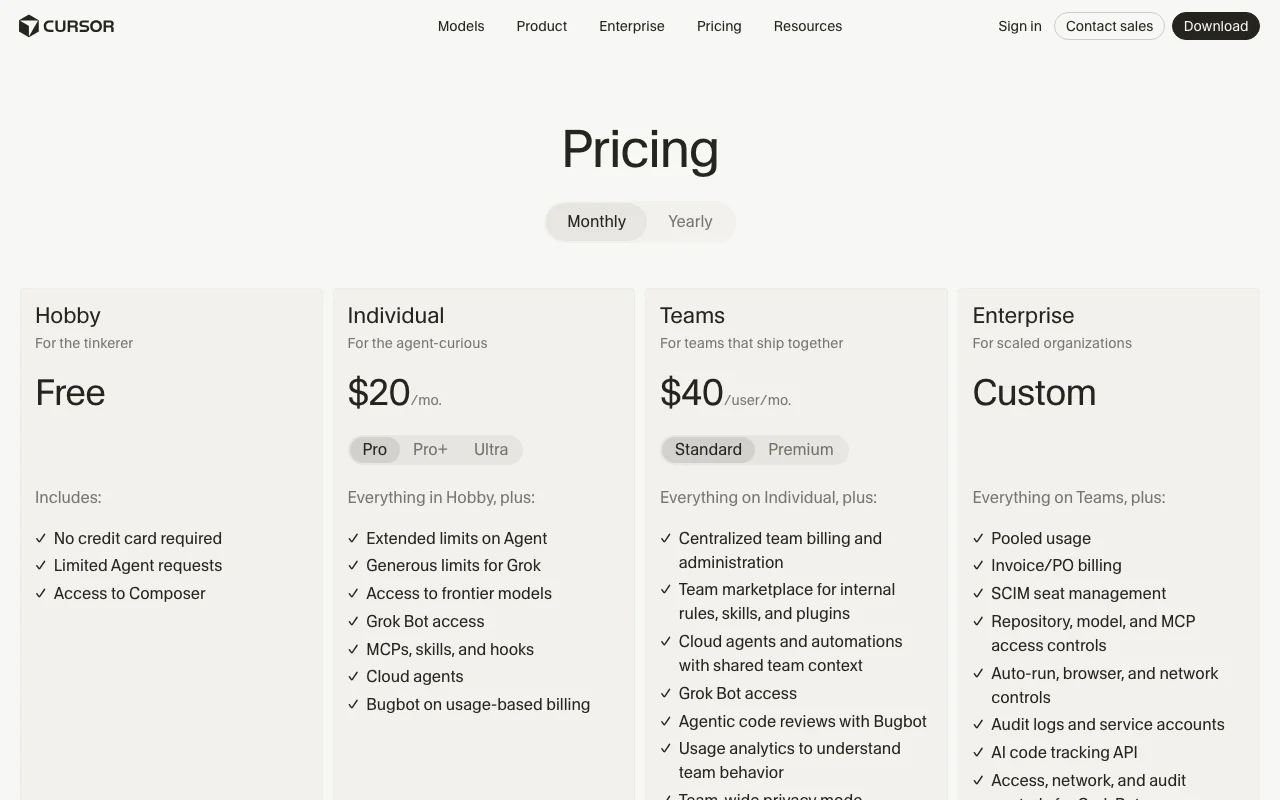
Cursor pricing page with plans and prices, screenshot of the coding AI tool, Oct 1, 2026
Cursor plans and prices. cursor.com, captured Oct 1, 2026
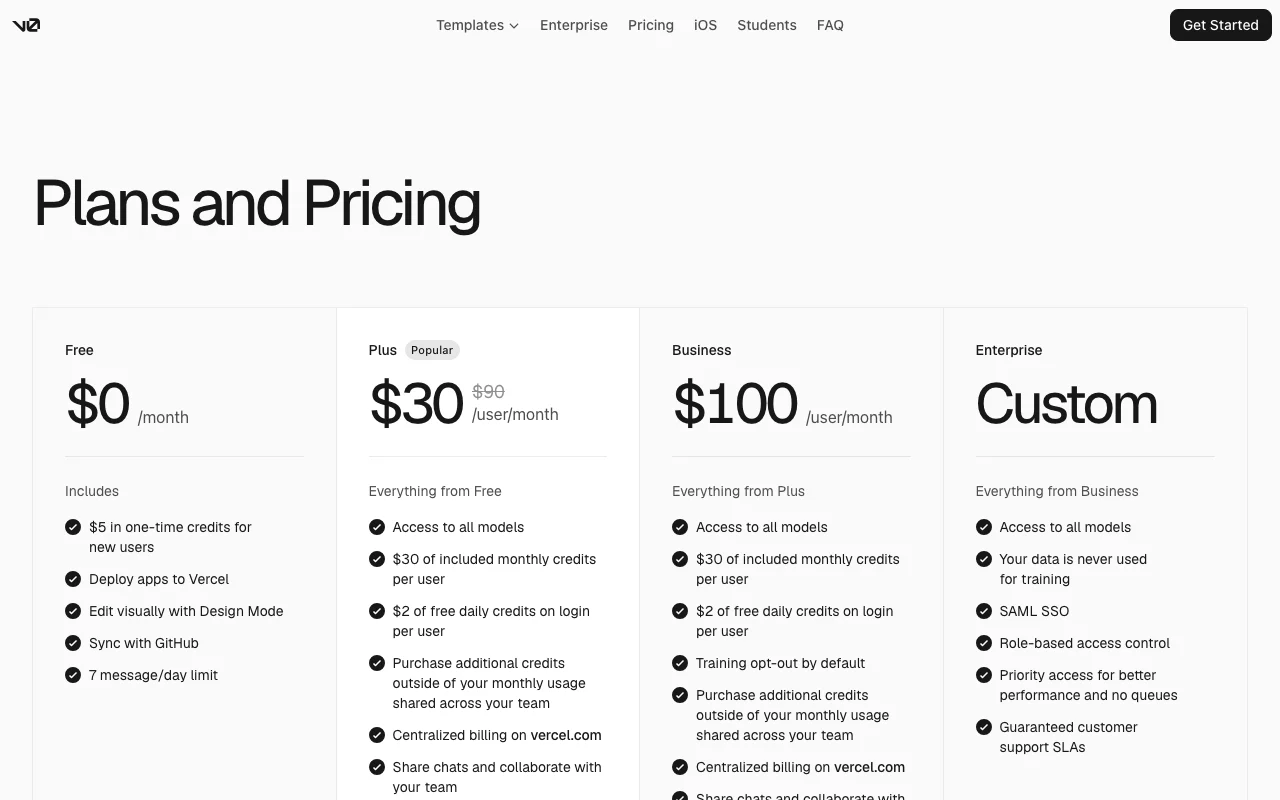
v0 pricing page with plans and prices, screenshot of the coding AI tool, Oct 31, 2026
v0 plans and prices. v0.app, captured Oct 31, 2026

Cursor or v0: which to use, by task

If you only want the answer, this is the table. Everything below is the evidence from the two documented profiles.

Side-by-side comparison
You want toUseWhy
Edit and refactor code in an existing projectCursorCursor lists writing and refactoring code with edits shown as diffs to review
Build a landing page or dashboard from a promptv0v0 turns a text description into a Next.js app with a live preview
Turn a Figma design into a working appv0v0 accepts Figma designs as input; Figma import limits are not stated
Tweak colors and spacing visuallyv0v0 Design Mode edits typography, colors and spacing in the live preview
Hand a bigger task to a cloud agentCursorCursor lists Cloud Agents on Premium ($30/mo) and above
Review pull requests automaticallyCursorCursor lists Bugbot on Premium and above, charged from usage
Publish an app in one clickv0v0 publishes to Vercel from the chat header; Cursor's profile lists no publishing step
Connect outside tools through MCPEitherCursor lists MCPs, skills and hooks; v0 connects external MCP servers
Keep work in sync with GitHubEitherCursor works in GitHub; v0 creates branches and pull requests, never pushing to main
Run a team with SSOEitherCursor Teams lists SAML/OIDC SSO; v0 lists SAML SSO on Enterprise

Who should pick which

Cursor suits editing an existing codebase, v0 suits generating a new app from a prompt Which one? Pick Cursor ifEdits to review as diffsAgent in editor, CLI, SlackTeams privacy mode and SSOPick v0 ifStart from prompt or FigmaNext.js, React, shadcn/uiPublish to Vercel in a clickFree; Plus $8/mo; Premium $30/mo · free tier: Yes Free; Plus $30/user/mo free tier: Yes Cursor vs v0 in 2026: code editor or app builder
Pick Cursor to edit an existing codebase, v0 to generate a new app from a prompt

Pick Cursor if

  • You work in an existing codebase and want edits shown as diffs to review
  • You want a coding agent in the desktop app, CLI, Slack and GitHub
  • Your team needs Teams privacy mode, SAML/OIDC SSO or Enterprise audit logs
  • You want Bugbot to review pull requests

Pick v0 if

  • You want to start from a text prompt, mockup or Figma design
  • You want React, Next.js, Tailwind and shadcn/ui output
  • You want to publish to Vercel or open a GitHub pull request from the chat
  • You want to tweak styles visually in Design Mode

What Cursor does better, and what v0 does better

Cursor
  • Editing an existing codebase in a desktop editor, CLI, Slack and GitHub
  • Cloud agents that run in parallel with automations
  • Bugbot pull request review
  • Source control support for GitHub, GitLab, Azure DevOps and Bitbucket
v0
  • Starting a new app from a prompt, mockup, screenshot or Figma file
  • Live preview with Design Mode for visual edits
  • One-click publish to Vercel with custom domains
  • Database and payment integrations such as Neon, Supabase and Stripe

Cursor vs v0 pricing: plans and free tiers

Side-by-side comparison
PlanToolPriceLimits
Cursor FreeCursor$0Limited AI usage; limited agent and Chat requests
Cursor PlusCursor$8/moGrok and Cursor models only; no Auto, Cloud Agents, Automations, Bugbot or third-party models
Cursor PremiumCursor$30/mo4x Plus usage, weekly pool; Cloud Agents and Bugbot; third-party models at API list price from prepaid credit
Cursor SuperCursor$100/mo15x Plus usage, weekly pool
Cursor UltraCursor$200/mo50x Plus usage, weekly pool
Cursor TeamsCursorFrom $30/user/moSeat tiers Premium $30, Super $100, Ultra $200; third-party usage plus $0.25 per million tokens
Cursor EnterpriseCursorCustom (sales)Pooled usage
v0 Freev0$07 messages per day
v0 Plusv0$30/user/mo$30 of included monthly credits and $2 of free daily credits per user
v0 Businessv0$100/user/mo$30 of included monthly credits and $2 of free daily credits per user
v0 Enterprisev0Custom (sales)Not stated

USD as published on each vendor's pricing page, checked Nov 1, 2026. Cursor pricing in full · v0 pricing in full

Usage limits: what the vendors state

Side-by-side comparison
Cursorv0
Messages / rate limitsFree: limited usage; paid plans: shared weekly pool (Premium 4x, Super 15x, Ultra 50x Plus usage), no rolloverFree: 7 messages per day; Plus and Business: $30 of monthly credits and $2 of free daily credits per user
Context / file sizeNot statedNot stated
Seats / teamTeams from $30 per user per month (seat tiers Premium $30, Super $100, Ultra $200); Enterprise custom with pooled usagePlus and Business priced per user per month; credits shared across the team; Enterprise custom

Feature comparison

Side-by-side comparison
FeatureCursorv0
Image generationNot statedNot stated
VoiceNot statedNot stated
File uploadYes (attached docs and files)Yes (mockups, screenshots, Figma designs)
Web searchNot statedYes
Agents / toolsCoding agent, cloud agents, MCPs, skills and hooksAgent with MCP client support and integrations
APIAgent SDK and cloud agent API in docs; billing not verifiedYes, model rates per 1M tokens listed
Mobile appsNot statedNot stated
Code reviewYes (Bugbot)Not stated

Privacy and data training

Side-by-side comparison
Cursorv0
Training on your dataNot used for training unless flagged for security review, reported as Feedback or agreed to; not used with privacy mode onPrompts may go to third-party model providers; Business opts out by default, Enterprise never used
RetentionNot statedNot stated
Business controlsTeam-wide privacy mode, SAML/OIDC SSO, audit logs (Enterprise)SAML SSO, role-based access control

Taken from each vendor's published policy pages at the time of our check. Policies change; the source links are at the bottom.

Switching between Cursor and v0: what carries over

Cursor → v0Carries over
  • Natural-language prompts and task descriptions
  • Code kept in GitHub, since v0 syncs through branches and pull requests
You lose
  • Desktop editor, CLI and Slack surfaces
  • Cloud agents and Bugbot review
  • Team-wide privacy mode on Teams
v0 → CursorCarries over
  • Prompts and task descriptions
  • Code exported from v0 or synced to GitHub
You lose
  • Live preview with Design Mode
  • One-click publish to Vercel
  • Figma designs as input

Pros and cons

Cursor
  • Free plan at $0
  • Team-wide privacy mode and SSO on Teams
  • Weekly usage pool that refreshes, and requests are not downgraded when it runs out
  • Free plan has limited usage
  • Third-party models are billed at API list price from prepaid credit
  • Plus excludes Auto, Cloud Agents and Bugbot
v0
  • Generates Next.js, React, Tailwind and shadcn/ui code
  • Two-way GitHub sync with pull requests
  • Code can be exported, so you are not locked to Vercel hosting
  • Free is limited to 7 messages per day
  • Agent runs consume credits even when they fail
  • Output may be incomplete or buggy

The two tools

Open the live comparison table

Cursor or v0: how to choose

  • Have an existing codebase to edit: choose Cursor
  • Starting from a prompt, mockup or Figma file: choose v0
  • Want one-click publishing to Vercel: choose v0
  • Need Bugbot review or cloud agents: choose Cursor
  • Need team SSO and privacy controls: both list them, so check the plan tier on each pricing page
  • Not sure: try both free plans, Cursor Free and v0 Free, on one small task

Frequently asked questions

Is Cursor or v0 cheaper?

Both have a free plan. Cursor starts at $8/mo (Plus, Cursor and Grok models only); Premium is $30/mo, Super $100/mo and Ultra $200/mo, and Teams starts at $30 per user per month. v0 Plus is $30 per user per month and Business is $100 per user per month. Cursor's older Pro plan at $20/mo is legacy and not sold to new customers.

Can v0 replace Cursor?

They do different jobs in the documented profiles. v0 generates full-stack Next.js apps from prompts, mockups or Figma files and publishes to Vercel. Cursor is a code editor with agents for editing and reviewing an existing codebase.

Does Cursor or v0 train on my code?

Cursor says it does not use data for training unless flagged for security review, reported as Feedback or explicitly agreed to, and not at all with privacy mode on. v0 may pass prompts to third-party model providers; Business opts out by default and Enterprise data is never used for training.

Do failed runs cost credits in v0?

Yes. The v0 FAQ says agents use credits when they fail. Cursor does not downgrade requests when the weekly pool runs out, and it bills Bugbot from usage at an average of $1.00 to $1.50 per run. Neither profile states a refund policy for failed runs.


Sources

Only official vendor pages. No third-party benchmarks, forum threads or press were used. How we review.