VideoDocumented overviewLast checked Sep 29, 2026

VideoVector: Pricing, Features & Best Use Cases

Media intelligence platform that turns video, audio and image libraries into structured metadata and searchable, grounded MediaRAG workflows.

Is VideoVector right for you?

Choose VideoVector if you need to turn video, audio and image libraries into time-stamped structured metadata and grounded search through an API or Python SDK, starting on a free 100-credit workspace. Based on the vendor's documentation, not on a hands-on test.

Best for: Media and publishing teams

Also a good fit for

  • Developers building video search
  • Security and operations teams

Consider another tool if processing is limited by credits (100 on Free)

Or if

  • Connector, webhook, export and API key access starts on Starter
  • Enterprise terms require contacting sales

VideoVector pricing and usage limits

Prices checked Sep 29, 2026 on the official US pricing page. Official pricing ↗ Prices and limits change often.

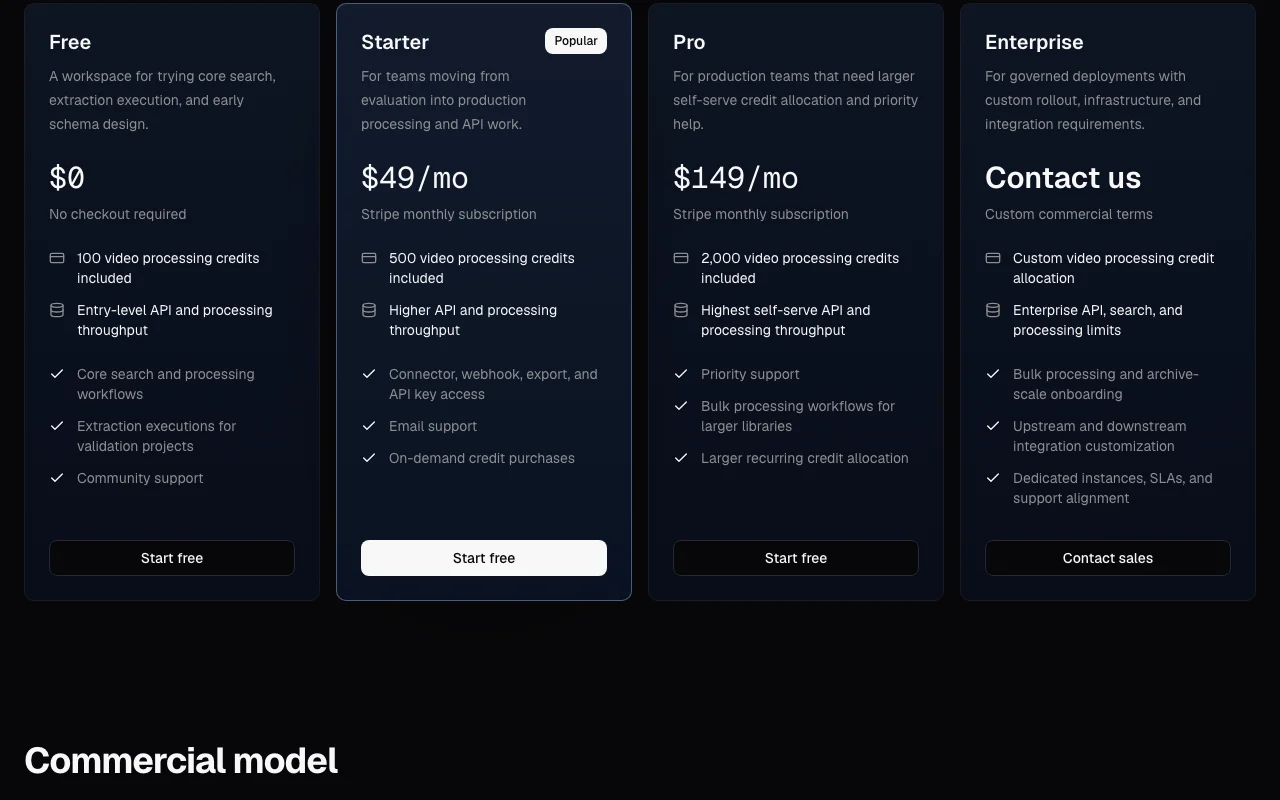
VideoVector pricing page with plans and prices — screenshot of the video AI tool, Oct 1, 2026
The official VideoVector pricing page as we saw it. vectormethods.com, captured Oct 1, 2026

Free access and trial conditions

Every new workspace starts on Free, no checkout.

Free plan serves as evaluation.

Paid plans: what changes as you upgrade

Free API

Free source (opens in a new tab)

Month

For: Evaluation

Limits

  • 100 video processing credits
  • Entry-level API throughput
1 more
  • Community support

Includes

  • Core search and processing
  • Extraction executions for validation

API included

Starter API

$49/mo source (opens in a new tab)

Month

For: Moving into production

Limits

  • 500 video processing credits

Includes

  • Connectors, webhooks, exports, API keys
  • Higher throughput
2 more
  • Email support
  • On-demand credit purchases

API included

Pro API

$149/mo source (opens in a new tab)

Month

For: Production teams

Limits

  • 2,000 video processing credits

Includes

  • Highest self-serve throughput
  • Priority support
1 more
  • Bulk processing workflows

API included

Enterprise API

Custom pricing source (opens in a new tab)

Unknown

For: Governed deployments

Limits

  • Custom credit allocation

Includes

  • Dedicated instances and SLAs
  • Archive-scale onboarding
1 more
  • Integration customization

API included

Usage caps, credits and extra costs

Additional video processing credit packages available; amounts not captured.

Not stated.

What is VideoVector, and how does it work?

VideoVector, from VectorMethods, extracts time-stamped, schema-based metadata from video, audio and image libraries and makes them searchable with text, image and multimodal queries. Outputs feed discovery, review and downstream pipelines. The docs describe an API reference and a Python SDK, with connectors, webhooks and exports. Pricing combines monthly plans with video processing credits.

VideoVector homepage — screenshot of the video AI tool, Oct 1, 2026
VideoVector's official site: how the product presents itself. vectormethods.com, captured Oct 1, 2026

What you provide and what you get back

How VideoVector works: what you provide, where it runs and what you get backYOU PROVIDEYour inputVideo, audio and image filesCustom extraction schemas and pro…Cloud connector librariesVIDEOVideoVectorAPIfrom $49/mo (Starter)free tier availableaccount requiredchecked Sep 29, 2026YOU GET BACKThe resultTime-stamped structured JSON meta…Search results with timestamped e…Exports and webhook eventsinput → VideoVector → output · from the vendor's own pages, no hands-on test unless stated
What you give VideoVector and what comes back, from its documentation

You provide

  • Video, audio and image files
  • Custom extraction schemas and prompts
  • Cloud connector libraries

You get back

  • Time-stamped structured JSON metadata
  • Search results with timestamped evidence
  • Exports and webhook events

Where you can use it

Platforms
API
Account
Required
Media types
Video, audio, image
Outputs
Time-stamped JSON metadata
Search
Text, image, multimodal, agentic
Access
REST API, Python SDK, MCP

What people use VideoVector for

Scenarios are worked out by our editors from the documentation; the actual result depends on your input and plan.

Indexing broadcast and sports footage

Who
Media and publishing teams
You provide
Archive video libraries
Expected result
Searchable scenes, entities and actions
Plan needed
Starter and up
Limitation
Credits scale with hours processed source (opens in a new tab)

Cataloging media archives

Who
Archive and rights teams
You provide
Owned libraries
Expected result
Rights-aware searchable collections
Plan needed
Pro or Enterprise
Limitation
Archive-scale needs a custom plan source (opens in a new tab)

Reviewing CCTV or bodycam evidence

Who
Security and operations teams
You provide
Recorded footage
Expected result
Evidence timelines and incident reports
Plan needed
Starter and up
Limitation
Review by a person is still required source (opens in a new tab)

Building video search and MediaRAG apps

Who
Developers
You provide
Indexed video through the API or SDK
Expected result
Grounded answers with timestamped evidence
Plan needed
Free to test
Limitation
API keys start on Starter source (opens in a new tab)

What VideoVector does, and where it stops

VideoVector homepage — screenshot of the video AI tool, Oct 1, 2026
Feature overview on the official site. vectormethods.com, captured Oct 1, 2026

Schema-backed metadata extraction

Extracts time-coded metadata defined by your own schema. Outputs fit downstream pipelines.

Access: Free and upLimit: Quality depends on schema design source (opens in a new tab)

Multimodal media search

Searches by text, image or multimodal queries. Finds scenes without manual tagging.

Access: Free and upLimit: Reprocessing consumes credits source (opens in a new tab)

Custom extraction schemas

Lets you define custom extraction schemas and JSON output. Matches your data model.

Access: Free and upLimit: Needs schema design effort source (opens in a new tab)

Webhooks and exports

Sends webhooks and exports results. Feeds other systems.

Access: Starter and upLimit: Not on Free source (opens in a new tab)

VideoVector: strengths and limits

Where VideoVector is strong

Limitations to check before paying

How to use VideoVector for indexing a video library for search

Set up VideoVector

  1. Create a free VideoVector workspace
  2. Open the API docs and create an index
  3. Install the Python SDK if you use Python

Example: indexing a video library for search

  1. Upload or import a video into the index
  2. Define an extraction schema (entities, actions, summary)
  3. Run extraction on the video
  4. Search with a text query and review timestamped results

Review and export the result

  1. Check the returned timestamps match the video
  2. Compare extracted fields with a manual sample
Example prompt suggested by our editors (not a recorded output of the product)
Find every scene where a goal is scored and list the players and timestamps.

VideoVector integrations and API

VideoVector pricing page with plans and prices — screenshot of the video AI tool, Oct 1, 2026
Plan comparison on the official pricing page. vectormethods.com, captured Oct 1, 2026

Native integrations and export formats

Export: JSON, Exports via API

API access and separate billing

VideoVector has no public API in its official documentation. REST API reference and Python SDK API documentation ↗

Privacy, data use and commercial rights

Summarized from the vendor's current policies; this is not legal advice and a vendor's badge is not an independent audit.

How your inputs and outputs are handled

Uploaded media and extracted metadata are processed and stored in indexes.

Not captured.

Governed by the hosted product Privacy Policy; deletion via media item delete action.

Commercial use and plan restrictions

Not stated.

Dedicated instances on Enterprise.

Controls for business users

  • Dedicated instances
  • Custom rollouts

Policies: vectormethods.com/privacy

Best VideoVector alternatives for different needs

"Better suited" is based on documented features and pricing, not on a head-to-head test.

Google Gemini: better suited to

Alternatives
AlternativeWhen to choose itPricingLimitation
Google Gemini——

Explore VideoVector further

If you are looking at VideoVector

VideoVector user reviews

No user reviews yet.

Used VideoVector? Be the first to share your experience.

Write a review

Reviews are checked by a moderator before they appear. Your email is never published. Plain text only.

Your rating (required)

Show what you made or what went wrong. Images are published only if the review is approved; location data is removed.

    VideoVector FAQ

    What is included in the free plan?

    100 video processing credits, entry-level API and processing throughput, core search and extraction executions, with community support. source (opens in a new tab)

    What do Starter and Pro cost?

    Starter is $49 per month with 500 credits; Pro is $149 per month with 2,000 credits. source (opens in a new tab)

    Which plan unlocks connectors and webhooks?

    Starter and above include connector, webhook, export and API key access. source (opens in a new tab)

    Can I buy more credits?

    Yes, additional video processing credit packages are available. source (opens in a new tab)

    Is there an SDK?

    Yes, a Python SDK plus a REST API reference are documented. source (opens in a new tab)

    Sources and review methodology

    Official sources and verification dates

    Not verified: Credits per hour of video; Credit package prices; Training policy.

    How we documented and maintain this page

    Every fact about VideoVector above comes from the 2 official pages listed here, last compared on Sep 29, 2026; we have not run VideoVector ourselves, so it has no editorial score. How we check and re-check pages.

    Article updated Oct 10, 2026; prices checked Sep 29, 2026. Outbound links to vendors are plain links; we do not earn commissions. How we review · Report an error