
Image generationDocumented overviewLast checked Sep 29, 2026

Marble (World Labs): Pricing, Features & Best Use Cases

World Labs' generative world model that creates editable 3D worlds from text, images, video or 3D layouts.

Who should use Marble (World Labs)

Marble is a good fit for game, VFX and robotics creators who want editable 3D worlds from text or images; check current USD credit prices in the app because they could not be read. Based on the vendor's documentation, not on a hands-on test.

Best for: 3D artists

Also a good fit for

  • Game developers
  • Designers

Consider another tool if credit-based; each action consumes credits

Or if

  • Free plan limited to 4 world generations
  • Mesh export and expansion require higher tiers

Marble (World Labs) in the news

Headlines from US outlets, selected automatically — not endorsements. Updated Oct 2, 2026

Marble (World Labs) pricing and usage limits

Prices checked Sep 29, 2026 on the official US pricing page. Official pricing ↗ Prices and limits change often.
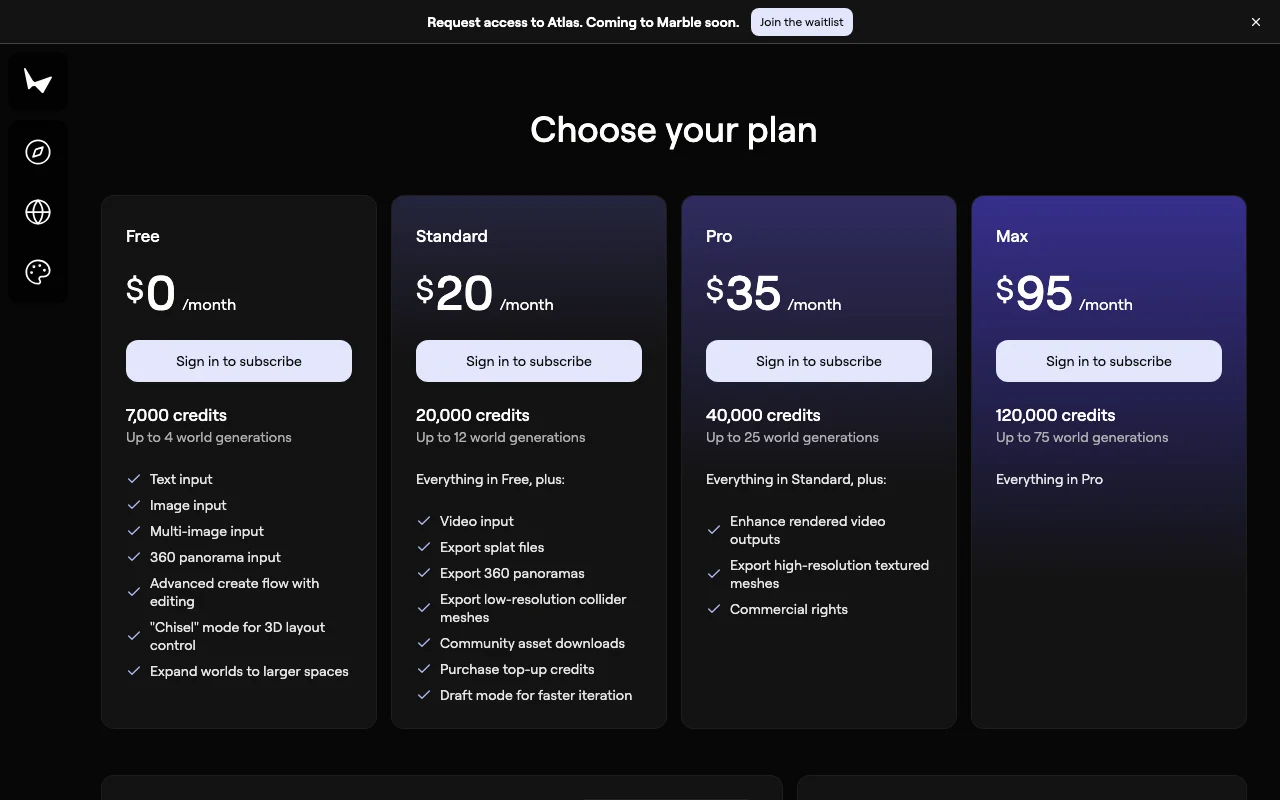
Marble (World Labs) pricing page with plans and prices — screenshot of the image generation AI tool, Oct 2, 2026
The official Marble (World Labs) pricing page as we saw it. marble.worldlabs.ai, captured Oct 2, 2026

Free access and trial conditions

Free plan with 4 generations

Not stated

Paid plans: what changes as you upgrade

Usage caps, credits and extra costs

World API credits are separate

Not stated

What is Marble (World Labs), and how does it work?

Marble is World Labs' first product, a multimodal world model that generates persistent 3D worlds from text prompts, images, video or coarse 3D layouts. Worlds can be edited, expanded, combined and exported as Gaussian splats, meshes or videos. Marble uses a credit-based subscription with Free, Standard, Pro and Max tiers plus custom enterprise plans.

What you provide and what you get back

You provide

  • Text prompts, images, video or 3D layouts

You get back

  • Persistent 3D worlds
  • Gaussian splat, mesh or video exports

Where you can use it

Platforms
Web
Account
Required
Input
Text, image, video, 3D layout
Export
Gaussian splat, mesh, video
Tiers
Free, Standard, Pro, Max, Enterprise
Credits
Per action

What people use Marble (World Labs) for

Scenarios are worked out by our editors from the documentation; the actual result depends on your input and plan.

Game and VFX environments

Who
Game and VFX artists
You provide
A prompt or image
Expected result
You get a 3D environment that you can export for use in a game or a visual effects scene.
Plan needed
Free or paid tiers
Limitation
Mesh export needs a higher tier, so free users may not be able to take a world into their engine. source (opens in a new tab)

3D design prototyping

Who
Designers
You provide
A reference image or layout
Expected result
You get a 3D prototype world made from a reference image or a layout.
Plan needed
Free or paid tiers
Limitation
Each action uses credits, so many revisions of a design use up the allowance quickly. source (opens in a new tab)

Robotics simulation worlds

Who
Robotics teams
You provide
A scene description
Expected result
You get a simulated world built from your scene description for testing robots.
Plan needed
Paid or enterprise
Limitation
The details of this use were not read in the sources we could access, so fit is unconfirmed. source (opens in a new tab)

Key features and their practical limits

Text, image, video and 3D-layout input

Accepts text, image, video and 3D-layout input. Artists can start a world from whichever material they already have, such as a text prompt, a photo or a rough 3D layout.

Access: Free, Standard, Pro, Max, EnterpriseLimit: Each action uses credits from the plan, and the free plan has only 4 world generations. source (opens in a new tab)

World editing and expansion

Edits and expands generated worlds. Creators can change a generated world or make it larger instead of regenerating it from the beginning.

Access: Not statedLimit: Each action uses credits, and expansion needs a higher tier. source (opens in a new tab)

Gaussian splat and mesh export

Exports Gaussian splats and meshes. Game and VFX artists can take a generated world into other tools as a splat or a mesh.

Access: Not statedLimit: Mesh export is gated to higher tiers according to the docs. source (opens in a new tab)

Studio tool for composing worlds

Provides a Studio tool for composing worlds. Creators can put together several parts into a single world in a dedicated tool.

Access: Not statedLimit: The details of the Studio tool were not read in the sources we could access. source (opens in a new tab)

Marble (World Labs): strengths and limits

Where Marble (World Labs) is strong

  • Free plan available A free plan is available, so you can generate a few worlds before you decide whether a paid tier is worth it. documented source (opens in a new tab)
  • Pro plan includes commercial rights per docs The docs say the Pro plan includes commercial rights, so professionals can check this before they use a world in paid work. documented source (opens in a new tab)
  • Multiple export formats Several export formats are offered, including Gaussian splats and meshes, so results can be moved into other 3D software. documented source (opens in a new tab)

Limitations to check before paying

  • Credit-based; each action consumes credits Each action uses credits, so the more you generate or edit, the sooner you need to buy more or move to a higher tier. documented source (opens in a new tab)
  • Free plan limited to 4 world generations The free plan is limited to 4 world generations, so it is only enough for a short trial of the product. documented source (opens in a new tab)
  • Mesh export and expansion require higher tiers Mesh export and world expansion need higher tiers, so free users cannot use these steps in their work. documented source (opens in a new tab)
  • Marble and World API credits are not interchangeable Marble credits and World API credits are not interchangeable, so you cannot spend one kind on the other service. documented source (opens in a new tab)

How to use Marble (World Labs) for generating a 3D world

Set up Marble (World Labs)

  1. Open marble.worldlabs.ai.
  2. Sign in.
  3. Choose a text, image or video input.

Example: generating a 3D world

  1. Enter a prompt or upload an image.
  2. Generate the world.
  3. Edit or expand it.
  4. Export a splat or mesh.

Review and export the result

  1. Open the export in your 3D tool.
  2. Check your remaining credits.
Example prompt suggested by our editors (not a recorded output of the product)
A misty forest clearing with a ruined stone tower at dawn.
Marble (World Labs) integrations and API

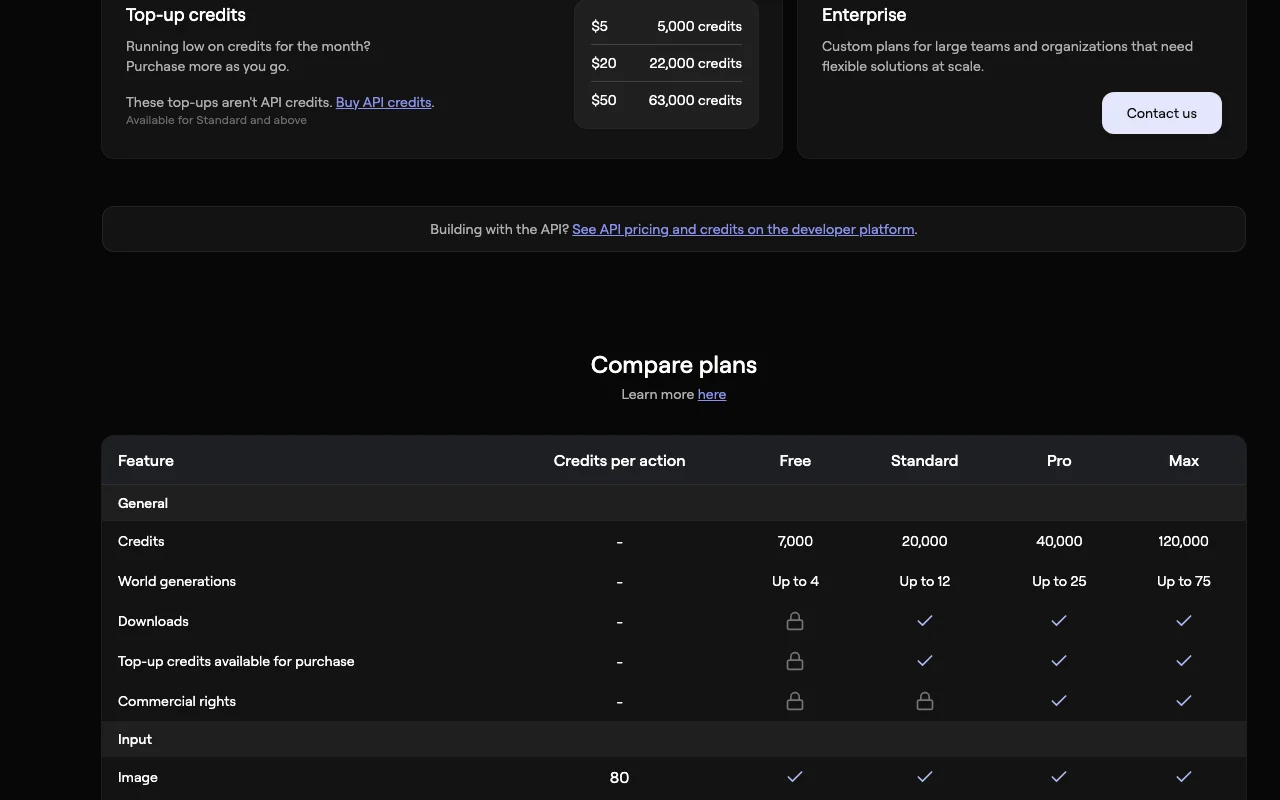
Marble (World Labs) pricing page with plans and prices — screenshot of the image generation AI tool, Oct 2, 2026
Plan comparison on the official pricing page. marble.worldlabs.ai, captured Oct 2, 2026

Native integrations and export formats

Export: Gaussian splat, Mesh, Video

API access and separate billing

An API is available, billing not documented. World API credits are separate. API documentation ↗

Privacy, data use and commercial rights

Summarized from the vendor's current policies; this is not legal advice and a vendor's badge is not an independent audit.

How your inputs and outputs are handled

Not stated on the pages read

Not stated on the pages read

Not stated on the pages read

Commercial use and plan restrictions

Pro includes commercial rights per docs

Not stated on the pages read

Policies: marble.worldlabs.ai/privacy

Other tools to consider instead of Marble (World Labs)

"Better suited" is based on documented features and pricing, not on a head-to-head test.

Luma: better suited to

Runway: better suited to

Midjourney: better suited to

Alternatives
AlternativeWhen to choose itPricingLimitation
Luma——
Runway——
Midjourney——Compare

Explore Marble (World Labs) further

Related to Marble (World Labs)

Marble (World Labs) user reviews

No user reviews yet.

Used Marble (World Labs)? Be the first to share your experience.

Write a review

Reviews are checked by a moderator before they appear. Your email is never published. Plain text only.

Your rating (required)

Show what you made or what went wrong. Images are published only if the review is approved; location data is removed.

    Marble (World Labs) FAQ

    Is Marble free?

    Yes, a free plan allows 4 world generations. source (opens in a new tab)

    What can I export?

    Gaussian splats, meshes and videos. source (opens in a new tab)

    Can I use worlds commercially?

    The docs say Pro includes commercial rights. source (opens in a new tab)

    Are API credits shared?

    No, Marble and World API credits are not interchangeable. source (opens in a new tab)

    Sources and review methodology

    Official sources and verification dates

    Not verified: USD prices; Credit allowances; Privacy.

    How we documented and maintain this page

    Every fact about Marble (World Labs) above comes from the 4 official pages listed here, last compared on Sep 29, 2026; we have not run Marble (World Labs) ourselves, so it has no editorial score. How we check and re-check pages.

    Article updated Oct 2, 2026; prices checked Sep 29, 2026. Outbound links to vendors are plain links; we do not earn commissions. How we review · Report an error