Our take: Best for creative teams and agencies needing multi-modal AI generation with commercial rights included and up to 20% annual savings.
Main limitation: Paid plans start at $30/month; team and enterprise pricing requires contacting sales.
By the AI Tool Atlas editors.
Based on the vendor's official documentation; we have not tested this product hands-on. What “documented overview” means
Who should use Luma
Best for creative teams and agencies needing multi-modal AI generation with commercial rights included and up to 20% annual savings. Based on the vendor's documentation, not on a hands-on test.
Best for: Video creators
Also a good fit for
Creative agencies
Marketers producing visual content
Consider another tool if paid plans start at $30/month billed monthly
Or if
Usage capped by monthly credits
Team and enterprise pricing requires contacting sales
Luma in the news
Headlines from US outlets, selected automatically — not endorsements. Updated Oct 12, 2026
API usage charged separately via credit system; additional credits purchasable
Pricing displayed in USD; taxes may apply per jurisdiction
What is Luma, and how does it work?
Luma is an AI creative platform whose Luma Agents research, generate and refine across video, image, audio and text while keeping brand consistency. Its latest video model is Ray 3.2. Individual plans are credit-based and include commercial use, and team/enterprise plans are sold via sales. Developers can use Luma's image and video generation APIs, including Ray3.2 with multi-keyframe control.
Luma's official site: how the product presents itself. lumalabs.ai, captured Oct 1, 2026
What you provide and what you get back
What you give Luma and what comes back, from its documentation
You provide
Text prompts
Images
Video clips
Audio files
You get back
Video (up to 4K resolution)
Images (1K to 4K)
Audio (text-to-speech, music, effects)
Video edits and variations
Where you can use it
Platforms
Web, API
Account
Required
Models / versions
Ray 3.2, Ray 3.14, Uni-1, Seedance 2.0/2.5, Kling Omni/3.0, Veo 3.1, Minimax H3
What people use Luma for
Scenarios are worked out by our editors from the documentation; the actual result depends on your input and plan.
Generating video clips from text or images
Who
Video creators and content producers
You provide
Text description or reference image
Expected result
AI-generated video clip at specified resolution (up to 4K)
Plan needed
Plus or higher
Limitation
Credits consumed per second of video; Ray 3.2 at 1080p costs 100 credits per 5 seconds source (opens in a new tab)
Each image model has different credit costs ranging from 1-255 credits per image source (opens in a new tab)
Editing and iterating on visual content
Who
Creative agencies and post-production teams
You provide
Existing video or image files
Expected result
Edited, reframed, or extended content with consistent style
Plan needed
Plus or higher
Limitation
Edits like reframe (10-120 credits/sec), upscaling (10-35 credits/sec), and extend cost credits source (opens in a new tab)
Key features and their practical limits
Feature overview on the official site. lumalabs.ai, captured Oct 1, 2026
Luma Agents across video, image, audio and text
Autonomously research, generate and refine creative assets across all media formats Reduces manual iteration cycles and speeds up production workflow
Access: Included in all paid plans; Pro and Ultra unlock 4x and 15x boostsLimit: Agent functionality availability may vary by plan tiersource (opens in a new tab)
Ray 3.2 video model
Generates and edits video with frame-by-frame control and cinematic quality Enables precise creative direction with up to 16 keyframes per clip
Access: Available via web interface and APILimit: Credit costs increase significantly for higher resolutions and HDR variantssource (opens in a new tab)
Luma and third-party image/video models
Provides access to proprietary Luma models plus Seedance, Kling, Veo, Minimax, Flux and others in one interface Allows choosing best model per use case without switching platforms
Access: Included in Plus plan and aboveLimit: Different models have different credit costs; switching requires re-generationsource (opens in a new tab)
Multi-keyframe control (up to 16 per clip) via API
Enables fine-grained control over Ray 3.2 video output at API level Allows developers to create precise visual narratives programmatically
Access: API endpoint with proper authenticationLimit: API billing separate from web credits; requires developer integrationsource (opens in a new tab)
Luma: strengths and limits
Where Luma is strong
Commercial use included on all individual plans No additional licensing or royalty fees for commercial projectsdocumentedsource (opens in a new tab)
Up to 20% off with yearly billing Annual commitment reduces monthly cost from $30 to $25, $90 to $75, $300 to $250documentedsource (opens in a new tab)
Access to third-party models in one place Eliminates need for multiple subscriptions or platform switchingdocumentedsource (opens in a new tab)
Ray 3.2 provides direct frame control Creators can achieve cinematic quality with precise directorial controldocumentedsource (opens in a new tab)
Limitations to check before paying
Paid plans start at $30/month billed monthly No free tier; trial credits limit free explorationdocumentedsource (opens in a new tab)
Usage capped by monthly credits High-volume creators may quickly exhaust credits, requiring upgrade or additional spendingdocumentedsource (opens in a new tab)
Team and enterprise pricing requires contacting sales No transparent multi-seat pricing; purchase process requires sales engagementdocumentedsource (opens in a new tab)
Different models have widely varying credit costs Users must understand credit economics for each model to optimize spendingdocumentedsource (opens in a new tab)
How to use Luma for generating a video from a text description using Ray 3.2
Set up Luma
Sign up at lumalabs.ai with email or Google account
Select Plus, Pro, or Ultra plan and add payment method
Verify email and create first project
Navigate to video generation interface
Example: generating a video from a text description using Ray 3.2
Click 'Text to Video' and enter prompt: 'cinematic shot of a sunset over mountains with dramatic orange lighting'
Select Ray 3.2 model and choose resolution (720p or 1080p)
Optionally add reference images or style parameters for brand consistency
Click Generate and monitor credit consumption (100 credits for 5 seconds at 1080p)
Review and export the result
Video appears in project library after generation completes (typically minutes)
Verify resolution, colors, and consistency match input prompt
Example prompt suggested by our editors (not a recorded output of the product)
Create a 10-second cinematic video of a futuristic city at night with neon lights, smooth camera pan from left to right, professional color grading, shot at 1080p
Luma integrations and API
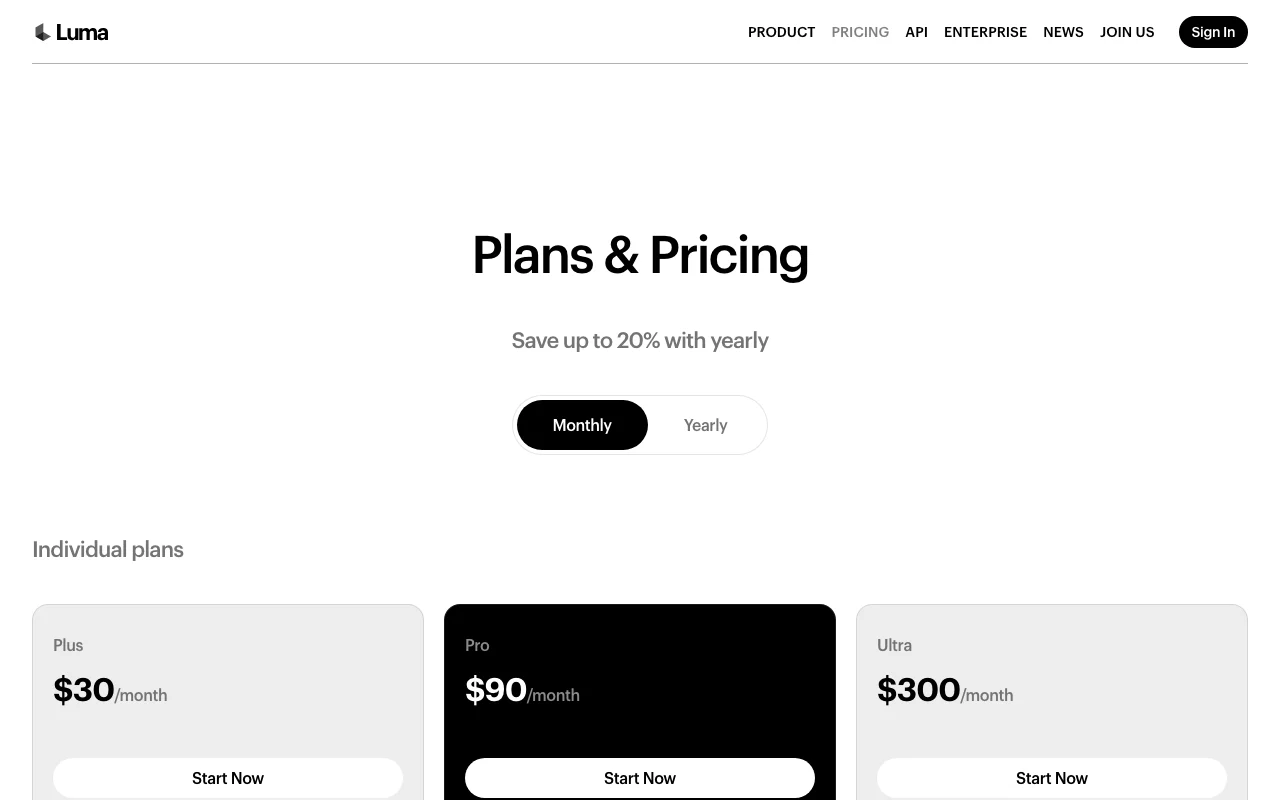
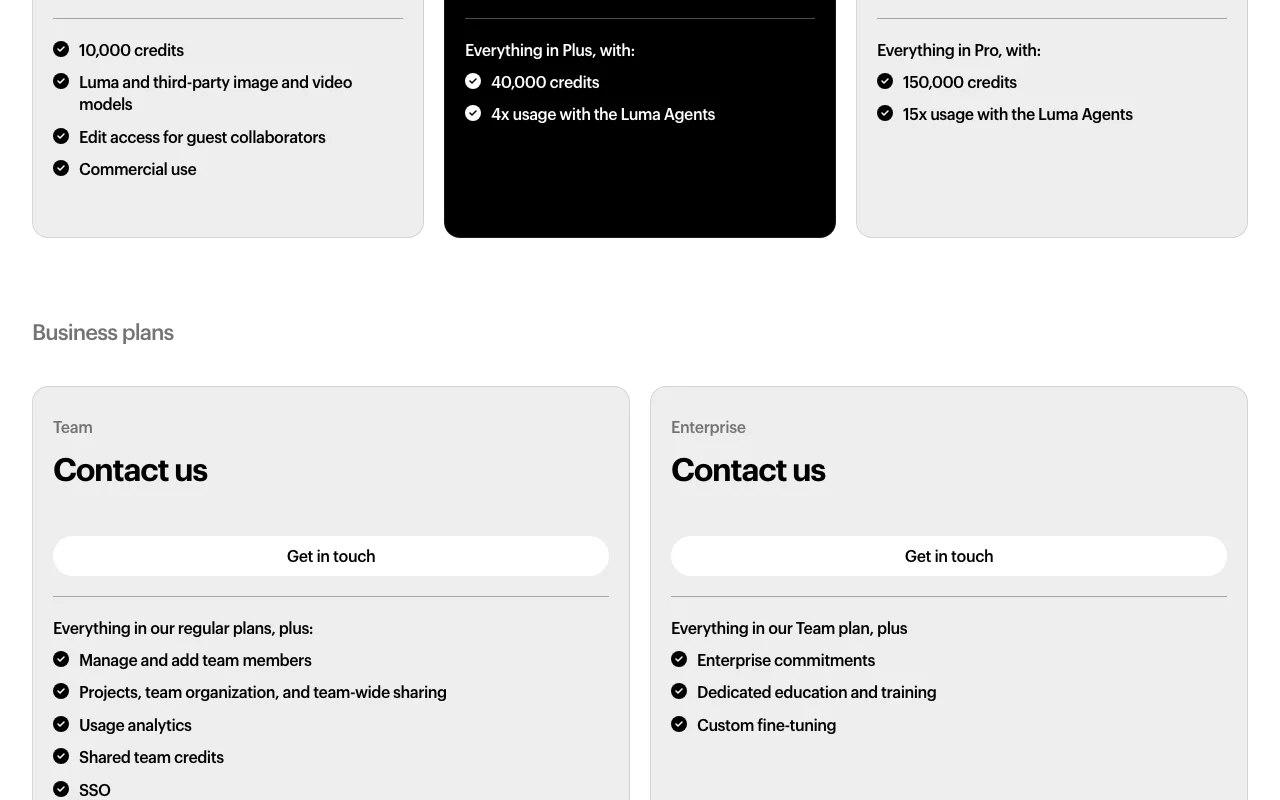
Plan comparison on the official pricing page. lumalabs.ai, captured Oct 1, 2026
Yes, all generated content is owned by the user with full commercial rights included on all paid plans. source (opens in a new tab)
What is the difference between Plus, Pro, and Ultra plans?
Plans differ in monthly credit allowance (Plus: 10,000, Pro: 40,000, Ultra: 150,000) and Luma Agents usage boost (Plus: baseline, Pro: 4x, Ultra: 15x). All include access to the same models. source (opens in a new tab)
Can I get a refund for unused credits?
Standard policy information not provided; credits expire per plan terms. Contact support for refund inquiries. source (opens in a new tab)
Is there an API available?
Yes, Luma provides APIs for image and video generation with the same credit-based billing; documentation at docs.lumalabs.ai. source (opens in a new tab)
What happens if I run out of credits before the end of the month?
Purchase additional credits to continue; pricing per credit varies by model and action (e.g., 100 credits for 5 seconds of Ray 3.2 at 1080p). source (opens in a new tab)
Plans & Pricing | Lumapricing · checked Oct 1, 2026 · Individual plans (Plus, Pro, Ultra), Business plans (Team, Enterprise), Cost tables for video generation models, Cost tables for image generation models, Cost tables for audio tools and utilities
Luma | AI Agents for Creative Workhomepage · checked Oct 1, 2026 · Product overview and Luma Agents description, Ray 3.2 model announcement, Uni-1 brand intelligence model, Team and company information, News and recent releases
Not verified: Detailed privacy policy (HTTP 404 at /privacy); Comprehensive documentation index (HTTP 404 at /docs); Free plan terms and trial credit limits; Data retention policy; Training data usage for model improvement; Specific support response times.
How we documented and maintain this page
Every fact about Luma above comes from the 4 official pages listed here, last compared on Oct 1, 2026; we have not run Luma ourselves, so it has no editorial score. How we check and re-check pages.
Article updated Oct 2, 2026; prices checked Oct 1, 2026. Outbound links to vendors are plain links; we do not earn commissions. How we review · Report an error