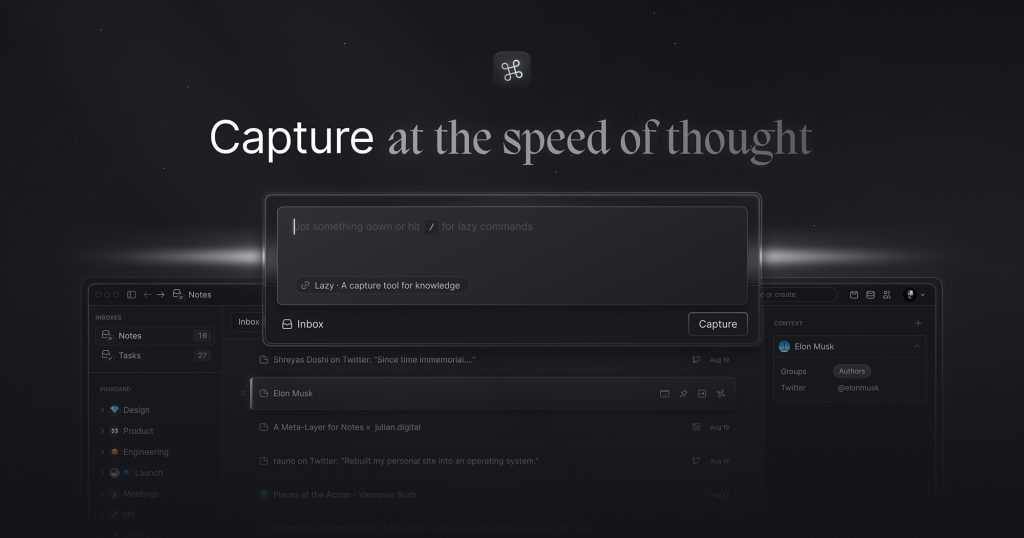
Our take: Ideal for researchers and knowledge workers who need fast, context-preserving capture across apps with optional AI-powered note intelligence.
Main limitation: No free plan; paid subscription required after 14-day trial; AI features locked to higher tier ($12.5/mo)
By the AI Tool Atlas editors.
Based on the vendor's official documentation; we have not tested this product hands-on. What “documented overview” means
Lazy in the news
Headlines from US outlets, selected automatically — not endorsements. Updated Oct 12, 2026
Billed annually at $12.5/month equivalent ($150/year) with 25% discount; includes all Lazy Capture features
For: Knowledge workers needing AI-powered search and chat over their personal knowledge base
Limits
Unlimited notes
Unlimited file uploads
1 more
Priority access to new AI features
Includes
Everything in Lazy Capture
Context-aware AI answers from captures
2 more
Chat interface over knowledge base
Priority access to new AI features
Usage caps, credits and extra costs
Annual commitment required; monthly option not available; prices include 25% annual discount
What is Lazy, and how does it work?
Lazy is a knowledge capture tool that lets users clip articles, threads, videos and other content from whatever app they are in, typically via a keyboard shortcut, without switching context. Captures land in a networked note-taking space. The Lazy AI tier adds context-aware answers drawn from saved captures and a chat interface over the personal knowledge base.
Lazy's official site: how the product presents itself. lazy.so, captured Oct 1, 2026
What you provide and what you get back
What you give Lazy and what comes back, from its documentation
You provide
Web articles and blog posts
Social media threads and tweets
Videos and media
Kindle book highlights
You get back
Networked personal notes with saved clips
Clip metadata and full-text search
AI-generated answers from captures (Lazy AI tier)
Chat interface over knowledge base (Lazy AI tier)
Where you can use it
Platforms
macOS, iOS, Web
Account
Required
Works offline
Yes
Where Lazy is most useful
Scenarios are worked out by our editors from the documentation; the actual result depends on your input and plan.
Quickly saving articles and threads for later
Who
Busy professionals, researchers, and content consumers
You provide
Articles, tweets, threads from various apps via ⌘L shortcut
Expected result
Content saved without interrupting workflow; searchable in personal note space
Captures content from any app via keyboard shortcut (⌘L on Mac) without browser-only restrictions Save research and inspiration while staying in current app; eliminates context switching
Access: Lazy Capture and Lazy AI; includes iOS and macOS supportLimit: Requires app/extension installation; not web-onlysource (opens in a new tab)
Networked note-taking with unlimited notes and uploads
Links and organizes captured content into interconnected notes; supports file attachments Discover connections between ideas and research across captures; scale personal knowledge base without storage limits
Access: All plansLimit: Network visualization and connection interface not detailed on pricing pagesource (opens in a new tab)
Offline mode for notes
Access and review saved notes without internet connection Work on research or read captures while traveling, commuting, or offline
Access: Lazy Capture and Lazy AILimit: New captures require internet; sync happens when reconnectedsource (opens in a new tab)
Kindle highlights sync
Automatically imports Kindle book highlights into Lazy notes on scheduled basis Consolidate reading highlights with other research and web captures in one searchable space
Access: Lazy Capture and Lazy AILimit: Only syncs highlights; annotations and margin notes not supportedsource (opens in a new tab)
Lazy: strengths and limits
Where Lazy is strong
Captures from any app, not just the browser Can save research and inspiration while staying in current workflow without context switchingdocumentedsource (opens in a new tab)
Unlimited notes and file uploads on base plan No storage limits or per-note costs for large knowledge bases; scales infinitelydocumentedsource (opens in a new tab)
14-day trial offered Can fully evaluate the tool and both plan tiers before committing to paid subscriptiondocumentedsource (opens in a new tab)
Integrates with Notion for content routing Can automatically export captures to existing Notion workspace for centralized knowledge managementdocumentedsource (opens in a new tab)
Limitations to check before paying
No free plan; paid subscription required after trial All long-term use requires paid subscription; no freemium option or perpetual free tier availabledocumentedsource (opens in a new tab)
AI features locked to higher $12.5/mo tier Users needing context-aware answers and AI chat must pay double the base tier costdocumentedsource (opens in a new tab)
Annual-only billing; monthly option not available Requires higher upfront cost ($72 or $150 per year) and annual commitment; more difficult to canceldocumentedsource (opens in a new tab)
Privacy policy and API docs return 404 errors Cannot verify data retention, training use, or API availability; raises concerns about product stabilitydocumentedsource (opens in a new tab)
How to use Lazy for capturing research and inspiration without app-switching
Set up Lazy
Visit https://lazy.so and click 'Get Lazy' to start the 14-day free trial
Install the Lazy app or browser extension for your platform (macOS, iOS, or web)
Customize your capture shortcut (default ⌘L on Mac) in settings if needed
Connect optional integrations: Notion for content routing, Kindle account for highlight sync
Before trial expires, subscribe to Lazy Capture ($72/year) or Lazy AI ($150/year)
Example: capturing research and inspiration without app-switching
Open an article, tweet, or video you want to save
Press ⌘L (Mac) or your configured shortcut to capture content instantly
Clip appears in Lazy with full text, source URL, and metadata; optionally add tags
Search or browse your captures; on Lazy AI tier, ask context-aware questions about them
Use Notion export to route captures to your existing knowledge workspace
Review and export the result
Verify capture includes full content and working source link; test offline access
Confirm Kindle sync is syncing highlights on schedule (test with a Kindle book highlight)
For Lazy AI: test that context-aware answers accurately reference your captures
Lazy integrations
Native integrations and export formats
Export: Notion pages
Privacy, data use and commercial rights
Summarized from the vendor's current policies; this is not legal advice and a vendor's badge is not an independent audit.
How your inputs and outputs are handled
Content captured (text, URLs, metadata) is stored on Lazy servers; Kindle highlights synced via Amazon integration
What's the difference between Lazy Capture and Lazy AI?
Lazy Capture ($72/year) includes universal capture across apps, unlimited notes and files, offline mode, and Kindle sync. Lazy AI ($150/year) adds context-aware AI answers from your captures and chat interface over your knowledge base, with priority access to new AI features. source (opens in a new tab)
Can I capture from any app, or just the browser?
Lazy works from any app using a keyboard shortcut (⌘L on Mac), not just the browser. It's a true universal clipper across all applications where you're working. source (opens in a new tab)
Is there a free plan or way to use Lazy forever without paying?
No. You get a 14-day trial to try both Lazy Capture and Lazy AI for free. After the trial ends, you must choose a paid subscription to continue using Lazy. source (opens in a new tab)
Can I export my notes to other tools?
Yes, you can route captures directly to Notion, and offline notes are available locally. Export options beyond Notion are not detailed on the pricing page. source (opens in a new tab)
Do I have to commit to a year, or can I pay monthly?
Lazy only offers annual billing ($72/year for Capture, $150/year for AI). Monthly payment option is not available. The pricing shown includes a 25% discount for annual commitment. source (opens in a new tab)
Lazy Pricingpricing · checked Oct 1, 2026 · plans and pricing, features per plan, trial information
Not verified: Monthly billing option (only annual available; monthly equivalent unclear); Desktop application vs browser extension only (⌘L inferred; download page not checked); Capture rate limits or frequency caps (not specified); Storage limits (not specified; claimed unlimited); Privacy policy details (policy URL returns 404); API availability, documentation, and pricing (docs URL returns 404); Data retention period (policy unavailable); Training data usage for AI features (policy unavailable); Enterprise or team collaboration features (not mentioned); Export formats beyond Notion; Customer support channels or SLA.
How we documented and maintain this page
Every fact about Lazy above comes from the 2 official pages listed here, last compared on Oct 1, 2026; we have not run Lazy ourselves, so it has no editorial score. How we check and re-check pages.
Article updated Oct 2, 2026; prices checked Oct 1, 2026. Outbound links to vendors are plain links; we do not earn commissions. How we review · Report an error