
CodingDocumented overviewLast checked Oct 1, 2026

Lanes: Pricing, Features & Best Use Cases

Desktop app for running many CLI coding agents in parallel, each on its own issue, branch and git worktree.

Who Lanes fits

Lanes suits developers who already use CLI coding agents like Claude Code or Codex and want to run several in parallel on separate branches and worktrees. Based on the vendor's documentation, not on a hands-on test.

Best for: Developers running multiple coding agents

Also a good fit for

  • Small teams coordinating agent work

Consider another tool if free plan is limited to one user, no team seats

Or if

  • Collaboration requires paid Pro plan
  • Slack integration, remote workspaces and automations are listed as coming soon

Lanes in the news

Headlines from US outlets, selected automatically — not endorsements. Updated Oct 2, 2026

Lanes pricing and usage limits

Prices checked Oct 1, 2026 on the official US pricing page. Official pricing ↗ Prices and limits change often.

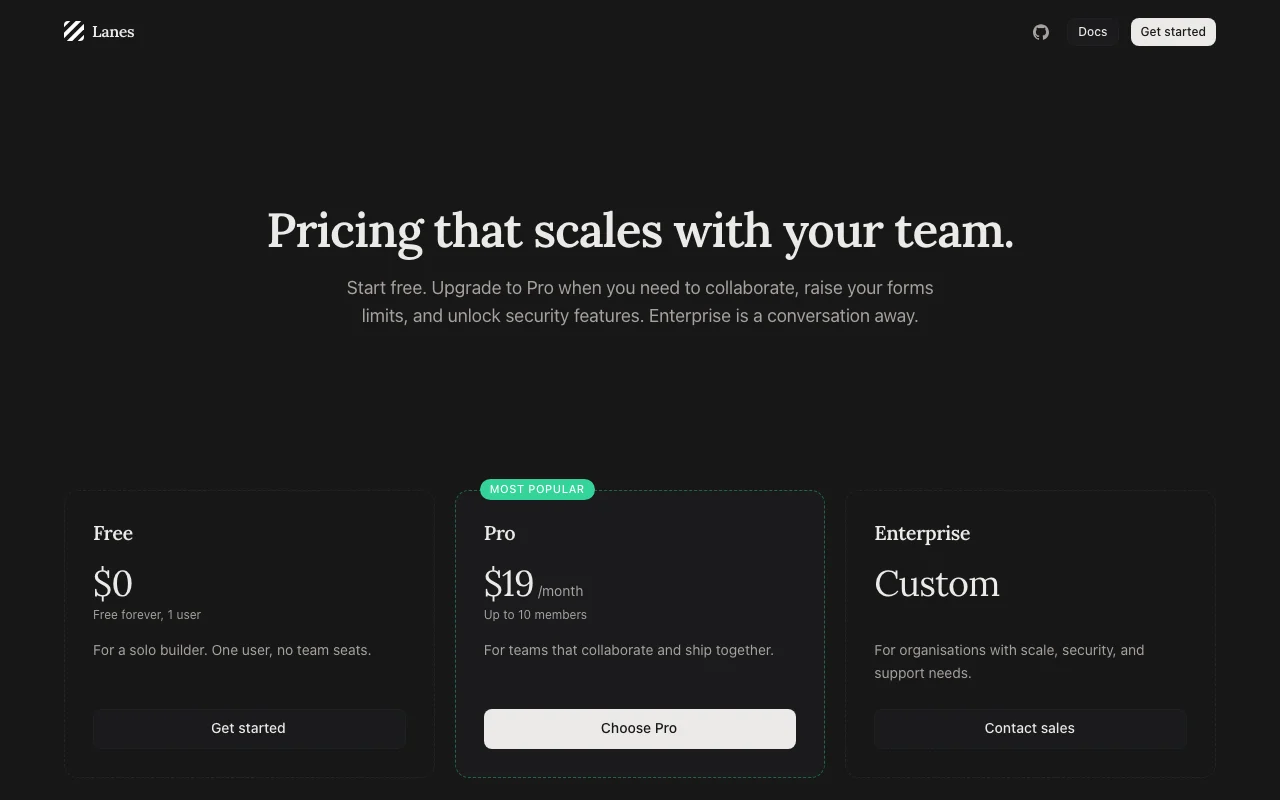
Lanes pricing page with plans and prices — screenshot of the coding AI tool, Oct 1, 2026
The official Lanes pricing page as we saw it. lanes.sh, captured Oct 1, 2026

Free access and trial conditions

Free forever for one user

Paid plans: what changes as you upgrade

Free web

Free source (opens in a new tab)

Monthly

For: Solo builders

Limits

  • 1 user, no team seats
  • 3 forms, 100 submissions per month

Includes

  • Unlimited local sessions
  • Multi-agent orchestration
2 more
  • Git worktrees and lanes
  • MCP and CLI access

Pro web

$19 source (opens in a new tab)

Monthly

For: Teams that collaborate

Limits

  • Up to 10 members
  • 1,000 forms, 50,000 submissions per month

Includes

  • Invite teammates
  • Roles and permissions
1 more
  • Email forwarding and hosted form pages

Enterprise web

Custom pricing source (opens in a new tab)

Custom

For: Organisations with security needs

Limits

  • Custom seats
  • Unlimited forms

Includes

  • SSO and SAML
  • Audit log
2 more
  • Uptime SLA
  • Data residency

Usage caps, credits and extra costs

Compute (GPUs billed by the second) is a separate offering

Not stated

What is Lanes, and how does it work?

Lanes is an agentic development environment that runs several CLI coding agents (such as Claude Code and Codex) at once. Each agent works on its own issue, branch and worktree, tracked on an issue board. The company also offers Lanes Link, an open-source MCP endpoint, and hosted form backends. Desktop is included on every plan.

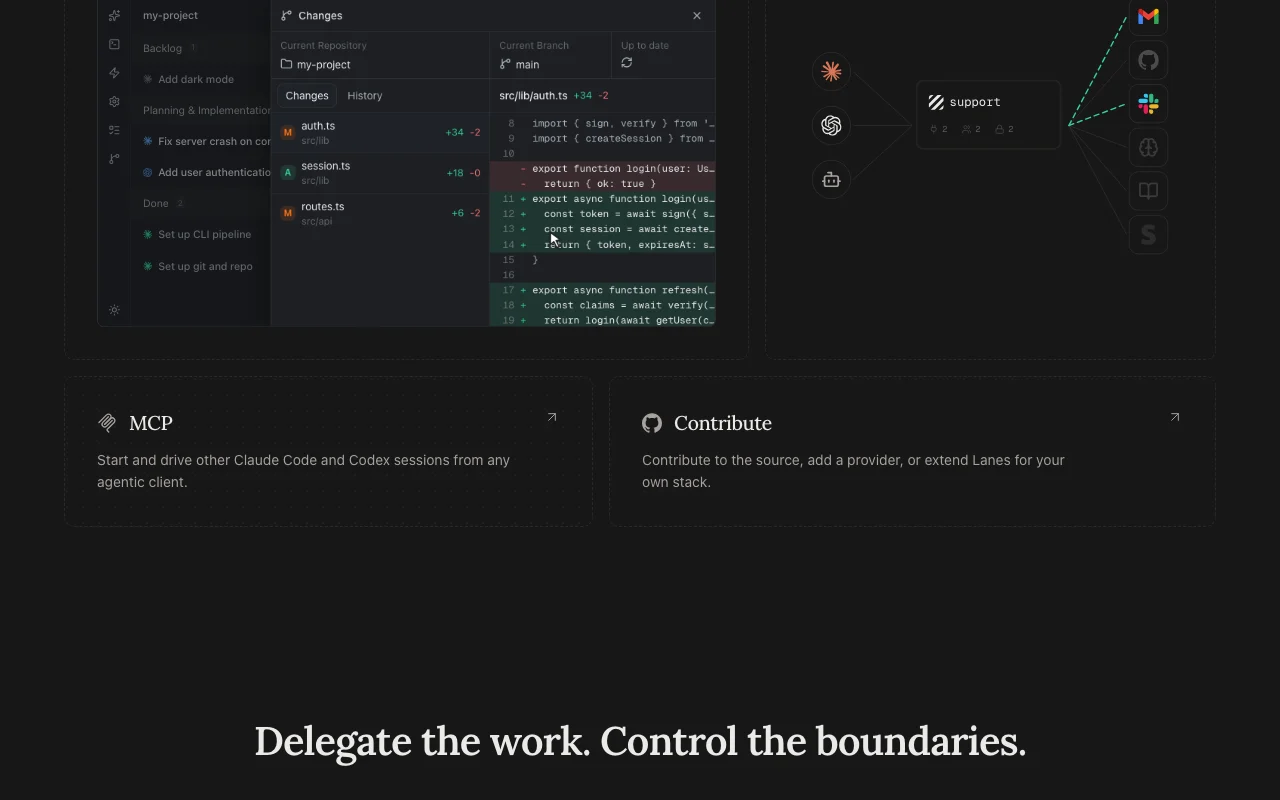
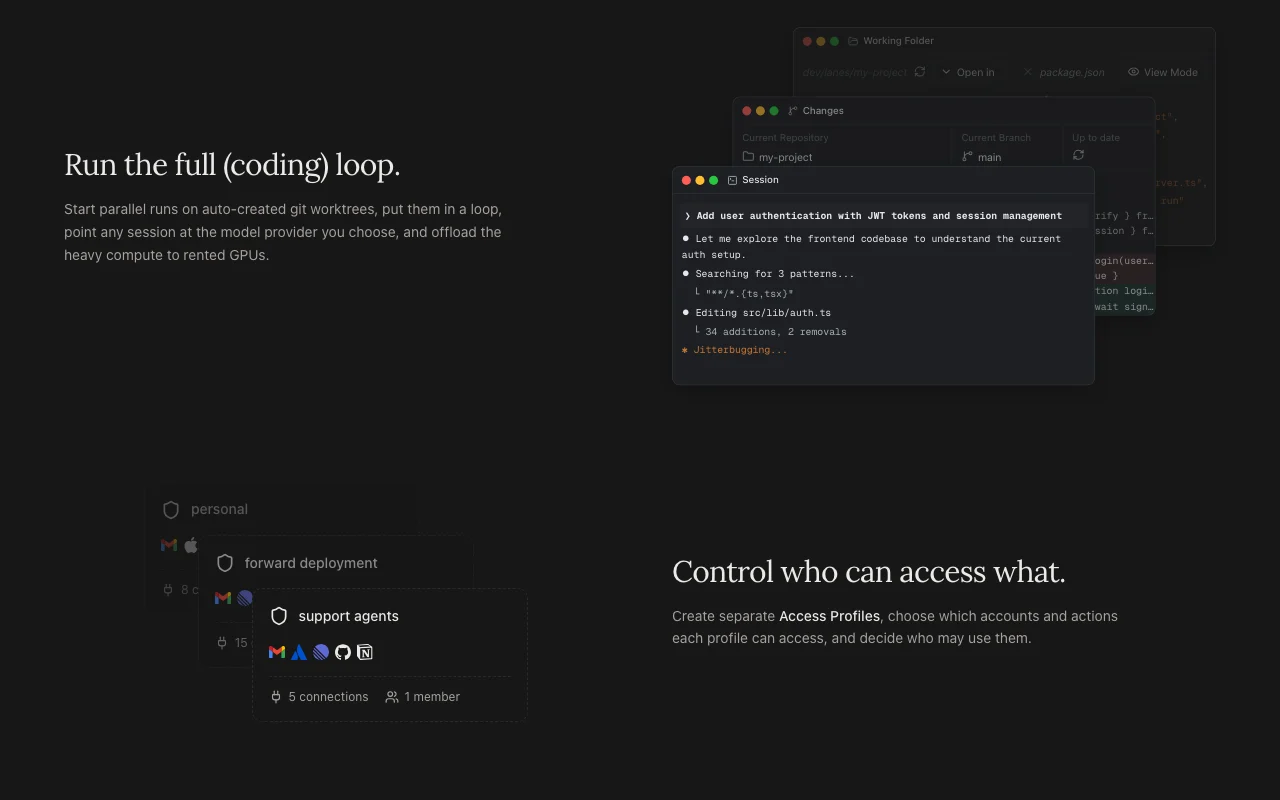
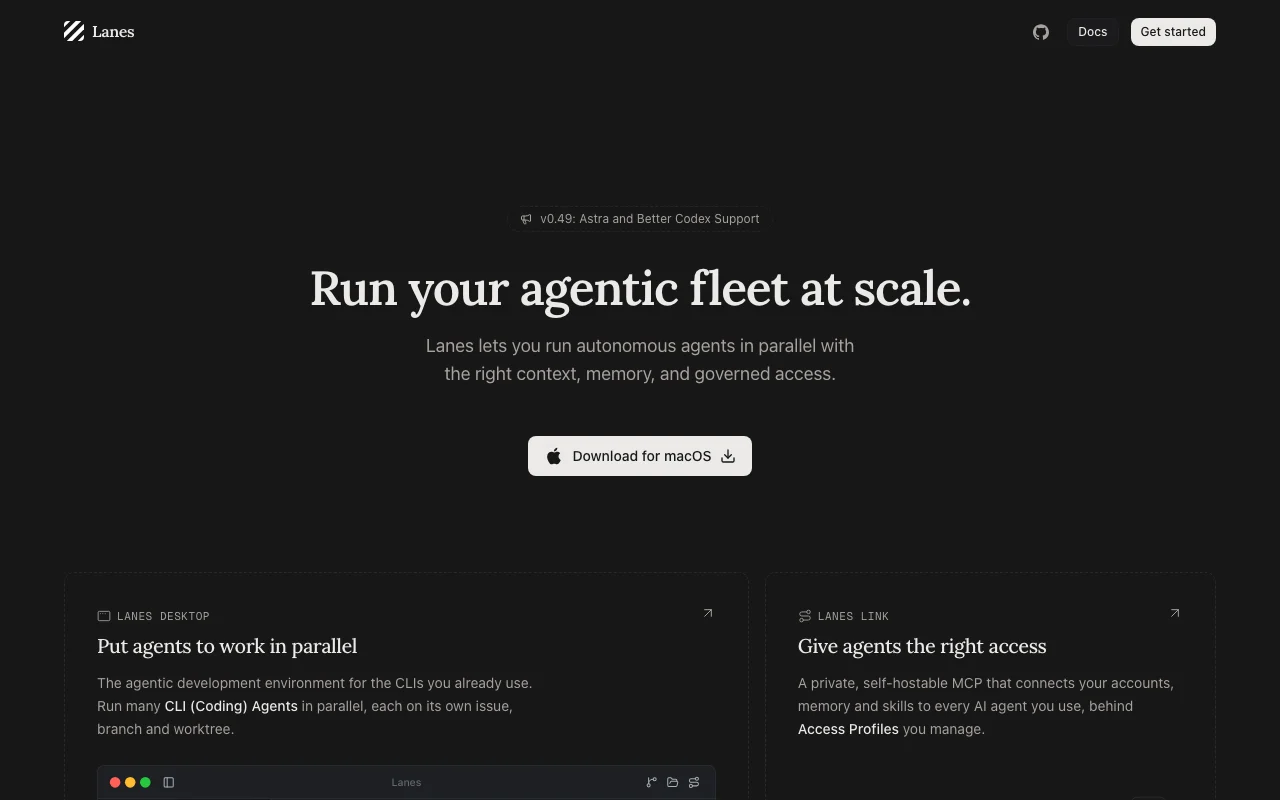
Lanes homepage — screenshot of the coding AI tool, Oct 1, 2026
Lanes's official site: how the product presents itself. lanes.sh, captured Oct 1, 2026

What you provide and what you get back

How Lanes works: what you provide, where it runs and what you get backYOU PROVIDEYour inputIssues on the boardYour installed CLI agentsProject repositoriesCODINGLanesDesktopfrom $19 (Pro)free tier availableaccount requiredchecked Oct 1, 2026YOU GET BACKThe resultAgent sessions per issue and git…Diffs and session historyinput → Lanes → output · from the vendor's own pages, no hands-on test unless stated
What you give Lanes and what comes back, from its documentation

You provide

  • Issues on the board
  • Your installed CLI agents
  • Project repositories

You get back

  • Agent sessions per issue and git worktree
  • Diffs and session history

Where you can use it

Platforms
Desktop
Account
Required
Platform
macOS desktop source (opens in a new tab)
Agents
Claude Code, Codex, Gemini CLI source (opens in a new tab)
Isolation
Git worktrees per issue source (opens in a new tab)
Forms
3 / 1,000 / unlimited source (opens in a new tab)
Coming soon
Slack, remote workspaces, automations source (opens in a new tab)

What people use Lanes for

Scenarios are worked out by our editors from the documentation; the actual result depends on your input and plan.

Run several coding agents on separate issues at once

Who
Developers using Claude Code or Codex
You provide
Issues on the board
Expected result
One agent per issue on its own branch
Plan needed
Free
Limitation
One user only source (opens in a new tab)

Review agent diffs and session history in one place

Who
Reviewers
You provide
Agent sessions
Expected result
Diffs and history per lane
Plan needed
Free
Limitation
Local sessions only source (opens in a new tab)

Manage a backlog-to-done issue board for agent work

Who
Tech leads
You provide
Backlog items
Expected result
Items moving through planning to done
Plan needed
Pro for collaboration
Limitation
Slack and automations are coming soon source (opens in a new tab)

Lanes features and their limits

Lanes homepage — screenshot of the coding AI tool, Oct 1, 2026
Feature overview on the official site. lanes.sh, captured Oct 1, 2026

Parallel agent sessions with git worktrees

Runs each agent in its own worktree and branch Prevents agents clobbering each other

Access: All plansLimit: Needs git repositories source (opens in a new tab)

Issue board with backlog, planning and done stages

Tracks agent work as issues across stages Clear status overview

Access: All plansLimit: Board is for Lanes work, not an external tracker source (opens in a new tab)

Works with existing CLI agents

Wraps CLI agents you already have such as Claude Code and Codex No new agent subscription

Access: All plansLimit: Interactions go directly to the provider source (opens in a new tab)

Lanes Link MCP endpoint

Open-source MCP endpoint for connecting agents Extend agents with tools

Access: MCP and CLI access on all plansLimit: Details not on fetched text source (opens in a new tab)

Lanes pros and cons

Reasons to choose Lanes

Check before paying for Lanes

How to use Lanes for running multiple coding agents in parallel on separate issues

Set up Lanes

  1. Download Lanes Desktop for macOS from lanes.sh
  2. Install and sign in; have a CLI agent such as Claude Code installed
  3. Open a git repository as a project

Example: running multiple coding agents in parallel on separate issues

  1. Create issues on the board
  2. Start an agent on each issue
  3. Let each work in its own worktree
  4. Review diffs per lane

Review and export the result

  1. Confirm each lane has its own branch
  2. Review session history before merging

Lanes API

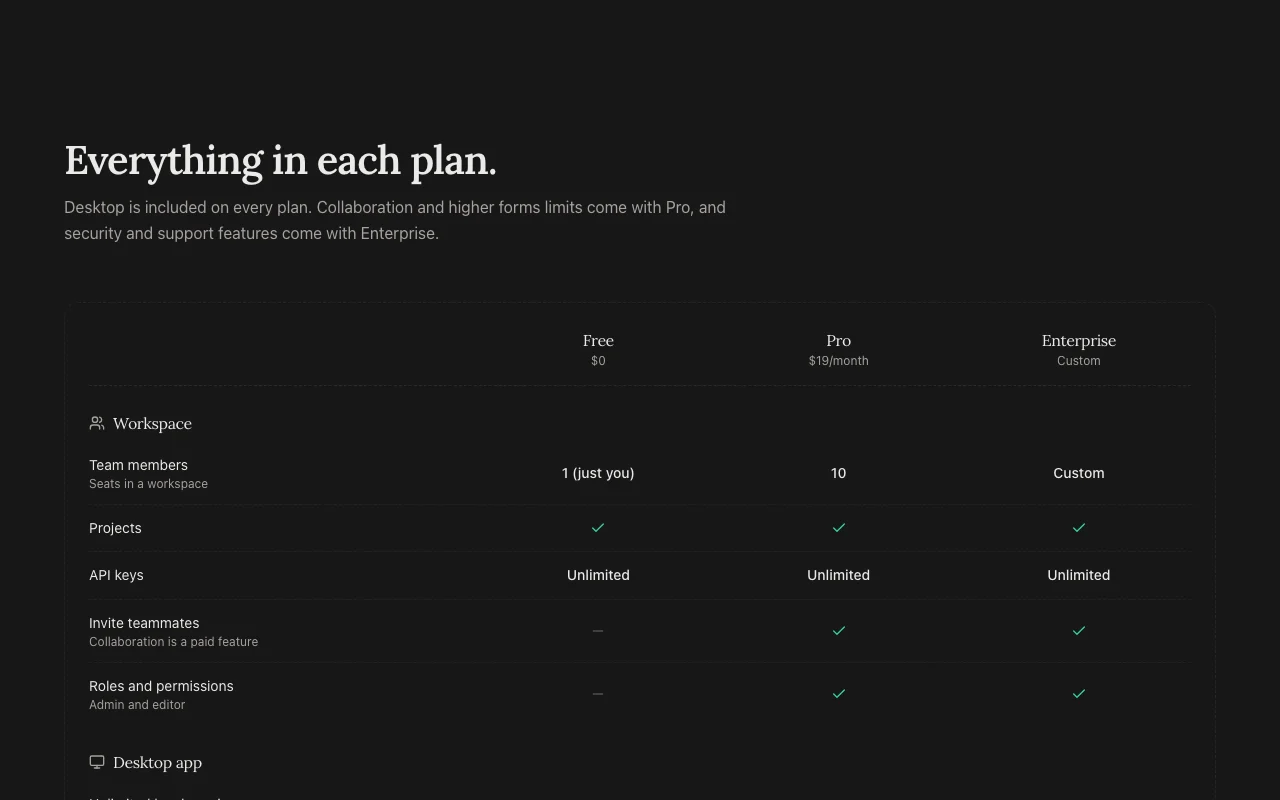
Lanes pricing page with plans and prices — screenshot of the coding AI tool, Oct 1, 2026
Plan comparison on the official pricing page. lanes.sh, captured Oct 1, 2026

API access and separate billing

Lanes has no public API in its official documentation. MCP and CLI access; Slack coming soon

Privacy, data use and commercial rights

Summarized from the vendor's current policies; this is not legal advice and a vendor's badge is not an independent audit.

How your inputs and outputs are handled

Agent interactions occur between your machine and providers; Lanes is not an intermediary

Form data retained until you delete it; unclaimed forms deleted after 37 days

Controls for business users

  • SSO, audit log, IP restrictions, data residency (Enterprise)

Policies: lanes.sh/privacy

Best Lanes alternatives for different needs

"Better suited" is based on documented features and pricing, not on a head-to-head test.

Cursor: better suited to

GitHub Copilot: better suited to

Devin Desktop (formerly Windsurf): better suited to

Claude: better suited to

Alternatives
AlternativeWhen to choose itPricingLimitation
Cursor——Compare
GitHub Copilot——Compare
Devin Desktop (formerly Windsurf)——Compare
Claude——

Explore Lanes further

Related to Lanes

Lanes user reviews

No user reviews yet.

Used Lanes? Be the first to share your experience.

Write a review

Reviews are checked by a moderator before they appear. Your email is never published. Plain text only.

Your rating (required)

Show what you made or what went wrong. Images are published only if the review is approved; location data is removed.

    Lanes FAQ

    Is Lanes free?

    Yes, Free is $0 for one user with unlimited local sessions and the desktop app. source (opens in a new tab)

    How much is Pro?

    $19 per month for up to 10 members, with collaboration and higher forms limits. source (opens in a new tab)

    Which agents does it run?

    CLI agents you already have, such as Claude Code, Codex and Gemini CLI. source (opens in a new tab)

    Does Lanes see my agent conversations?

    The privacy policy says agent interactions occur directly between your machine and the provider. source (opens in a new tab)

    What platforms is it on?

    The homepage offers a macOS download. source (opens in a new tab)

    Recent changes that affect your choice

    :

    Official announcement (opens in a new tab)

    Sources and review methodology

    Official sources and verification dates

    Not verified: Windows and Linux support; Training use of data; Enterprise price.

    How we documented and maintain this page

    Every fact about Lanes above comes from the 4 official pages listed here, last compared on Oct 1, 2026; we have not run Lanes ourselves, so it has no editorial score. How we check and re-check pages.

    Article updated Oct 10, 2026; prices checked Oct 1, 2026. Outbound links to vendors are plain links; we do not earn commissions. How we review · Report an error