
CodingDocumented overviewLast checked Sep 29, 2026

Google Antigravity: Pricing, Features & Best Use Cases

Google's agentic development platform: desktop app, CLI, SDK and IDE extensions for working with coding agents.
Is Google Antigravity right for you?

Antigravity suits developers who want to run coding agents across a desktop app, CLI and SDK, starting on the free individual plan; Pro and Ultra prices were not shown. Based on the vendor's documentation, not on a hands-on test.

Best for: Developers wanting agent-driven coding

Also a good fit for

  • Teams on Google Cloud or Gemini Enterprise

Consider another tool if free plan has basic weekly rate limits

Or if

  • AI Pro and Ultra prices not shown on the pricing page
  • Business plan requires contacting sales via Google Cloud

Google Antigravity in the news

Headlines from US outlets, selected automatically — not endorsements. Updated Oct 2, 2026

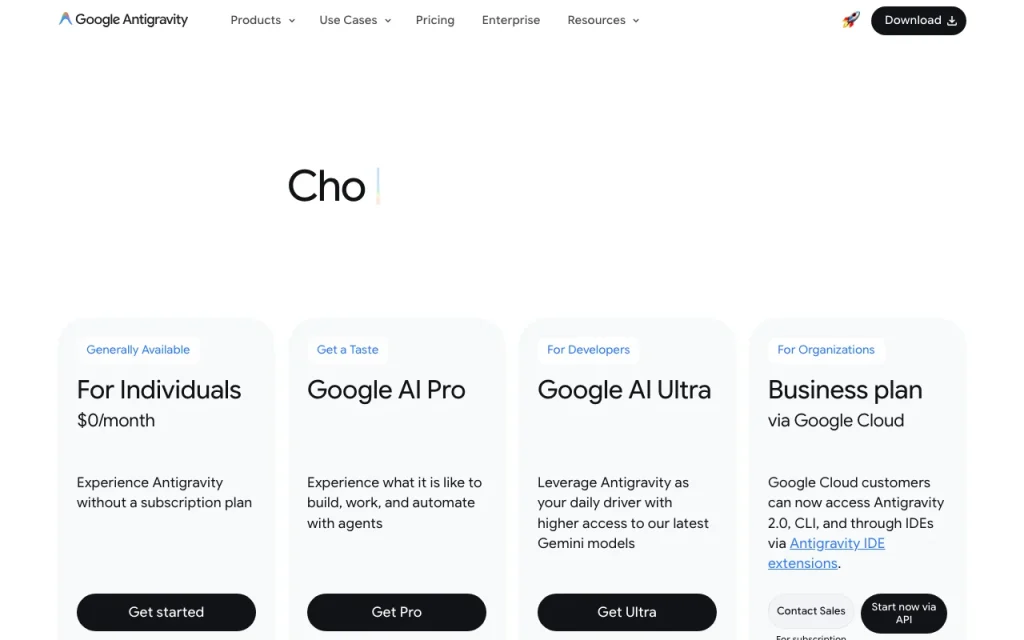
Google Antigravity pricing and usage limits

Prices checked Sep 29, 2026 on the official US pricing page. Official pricing ↗ Prices and limits change often.
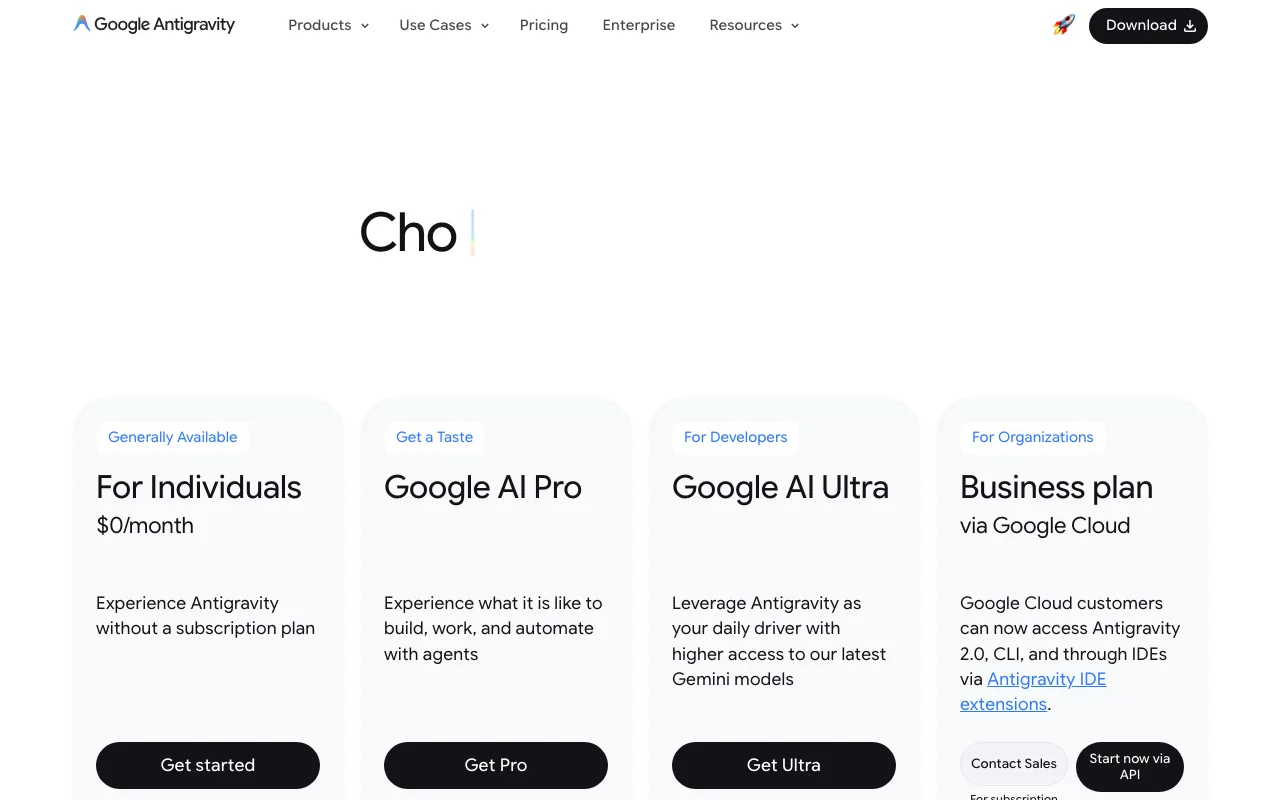
Google Antigravity pricing page with plans and prices — screenshot of the coding AI tool, Oct 2, 2026
The official Google Antigravity pricing page as we saw it. antigravity.google, captured Oct 2, 2026

Free access and trial conditions

$0 individual plan

Not stated

Paid plans: what changes as you upgrade

Individual direct

Free source (opens in a new tab)

Month

For: Trying it out

Limits

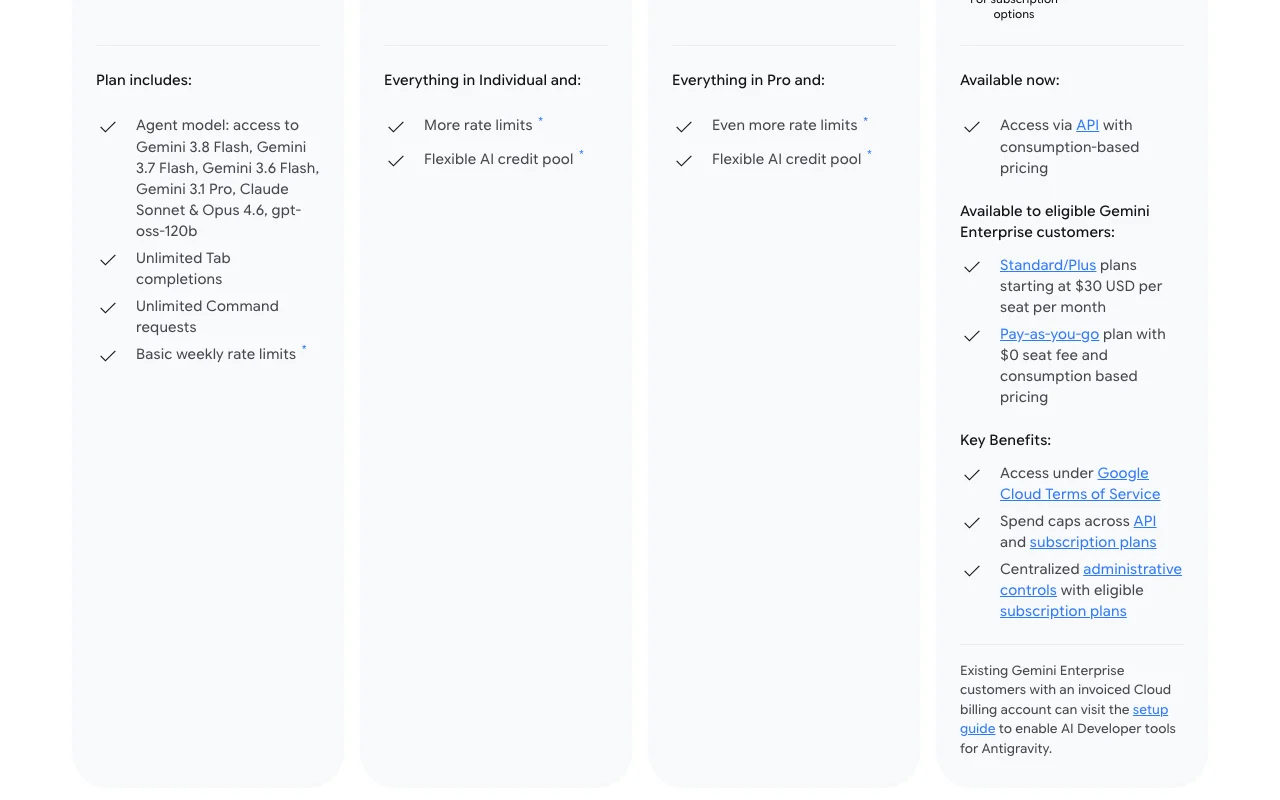
  • Basic weekly rate limits

Includes

  • Agent models
  • Unlimited Tab completions
1 more
  • Unlimited command requests

Google AI Ultra direct

See official pricing source (opens in a new tab)

Month

Price not shown

Limits

  • Even more rate limits
  • Flexible AI credit pool

Gemini Enterprise Standard/Plus direct

$30/mo source (opens in a new tab)

Month

Starting at $30 per seat per month

For: Eligible Gemini Enterprise customers

Usage caps, credits and extra costs

API is consumption-based

Not stated

What is Google Antigravity, and how does it work?

Google Antigravity is an agent-first development platform. Its surfaces include Antigravity 2.0 (a desktop app for managing several local agents in parallel), a terminal CLI, a Python SDK and an Antigravity IDE. The official pricing page lists a $0/month individual plan with basic weekly rate limits, higher-limit Google AI Pro and Ultra tiers, and business or API consumption options. Desktop downloads are offered for macOS, Windows and Linux.

What you provide and what you get back

How Google Antigravity works: what you provide, where it runs and what you get backYOU PROVIDEYour inputCoding tasks in chat or terminalYour repositoriesCODINGGoogle AntigravityDesktop, APIfrom $30/mo (Gemini Enterprise St…free tier availableaccount requiredchecked Sep 29, 2026YOU GET BACKThe resultCode changesAgent run resultsinput → Google Antigravity → output · from the vendor's own pages, no hands-on test unless stated
What you give Google Antigravity and what comes back, from its documentation

You provide

  • Coding tasks in chat or terminal
  • Your repositories

You get back

  • Code changes
  • Agent run results

Where you can use it

Platforms
Desktop, API
Account
Required
Platforms
macOS, Windows, Linux
Surfaces
Desktop app, CLI, SDK, IDE extensions
Free limits
Basic weekly rate limits

What people use Google Antigravity for

Scenarios are worked out by our editors from the documentation; the actual result depends on your input and plan.

Running several coding agents in parallel across workspaces

Who
Developers
You provide
Several tasks at once
Expected result
Several coding agents work in parallel across your workspaces.
Plan needed
Free to start
Limitation
Rate limits apply, so running many agents at once can use up the weekly allowance quickly. source (opens in a new tab)

Building, debugging and shipping code from the terminal

Who
Terminal users
You provide
Commands and prompts
Expected result
You get code that is built and debugged from the command line.
Plan needed
Free to start
Limitation
Weekly limits apply on the free plan, so long sessions may be cut off. source (opens in a new tab)

Prototyping custom agents with the SDK

Who
Agent builders
You provide
SDK code
Expected result
You get a custom agent that you have written and tested with the SDK.
Plan needed
Free or API
Limitation
Only a Python SDK is mentioned on the page, so other languages may not be supported. source (opens in a new tab)

Key features and their practical limits

Antigravity 2.0 desktop app with Projects and scheduled messages

Runs a desktop app with Projects and scheduled messages. Developers can manage several local agents in parallel from one desktop app and set messages to run later.

Access: Individual, Google AI Pro, Google AI UltraLimit: Rate limits apply to the plan you use, and the Individual plan has basic weekly limits. source (opens in a new tab)

Terminal-first CLI with background subagents

Offers a terminal CLI with background subagents. Developers who work in the terminal can hand work to background subagents without leaving their shell.

Access: Individual, Google AI Pro, Google AI UltraLimit: Rate limits apply to the plan you use, and the Individual plan has basic weekly limits. source (opens in a new tab)

Python SDK for custom agents

Provides a Python SDK. Developers can write their own agents in code instead of relying only on the built-in ones.

Access: Not statedLimit: The pricing page mentions only a Python SDK. source (opens in a new tab)

Official IDE extensions and standalone IDE

Includes IDE extensions and a standalone IDE. Developers who prefer their usual editor can use the official IDE extensions or a standalone IDE.

Access: Not statedLimit: Details of the IDE extensions were not read from the pricing page. source (opens in a new tab)

Pros, cons and deal-breakers

Where Google Antigravity is strong

  • $0/month individual plan available A $0 per month individual plan is available, so a developer can try the product without a subscription. documented source (opens in a new tab)
  • Downloads for macOS, Windows and Linux Downloads are offered for macOS, Windows and Linux, so most developers can install it on the computer they already use. documented source (opens in a new tab)
  • Multiple surfaces: app, CLI, SDK, IDE extensions The app, CLI, SDK and IDE extensions are all offered, so you can pick the surface that suits your way of working. documented source (opens in a new tab)
  • API access with consumption-based pricing API access with consumption-based pricing is listed, so you can pay for only what you use instead of a fixed plan. documented source (opens in a new tab)

Limitations to check before paying

  • Free plan has basic weekly rate limits The free plan has basic weekly rate limits, so heavy users may be stopped until the next week. documented source (opens in a new tab)
  • AI Pro and Ultra prices not shown on the pricing page The prices of AI Pro and Ultra are not shown on the pricing page, so you cannot work out the cost before you sign in. documented source (opens in a new tab)
  • Business plan requires contacting sales via Google Cloud The business plan needs you to contact sales via Google Cloud, so a team cannot buy it instantly online. documented source (opens in a new tab)
  • Pro and Ultra use a credit pool with rate limits Pro and Ultra use a credit pool together with rate limits, so you need to watch your usage even on paid plans. documented source (opens in a new tab)

How to use Google Antigravity for running coding agents

Set up Google Antigravity

  1. Download Antigravity for your OS.
  2. Sign in with a Google account.
  3. Open a project folder.

Example: running coding agents

  1. Describe a coding task.
  2. Let the agent work.
  3. Review changes.

Review and export the result

  1. Run your tests.
  2. Check your rate limit usage.
Example prompt suggested by our editors (not a recorded output of the product)
Add input validation to the signup form and update its tests.
Google Antigravity API

Google Antigravity pricing page with plans and prices — screenshot of the coding AI tool, Oct 2, 2026
Plan comparison on the official pricing page. antigravity.google, captured Oct 2, 2026

API access and separate billing

An API is available, billing not documented. Docs returned 403. API documentation ↗

Privacy, data use and commercial rights

Summarized from the vendor's current policies; this is not legal advice and a vendor's badge is not an independent audit.

How your inputs and outputs are handled

Not stated on the pages read

Not stated on the pages read

Not stated on the pages read

Commercial use and plan restrictions

Not stated on the pages read

Not stated on the pages read

Policies: antigravity.google/privacy

Other tools to consider instead of Google Antigravity

"Better suited" is based on documented features and pricing, not on a head-to-head test.

Cursor: better suited to

Devin Desktop (formerly Windsurf): better suited to

GitHub Copilot: better suited to

Replit: better suited to

Alternatives
AlternativeWhen to choose itPricingLimitation
Cursor——Compare
Devin Desktop (formerly Windsurf)——Compare
GitHub Copilot——Compare
Replit——Compare

Explore Google Antigravity further

If you are looking at Google Antigravity

Google Antigravity user reviews

No user reviews yet.

Used Google Antigravity? Be the first to share your experience.

Write a review

Reviews are checked by a moderator before they appear. Your email is never published. Plain text only.

Your rating (required)

Show what you made or what went wrong. Images are published only if the review is approved; location data is removed.

    Google Antigravity FAQ

    Is Antigravity free?

    Yes, the Individual plan is $0 per month with basic weekly rate limits. source (opens in a new tab)

    What platforms is it available on?

    macOS, Windows, Linux and Googlebook. source (opens in a new tab)

    How much are Pro and Ultra?

    Not shown on the pricing page. source (opens in a new tab)

    Can businesses use it?

    Yes via Google Cloud; contact sales. source (opens in a new tab)

    Sources and review methodology

    Official sources and verification dates

    Not verified: Pro/Ultra prices; Privacy; Docs.

    How we documented and maintain this page

    Every fact about Google Antigravity above comes from the 3 official pages listed here, last compared on Sep 29, 2026; we have not run Google Antigravity ourselves, so it has no editorial score. How we check and re-check pages.

    Article updated Oct 2, 2026; prices checked Sep 29, 2026. Outbound links to vendors are plain links; we do not earn commissions. How we review · Report an error