Productivity & writingDocumented overviewLast checked Sep 29, 2026

Dokie: Pricing, Features & Best Use Cases

AI presentation maker that generates and edits slide decks, with PowerPoint-style export on paid plans.

Who should use Dokie

Use Dokie to generate and revise slide decks with AI on a credit budget, starting free with daily credits and upgrading to Plus for custom templates and export options. Based on the vendor's documentation, not on a hands-on test.

Best for: Students and professionals making occasional decks

Also a good fit for

  • Teams wanting on-brand slides from templates

Consider another tool if usage is limited by credits (about 100 credits per new presentation)

Or if

  • Welcome credits expire after one year
  • Custom templates and export options need a paid plan

Dokie pricing and usage limits

Prices checked Sep 29, 2026 on the official US pricing page. Official pricing ↗ Prices and limits change often.

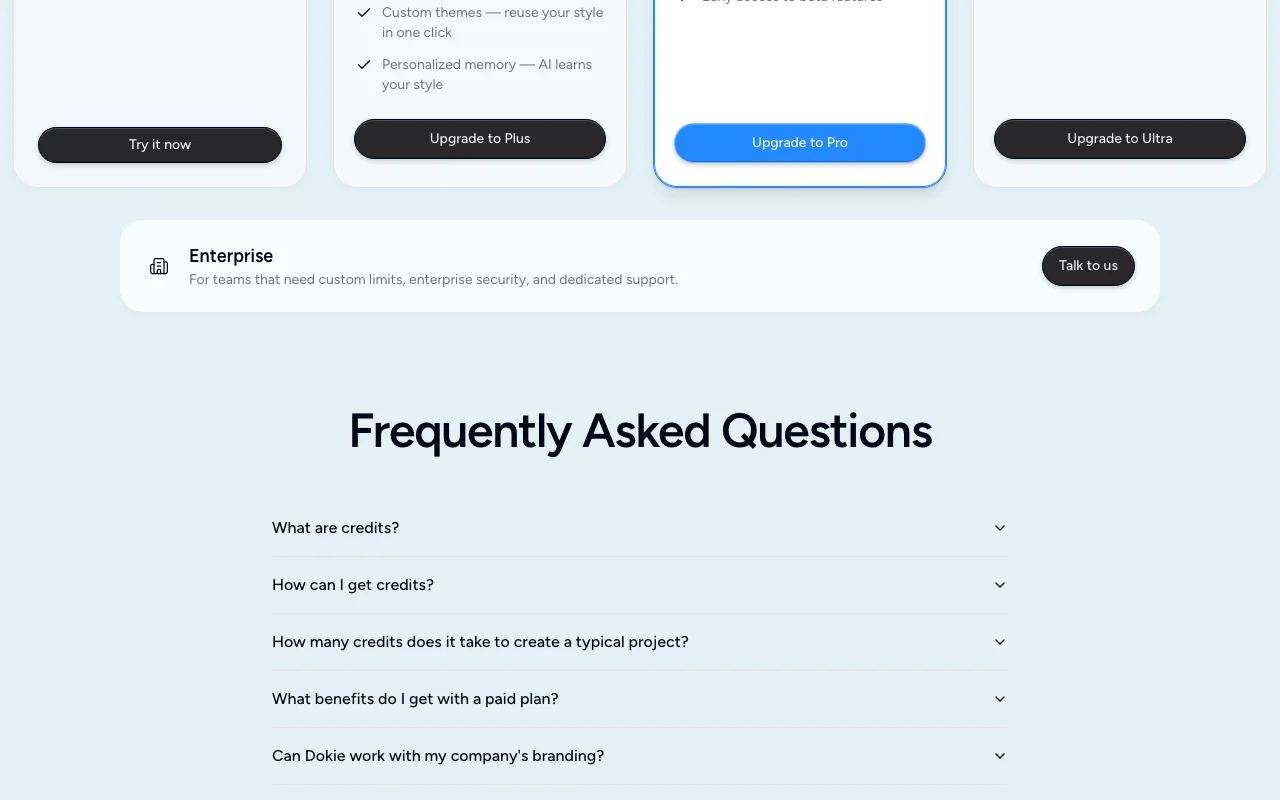
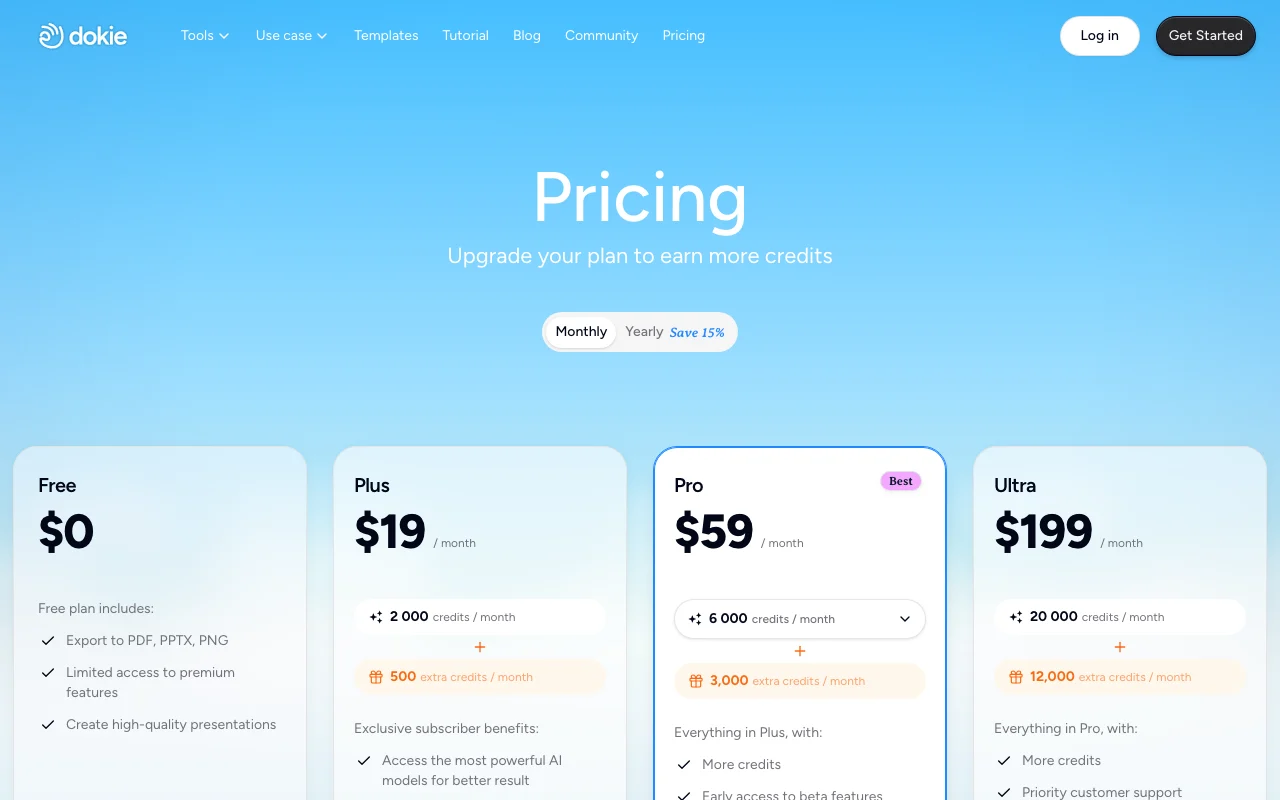
Dokie pricing page with plans and prices — screenshot of the productivity & writing AI tool, Oct 2, 2026
The official Dokie pricing page as we saw it. dokie.ai, captured Oct 2, 2026

Free access and trial conditions

Starter free

None beyond free credits

Paid plans: what changes as you upgrade

Starter web

Free source (opens in a new tab)

Month, annual commitment

For: Exploring

Limits

  • 200 daily credits
  • 300 welcome credits (1 year)

Includes

  • Core features

No API

Plus web

$19/mo source (opens in a new tab)

Month, annual commitment

For: Regular creators

Limits

  • 2,000 credits/month

Includes

  • Custom templates
  • Export options

No API

Pro web

$59/mo source (opens in a new tab)

Month, annual commitment

For: Daily users

Limits

  • 6,000 credits/month

Includes

  • Faster support
  • Product co-creation

No API

Ultra web

$199/mo source (opens in a new tab)

Month, annual commitment

For: High-volume creators

Limits

  • 20,000 credits/month

Includes

  • Priority support
  • Early access to features

No API

Enterprise web

Custom pricing source (opens in a new tab)

Month, annual commitment

For: Teams

Limits

  • Custom credit limits

Includes

  • Dedicated support
  • Enterprise security

Usage caps, credits and extra costs

None stated

Not stated

What is Dokie, and how does it work?

Dokie is an AI presentation maker that generates slide decks from a prompt and lets users edit slides and create images with further requests. Its site describes brand-aligned layouts and PPT generation. Usage is metered in credits: a free Starter plan gives daily and welcome credits, and paid plans add monthly credits plus custom templates and export options.

What you provide and what you get back

How Dokie works: what you provide, where it runs and what you get backYOU PROVIDEYour inputText promptCustom templates and themesPRODUCTIVITY & WRITINGDokieWebfrom $19/mo (Plus)free tier availableaccount requiredchecked Sep 29, 2026YOU GET BACKThe resultSlide decksImagesPPT exportinput → Dokie → output · from the vendor's own pages, no hands-on test unless stated
What you give Dokie and what comes back, from its documentation

You provide

  • Text prompt
  • Custom templates and themes

You get back

  • Slide decks
  • Images
  • PPT export

Where you can use it

Platforms
Web
Account
Required
Credits
2,000 to 20,000 monthly on paid plans
Export
PPT-style export on paid plans

Where Dokie is most useful

Scenarios are worked out by our editors from the documentation; the actual result depends on your input and plan.

Generate a first-draft presentation from a prompt

Who
Students and professionals
You provide
A prompt describing the talk
Expected result
A first-draft deck in about 100 credits
Plan needed
Starter (free)
Limitation
Free credits expire daily source (opens in a new tab)

Revise individual slides with follow-up requests

Who
Anyone refining a deck
You provide
A follow-up request on one slide
Expected result
The slide revised for about 20 credits
Plan needed
Any plan
Limitation
Each edit uses credits source (opens in a new tab)

Build on-brand decks from custom templates

Who
Corporate teams
You provide
A branded template
Expected result
On-brand slides generated from the template
Plan needed
Plus and above
Limitation
Custom templates need a paid plan source (opens in a new tab)

Key features and their practical limits

AI slide deck generation

Generates a full slide deck from a prompt Skips the blank page

Access: All plansLimit: About 100 credits per deck source (opens in a new tab)

Slide-level AI editing

Edits single slides through follow-up requests Targeted changes

Access: All plansLimit: About 20 credits per edit source (opens in a new tab)

AI image creation

Creates images on request Visuals without a stock search

Access: All plansLimit: Uses credits source (opens in a new tab)

Credit-based usage

Meters usage in credits Predictable budget

Access: Free: 200 daily and 300 welcome; paid monthlyLimit: Welcome credits expire after one year source (opens in a new tab)

Pros, cons and deal-breakers

Reasons to choose Dokie

Check before paying for Dokie

How to use Dokie for generating a presentation with AI

Set up Dokie

  1. Sign up free to get 300 welcome credits
  2. Visit daily for the 200 free credits
  3. Open a new presentation

Example: generating a presentation with AI

  1. Enter a prompt about your talk
  2. Review the generated deck
  3. Ask for a change to one slide
  4. Export on a paid plan

Review and export the result

  1. Check the credit balance after each request
  2. Compare slide facts against your sources
Example prompt suggested by our editors (not a recorded output of the product)
Create a 10-slide deck introducing our Q3 product roadmap to the sales team.

Privacy, data use and commercial rights

Summarized from the vendor's current policies; this is not legal advice and a vendor's badge is not an independent audit.

How your inputs and outputs are handled

Not stated; privacy page was empty

Not stated

Not stated

Commercial use and plan restrictions

Not stated

Not stated

Best Dokie alternatives for different needs

"Better suited" is based on documented features and pricing, not on a head-to-head test.

Canva: better suited to

Notion AI: better suited to

ChatGPT: better suited to

Alternatives
AlternativeWhen to choose itPricingLimitation
Canva——Compare
Notion AI——Compare
ChatGPT——

Explore Dokie further

If you are looking at Dokie

Dokie user reviews

No user reviews yet.

Used Dokie? Be the first to share your experience.

Write a review

Reviews are checked by a moderator before they appear. Your email is never published. Plain text only.

Your rating (required)

Show what you made or what went wrong. Images are published only if the review is approved; location data is removed.

    Dokie FAQ

    What are credits?

    Units that pay for AI tasks such as generating presentations, modifying slides or creating images. source (opens in a new tab)

    How many credits does a deck cost?

    About 100 credits for a new presentation and about 20 per slide edit. source (opens in a new tab)

    How do free credits work?

    300 welcome credits valid one year, plus 200 daily credits valid for one day. source (opens in a new tab)

    When does a plan change take effect?

    Upgrades immediately; downgrades or cancellations at the end of the billing cycle. source (opens in a new tab)

    Can I use my branding?

    Yes, upload custom templates and themes on paid plans. source (opens in a new tab)

    Sources and review methodology

    Official sources and verification dates

    Not verified: Privacy terms; API.

    How we documented and maintain this page

    Every fact about Dokie above comes from the 2 official pages listed here, last compared on Sep 29, 2026; we have not run Dokie ourselves, so it has no editorial score. How we check and re-check pages.

    Article updated Oct 2, 2026; prices checked Sep 29, 2026. Outbound links to vendors are plain links; we do not earn commissions. How we review · Report an error