Audio & voiceDocumented overviewLast checked Sep 29, 2026

OnCallClerk: Pricing, Features & Best Use Cases

AI receptionist that answers business calls 24/7, books appointments and sends call summaries.
Who OnCallClerk fits

OnCallClerk suits small service businesses, trades and agencies that want an AI receptionist to answer calls around the clock, book appointments and text or email summaries, with paid plans from $29 a month. Based on the vendor's documentation, not on a hands-on test.

Best for: Small service businesses

Also a good fit for

  • Agencies
  • Trades such as HVAC and plumbing

Consider another tool if overage calls are billed at a per-minute rate

Or if

  • Usage limits apply per plan
  • Account and phone number setup required

OnCallClerk pricing and usage limits

Prices checked Sep 29, 2026 on the official US pricing page. Official pricing ↗ Prices and limits change often.

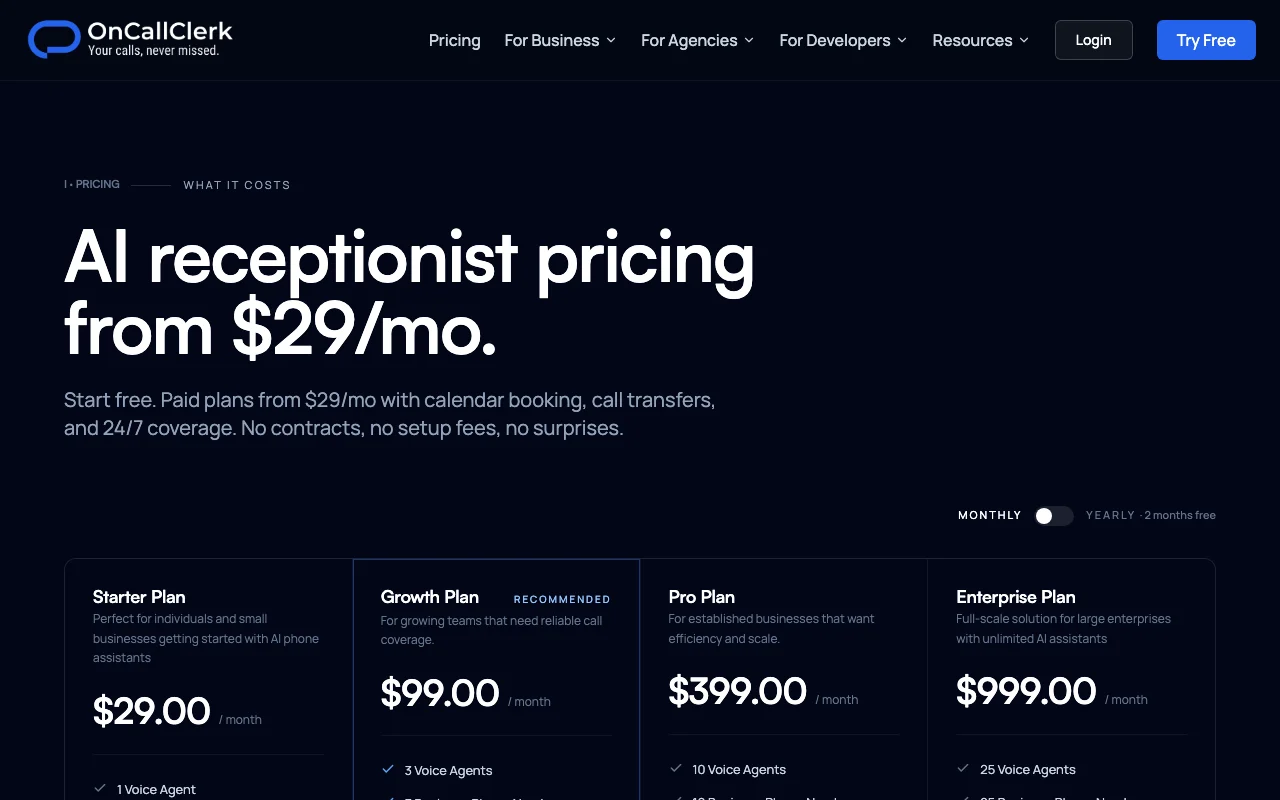
OnCallClerk pricing page with plans and prices — screenshot of the audio & voice AI tool, Oct 1, 2026
The official OnCallClerk pricing page as we saw it. oncallclerk.com, captured Oct 1, 2026

Free access and trial conditions

Starter plan described as free with no card

14-day free trial on all plans

Paid plans: what changes as you upgrade

Starter web

Free source (opens in a new tab)

Month

For: Trying OnCallClerk with no risk

Limits

  • Call limits not itemized

Includes

  • AI agent with a phone number

Entry paid plan web

$29/mo source (opens in a new tab)

Month

Yearly gives 2 months free; plan name and billing label not shown

For: Small businesses wanting booking

Limits

  • Per-plan call limit; overage at per-minute rate

Includes

  • Calendar booking
  • Call transfers
1 more
  • 24/7 coverage

Full-feature plans web

See official pricing source (opens in a new tab)

Month

For: Higher call volumes

Includes

  • Listed at $99 to $299 per month in comparison table

Usage caps, credits and extra costs

Overage calls billed per minute

Not stated

What is OnCallClerk, and how does it work?

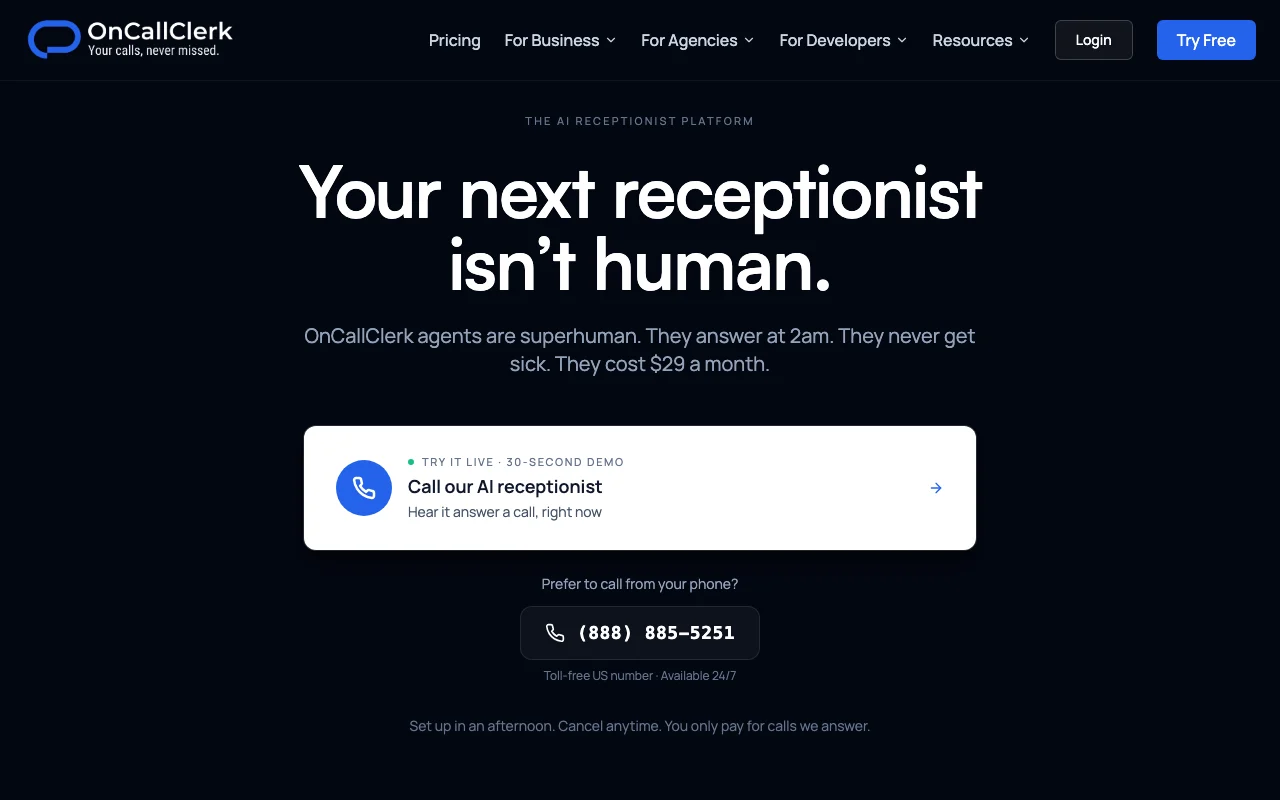
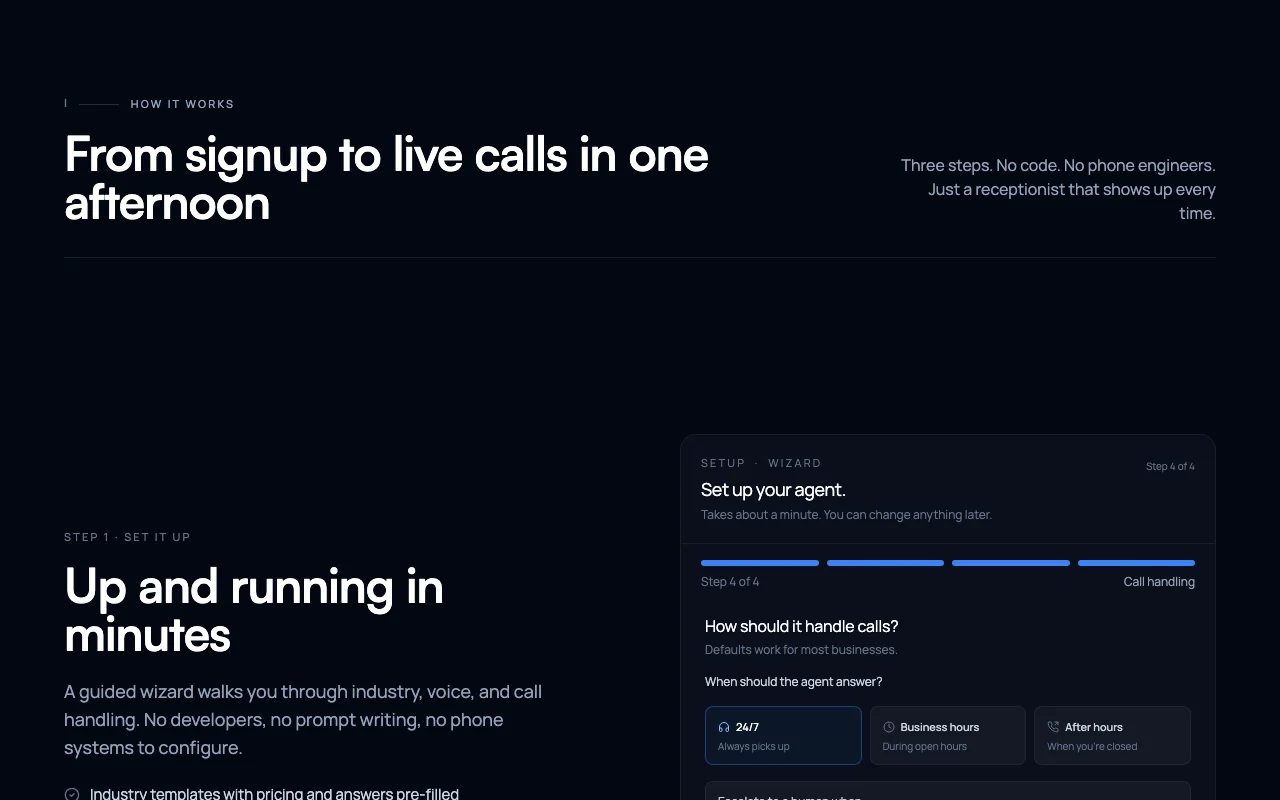
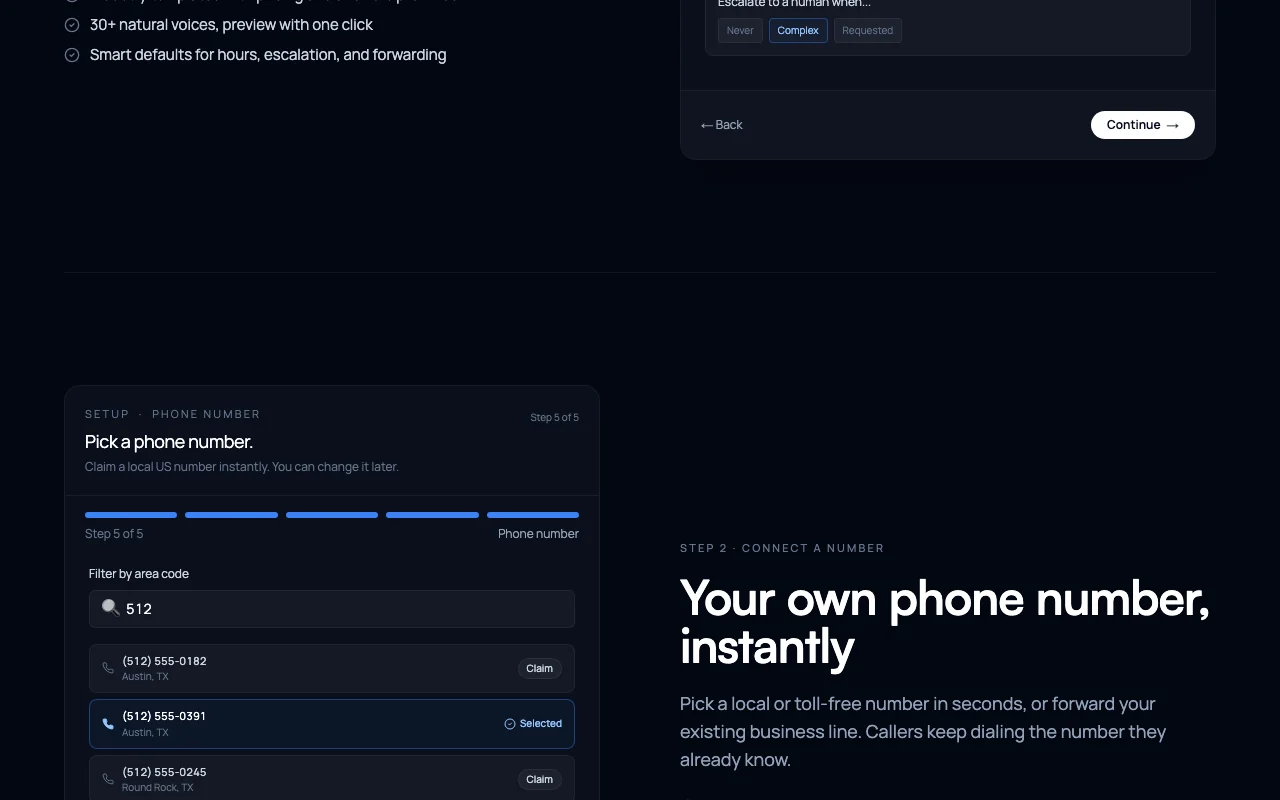
OnCallClerk provides AI phone agents for small businesses that answer calls, capture caller details, book appointments into a calendar and send transcripts and summaries. Setup is done through a guided wizard with industry templates and a choice of voices, and users get a local or toll-free US number or can forward an existing line.

OnCallClerk homepage — screenshot of the audio & voice AI tool, Oct 1, 2026
OnCallClerk's official site: how the product presents itself. oncallclerk.com, captured Oct 1, 2026

What you provide and what you get back

How OnCallClerk works: what you provide, where it runs and what you get backYOU PROVIDEYour inputBusiness details and industry tem…Calendar connectionExisting phone line for forwardingAUDIO & VOICEOnCallClerkWebfrom $29/mo (Entry paid plan)free tier availableaccount requiredchecked Sep 29, 2026YOU GET BACKThe resultAnswered calls with booked appoin…Call transcripts and summariesUrgent call alertsinput → OnCallClerk → output · from the vendor's own pages, no hands-on test unless stated
What you give OnCallClerk and what comes back, from its documentation

You provide

  • Business details and industry template
  • Calendar connection
  • Existing phone line for forwarding

You get back

  • Answered calls with booked appointments
  • Call transcripts and summaries
  • Urgent call alerts

Where you can use it

Platforms
Web
Account
Required
Voices
30+
Numbers
Local or toll-free US, or forward existing
Outputs
Transcripts, summaries, urgent alerts

What people use OnCallClerk for

Scenarios are worked out by our editors from the documentation; the actual result depends on your input and plan.

After-hours call answering

Who
Small service businesses
You provide
Incoming calls outside opening hours
Expected result
Callers handled and details captured
Plan needed
Starter free plan or paid
Limitation
Call limits per plan source (opens in a new tab)

Appointment booking

Who
Trades such as HVAC and plumbing
You provide
Caller availability and your calendar
Expected result
Appointment booked into the calendar
Plan needed
Entry plan from $29 includes calendar booking
Limitation
Setup of calendar required source (opens in a new tab)

Urgent call alerts

Who
Property managers and emergency trades
You provide
Emergency calls
Expected result
Instant alert to staff with call summary
Plan needed
Paid plans
Limitation
Transfer rules need configuring source (opens in a new tab)

OnCallClerk features and their limits

OnCallClerk homepage — screenshot of the audio & voice AI tool, Oct 1, 2026
Feature overview on the official site. oncallclerk.com, captured Oct 1, 2026

30+ voices

Lets you pick the voice and personality your AI receptionist uses Matches the brand tone

Access: All plansLimit: Choice among provided voices only source (opens in a new tab)

Industry templates

Starts the agent from pre-written scripts for trades and other industries Speeds setup

Access: All plansLimit: Changes can be made later source (opens in a new tab)

Local and toll-free numbers

Provides a US local or toll-free number or lets you forward your line Gets calls routed in minutes

Access: All plansLimit: US-focused numbers source (opens in a new tab)

Call transcripts and summaries

Records each call as text with a summary Gives a written record

Access: All plansLimit: Transcription included with no extra fee source (opens in a new tab)

Calendar booking and call transfers

Books appointments and transfers calls to a human Resolves calls without staff

Access: Included from the $29 entry planLimit: Beyond plan call limits overage rate applies source (opens in a new tab)

Pros, cons and deal-breakers

Reasons to choose OnCallClerk

Check before paying for OnCallClerk

How to use OnCallClerk for setting up an AI receptionist for incoming calls

Set up OnCallClerk

  1. Sign up at oncallclerk.com (no card needed)
  2. Run the guided wizard and pick an industry template
  3. Choose a voice and your business details
  4. Get a local or toll-free number or forward your existing line

Example: setting up an AI receptionist for incoming calls

  1. Connect your calendar
  2. Set transfer rules for urgent calls
  3. Call the new number to test it
  4. Review the transcript and summary afterwards

Review and export the result

  1. Read a call summary and compare it to the actual call
  2. Watch call counts against your plan limit

OnCallClerk API

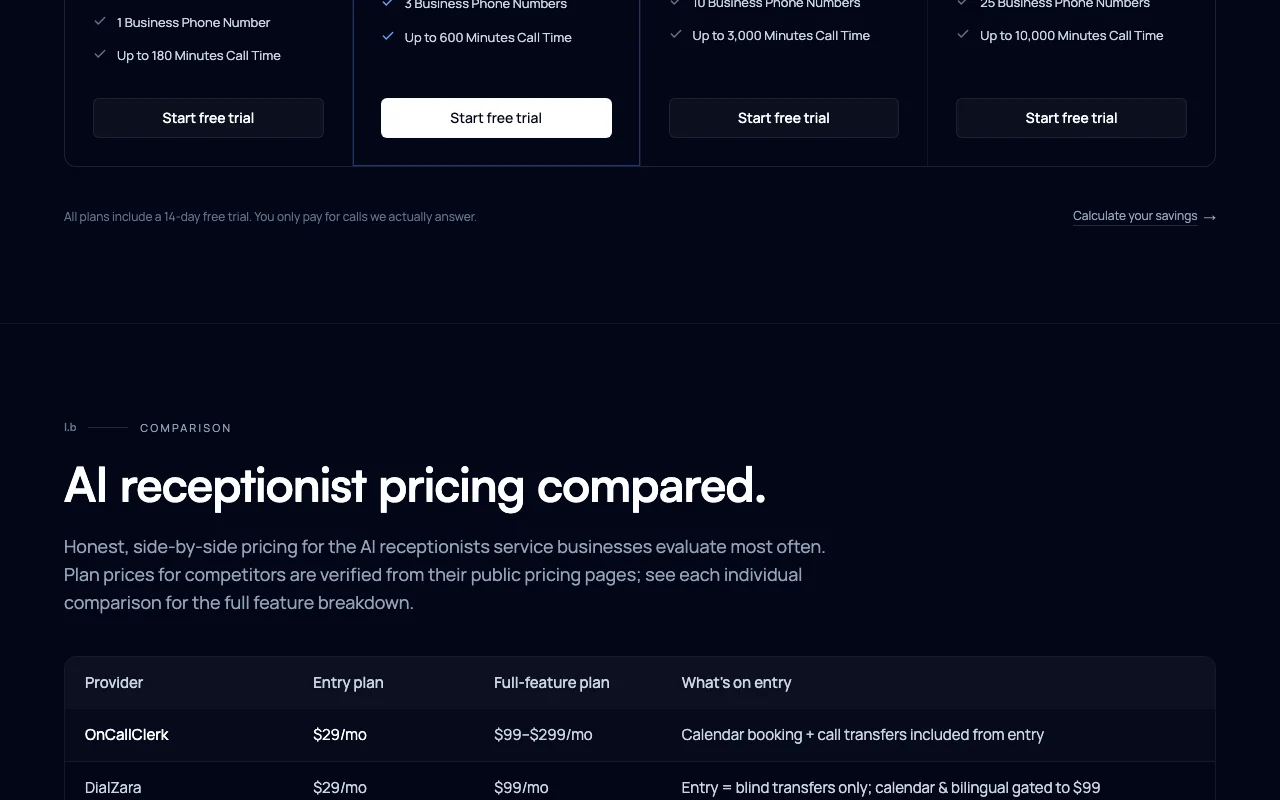
OnCallClerk pricing page with plans and prices — screenshot of the audio & voice AI tool, Oct 1, 2026
Plan comparison on the official pricing page. oncallclerk.com, captured Oct 1, 2026

API access and separate billing

OnCallClerk has no public API in its official documentation. No API described API documentation ↗

Privacy, data use and commercial rights

Summarized from the vendor's current policies; this is not legal advice and a vendor's badge is not an independent audit.

How your inputs and outputs are handled

Calls and transcripts are processed by AI models to generate responses

Model improvement uses only anonymized and aggregated data

Controls for business users

  • Acts as GDPR data processor

Policies: oncallclerk.com/privacy

Best OnCallClerk alternatives for different needs

"Better suited" is based on documented features and pricing, not on a head-to-head test.

ElevenLabs: better suited to

Alternatives
AlternativeWhen to choose itPricingLimitation
ElevenLabs——Compare

Explore OnCallClerk further

Tools and guides near OnCallClerk

OnCallClerk user reviews

No user reviews yet.

Used OnCallClerk? Be the first to share your experience.

Write a review

Reviews are checked by a moderator before they appear. Your email is never published. Plain text only.

Your rating (required)

Show what you made or what went wrong. Images are published only if the review is approved; location data is removed.

    OnCallClerk FAQ

    Is OnCallClerk free?

    The pricing FAQ says the starter plan is completely free with an AI agent and phone number; the page header also mentions a 14-day free trial on all plans. source (opens in a new tab)

    How much do paid plans cost?

    Paid plans start at $29 a month, and full-feature plans are listed at $99 to $299 a month. source (opens in a new tab)

    What happens if I exceed my call limit?

    You are notified near the limit and can upgrade, or overage calls are billed at a per-minute rate. source (opens in a new tab)

    Are there setup fees?

    No, phone numbers, AI processing and transcription are included in every plan. source (opens in a new tab)

    Does yearly billing save money?

    Yes, 20% compared with monthly billing. source (opens in a new tab)

    Sources and review methodology

    Official sources and verification dates

    Not verified: Per-plan call limits; Names of $99-$299 plans; Whether Starter is free or a trial; Supported countries.

    How we documented and maintain this page

    Every fact about OnCallClerk above comes from the 3 official pages listed here, last compared on Sep 29, 2026; we have not run OnCallClerk ourselves, so it has no editorial score. How we check and re-check pages.

    Article updated Oct 10, 2026; prices checked Sep 29, 2026. Outbound links to vendors are plain links; we do not earn commissions. How we review · Report an error