Productivity & writingDocumented overviewLast checked Sep 29, 2026

auxx.Ai: Pricing, Features & Best Use Cases

AI customer support platform whose agent Kopilot reads tickets, drafts replies and updates customer records in a built-in CRM.


Is auxx.Ai right for you?

Auxx suits small support teams that want an AI agent working inside their inbox and CRM, starting free and moving to $14 or $35 per month as volume grows. Based on the vendor's documentation, not on a hands-on test.

Best for: Small support teams

Also a good fit for

  • Ecommerce and service businesses with inbox-heavy operations

Consider another tool if free plan limited to 50 AI completions and 100 outbound emails per month

Or if

  • Free plan has 1 team member and 1 channel
  • API access only on Growth and above

auxx.Ai pricing and usage limits

Prices checked Sep 29, 2026 on the official US pricing page. Official pricing ↗ Prices and limits change often.

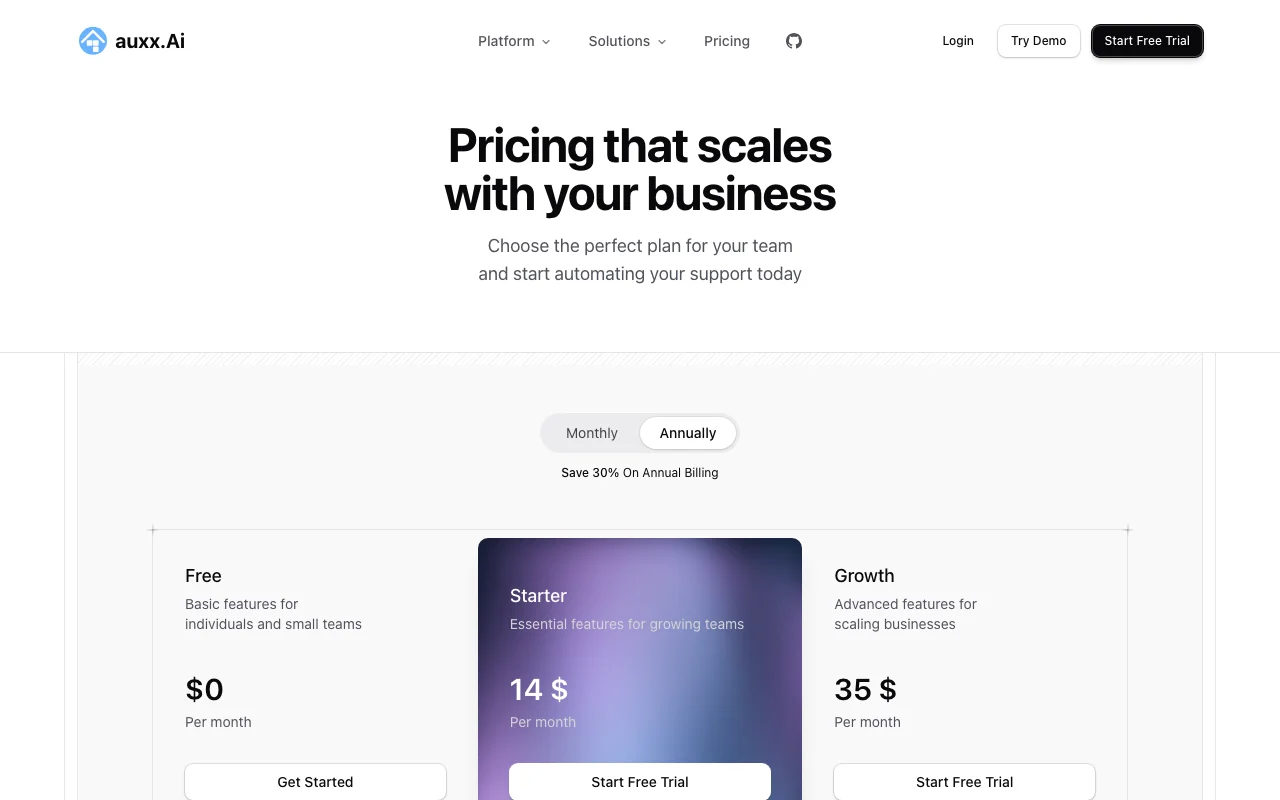
auxx.Ai pricing page with plans and prices — screenshot of the productivity & writing AI tool, Oct 1, 2026
The official auxx.Ai pricing page as we saw it. auxx.ai, captured Oct 1, 2026

Free access and trial conditions

Free plan at $0 per month.

14-day free trial on Starter and Growth.

Paid plans: what changes as you upgrade

Free web

Free source (opens in a new tab)

Month

For: Individuals and tiny teams

Limits

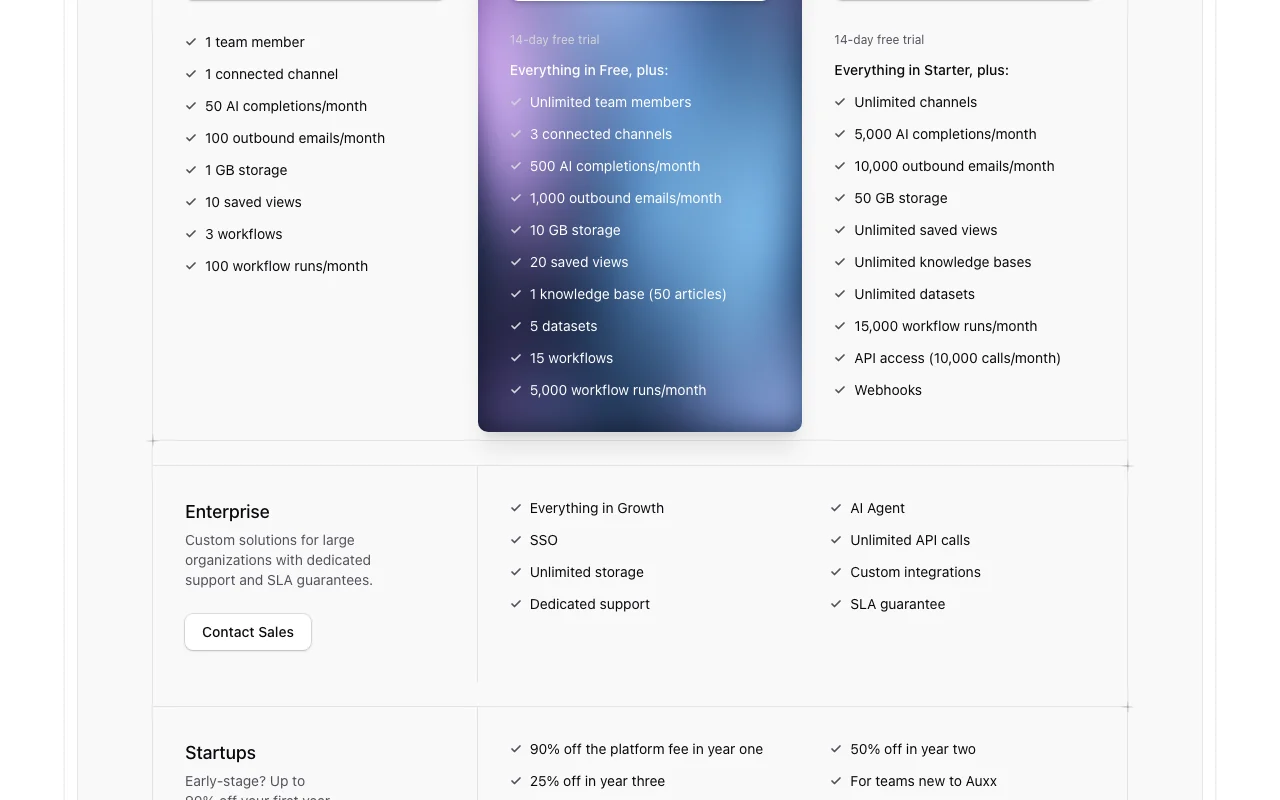
  • 1 team member, 1 channel
  • 50 AI completions, 100 outbound emails per month
1 more
  • 3 workflows, 100 runs per month

Includes

  • 1 GB storage
  • 10 saved views

No API

Starter web

$14/mo source (opens in a new tab)

Month

For: Growing support teams

Limits

  • 3 channels
  • 500 AI completions, 1,000 outbound emails per month
1 more
  • 15 workflows, 5,000 runs per month

Includes

  • Unlimited team members
  • 1 knowledge base (50 articles)
2 more
  • 5 datasets
  • 10 GB storage

No API

Growth web

$35/mo source (opens in a new tab)

Month

Annual billing saves 30% per the pricing toggle

For: Scaling businesses

Limits

  • Unlimited channels
  • 5,000 AI completions, 10,000 outbound emails per month
1 more
  • 15,000 workflow runs per month

Includes

  • API access (10,000 calls per month)
  • Webhooks
2 more
  • Unlimited knowledge bases and datasets
  • 50 GB storage

API included

Enterprise web

Custom pricing source (opens in a new tab)

Custom

For: Large organizations

Limits

  • Unlimited API calls and storage

Includes

  • AI Agent
  • SSO
2 more
  • Dedicated support and SLA
  • Custom integrations

API included

Usage caps, credits and extra costs

Not stated.

Not stated.

What is auxx.Ai, and how does it work?

auxx.Ai is a customer support platform that combines a shared inbox with a CRM. Its agent, Kopilot, reads incoming tickets, drafts replies and updates customer records, following step-by-step procedures written in plain language. Agents carry an allow-list of tools and can be started by schedules, record changes, webhooks, mentions or ticket assignment. Plans range from a free tier to paid Starter and Growth tiers, plus custom Enterprise.

auxx.Ai homepage — screenshot of the productivity & writing AI tool, Oct 1, 2026
auxx.Ai's official site: how the product presents itself. auxx.ai, captured Oct 1, 2026

What you provide and what you get back

How auxx.Ai works: what you provide, where it runs and what you get backYOU PROVIDEYour inputCustomer emails and tickets from…Knowledge base articles, PDFs, DO…Procedures written in plain langu…PRODUCTIVITY & WRITINGauxx.AiWeb, APIfrom $14/mo (Starter)free tier availableaccount requiredchecked Sep 29, 2026YOU GET BACKThe resultDrafted replies and tagged ticketsUpdated customer recordsWorkflow actions run on triggersinput → auxx.Ai → output · from the vendor's own pages, no hands-on test unless stated
What you give auxx.Ai and what comes back, from its documentation

You provide

  • Customer emails and tickets from connected channels
  • Knowledge base articles, PDFs, DOCX, HTML and CSV
  • Procedures written in plain language

You get back

  • Drafted replies and tagged tickets
  • Updated customer records
  • Workflow actions run on triggers

Where you can use it

Platforms
Web, API
Account
Required
Channels
1 / 3 / unlimited
AI completions per month
50 / 500 / 5,000
Outbound emails
100 / 1,000 / 10,000
Storage
1 / 10 / 50 GB
Knowledge formats
PDF, DOCX, HTML, CSV, JSON, Markdown

Best use cases for auxx.Ai

Scenarios are worked out by our editors from the documentation; the actual result depends on your input and plan.

Triage and reply to support tickets

Who
Support agents with a busy inbox
You provide
Open VIP tickets in the shared inbox
Expected result
Kopilot drafts replies and tags shipping-delay tickets
Plan needed
Starter or Free
Limitation
Free allows 50 AI completions per month source (opens in a new tab)

Handle refunds and returns with set playbooks

Who
Ecommerce support leads
You provide
Refund policy written as a procedure
Expected result
Agent follows steps and checks delivery date before promising money back
Plan needed
Starter or higher
Limitation
Agent can use only tools on its allow-list source (opens in a new tab)

Keep customer records updated automatically

Who
Account managers
You provide
Incoming tickets and orders
Expected result
Contacts, tickets and orders records updated automatically
Plan needed
Any plan
Limitation
Record limits and datasets scale with plan source (opens in a new tab)

Key features and their practical limits

auxx.Ai homepage — screenshot of the productivity & writing AI tool, Oct 1, 2026
Feature overview on the official site. auxx.ai, captured Oct 1, 2026

Kopilot AI agent for inbox and CRM

Reads tickets, drafts replies and updates CRM records from a chat prompt Cuts manual inbox triage

Access: All plans, 50 to 5,000 completions per monthLimit: Quota-limited by plan source (opens in a new tab)

Procedures as deterministic playbooks

Turns written playbooks into steps with tools, branches and an end point Keeps agent behavior predictable

Access: Procedures shown in the product demoLimit: AI Agent add-on is listed under Enterprise source (opens in a new tab)

Per-agent tool allow-lists

Limits each agent to named tools Prevents an agent from acting beyond its remit

Access: Set per agentLimit: Access is clamped to the publisher source (opens in a new tab)

Seven trigger types

Starts runs from a schedule, record change, webhook, @mention, ticket assignment or message Automates recurring support work

Access: Workflows 3 to unlimited by planLimit: Webhooks need Growth source (opens in a new tab)

auxx.Ai pros and cons

Reasons to choose auxx.Ai

Check before paying for auxx.Ai

How to use auxx.Ai for automating support ticket replies

Set up auxx.Ai

  1. Start on the Free plan or the 14-day trial from the pricing page
  2. Connect your support email as a channel
  3. Upload your refund and shipping policies to the knowledge base
  4. Write a procedure such as Refund requests in plain language

Example: automating support ticket replies

  1. Open Chats and ask Kopilot to reply to open VIP tickets
  2. Review the drafted replies
  3. Approve and send them
  4. Check that shipping-delay tickets were tagged

Review and export the result

  1. Compare each reply with the cited policy snippet
  2. Confirm the contact and ticket records updated
Example prompt suggested by our editors (not a recorded output of the product)
Reply to the open VIP tickets and tag anything about shipping delays.

auxx.Ai integrations and API

auxx.Ai pricing page with plans and prices — screenshot of the productivity & writing AI tool, Oct 1, 2026
Plan comparison on the official pricing page. auxx.ai, captured Oct 1, 2026

Native integrations and export formats

Export: CSV, JSON

API access and separate billing

auxx.Ai has no public API in its official documentation. Docs page returned 404.

Privacy, data use and commercial rights

Summarized from the vendor's current policies; this is not legal advice and a vendor's badge is not an independent audit.

How your inputs and outputs are handled

Tickets, emails and knowledge documents are processed to draft replies and update records.

Commercial use and plan restrictions

SSO only on Enterprise

Controls for business users

  • Per-agent tool allow-lists
  • Access clamped to publisher

Other tools to consider instead of auxx.Ai

"Better suited" is based on documented features and pricing, not on a head-to-head test.

Zapier: better suited to

Make: better suited to

ChatGPT: better suited to

Alternatives
AlternativeWhen to choose itPricingLimitation
Zapier——Compare
Make——Compare
ChatGPT——

Explore auxx.Ai further

Related to auxx.Ai

auxx.Ai user reviews

No user reviews yet.

Used auxx.Ai? Be the first to share your experience.

Write a review

Reviews are checked by a moderator before they appear. Your email is never published. Plain text only.

Your rating (required)

Show what you made or what went wrong. Images are published only if the review is approved; location data is removed.

    auxx.Ai FAQ

    How much does Auxx cost?

    Free is $0, Starter $14 and Growth $35 per month; Enterprise is custom. Annual billing saves 30% according to the pricing toggle. source (opens in a new tab)

    Is there a free trial?

    Yes, Starter and Growth include a 14-day free trial, and a Free plan exists. source (opens in a new tab)

    What limits does the Free plan have?

    One team member, one channel, 50 AI completions and 100 outbound emails per month, 3 workflows and 1 GB storage. source (opens in a new tab)

    Which plan includes API access?

    Growth includes API access with 10,000 calls per month and webhooks; Enterprise has unlimited calls. source (opens in a new tab)

    Is there a startup discount?

    Yes: 90% off the platform fee in year one, 50% in year two and 25% in year three for teams under 15 employees that raised up to $10M. source (opens in a new tab)

    Sources and review methodology

    Official sources and verification dates

    Not verified: privacy terms; docs URL; mobile apps; models used beyond demo.

    How we documented and maintain this page

    Every fact about auxx.Ai above comes from the 2 official pages listed here, last compared on Sep 29, 2026; we have not run auxx.Ai ourselves, so it has no editorial score. How we check and re-check pages.

    Article updated Oct 10, 2026; prices checked Sep 29, 2026. Outbound links to vendors are plain links; we do not earn commissions. How we review · Report an error