Our take: Choose Sketchflow if you want to go from product idea to flows, designs and exportable code in one tool, noting credit limits and unreadable prices.
Main limitation: Generation is limited by credits, and the prices for Plus and Pro could not be read from the official pages.
By the AI Tool Atlas editors.
Based on the vendor's official documentation; we have not tested this product hands-on. What “documented overview” means
Is Sketchflow right for you?
Choose Sketchflow if you want to go from product idea to flows, designs and exportable code in one tool, noting credit limits and unreadable prices. Based on the vendor's documentation, not on a hands-on test.
Best for: Founders prototyping an MVP
Also a good fit for
Non-developers building apps from prompts
Consider another tool if generation is credit-limited
Or if
Pricing page not readable without JavaScript
Site content is client-rendered with little static documentation
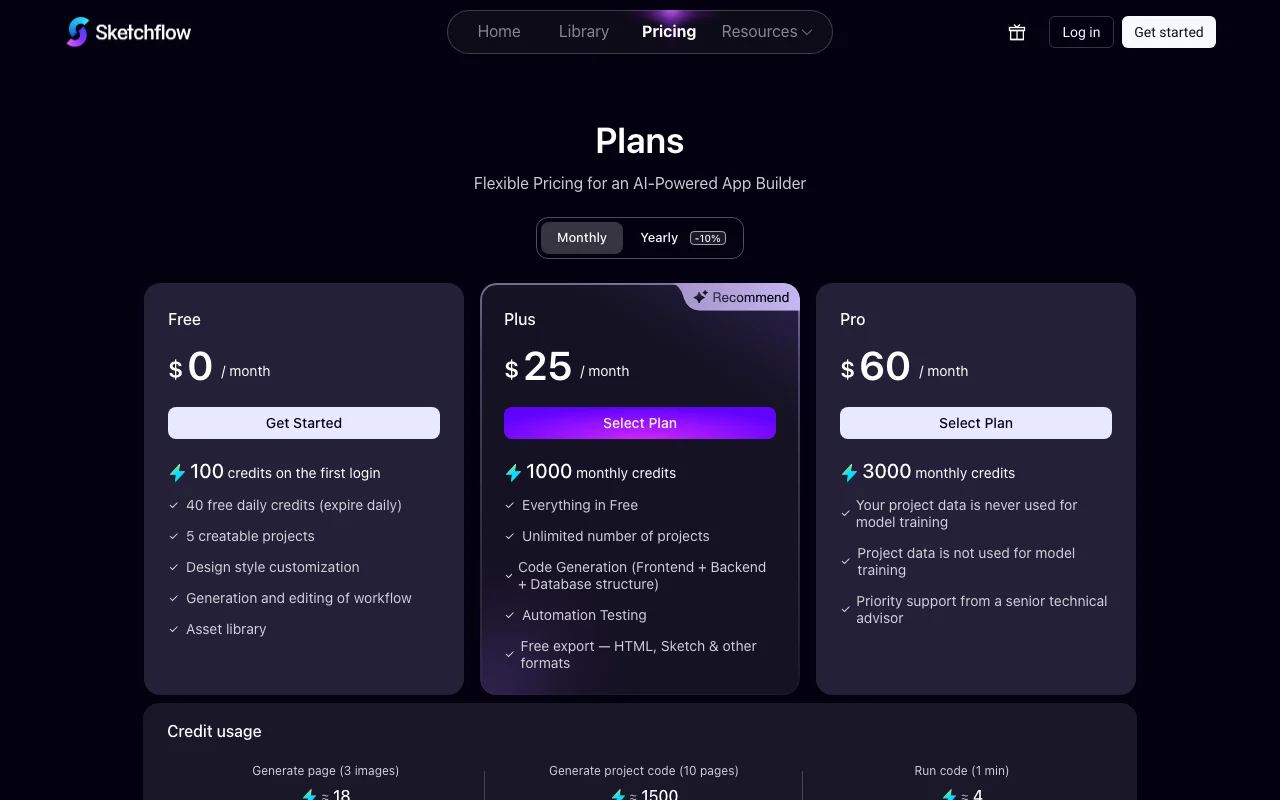
Sketchflow pricing and usage limits
Prices checked Oct 4, 2026 on the official US pricing page. Official pricing ↗ Prices and limits change often.
The official Sketchflow pricing page as we saw it. sketchflow.ai, captured Oct 2, 2026
Sketchflow.ai describes itself as a full-stack AI app builder that helps users design, build and launch functional applications using visual tools and natural language prompts. Its Plan Mode is used to visualize and edit product UX, while an AI Assistant handles design, code generation and external service configuration.
The site says users keep ownership of their full-stack code and can export projects in multiple formats. A template library covers web, mobile, tablet and desktop designs, and AI generation runs on credits across Free, Plus and Pro tiers.
What you provide and what you get back
What you give Sketchflow and what comes back, from its documentation
You provide
Prompts
Product ideas
You get back
UX flows, designs and code
Exported projects
Where you can use it
Account
Required
Targets
Web, mobile, tablet, desktop
Modes
Plan Mode, Assistant
Tiers
Free, Plus, Pro
Export
Multiple formats
Best use cases for Sketchflow
Scenarios are worked out by our editors from the documentation; the actual result depends on your input and plan.
Turning a product idea into a full-stack app
Who
Founders
You provide
Idea
Expected result
Sketchflow produces a full-stack app from the idea, with code that the founder owns and can export.
Lets you lay out screens and flows. Founders and designers can lay out screens and user flows visually before any code is generated.
Access: Not statedLimit: The pages we could read give no detail on limits for Plan Mode.source (opens in a new tab)
AI Assistant for design and code generation
Builds screens and code. Non-developers can describe an app in words and receive screens and code instead of writing them.
Access: FreeLimit: Generation uses credits, and the allowance per plan could not be read.source (opens in a new tab)
Precision Editor for editing pages and elements
Edits elements. Designers can adjust individual pages and elements by hand after generation instead of regenerating everything.
Access: Not statedLimit: The pages we could read give little detail on what the editor can change.source (opens in a new tab)
Template library (web, mobile, tablet, desktop)
Starter layouts. Users can begin from an existing layout for their device type, which saves time on common screens.
Access: Not statedLimit: The number and range of templates are not stated in the pages we could read.source (opens in a new tab)
Pros, cons and deal-breakers
Reasons to choose Sketchflow
Covers planning, design, code and deployment in one tool Planning, design, code and deployment are in one tool, so a founder does not need to move work between separate products.documentedsource (opens in a new tab)
Users retain ownership of generated code You keep ownership of the generated full-stack code, so you can export the project and continue working outside Sketchflow.documentedsource (opens in a new tab)
Free tier available A free tier exists, so you can try generating an app before deciding whether to pay for Plus or Pro.documentedsource (opens in a new tab)
Template library to start from A template library for web, mobile, tablet and desktop gives you a starting layout instead of a blank screen.documentedsource (opens in a new tab)
Check before paying for Sketchflow
Generation is credit-limited Generation runs on credits, so a large or frequently revised app can use up the allowance of the plan.documentedsource (opens in a new tab)
Pricing page not readable without JavaScript The pricing page cannot be read without JavaScript, so the cost of Plus and Pro is unknown before you sign up.documentedsource (opens in a new tab)
Site content is client-rendered with little static documentation The site is rendered on the client and has little static documentation, so features are hard to check before trying them.documentedsource (opens in a new tab)
How to use Sketchflow for building an app with AI
Set up Sketchflow
Open sketchflow.ai and sign up.
Create a project.
Open Plan Mode.
Example: building an app with AI
Describe the app.
Review flows.
Generate screens.
Review and export the result
Test screens.
Export code.
Example prompt suggested by our editors (not a recorded output of the product)
A booking app for yoga studios with schedule, payments and profiles.
Privacy, data use and commercial rights
Summarized from the vendor's current policies; this is not legal advice and a vendor's badge is not an independent audit.
How your inputs and outputs are handled
Prompts and projects
Not stated
Not stated
Commercial use and plan restrictions
Users keep ownership of code per site
Not stated
Other tools to consider instead of Sketchflow
"Better suited" is based on documented features and pricing, not on a head-to-head test.
Not verified: Prices; Privacy; Official pages could not be read as text (client-rendered or empty fetch); facts come from the verified seed research.
How we documented and maintain this page
Every fact about Sketchflow above comes from the 2 official pages listed here, last compared on Oct 4, 2026; we have not run Sketchflow ourselves, so it has no editorial score. How we check and re-check pages.
Article updated Oct 10, 2026; prices checked Oct 4, 2026. Outbound links to vendors are plain links; we do not earn commissions. How we review · Report an error