CodingDocumented overviewLast checked Oct 1, 2026

Isle: Pricing, Features & Best Use Cases

Managed desktop application environments (e.g. KiCad, FreeCAD) for computer-use AI agents, with monitoring and checkpoints.

Is Isle right for you?

Isle provides managed, application-aware desktop environments for AI agents, ideal for teams automating engineering software like KiCad or FreeCAD with built-in health monitoring and checkpoint recovery. Based on the vendor's documentation, not on a hands-on test.

Best for: AI agent developers

Also a good fit for

  • Teams automating engineering desktop software

Consider another tool if file uploads/downloads limited to 4 MiB each

Or if

  • Recordings capped at 512 MiB or six hours
  • Requires an API key and account

Isle pricing and usage limits

Prices checked Oct 1, 2026 on the official US pricing page. Official pricing ↗ Prices and limits change often.

Free access and trial conditions

Free plan includes 5 environment-hours per month

Paid plans: what changes as you upgrade

Free self-serve

Free source (opens in a new tab)

Month

For: Evaluation and light development

Limits

  • 5 environment-hours per month
  • 30 minute session runtime maximum
1 more
  • 1 concurrent environment

Includes

  • KiCad and FreeCAD support
  • Python SDK access
1 more
  • Artifact checkpoints

API included

Developer self-serve

$29/mo source (opens in a new tab)

Month

For: Active development and production use

Limits

  • 100 environment-hours per month
  • No per-session runtime cap
1 more
  • 5 concurrent environments

Includes

  • KiCad and FreeCAD support
  • Priority support
2 more
  • Python SDK access
  • Persistent Python execution

API included

Enterprise sales

Custom pricing source (opens in a new tab)

Month

Contact sales for pricing

For: Large-scale production deployments

Limits

  • Unlimited environment-hours
  • Unlimited concurrency
1 more
  • Custom application environments

Includes

  • Custom application environments
  • Dedicated support
1 more
  • SLA and uptime guarantees

API included

Usage caps, credits and extra costs

Overage not mentioned in public pricing

What is Isle, and how does it work?

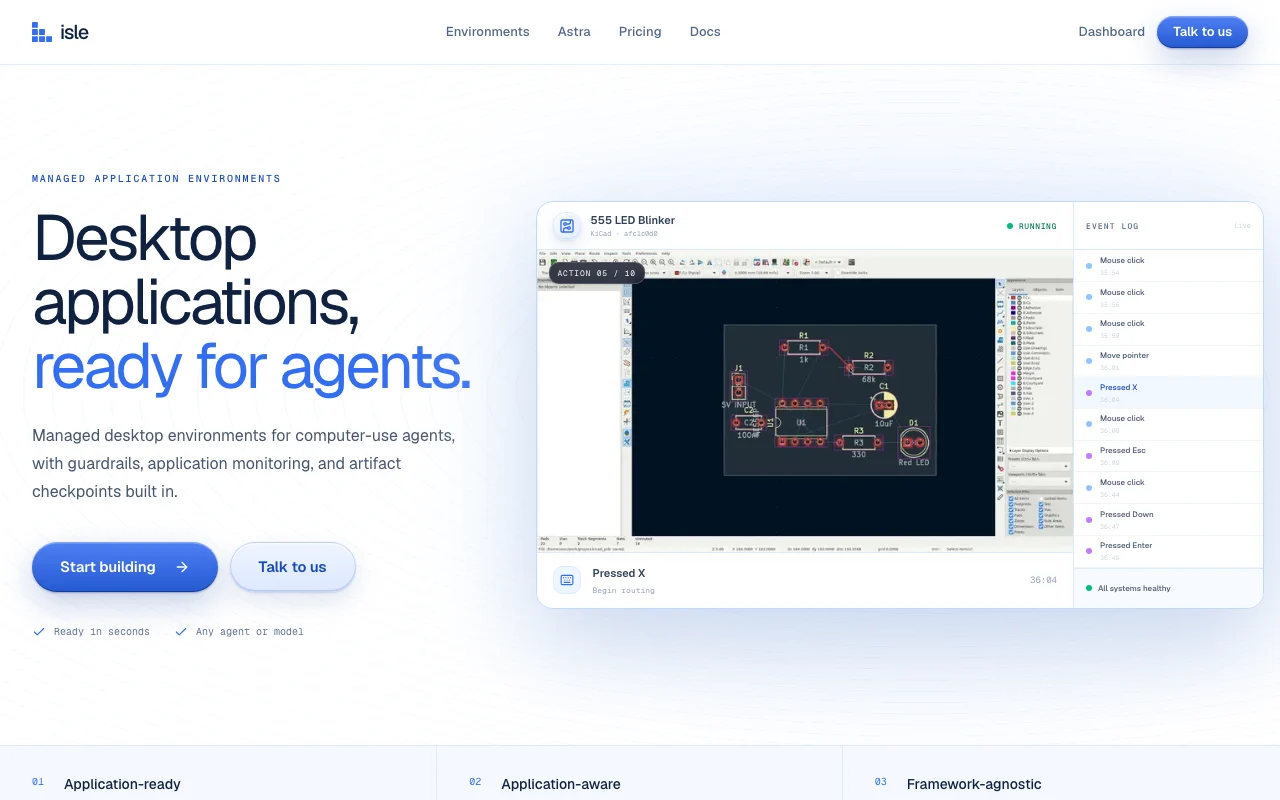
Isle provides managed desktop environments where the target application is already installed and open, so computer-use agents can operate it. It monitors application health, contains the agent within the workflow and supports artifact checkpoints. Developers create sandboxes through a Python SDK or REST API, control them with screenshot, mouse, keyboard and file-transfer primitives, and can stop and resume environments with state preserved.

Isle homepage — screenshot of the coding AI tool, Oct 1, 2026
Isle's official site: how the product presents itself. tryisle.com, captured Oct 1, 2026

What you provide and what you get back

How Isle works: what you provide, where it runs and what you get backYOU PROVIDEYour inputAgent instructions and models via…File uploads (max 4 MiB per uploa…Keyboard and mouse commandsPython code for persistent execut…CODINGIsleAPIfrom $29/mo (Developer)free tier availableaccount requiredchecked Oct 1, 2026YOU GET BACKThe resultScreenshots and observations of t…Recordings (max 512 MiB or 6 hour…File downloads (max 4 MiB per dow…Execution results and Python outp…input → Isle → output · from the vendor's own pages, no hands-on test unless stated
What you give Isle and what comes back, from its documentation

You provide

  • Agent instructions and models via SDK or REST API
  • File uploads (max 4 MiB per upload)
  • Keyboard and mouse commands
  • Python code for persistent execution

You get back

  • Screenshots and observations of the desktop
  • Recordings (max 512 MiB or 6 hours)
  • File downloads (max 4 MiB per download)
  • Execution results and Python output

Where you can use it

Platforms
API
Account
Required
KiCad (schematic capture, PCB layout, Gerber/BOM export)
FreeCAD (parametric modeling, STEP/IGES/STL/native export)
Python 3.9+; requires isle-sdk>=0.2.0 for persistent execution
4 MiB per upload/download
512 MiB maximum or 6 hours per session
Billing automatically pauses when a sandbox is stopped

What people use Isle for

Scenarios are worked out by our editors from the documentation; the actual result depends on your input and plan.

Running computer-use agents on CAD/EDA software

Who
AI developers and engineers
You provide
KiCad or FreeCAD environment with agent instructions
Expected result
Automated PCB design, schematic capture, or 3D modeling
Plan needed
Start free (5 env-hours/month) or Developer ($29/month for 100 env-hours)
Limitation
Individual file transfers limited to 4 MiB source (opens in a new tab)

Automating KiCad or FreeCAD tasks with AI agents

Who
Electronics and mechanical design teams
You provide
Project files and design specifications
Expected result
Completed PCB layouts, schematics, or mechanical designs
Plan needed
Developer plan ($29/month) recommended for production use
Limitation
Runtime capped at 30 minutes per session on Free plan source (opens in a new tab)

Checkpointing agent progress on long desktop tasks

Who
Development teams needing fault recovery
You provide
Agent state and intermediate designs
Expected result
Safe restore points for complex, multi-step automation
Plan needed
All plans include artifact checkpoints
Limitation
Recording limited to 512 MiB or 6 hours per session source (opens in a new tab)

Key features and their practical limits

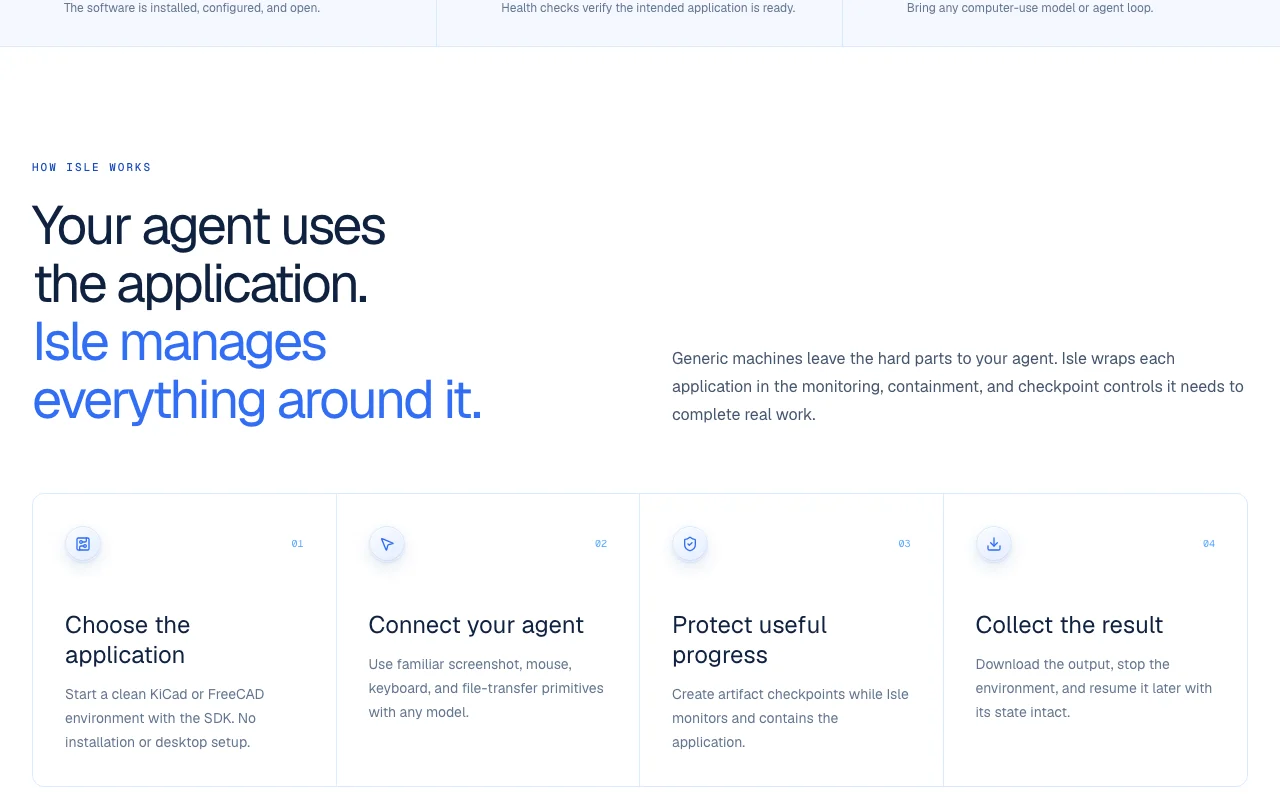
Isle homepage — screenshot of the coding AI tool, Oct 1, 2026
Feature overview on the official site. tryisle.com, captured Oct 1, 2026

Preinstalled application environments (KiCad, FreeCAD)

Provides ready-to-use KiCad and FreeCAD installations in managed sandboxes Eliminates setup time and configuration complexity for agents

Access: Automatically available when creating a sandboxLimit: Limited to KiCad and FreeCAD; other applications available on Enterprise plan source (opens in a new tab)

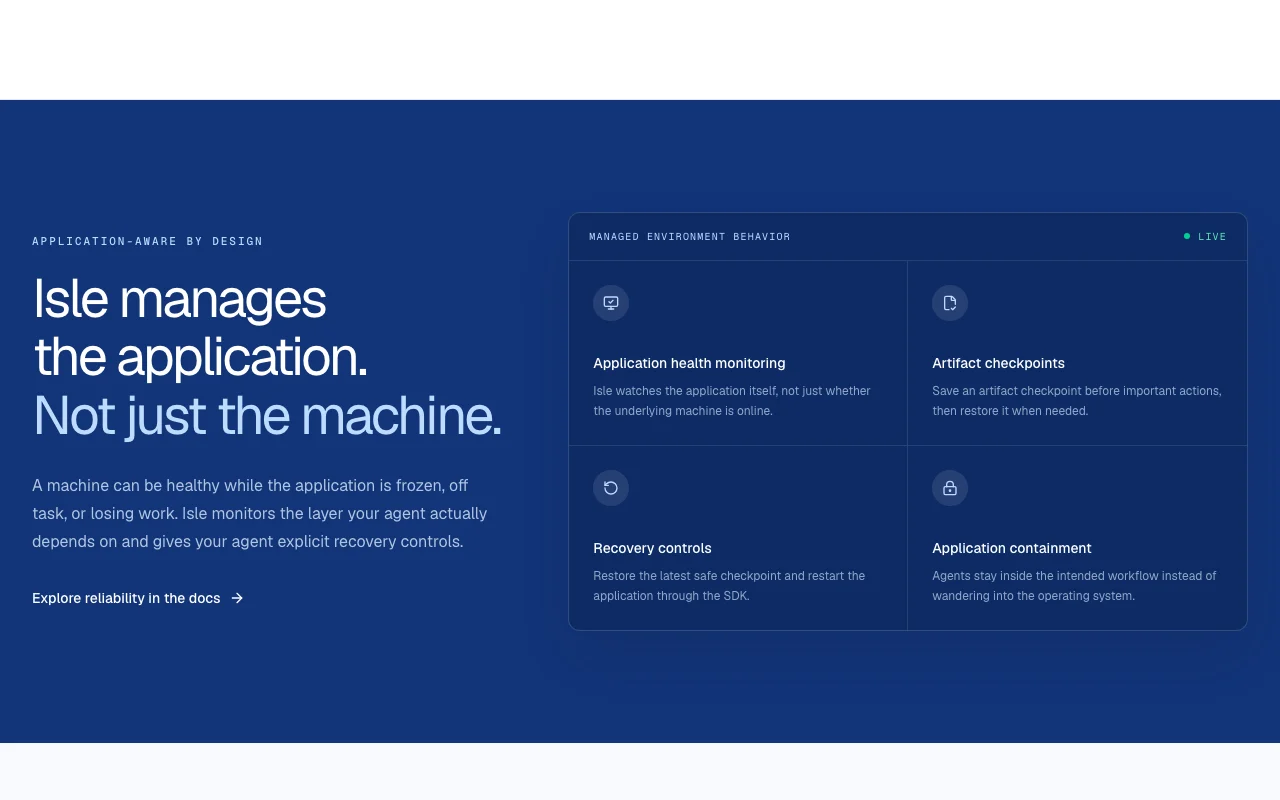
Application health monitoring

Continuously monitors the state of KiCad or FreeCAD Ensures the application is running and ready before agent actions

Access: Automatic; check capabilities() APILimit: Monitoring is application-specific, not OS-level source (opens in a new tab)

Artifact checkpoints and restore

Creates and restores snapshots of application state Allows recovery from agent errors or incomplete actions

Access: Through SDK and REST APILimit: Checkpoint storage counts toward environment limits source (opens in a new tab)

Python SDK and REST API

Provides multiple integration options for agent control Supports any agent loop or model via consistent primitives

Access: SDK via pip, REST API documented in quickstartLimit: Python 3.9+ required for SDK source (opens in a new tab)

Isle pros and cons

Reasons to choose Isle

  • Works with any computer-use model or agent loop Framework-agnostic design integrates with Claude, GPT, or custom agents documented source (opens in a new tab)
  • Python SDK and REST API documented Multiple integration paths with clear examples and quickstart guide documented source (opens in a new tab)
  • Billing pauses when a sandbox is stopped Cost-effective for intermittent workloads documented source (opens in a new tab)
  • Artifact checkpoints can be saved before important actions and restored, with recovery controls to restart the application An agent that crashes or loses work in KiCad can resume from the last safe state. documented source (opens in a new tab)
  • KiCad and FreeCAD environments produce KiCad-native, Gerber, BOM, STEP, IGES and STL files Agent output can be handed straight to PCB fabrication or CAD workflows. documented source (opens in a new tab)

Check before paying for Isle

  • File uploads/downloads limited to 4 MiB each Large datasets or binaries require workarounds or direct S3 integration documented source (opens in a new tab)
  • Recordings capped at 512 MiB or six hours Long-running sessions lose recording history if limit exceeded documented source (opens in a new tab)
  • Requires an API key and account Authentication overhead; cannot use without registration documented source (opens in a new tab)
  • Limited set of supported applications listed Requires Enterprise plan for custom applications documented source (opens in a new tab)
  • The /pricing page returned HTTP 404 when checked Cost per sandbox hour cannot be compared before signing up. documented source (opens in a new tab)

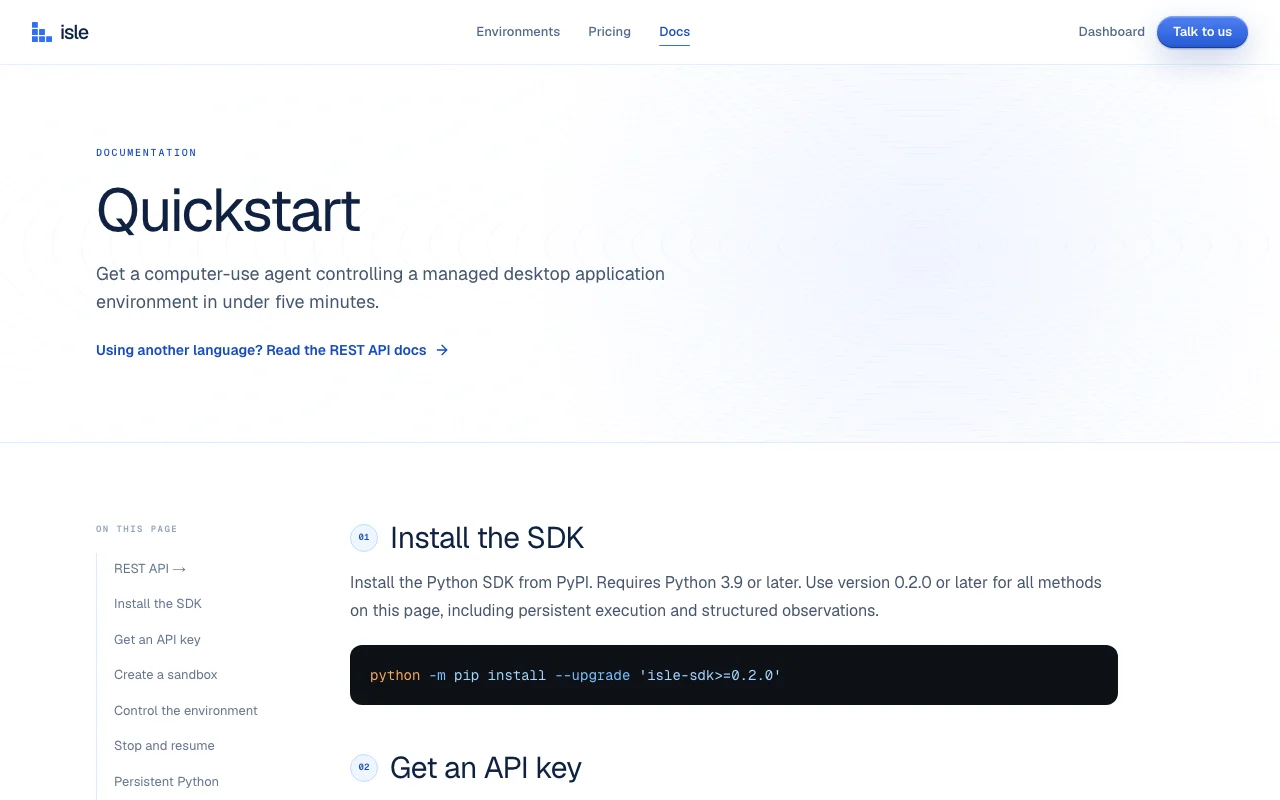
How to use Isle for setting up an AI agent to control KiCad or FreeCAD via Isle

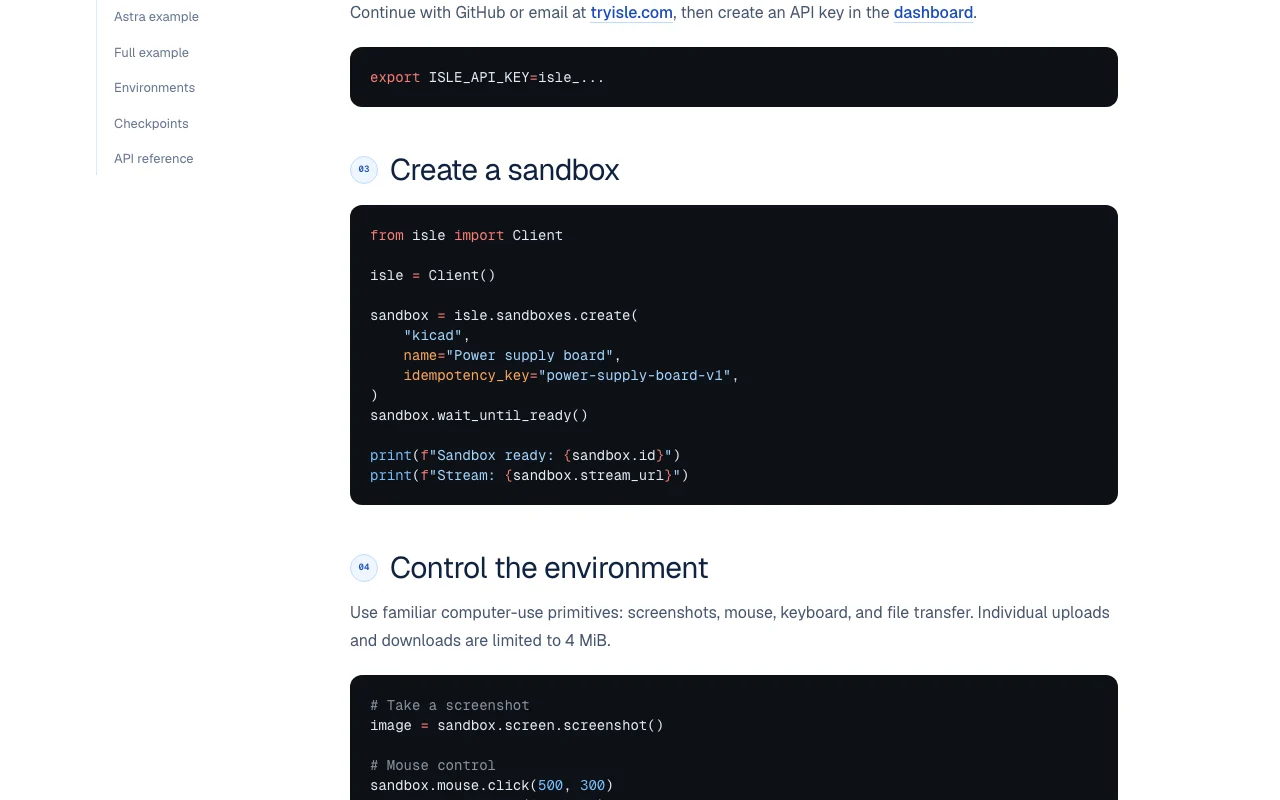
Isle documentation — screenshot of the coding AI tool, Oct 1, 2026
Isle documentation: where the steps below come from. tryisle.com, captured Oct 1, 2026

Set up Isle

  1. Install Python SDK with: python -m pip install --upgrade 'isle-sdk>=0.2.0'
  2. Create an account at tryisle.com and generate an API key in the dashboard
  3. Set environment variable: export ISLE_API_KEY=isle_... (your key from step 2)
  4. Initialize Isle client and create a sandbox

Example: setting up an AI agent to control KiCad or FreeCAD via Isle

  1. Create a sandbox: sandbox = isle.sandboxes.create('kicad', name='Power supply board')
  2. Wait for readiness: sandbox.wait_until_ready()
  3. Connect your agent to control the desktop via screenshot(), mouse.click(), keyboard.type(), and file transfer methods

Review and export the result

  1. Verify capabilities with: sandbox.capabilities() (should show execution available)
  2. Test a simple action: sandbox.mouse.click(500, 300) and take a screenshot to confirm state
Example prompt suggested by our editors (not a recorded output of the product)
Design a simple breadboard circuit with a 100nF capacitor in KiCad by placing and connecting components

Isle integrations and API

Isle documentation — screenshot of the coding AI tool, Oct 1, 2026
Isle documentation (continued). tryisle.com, captured Oct 1, 2026

Native integrations and export formats

Export: Gerber (electronics), STEP, IGES, STL (mechanical), Native KiCad and FreeCAD files

API access and separate billing

Isle has no public API in its official documentation. REST API available for non-Python integrations API documentation ↗

Privacy, data use and commercial rights

Summarized from the vendor's current policies; this is not legal advice and a vendor's badge is not an independent audit.

How your inputs and outputs are handled

Screenshots, file uploads, keyboard/mouse actions sent to Isle servers

Commercial use and plan restrictions

Allowed for API users; own IP retained

Controls for business users

  • API key-based authentication
  • Sandbox isolation per session

Best Isle alternatives for different needs

"Better suited" is based on documented features and pricing, not on a head-to-head test.

Replit: better suited to general-purpose web and desktop app hosting

Cursor: better suited to aI-powered code editor

Alternatives
AlternativeWhen to choose itPricingLimitation
ReplitNeed browser-based IDE and broader app supportFree and paid plans availableNot specifically optimized for computer-use agentsCompare
CursorFocus is on coding assistance rather than desktop automationFree and Pro availableLimited to code editing; not a desktop environment managerCompare

Explore Isle further

Related to Isle

Isle user reviews

No user reviews yet.

Used Isle? Be the first to share your experience.

Write a review

Reviews are checked by a moderator before they appear. Your email is never published. Plain text only.

Your rating (required)

Show what you made or what went wrong. Images are published only if the review is approved; location data is removed.

    Isle FAQ

    What models does Isle work with?

    Isle is framework-agnostic and works with any computer-use model or agent loop, including Claude (via computer-use), GPT-6 Astra, and custom agents. You bring the model, Isle manages the desktop. source (opens in a new tab)

    Can I use custom applications beyond KiCad and FreeCAD?

    Custom application environments are available on the Enterprise plan. Contact sales at tryisle.com for a demo and custom configuration. source (opens in a new tab)

    What is the file upload/download limit?

    Individual uploads and downloads are limited to 4 MiB each. This covers most designs but large binaries may require workarounds. source (opens in a new tab)

    What happens to my sandbox when I stop it?

    When you stop a sandbox, billing pauses and files persist. You can resume it later with its state intact using sandbox.resume(), or permanently delete it with sandbox.destroy(). source (opens in a new tab)

    Does Isle include persistent Python execution?

    Yes, new environments with Isle SDK 0.2.0+ support persistent Python on the desktop. Variables and imports persist between cells, allowing complex automation sequences. source (opens in a new tab)

    Recent changes that affect your choice

    :

    Sources and review methodology

    Official sources and verification dates

    Not verified: Privacy policy (404 error); Trial period details; Overage charges for exceeding plan limits; Payment methods accepted.

    How we documented and maintain this page

    Every fact about Isle above comes from the 2 official pages listed here, last compared on Oct 1, 2026; we have not run Isle ourselves, so it has no editorial score. How we check and re-check pages.

    Article updated Oct 10, 2026; prices checked Oct 1, 2026. Outbound links to vendors are plain links; we do not earn commissions. How we review · Report an error