
All-Access (monthly) web
$29/mo source (opens in a new tab)
Month
For: Teams starting short term
Limits
- Per host
- Guests join free
Includes
- Every workspace feature
- Echo AI included

Productivity & writingDocumented overviewLast checked Sep 29, 2026
Video calls with a shared canvas and an AI agent named Echo that produces recaps and action plans.
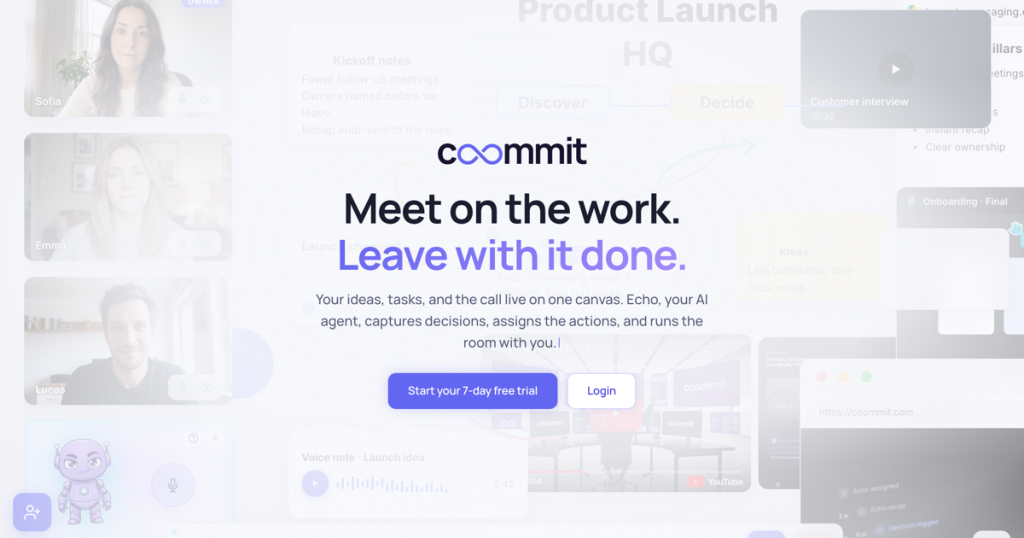
Our take: Coommit suits small teams and client-facing groups that want video calls on a shared canvas with an AI agent for recaps and tasks, billed per host.
Main limitation: There is no permanent free plan beyond a 7-day trial and the monthly price is $29 per host.
Coommit suits small teams and client-facing groups that want video calls on a shared canvas with an AI agent for recaps and tasks, billed per host. Based on the vendor's documentation, not on a hands-on test.
Also a good fit for
Or if
Prices checked Sep 29, 2026 on the official US pricing page. Official pricing ↗ Prices and limits change often.
No permanent free plan; guests join free.
7-day free trial, no card required.
$29/mo source (opens in a new tab)
Month
For: Teams starting short term
Limits
Includes
$23/mo source (opens in a new tab)
Month, annual commitment
Billed $276 per year
For: Regular users
Limits
Includes
$19 source (opens in a new tab)
2 years, annual commitment
Billed $456 every 2 years
For: Long-term users
Limits
Includes
Custom pricing source (opens in a new tab)
Month
For: Companies with custom needs
Includes
Guests need no account or download.
All prices in USD; taxes not stated.
Coommit combines video calls with a shared canvas where ideas, tasks and the call live together. Its built-in AI agent Echo runs the room with you: it recaps calls, turns discussion into suggested tasks and builds action plans. Rooms are persistent, so the canvas and its history stay available after the call, and PDFs, video and Figma files can be placed on the canvas. Hosts pay per seat on one all-access plan; guests join from a link with no account and no download. A REST API and MCP tools let software or AI agents build a live board in one call.
You provide
You get back
Scenarios are worked out by our editors from the documentation; the actual result depends on your input and plan.
Runs live calls inside the same room as the canvas. Keeps conversation and work together.
Provides a canvas where ideas and tasks live next to the call. Avoids switching apps.
Keeps rooms and history so you can return after the call. Continues work without rebuilding context.
Places PDFs, video and Figma files on the canvas. Lets people review in context.
Echo, recap this call and list the next steps
Export: PDF, Video
An API is available, billing not documented. A REST API with 64 endpoints and MCP tools is described on the developers page.
Summarized from the vendor's current policies; this is not legal advice and a vendor's badge is not an independent audit.
Encrypted connections; you control access, choose the connected AI provider and keep ownership of content.
Users keep ownership of their content.
"Better suited" is based on documented features and pricing, not on a head-to-head test.
No user reviews yet.
Used Coommit? Be the first to share your experience.
$29 per month, $276 per year or $456 per two years, in USD. source (opens in a new tab)
7 days, with no card required. source (opens in a new tab)
No, guests join from a link with no account and no download, at no extra cost. source (opens in a new tab)
Yes, the developers page lists 64 REST endpoints and MCP tools. source (opens in a new tab)
Not verified: Call participant limits; Recording and retention; Detailed privacy policy.
Every fact about Coommit above comes from the 3 official pages listed here, last compared on Sep 29, 2026; we have not run Coommit ourselves, so it has no editorial score. How we check and re-check pages.
Article updated Oct 10, 2026; prices checked Sep 29, 2026. Outbound links to vendors are plain links; we do not earn commissions. How we review · Report an error
compare>