Audio & voiceDocumented overviewLast checked Oct 2, 2026

DittoDub: Pricing, Features & Best Use Cases

AI dubbing service for YouTube creators with a dubbing editor, sync extension and metadata and thumbnail translation.

Who should use DittoDub

DittoDub fits YouTube creators who want dubbing, subtitle and metadata translation in one monthly membership measured in translation minutes. Based on the vendor's documentation, not on a hands-on test.

Best for: YouTube creators

Also a good fit for

  • Channels expanding internationally

Consider another tool if no free tier shown

Or if

  • Additional minutes cost a 62% premium
  • Entry plan's first-month price rises to $48 afterward

DittoDub in the news

Headlines from US outlets, selected automatically — not endorsements. Updated Oct 2, 2026

DittoDub pricing and usage limits

Prices checked Oct 2, 2026 on the official US pricing page. Official pricing ↗ Prices and limits change often.

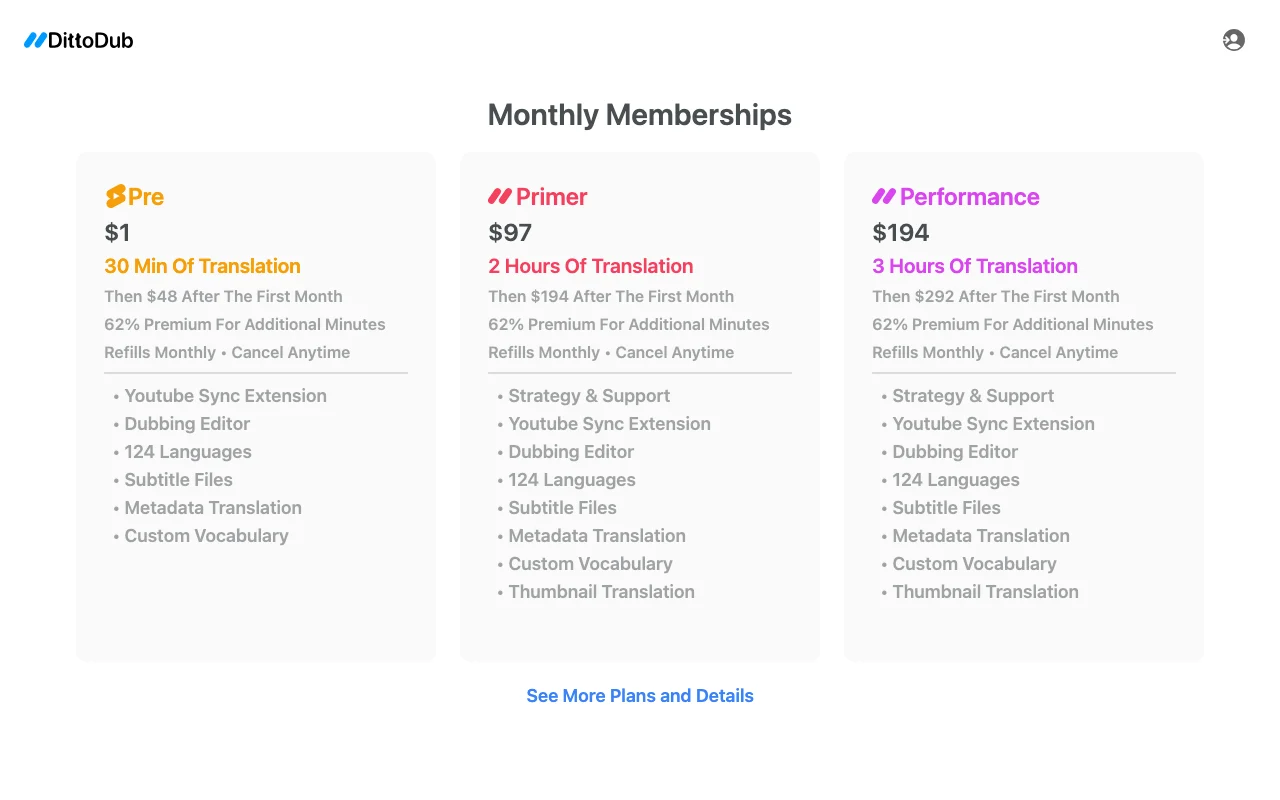
DittoDub pricing page with plans and prices — screenshot of the audio & voice AI tool, Oct 2, 2026
The official DittoDub pricing page as we saw it. dittodub.com, captured Oct 2, 2026

Free access and trial conditions

No free tier shown.

Entry plan costs $1 for the first month.

Paid plans: what changes as you upgrade

Pre (first month) web

$1 per user source (opens in a new tab)

Monthly

Introductory $1 first month; $48 afterwards

For: Creators trying dubbing

Limits

  • 30 min of translation
  • Then $48 per month
1 more
  • 62% premium for extra minutes

Includes

  • YouTube Sync Extension
  • Dubbing Editor
2 more
  • Subtitle files
  • Metadata translation

Primer web

$97 per user source (opens in a new tab)

Monthly

First-month price; $194 afterwards

For: Regular uploaders

Limits

  • 2 hours of translation
  • Then $194 per month
1 more
  • 62% premium for extra minutes

Includes

  • Strategy and support
  • Thumbnail translation
2 more
  • Custom vocabulary
  • Dubbing Editor

Performance web

$194 per user source (opens in a new tab)

Monthly

First-month price; $292 afterwards

For: High-volume channels

Limits

  • 3 hours of translation
  • Then $292 per month
1 more
  • 62% premium for extra minutes

Includes

  • Strategy and support
  • Thumbnail translation
2 more
  • Custom vocabulary
  • Dubbing Editor

Usage caps, credits and extra costs

Additional minutes cost a 62% premium.

What is DittoDub, and how does it work?

DittoDub is an AI dubbing service aimed at YouTube creators who want to publish videos in other languages. Memberships include a dubbing editor, YouTube Sync extension, subtitle files, metadata translation and custom vocabulary. Plans are monthly memberships measured in minutes of translation; higher tiers add strategy and support and thumbnail translation.

DittoDub homepage — screenshot of the audio & voice AI tool, Oct 2, 2026
DittoDub's official site: how the product presents itself. dittodub.com, captured Oct 2, 2026

What you provide and what you get back

How DittoDub works: what you provide, where it runs and what you get backYOU PROVIDEYour inputYouTube videosTitles and metadataCustom vocabularyAUDIO & VOICEDittoDubfrom $1 (Pre (first month))no free tieraccount requiredchecked Oct 2, 2026YOU GET BACKThe resultDubbed audio tracksSubtitle filesTranslated metadata and thumbnailsinput → DittoDub → output · from the vendor's own pages, no hands-on test unless stated
What you give DittoDub and what comes back, from its documentation

You provide

  • YouTube videos
  • Titles and metadata
  • Custom vocabulary

You get back

  • Dubbed audio tracks
  • Subtitle files
  • Translated metadata and thumbnails

Where you can use it

Account
Required
Languages
124 per pricing page (60+ on another page)
Minutes included
30 min / 2 h / 3 h
Export
Subtitle files
Platform
YouTube

What people use DittoDub for

Scenarios are worked out by our editors from the documentation; the actual result depends on your input and plan.

Dubbing YouTube videos into other languages

Who
YouTube creators
You provide
Published video
Expected result
Dubbed version in another language
Plan needed
Any membership
Limitation
Limited by monthly minutes source (opens in a new tab)

Translating titles and metadata

Who
Channel owners
You provide
Titles and descriptions
Expected result
Translated metadata for each language
Plan needed
Any membership
Limitation
Thumbnail translation only on higher tiers source (opens in a new tab)

Generating subtitle files

Who
Creators and editors
You provide
Dubbed video
Expected result
Subtitle files for each language
Plan needed
Any membership
Limitation
Quality depends on source audio source (opens in a new tab)

Key features and their practical limits

DittoDub homepage — screenshot of the audio & voice AI tool, Oct 2, 2026
Feature overview on the official site. dittodub.com, captured Oct 2, 2026

Dubbing editor

Lets you review and adjust AI dubbing before publishing. Fixes mistakes before viewers see them.

Access: All membershipsLimit: Time spent per video is manual source (opens in a new tab)

YouTube Sync extension

Connects dubbing output to your YouTube channel as an extension. Reduces manual upload steps.

Access: All membershipsLimit: Works with YouTube only source (opens in a new tab)

Subtitle files

Produces subtitle files alongside dubbed tracks. Adds accessibility and search reach.

Access: All membershipsLimit: Formats not itemised on the page source (opens in a new tab)

Metadata translation

Translates titles and descriptions, and thumbnails on higher tiers. Localises the full listing, not only audio.

Access: All; thumbnails on Primer and PerformanceLimit: Thumbnail translation needs a higher tier source (opens in a new tab)

DittoDub pros and cons

Reasons to choose DittoDub

Check before paying for DittoDub

How to use DittoDub for dubbing YouTube videos into other languages

Set up DittoDub

  1. Open dittodub.com and choose Get Started.
  2. Pick the Pre plan or a higher membership.
  3. Connect your YouTube channel with the Sync extension.

Example: dubbing YouTube videos into other languages

  1. Select a published video.
  2. Choose target languages.
  3. Open the Dubbing Editor and fix wording.
  4. Publish the dubbed track and translated metadata.

Review and export the result

  1. Listen to the dub for pronunciation of names.
  2. Confirm remaining monthly minutes after the job.

DittoDub integrations and API

Native integrations and export formats

Export: Subtitle files

API access and separate billing

DittoDub has no public API in its official documentation. No API shown on fetched pages

Best DittoDub alternatives for different needs

"Better suited" is based on documented features and pricing, not on a head-to-head test.

ElevenLabs: better suited to

Synthesia: better suited to

Alternatives
AlternativeWhen to choose itPricingLimitation
ElevenLabs——Compare
Synthesia——

Explore DittoDub further

Tools and guides near DittoDub

DittoDub user reviews

No user reviews yet.

Used DittoDub? Be the first to share your experience.

Write a review

Reviews are checked by a moderator before they appear. Your email is never published. Plain text only.

Your rating (required)

Show what you made or what went wrong. Images are published only if the review is approved; location data is removed.

    DittoDub FAQ

    How much translation does DittoDub Primer include?

    DittoDub Primer includes 2 hours of translation per month at $97 for the first month, then $194. source (opens in a new tab)

    What happens to DittoDub pricing after the first month?

    The Pre plan rises from $1 to $48, Primer from $97 to $194 and Performance from $194 to $292. source (opens in a new tab)

    What does DittoDub charge for extra minutes?

    DittoDub charges a 62% premium for additional minutes beyond the monthly allowance. source (opens in a new tab)

    How many languages does DittoDub support?

    The pricing page lists 124 languages, while another page gives a different count (60+), so confirm your language before buying. source (opens in a new tab)

    Sources and review methodology

    Official sources and verification dates

    Not verified: Privacy and retention; Voice cloning consent terms; Audio output formats; Platforms; Extra plans beyond Performance.

    How we documented and maintain this page

    Every fact about DittoDub above comes from the 2 official pages listed here, last compared on Oct 2, 2026; we have not run DittoDub ourselves, so it has no editorial score. How we check and re-check pages.

    Article updated Oct 2, 2026; prices checked Oct 2, 2026. Outbound links to vendors are plain links; we do not earn commissions. How we review · Report an error