CodingDocumented overviewLast checked Sep 29, 2026

VybeBot: Pricing, Features & Best Use Cases

Describe a bot in plain language and VybeBot generates the code and deploys it for Discord, Telegram, Slack, Reddit and more.
Is VybeBot right for you?

Choose VybeBot if you want to describe a Discord, Telegram or Slack bot in plain language, get editable code and deploy it from the same workspace, starting free with no credit card. Based on the vendor's documentation, not on a hands-on test.

Best for: Discord server owners

Also a good fit for

  • Non-coders wanting a bot
  • Community managers

Consider another tool if higher usage requires Pro credit tiers

Or if

  • Pricing figures not visible without JavaScript
  • Requires an account

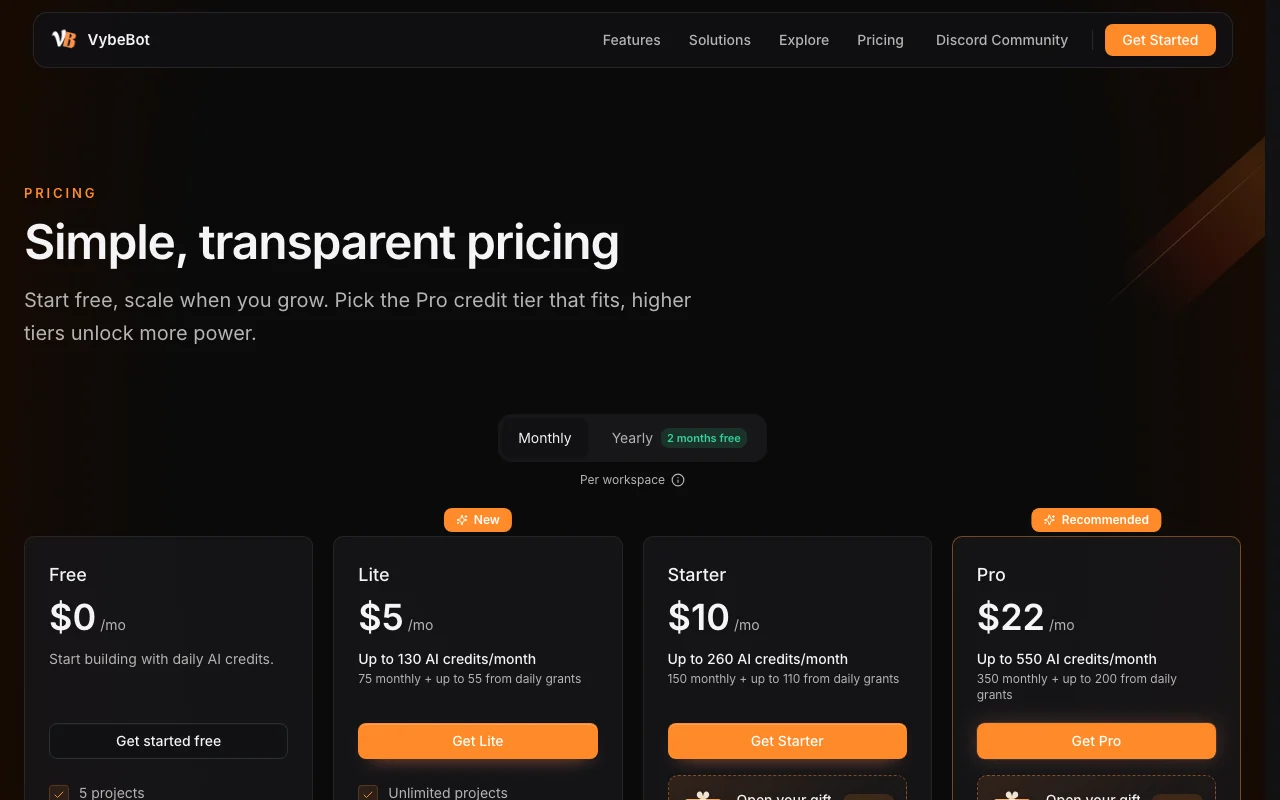
VybeBot pricing and usage limits

Prices checked Sep 29, 2026 on the official US pricing page. Official pricing ↗ Prices and limits change often.

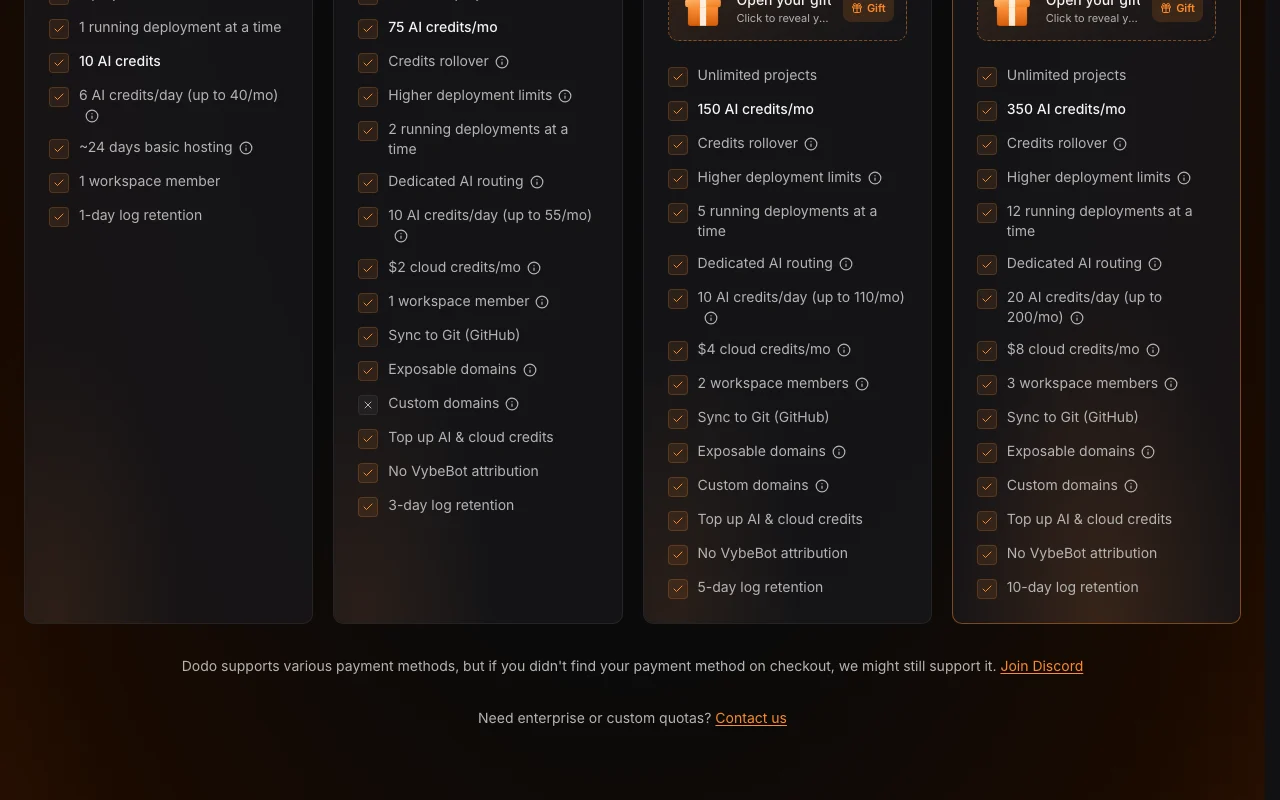
VybeBot pricing page with plans and prices — screenshot of the coding AI tool, Oct 1, 2026
The official VybeBot pricing page as we saw it. vybebot.ai, captured Oct 1, 2026

Free access and trial conditions

Start free, no credit card required

Paid plans: what changes as you upgrade

Usage caps, credits and extra costs

AI and cloud credits; automatic recharge exists per privacy policy

What is VybeBot, and how does it work?

VybeBot is an AI builder for chat-platform bots. You describe the bot, it creates a project for the chosen platform, and you refine it with AI in a workspace where files can be inspected and edited. It includes deployment and runtime tools, connectors and MCP servers for services such as Google Sheets and Supabase, and shared editing with live presence.

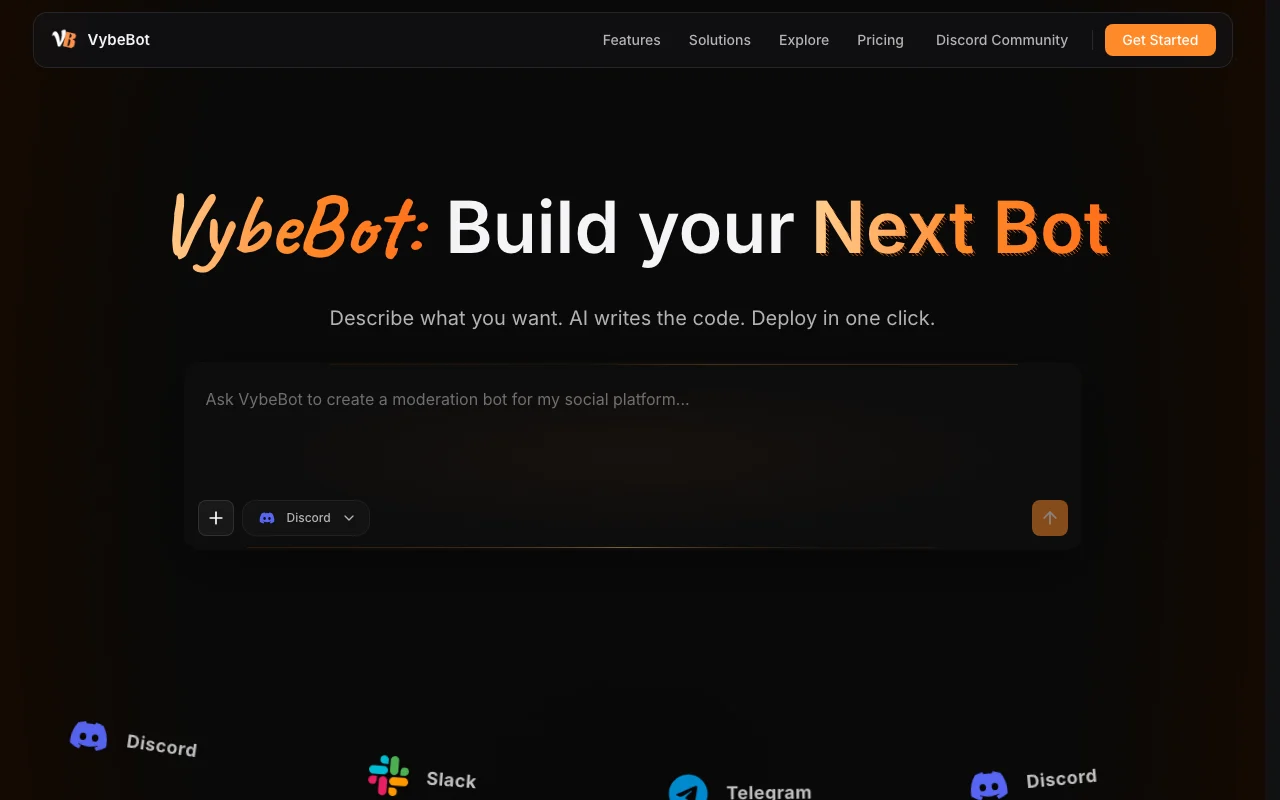
VybeBot homepage — screenshot of the coding AI tool, Oct 1, 2026
VybeBot's official site: how the product presents itself. vybebot.ai, captured Oct 1, 2026

What you provide and what you get back

How VybeBot works: what you provide, where it runs and what you get backYOU PROVIDEYour inputPlain-language bot descriptionTarget platform such as Discord,…Connector or MCP server credentia…CODINGVybeBotWebfree tier, paid price not publish…free tier availableaccount requiredchecked Sep 29, 2026YOU GET BACKThe resultGenerated bot project with editab…Deployed running bot with live de…Public project page in the commun…input → VybeBot → output · from the vendor's own pages, no hands-on test unless stated
What you give VybeBot and what comes back, from its documentation

You provide

  • Plain-language bot description
  • Target platform such as Discord, Telegram, Slack or Reddit
  • Connector or MCP server credentials (Google Sheets, Supabase, Linear)

You get back

  • Generated bot project with editable files
  • Deployed running bot with live deployment stages
  • Public project page in the community gallery

Where you can use it

Platforms
Web
Account
Required
Platforms
Discord, Telegram, Slack, Reddit and others
Discord stack shown
Discord API v10, discord.js v14
Integrations
Connectors and MCP servers
Collaboration
Live presence, branch-aware sessions

Best use cases for VybeBot

Scenarios are worked out by our editors from the documentation; the actual result depends on your input and plan.

Discord support-ticket bots

Who
Discord server owners without coding skills
You provide
Prompt describing ticket flow and admin settings
Expected result
Working ticket bot with customizable messages
Plan needed
Free start
Limitation
Higher usage requires Pro credits source (opens in a new tab)

Moderation bots

Who
Community managers
You provide
Rules for detecting and banning spam accounts
Expected result
Moderation bot with an appeal mechanism, as in a public example
Plan needed
Free start
Limitation
Rules should be tested on a small server first source (opens in a new tab)

Telegram or Slack bots

Who
Teams wanting chat automations
You provide
Prompt naming the platform and behaviour
Expected result
Platform-specific project ready to deploy
Plan needed
Free start
Limitation
Platform coverage beyond those named is not detailed source (opens in a new tab)

Bots that read or write Google Sheets or Supabase

Who
Builders needing data-backed bots
You provide
Connector authorization plus a prompt
Expected result
Bot calling the connected service
Plan needed
Free start
Limitation
More integrations listed as 'as they arrive' source (opens in a new tab)

What VybeBot does, and where it stops

VybeBot homepage — screenshot of the coding AI tool, Oct 1, 2026
Feature overview on the official site. vybebot.ai, captured Oct 1, 2026

Prompt-to-bot generation

Creates a platform-specific project from a plain-language description and opens it in a workspace Skips writing boilerplate bot code

Access: Free startLimit: Generation consumes credits source (opens in a new tab)

One-click deployment

Deploys the current branch and shows each live stage with runtime monitoring Avoids managing your own hosting

Access: Included in the workspaceLimit: Resource quotas tied to plan source (opens in a new tab)

Connectors and MCP servers

Connects the bot to Google Sheets, Supabase, Linear and other services Lets bots use external data

Access: AccountLimit: Connector list still growing source (opens in a new tab)

Platform-specific context packs

Loads current platform guidance such as Discord API v10 and discord.js v14 before generating code Reduces outdated API usage

Access: AutomaticLimit: Packs shown only for named platforms source (opens in a new tab)

Shared workspace

Provides live presence, shared files and branch-aware sessions Co-editing a bot with teammates

Access: Workspace membersLimit: Roles and seats depend on plan source (opens in a new tab)

Pros, cons and deal-breakers

Reasons to choose VybeBot

Check before paying for VybeBot

How to use VybeBot for building and deploying a Discord bot

Set up VybeBot

  1. Open vybebot.ai and click Get started free
  2. Sign in with a supported provider such as GitHub, Google or Discord
  3. Pick the target platform (Discord, Telegram or Slack)

Example: building and deploying a Discord bot

  1. Describe the bot, e.g. a ticket bot with admin-only settings
  2. Watch the project being generated and review the files
  3. Connect any needed service such as Google Sheets
  4. Deploy the current branch and follow the live stages

Review and export the result

  1. Invite the bot to a test server and trigger each command
  2. Read the deployment logs for errors
Example prompt suggested by our editors (not a recorded output of the product)
Build a Discord onboarding flow with role selection and a welcome panel.

VybeBot API

VybeBot pricing page with plans and prices — screenshot of the coding AI tool, Oct 1, 2026
Plan comparison on the official pricing page. vybebot.ai, captured Oct 1, 2026

API access and separate billing

VybeBot has no public API in its official documentation. Privacy policy mentions APIs; public docs page returned 404

Privacy, data use and commercial rights

Summarized from the vendor's current policies; this is not legal advice and a vendor's badge is not an independent audit.

How your inputs and outputs are handled

Prompts, code, files, secrets and deployment logs are processed to run the service

Retention and deletion section exists in the policy; periods not captured

Controls for business users

  • Workspace roles and audit events
  • Encrypted sensitive values

Policies: vybebot.ai/privacy

VybeBot alternatives by need

"Better suited" is based on documented features and pricing, not on a head-to-head test.

Lovable: better suited to

Replit: better suited to

Alternatives
AlternativeWhen to choose itPricingLimitation
Lovable——Compare
Replit——Compare

Explore VybeBot further

If you are looking at VybeBot

VybeBot user reviews

No user reviews yet.

Used VybeBot? Be the first to share your experience.

Write a review

Reviews are checked by a moderator before they appear. Your email is never published. Plain text only.

Your rating (required)

Show what you made or what went wrong. Images are published only if the review is approved; location data is removed.

    VybeBot FAQ

    Can I make a Discord bot with VybeBot without coding?

    Yes. Start with a plain-language prompt; you can inspect or edit the code whenever you want. source (opens in a new tab)

    Do I have to host the bot myself?

    No. Deployment and runtime tools let you deploy and monitor from the same workspace. source (opens in a new tab)

    Which services can a VybeBot bot connect to?

    Connectors and MCP servers cover Google Sheets, Supabase, Linear issues and more as they arrive. source (opens in a new tab)

    Does VybeBot need a credit card to start?

    No. The site says no credit card is required to start free. source (opens in a new tab)

    Which sign-in providers are supported?

    The privacy policy lists GitHub, Google and Discord as possible providers. source (opens in a new tab)

    Sources and review methodology

    Official sources and verification dates

    Not verified: Pro tier prices and credit amounts; Data retention periods; Training use of prompts; Docs URL.

    How we documented and maintain this page

    Every fact about VybeBot above comes from the 3 official pages listed here, last compared on Sep 29, 2026; we have not run VybeBot ourselves, so it has no editorial score. How we check and re-check pages.

    Article updated Oct 10, 2026; prices checked Sep 29, 2026. Outbound links to vendors are plain links; we do not earn commissions. How we review · Report an error