DocsMint pricing in 2026: Free, Pro and Advanced explained
Best for individuals building a knowledge base, small teams organizing shared knowledge, and developers giving AI agents persistent, scoped access to documents.
Starting price
$12 (Pro)
Free option
Yes
Plans
3
Prices checked
Sep 29, 2026
Advanced$29.00
Pro$12.00
DocsMint pricing page, captured
Our own captures of each vendor's public pages. Click a frame for the full-size image.
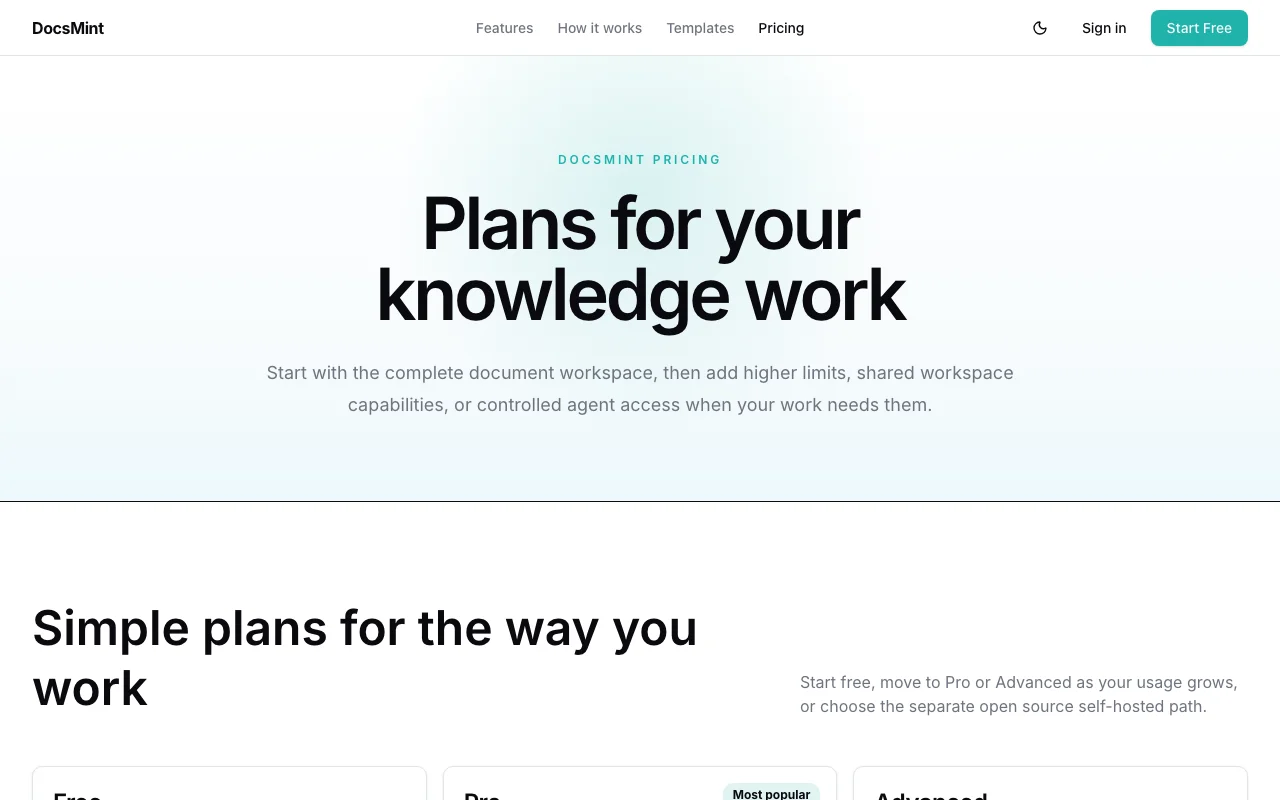
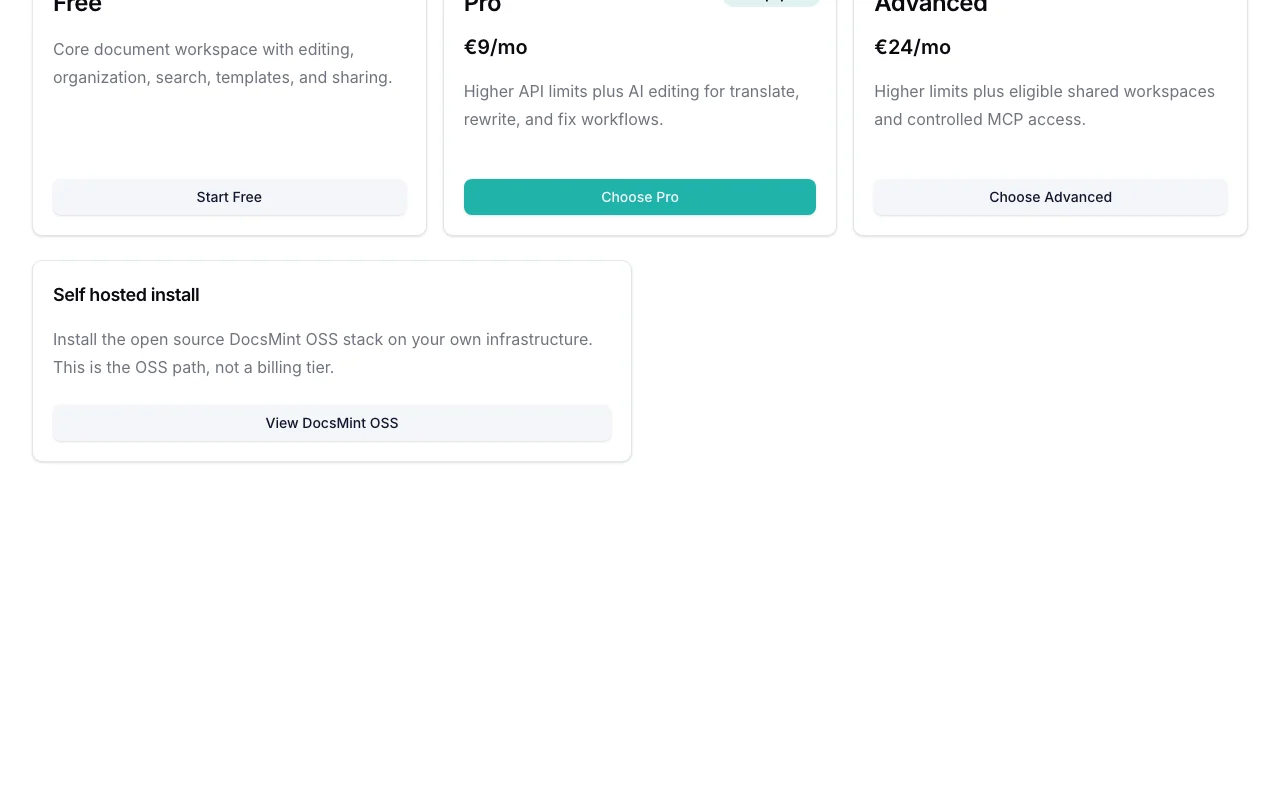
DocsMint plans as listed on its pricing page. docsmint.com, captured Oct 1, 2026More of the DocsMint pricing page. docsmint.com, captured Oct 1, 2026DocsMint homepage. docsmint.com, captured Oct 1, 2026
DocsMint plans and what they include
DocsMint has three plans, and each step unlocks one clear thing. Free gives you the document workspace: editor, folders, tags, search, templates, version history, sharing and comments. It has no AI editing, no API and no MCP access. Pro costs $12 per month and adds the AI editing tools (translate, rewrite, fix, format, generate) plus REST API access with scoped API keys.
Advanced costs $29 per month and is the plan for agents and teams: it adds hosted MCP server access with controlled permissions, shared workspaces and higher limits than Pro. Prices are shown per month; an annual option is not mentioned. Prices checked on 2026-09-29.
DocsMint plans compared
Plans and prices
Plan
Price
Billing
Who it is for
Key limits
API
Free Hosted SaaS
Free
Forever
Personal knowledge bases, trying out DocsMint
Core document workspace; No AI editing tools; No API access
No
Pro Hosted SaaS
$12
Monthly
Individuals and small teams needing AI writing tools and API access
Higher API rate limits than Free; No MCP access (Advanced only); No shared workspaces (Advanced only)
Included
Advanced Hosted SaaS
$29
Monthly
Teams with shared knowledge bases and teams deploying AI agents with persistent context
Higher limits than Pro; Eligible shared workspaces (limits not specified); Controlled MCP access
Included
Which DocsMint plan to pick
Which plan to pick
If you
Pick
Why
you only need a place to write, organize and share documents
Free
Editor, folders, tags, search, templates and version history are included. AI tools and API access are not.
you want AI rewriting or translation and a REST API
Pro, $12/mo
Adds AI editing tools and API access with higher rate limits than Free. MCP and shared workspaces are still excluded.
AI agents need to read your docs, or a team shares a workspace
Advanced, $29/mo
Only this plan has the hosted MCP server and shared workspaces, with controlled permissions for agent access.
What is free, what costs extra
Free access and trial
Free tier includes core document workspace with editing, organization, search, templates, version history, and sharing. No AI tools, API access, or shared workspaces.
No trial mentioned; Free tier serves as unlimited trial
Extra costs and taxes
Stripe processes payments; no additional fees mentioned beyond monthly subscription
Handled by Stripe at checkout; pricing shown is before tax/VAT
Costs that are easy to miss
Free has limits on document count and storage, but the numbers are not stated in our verified data.
Shared workspaces are Advanced-only, so a small team cannot share on Pro.
Pricing is shown before tax or VAT, which Stripe handles at checkout.
No trial is mentioned; the Free plan is the way to test it.
DocsMint pricing and usage limits
Prices checked Sep 29, 2026 on the official US pricing page. Official pricing ↗ Prices and limits change often.
Vendor pricing page re-checked automatically 12 days ago: no changes detected.
Free access and trial conditions
Free tier includes core document workspace with editing, organization, search, templates, version history, and sharing. No AI tools, API access, or shared workspaces.
No trial mentioned; Free tier serves as unlimited trial
Billing period shown as /mo; annual option not mentioned
For: Teams with shared knowledge bases and teams deploying AI agents with persistent context
Limits
Higher limits than Pro
Eligible shared workspaces (limits not specified)
1 more
Controlled MCP access
Includes
Everything in Pro, plus:
Shared workspace capabilities with team collaboration
3 more
Hosted MCP server access (https://docsmint.com/mcp)
Controlled permissions for agent access
Higher rate limits and storage
API included
Usage caps, credits and extra costs
Stripe processes payments; no additional fees mentioned beyond monthly subscription
Handled by Stripe at checkout; pricing shown is before tax/VAT
How much DocsMint costs per year
At the listed prices, a single user pays between $144 and $348 a year on the fixed-price plans, or nothing on the free tier within its limits. Annual billing discounts, taxes and usage-based extras are listed per plan above where the vendor publishes them.
DocsMint FAQ
Can I start without paying?
Yes. Start with Free and choose Pro or Advanced when you need additional limits and capabilities like AI editing or shared workspaces. source (opens in a new tab)
Is self-hosting a SaaS plan?
No. DocsMint OSS is a separate open source path for teams that want to run the stack on their own infrastructure. It is not a billing tier. source (opens in a new tab)
Is DocsMint free?
Yes, there is a Free plan with the core document workspace, version history and sharing. It excludes AI editing tools, API access, MCP access and shared workspaces.
What does DocsMint Pro include?
At $12 per month it adds AI editing (translate, rewrite, fix, format, generate) and REST API access with scoped, versioned v1 keys, plus higher API rate limits than Free.
Which DocsMint plan has MCP access?
Only Advanced, at $29 per month. It gives hosted MCP server access with controlled permissions for agents.
Does DocsMint offer annual billing?
An annual option is not mentioned on the pricing page we checked. Prices are shown per month.