Unsere Einschätzung: Use Vocal Remover when you need a quick, free, no-install split of a song into karaoke and a cappella tracks and do not need a documented API or published paid tiers.
Wichtigste Einschränkung: The improved new version is marked subscribers-only and no subscription price is published.
Von den Redakteuren des AI Tool Atlas.
Auf Basis der offiziellen Dokumentation des Anbieters; wir haben dieses Produkt nicht selbst getestet. Was „dokumentierte Übersicht“ bedeutet
Ist Vocal Remover das Richtige für Sie?
Use Vocal Remover when you need a quick, free, no-install split of a song into karaoke and a cappella tracks and do not need a documented API or published paid tiers. Auf Basis der Dokumentation des Anbieters, nicht in einem praktischen Test.
Am besten für: Karaoke fans
Auch gut geeignet für
Musicians practicing covers
Casual audio editing
Ein anderes Tool in Betracht ziehen, wenn improved new version restricted to subscribers
Oder wenn
Subscription prices not published on pages loaded
Web only; no app or API confirmed
Vocal Remover Preise und Nutzungslimits
Preise am Oct 1, 2026 auf der offiziellen US-Preisseite geprüft. Preise und Limits ändern sich häufig.
Die offizielle Vocal Remover-Preisseite, wie wir sie gesehen haben. vocalremover.org, erfasst Oct 2, 2026
Kostenloser Zugang und Testbedingungen
The homepage says the app can be used absolutely free.
No trial documented.
Kostenpflichtige Tarife: was sich beim Upgrade ändert
Improved algorithms in the new version, per the vendor's subscribers-only note
Nutzungsobergrenzen, Guthaben und Zusatzkosten
Subscription price for the new version is not shown; a Donate link is present.
Not stated.
Was ist Vocal Remover und wie funktioniert es?
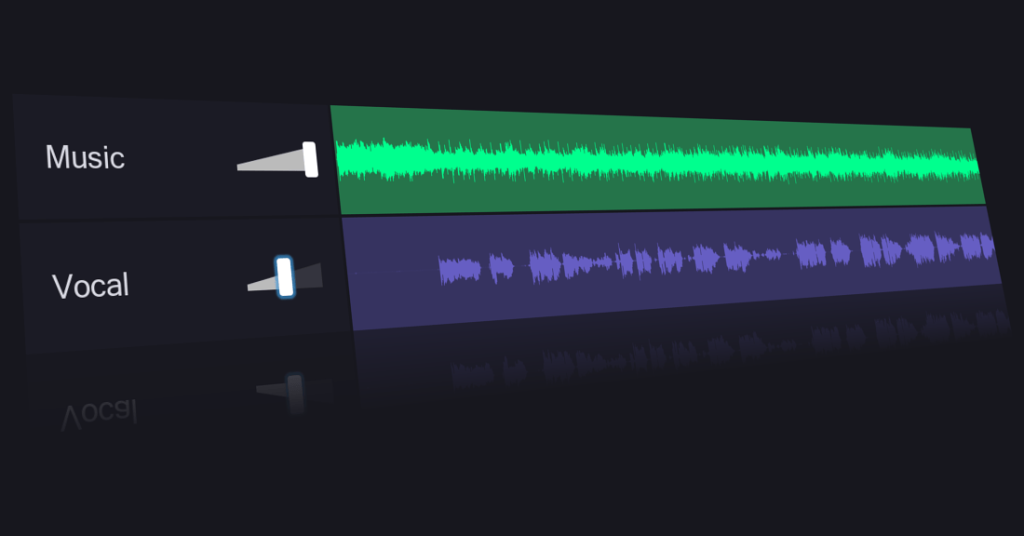
Vocal Remover is a browser-based tool that separates vocals from music using AI. Uploading a song returns two tracks: a karaoke version without vocals and an a cappella version with isolated vocals.
The site also offers related audio utilities such as a splitter, pitch changer, key and BPM finder, cutter, joiner, recorder and karaoke tool. A newer version with improved algorithms is marked as available to subscribers only.
Offizielle Website von Vocal Remover: So stellt sich das Produkt selbst dar. vocalremover.org, erfasst Oct 2, 2026
Was Sie liefern und was Sie erhalten
Sie liefern
Audio file chosen via Browse my files
Sie erhalten zurück
Karaoke (no vocals) track
A cappella (isolated vocals) track
Wo Sie es nutzen können
Plattformen
Web
Konto
Erforderlich
Outputs
Karaoke (instrumental) and a cappella (vocals) tracks
Splits an uploaded song into an instrumental and a vocal track with AI, in about 10 seconds per the vendor. Gives a ready karaoke backing and an a cappella without studio software.
Zugriff: Free on the web; improved new version for subscribers.Limit: Only two outputs shown (vocals and music); no per-instrument stems on this tool.Quelle (öffnet in neuem Tab)
Stem splitter
A separate Splitter utility listed in the site navigation. Lets users cut audio into parts in the same site.
Zugriff: Listed in the top navigation.Limit: Behavior and limits of the Splitter are not described on pages checked.Quelle (öffnet in neuem Tab)
Pitch changer
A Pitcher utility to change the pitch of audio. Helps fit a backing track to a singer's range.
Zugriff: Listed in the top navigation.Limit: Pitch range and quality settings not documented.Quelle (öffnet in neuem Tab)
Key and BPM finder
A Key BPM Finder utility. Helps DJs and musicians match tempo and key.
Zugriff: Listed in the top navigation.Limit: Accuracy and supported formats not documented.Quelle (öffnet in neuem Tab)
Vor- und Nachteile sowie Ausschlusskriterien
Wo Vocal Remover stark ist
Basic vocal removal usable for free You can make a karaoke track without paying or installing anythingdokumentiertQuelle (öffnet in neuem Tab)
Runs in the browser, no install No software setup, works from any modern browserdokumentiertQuelle (öffnet in neuem Tab)
Processing stated to take about 10 seconds A split finishes quickly enough to try several songs in a rowdokumentiertQuelle (öffnet in neuem Tab)
Several audio utilities on one site Cutter, joiner and recorder are available without leaving the sitedokumentiertQuelle (öffnet in neuem Tab)
Einschränkungen, die Sie vor dem Bezahlen prüfen sollten
Improved new version restricted to subscribers Subscribers get a better separation than free usersdokumentiertQuelle (öffnet in neuem Tab)
Subscription prices not published on pages loaded You cannot budget for an upgrade because no price is showndokumentiertQuelle (öffnet in neuem Tab)
Web only; no app or API confirmed No mobile app or API means no automation or offline usedokumentiertQuelle (öffnet in neuem Tab)
Requires uploading audio files to the service Your copyrighted audio leaves your device and is handled by the vendordokumentiertQuelle (öffnet in neuem Tab)
So nutzen Sie Vocal Remover für removing vocals from a song
Vocal Remover einrichten
Open vocalremover.org in a browser
Click Browse my files (Choose file on the new version)
Select an audio file from your device
Beispiel: removing vocals from a song
Choose a song you have the right to process
Wait roughly 10 seconds for processing
Play and download the karaoke track
Download the a cappella track if needed
Ergebnis prüfen und exportieren
Play both tracks and listen for vocal remnants in the instrumental
Confirm the output format fits your player or editor
Datenschutz, Datennutzung und kommerzielle Rechte
Zusammengefasst aus den aktuellen Richtlinien des Anbieters; dies ist keine Rechtsberatung, und das Badge eines Anbieters ersetzt kein unabhängiges Audit.
Wie Ihre Eingaben und Ausgaben verarbeitet werden
Users upload a song file and receive two processed tracks.
Die besten Vocal Remover-Alternativen für unterschiedliche Anforderungen
„Besser geeignet“ beruht auf dokumentierten Funktionen und Preisen, nicht auf einem direkten Test.
Yes for the standard tool: the homepage says it can be used absolutely free. The improved new version is marked as available to subscribers only. Quelle (öffnet in neuem Tab)
What files do I get back?
Two tracks: a karaoke version without vocals and an a cappella version with isolated vocals. Quelle (öffnet in neuem Tab)
Nicht verifiziert: Subscription price and plan details; Accepted input formats, file size and length limits; Output formats and quality; Privacy policy, retention and training use (/privacy returned 404); Account requirement for subscribers; Vendor legal name.
Wie wir diese Seite dokumentiert haben und pflegen
Jede Angabe zu Vocal Remover oben stammt aus den 2 hier aufgeführten offiziellen Seiten, zuletzt verglichen am Oct 1, 2026; wir haben Vocal Remover nicht selbst getestet, daher gibt es keine redaktionelle Bewertung. Wie wir Seiten prüfen und erneut prüfen.
Artikel aktualisiert Oct 2, 2026; Preise geprüft Oct 1, 2026. Ausgehende Links zu Anbietern sind einfache Links; wir erhalten keine Provisionen. So testen wir · Fehler melden