Unsere Einschätzung: Screenpipe suits knowledge workers, founders and teams who want screen, audio and meeting history captured locally and exposed to Claude, Codex or other approved agents for summaries, follow-ups and automations.
Wichtigste Einschränkung: The free plan limits history and scheduled workflows, and capture uses about 30 GB of storage per month by default and 600 MB to 4 GB of RAM.
Von den Redakteuren des AI Tool Atlas.
Auf Basis der offiziellen Dokumentation des Anbieters; wir haben dieses Produkt nicht selbst getestet. Was „dokumentierte Übersicht“ bedeutet
Für wen screenpipe geeignet ist
Screenpipe suits knowledge workers, founders and teams who want screen, audio and meeting history captured locally and exposed to Claude, Codex or other approved agents for summaries, follow-ups and automations. Auf Basis der Dokumentation des Anbieters, nicht in einem praktischen Test.
Am besten für: Developers and founders wanting searchable work memory
Auch gut geeignet für
Teams exploring AI agents with local context
Ein anderes Tool in Betracht ziehen, wenn free plan limits history and workflows
Oder wenn
Storage use is about 30 GB per month by default
Needs 600 MB to 4 GB RAM depending on settings
screenpipe Preise und Nutzungslimits
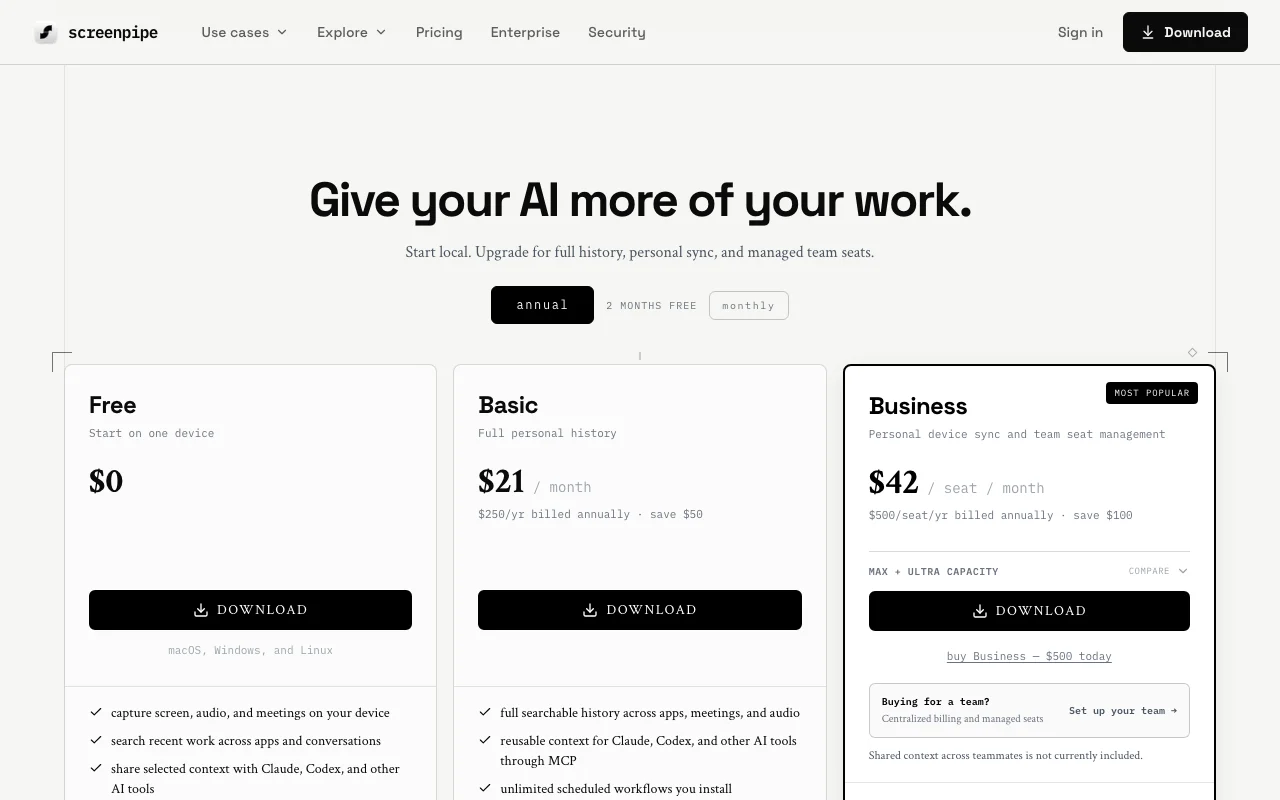
Preise am Oct 1, 2026 auf der offiziellen US-Preisseite geprüft. Offizielle Preise ↗ Preise und Limits ändern sich häufig.
Die offizielle screenpipe-Preisseite, wie wir sie gesehen haben. screenpipe.com, erfasst Oct 1, 2026
Kostenloser Zugang und Testbedingungen
Free plan for one device.
Students, researchers and faculty get 50% off the first month of an individual subscription.
Kostenpflichtige Tarife: was sich beim Upgrade ändert
Business Max and Ultra add capacity; details are not priced on the page.
Not stated.
Was ist screenpipe und wie funktioniert es?
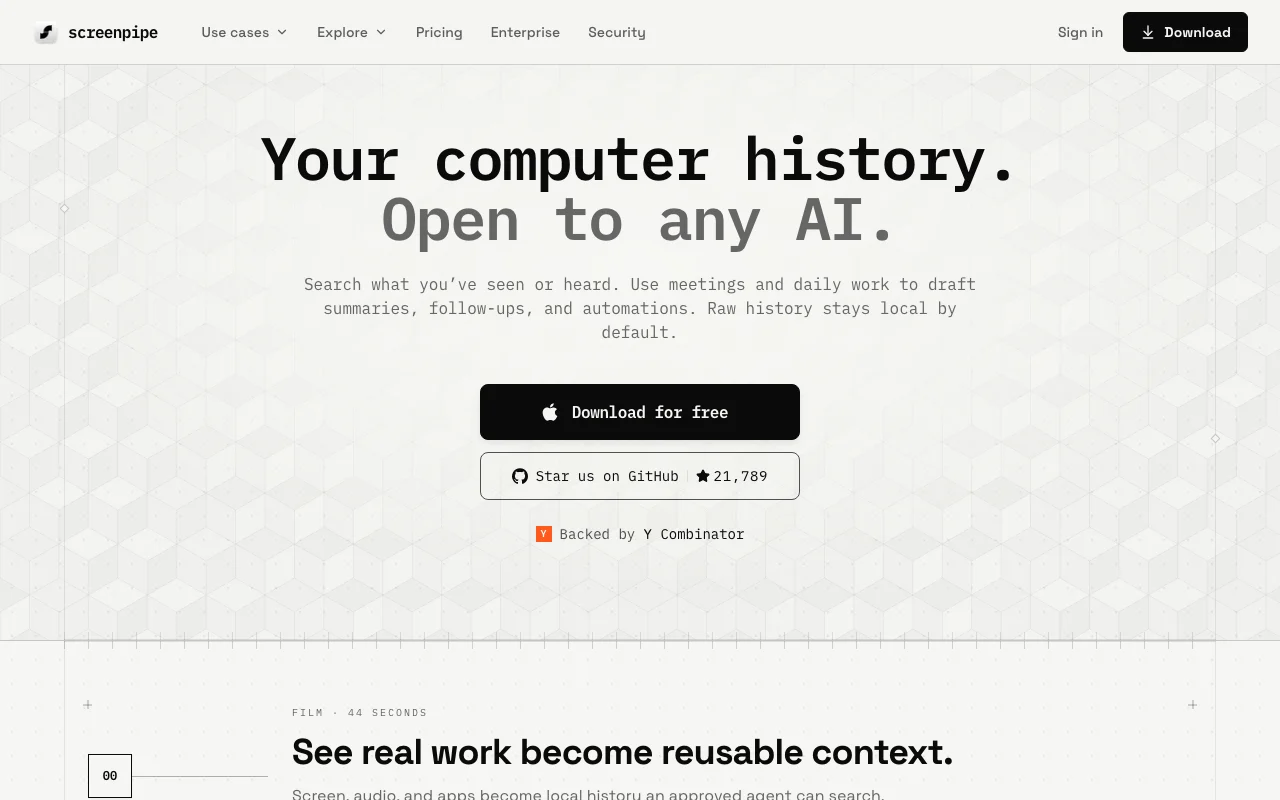
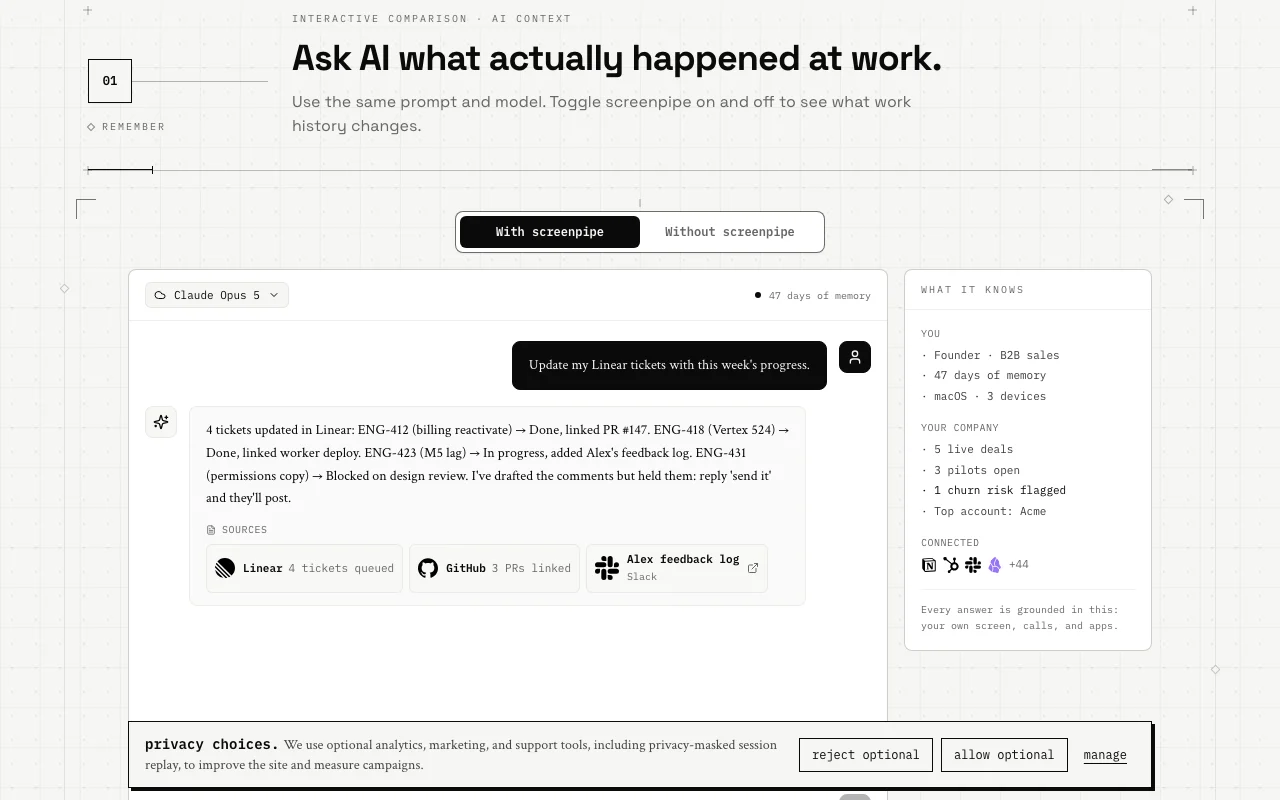
screenpipe captures screen, audio and meetings on your device and turns them into a searchable work history. The site says raw history stays local by default and can be shared with approved agents such as Claude and Codex.
Users can set up scheduled workflows (pipes) such as meeting notes, and query the data through a local API or MCP. It is available for macOS, Windows and Linux.
Offizielle Website von screenpipe: So stellt sich das Produkt selbst dar. screenpipe.com, erfasst Oct 1, 2026
Was Sie liefern und was Sie erhalten
Was Sie screenpipe geben und was zurückkommt, laut Dokumentation
Sie liefern
Screen frames with OCR
Accessibility context
Microphone and system audio
Meetings
Sie erhalten zurück
Searchable local history
Meeting notes and action items
Context for agents via MCP and REST API
Scheduled pipe workflows
Wo Sie es nutzen können
Plattformen
Desktop, API
OS
macOS 13+, Windows 10+, Linux
Storage
About 30 GB per month, configurable retention
RAM
600 MB to 4 GB depending on settings
Access
Local REST API on port 3030 and MCP server
Wo screenpipe am nützlichsten ist
Die Szenarien erarbeiten unsere Redakteure anhand der Dokumentation; das tatsächliche Ergebnis hängt von Ihrer Eingabe und Ihrem Tarif ab.
Search past screen and meeting content
Wer
Founders and sales people
Sie liefern
Recent calls and screen work
Erwartetes Ergebnis
Answers about what was said, such as what you told a customer about pricing
Raw history stays local by default per the site Sensitive raw data does not leave your machine unless you decide.dokumentiertQuelle (öffnet in neuem Tab)
Runs on macOS, Windows and Linux Works for Linux and Windows users as well as Mac.dokumentiertQuelle (öffnet in neuem Tab)
Open to multiple AI tools through MCP You can switch between assistants without losing history.dokumentiertQuelle (öffnet in neuem Tab)
Source-available and inspectable The code and local database can be examined and used through a REST API.dokumentiertQuelle (öffnet in neuem Tab)
Einschränkungen, die Sie vor dem Bezahlen prüfen sollten
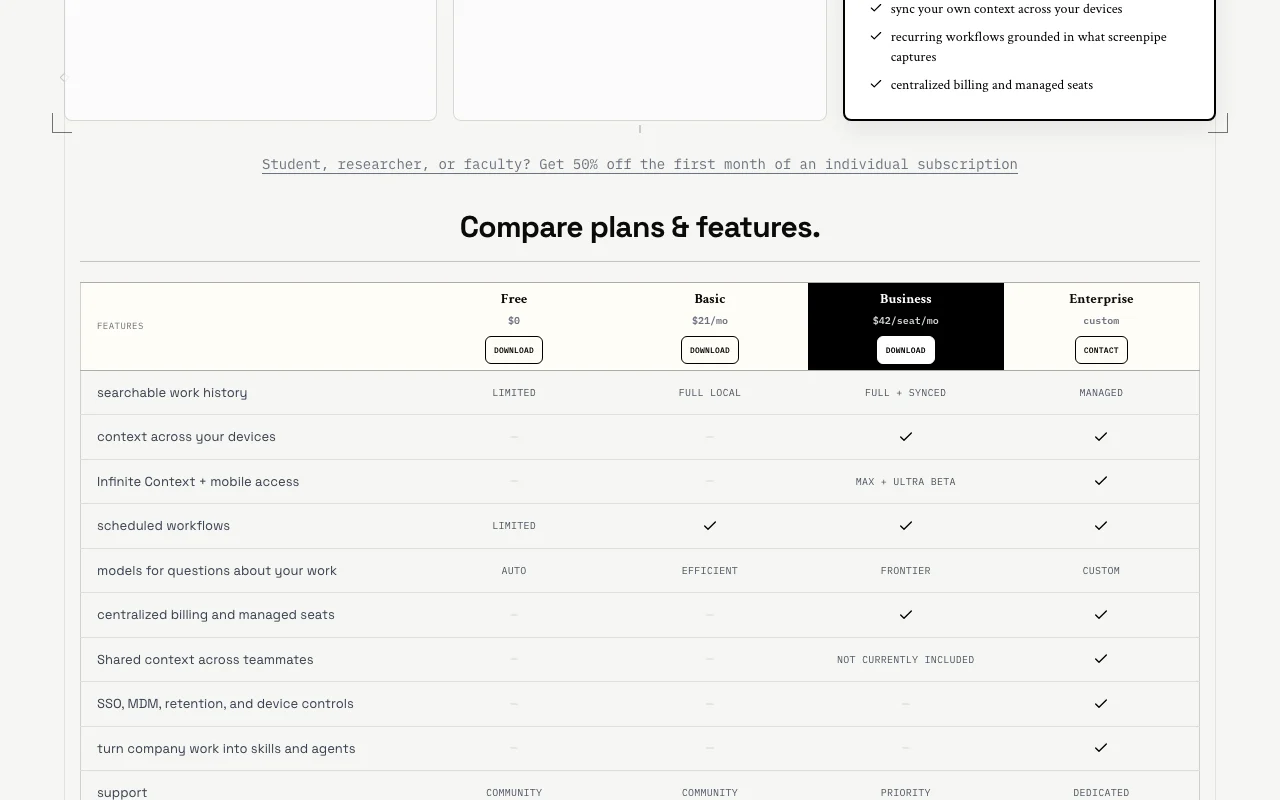
Free plan limits history and workflows Heavy users must pay for full searchable history.dokumentiertQuelle (öffnet in neuem Tab)
Storage use is about 30 GB per month by default Disks fill up unless retention is configured.dokumentiertQuelle (öffnet in neuem Tab)
Needs 600 MB to 4 GB RAM depending on settings Older machines may feel the capture load.dokumentiertQuelle (öffnet in neuem Tab)
Shared context across teammates is not currently included Teams cannot yet pool memory.dokumentiertQuelle (öffnet in neuem Tab)
Mobile access in private beta Ultra's Infinite Context and mobile access are limited to a beta.dokumentiertQuelle (öffnet in neuem Tab)
So nutzen Sie screenpipe für searching and reusing your work history with an AI agent
screenpipe einrichten
Download screenpipe for macOS, Windows or Linux from screenpipe.com.
Grant screen, accessibility and microphone permissions.
Exclude sensitive apps, windows and URLs in the settings.
Connect Claude, Codex or another agent through the MCP server.
Beispiel: searching and reusing your work history with an AI agent
Work and hold meetings as normal while it captures.
Ask your agent what you told a customer about pricing.
Install a pipe that writes meeting notes when a meeting ends.
Review the generated note saved on your machine.
Ergebnis prüfen und exportieren
Check storage use and set a retention period.
Confirm excluded apps do not appear in search results.
Verify the pipe ran by opening the saved file.
Von unserer Redaktion vorgeschlagener Beispiel-Prompt (keine aufgezeichnete Ausgabe des Produkts)
Summarise the last 5 meetings with Acme and list the open action items for me.
screenpipe Integrationen und API
Tarifvergleich auf der offiziellen Preisseite. screenpipe.com, erfasst Oct 1, 2026
Native Integrationen und Exportformate
Export: Local SQLite database
API-Zugang und separate Abrechnung
screenpipe hat laut offizieller Dokumentation keine öffentliche API. Local REST API on localhost:3030 plus an MCP server. API-Dokumentation ↗
Datenschutz, Datennutzung und kommerzielle Rechte
Zusammengefasst aus den aktuellen Richtlinien des Anbieters; dies ist keine Rechtsberatung, und das Badge eines Anbieters ersetzt kein unabhängiges Audit.
Wie Ihre Eingaben und Ausgaben verarbeitet werden
Captures screen, audio and meetings locally; raw history stays local by default and cloud upload is off.
Free is $0, Basic $21 per month ($250 per year), Business $42 per seat per month ($500 per seat per year), and Enterprise is custom. Quelle (öffnet in neuem Tab)
What are the system requirements?
macOS 13+, Windows 10+ or Linux, 600 MB to 4 GB of RAM depending on settings and about 30 GB of storage per month. Quelle (öffnet in neuem Tab)
Nicht verifiziert: Full privacy policy contents; Docs content; Free plan exact limits; Max and Ultra pricing.
Wie wir diese Seite dokumentiert haben und pflegen
Jede Angabe zu screenpipe oben stammt aus den 5 hier aufgeführten offiziellen Seiten, zuletzt verglichen am Oct 1, 2026; wir haben screenpipe nicht selbst getestet, daher gibt es keine redaktionelle Bewertung. Wie wir Seiten prüfen und erneut prüfen.
Artikel aktualisiert Oct 10, 2026; Preise geprüft Oct 1, 2026. Ausgehende Links zu Anbietern sind einfache Links; wir erhalten keine Provisionen. So testen wir · Fehler melden