Unsere Einschätzung: Best for content creators and marketers who want access to multiple AI video models in one place with motion control and text-based editing.
Wichtigste Einschränkung: Credit-based usage with monthly caps; Lite plan limited to 720p resolution on some models; no free plan
Von den Redakteuren des AI Tool Atlas.
Auf Basis der offiziellen Dokumentation des Anbieters; wir haben dieses Produkt nicht selbst getestet. Was „dokumentierte Übersicht“ bedeutet
Für wen SparkVid geeignet ist
Best for content creators and marketers who want access to multiple AI video models in one place with motion control and text-based editing. Auf Basis der Dokumentation des Anbieters, nicht in einem praktischen Test.
Am besten für: Content creators making daily shorts
Auch gut geeignet für
Marketers testing ad variations
E-commerce product video creation
Ein anderes Tool in Betracht ziehen, wenn need a free tier or free trial
Oder wenn
Prefer unlimited monthly video generation
Require 4K resolution outputs
SparkVid Preise und Nutzungslimits
Preise am Oct 1, 2026 auf der offiziellen US-Preisseite geprüft. Offizielle Preise ↗ Preise und Limits ändern sich häufig.
Preisseite des Anbieters vor 12 Tagen automatisch neu geprüft: keine Änderungen festgestellt.
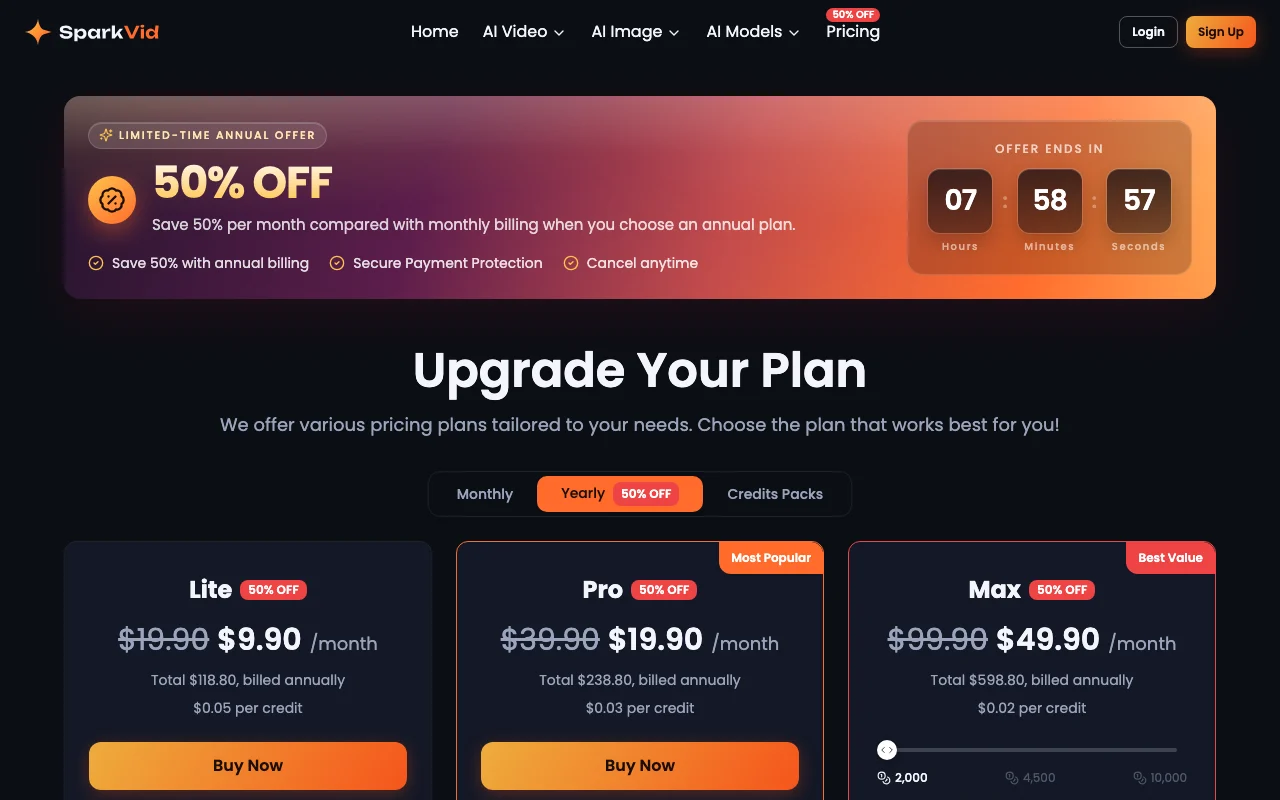
Die offizielle SparkVid-Preisseite, wie wir sie gesehen haben. sparkvid.ai, erfasst Oct 1, 2026
Kostenloser Zugang und Testbedingungen
No free plan or trial offered
Not offered; must subscribe to paid plan
Kostenpflichtige Tarife: was sich beim Upgrade ändert
Annual billing available at $49.90/month (saves 50%, total $598.80/year)
Für: Marketing teams and studios with daily video needs
Limits
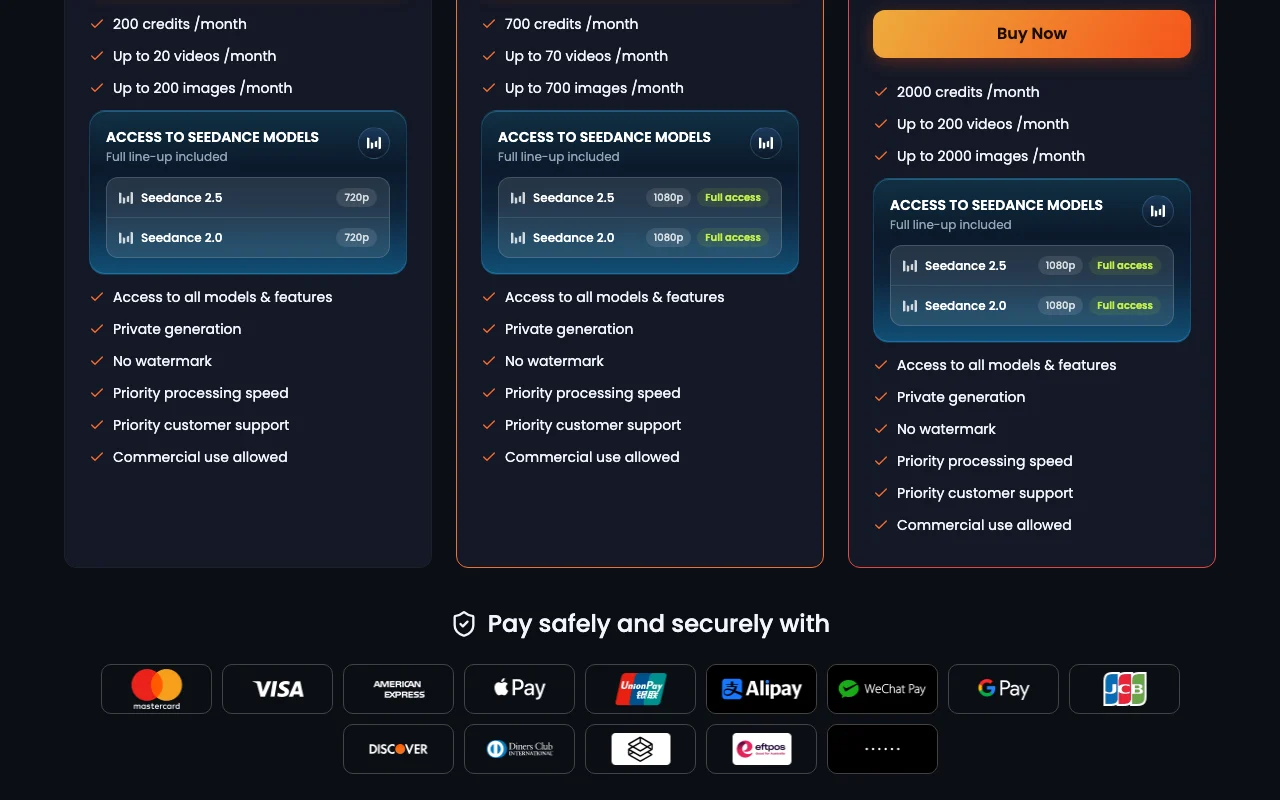
2,000 credits per month (expandable to 4,500 or 10,000)
Up to 200 videos per month
2 mehr
Up to 2,000 images per month
1080p resolution on all models
Enthält
Access to all models (full line-up included)
Seedance 2.5 at 1080p with full access
7 mehr
Seedance 2.0 at 1080p with full access
Private generation
No watermark
Priority processing speed
Commercial use allowed
Priority customer support
Highest credit allocation for large projects
Nutzungsobergrenzen, Guthaben und Zusatzkosten
Additional credit packs available; per-credit cost drops with plan tier ($0.05 Lite, $0.03 Pro, $0.02 Max)
Not mentioned; likely subject to applicable sales tax
Was ist SparkVid und wie funktioniert es?
SparkVid is a web app for creating AI videos from text prompts or reference images, videos and audio, using third-party models such as Seedance, Kling, Veo, Sora, Wan and MiniMax. Users can switch models per run and compare results. It also offers motion control (transferring motion from a reference clip and directing camera moves), text-instruction video editing such as object removal and background swaps, and image generation with models like GPT Image and Nano Banana.
Offizielle Website von SparkVid: So stellt sich das Produkt selbst dar. sparkvid.ai, erfasst Oct 1, 2026
Was Sie liefern und was Sie erhalten
Was Sie SparkVid geben und was zurückkommt, laut Dokumentation
Sie liefern
Text prompts (up to 10,000 characters)
Reference images (up to 9 files, max 10MB each, JPG/PNG/WEBP)
Reference videos (up to 3 files, max 15s total, max 50MB, MP4/MOV)
Reference audio (up to 3 files, max 15s total, max 15MB, MP3/WAV)
Upload up to 9 images, 3 videos (15s total), and 3 audio files (15s total) as references Provides models with context for style, motion, and audio consistency
Transfer motion from reference video; choreograph camera (pans, zooms, orbits, dolly shots) Direct exactly how subjects and cameras move without multiple generations
Prices shown in USD Transparent pricing with clear credit costs ($0.05–$0.02 per credit)dokumentiertQuelle (öffnet in neuem Tab)
Access to 11+ video and image models in one tool Compare Seedance, Kling, Veo, Sora and others side-by-side without platform switchingdokumentiertQuelle (öffnet in neuem Tab)
Paid plans include no watermark and commercial use Output can be used in professional work and commercial productsdokumentiertQuelle (öffnet in neuem Tab)
Annual subscription saves 50% (limited-time offer) Lite $9.90/mo, Pro $19.90/mo, Max $49.90/mo when billed yearlydokumentiertQuelle (öffnet in neuem Tab)
Einschränkungen, die Sie vor dem Bezahlen prüfen sollten
Credit-based usage with monthly caps Monthly video/image limits (20–200 videos, 200–2000 images per plan)dokumentiertQuelle (öffnet in neuem Tab)
No free plan shown on the pricing page Must subscribe to any paid plan to use; no trial or free tierdokumentiertQuelle (öffnet in neuem Tab)
Lite plan limited to 720p for Seedance models Lower resolution output on budget tier; Pro/Max offer 1080pdokumentiertQuelle (öffnet in neuem Tab)
Requires account creation Must sign up and log in; email or Google account neededdokumentiertQuelle (öffnet in neuem Tab)
So nutzen Sie SparkVid für creating an AI video from a text prompt or image
SparkVid einrichten
Sign up at https://sparkvid.ai/ (email or Google account)
Select a paid plan (Lite, Pro, or Max)
Log in to the dashboard
Choose a video model (Seedance, Kling, Veo, etc.)
Beispiel: creating an AI video from a text prompt or image
Click Create Video or Create Image button
Enter text prompt (e.g., 'cinematic travel vlog of packing, airport, flight meal, hotel skyline')
Select video length (5s shown as default) and resolution (480p–1080p)
Click Generate and wait for processing
Preview video in browser; compare with other models if desired
Download or export video
Ergebnis prüfen und exportieren
Preview generated video for visual quality and accuracy to prompt
Compare outputs from different models (Seedance vs. Kling vs. Veo)
Check video meets watermark-free and commercial-use requirements
Von unserer Redaktion vorgeschlagener Beispiel-Prompt (keine aufgezeichnete Ausgabe des Produkts)
Colorful fruit biscuit commercial with geometric arrays and slow-mo snap
SparkVid Integrationen und API
Tarifvergleich auf der offiziellen Preisseite. sparkvid.ai, erfasst Oct 1, 2026
Native Integrationen und Exportformate
Export: MP4 video, Image formats for generated images
API-Zugang und separate Abrechnung
SparkVid hat laut offizieller Dokumentation keine öffentliche API. No API access mentioned; web interface only
Datenschutz, Datennutzung und kommerzielle Rechte
Zusammengefasst aus den aktuellen Richtlinien des Anbieters; dies ist keine Rechtsberatung, und das Badge eines Anbieters ersetzt kein unabhängiges Audit.
Wie Ihre Eingaben und Ausgaben verarbeitet werden
Uploaded images, videos, audio, and text prompts processed to generate videos
Not stated; assume materials used for generation only
Not stated; assume standard SaaS retention
Kommerzielle Nutzung und Tarifbeschränkungen
Explicitly allowed on paid plans; no watermark in commercial outputs
Lite plan may have different commercial use terms (unclear)
SparkVid offers 11+ models: Seedance 2.5, Seedance 2.0, Sora, Veo, Kling, Grok Imagine, HappyHorse, Seedream, MiniMax H3, Nano Banana, and GPT Image. Quelle (öffnet in neuem Tab)
What is the difference between monthly and annual billing?
Annual billing offers 50% off (limited-time offer): Lite $9.90/month, Pro $19.90/month, Max $49.90/month. Standard monthly prices are Lite $19.90, Pro $39.90, Max $99.90. Quelle (öffnet in neuem Tab)
Can I use videos created with SparkVid for commercial purposes?
Pricing & Plans | SparkVidpricing · geprüft Oct 1, 2026 · Three pricing tiers (Lite, Pro, Max), Monthly and annual billing options, Credit allocation and video/image limits, Feature comparison across plans
Nicht verifiziert: Privacy policy (page returned 404); API availability and documentation; Exact data retention policy; Training data usage; Free trial availability.
Wie wir diese Seite dokumentiert haben und pflegen
Jede Angabe zu SparkVid oben stammt aus den 2 hier aufgeführten offiziellen Seiten, zuletzt verglichen am Oct 1, 2026; wir haben SparkVid nicht selbst getestet, daher gibt es keine redaktionelle Bewertung. Wie wir Seiten prüfen und erneut prüfen.
Artikel aktualisiert Oct 10, 2026; Preise geprüft Oct 1, 2026. Ausgehende Links zu Anbietern sind einfache Links; wir erhalten keine Provisionen. So testen wir · Fehler melden