Unsere Einschätzung: Choose Muse if you want a Meta personal agent that completes multi-step web and app tasks, accepting a usage limit and an unpublished price for the paid tier.
Wichtigste Einschränkung: The free tier has a usage limit, and the price of the paid subscription is not stated on the pages we could read.
Von den Redakteuren des AI Tool Atlas.
Auf Basis der offiziellen Dokumentation des Anbieters; wir haben dieses Produkt nicht selbst getestet. Was „dokumentierte Übersicht“ bedeutet
Für wen Muse geeignet ist
Choose Muse if you want a Meta personal agent that completes multi-step web and app tasks, accepting a usage limit and an unpublished price for the paid tier. Auf Basis der Dokumentation des Anbieters, nicht in einem praktischen Test.
Am besten für: People who want an assistant to run everyday tasks for them
Auch gut geeignet für
Mac and mobile users who want it connected to Messages, Calendar and Notes
Ein anderes Tool in Betracht ziehen, wenn free tier has a usage limit
Oder wenn
Paid subscription price not stated on the pages read
Can take real actions, so permissions need careful setup
Muse in den Nachrichten
Schlagzeilen von US-Medien, automatisch ausgewählt – keine Empfehlungen. Aktualisiert Oct 2, 2026
Muse is Meta's personal AI agent. Unlike a chatbot that answers one question at a time, it can browse the web, make purchases, generate images, create documents and connect to apps through Connectors, working through multi-step tasks and continuing in the background after the app is closed.
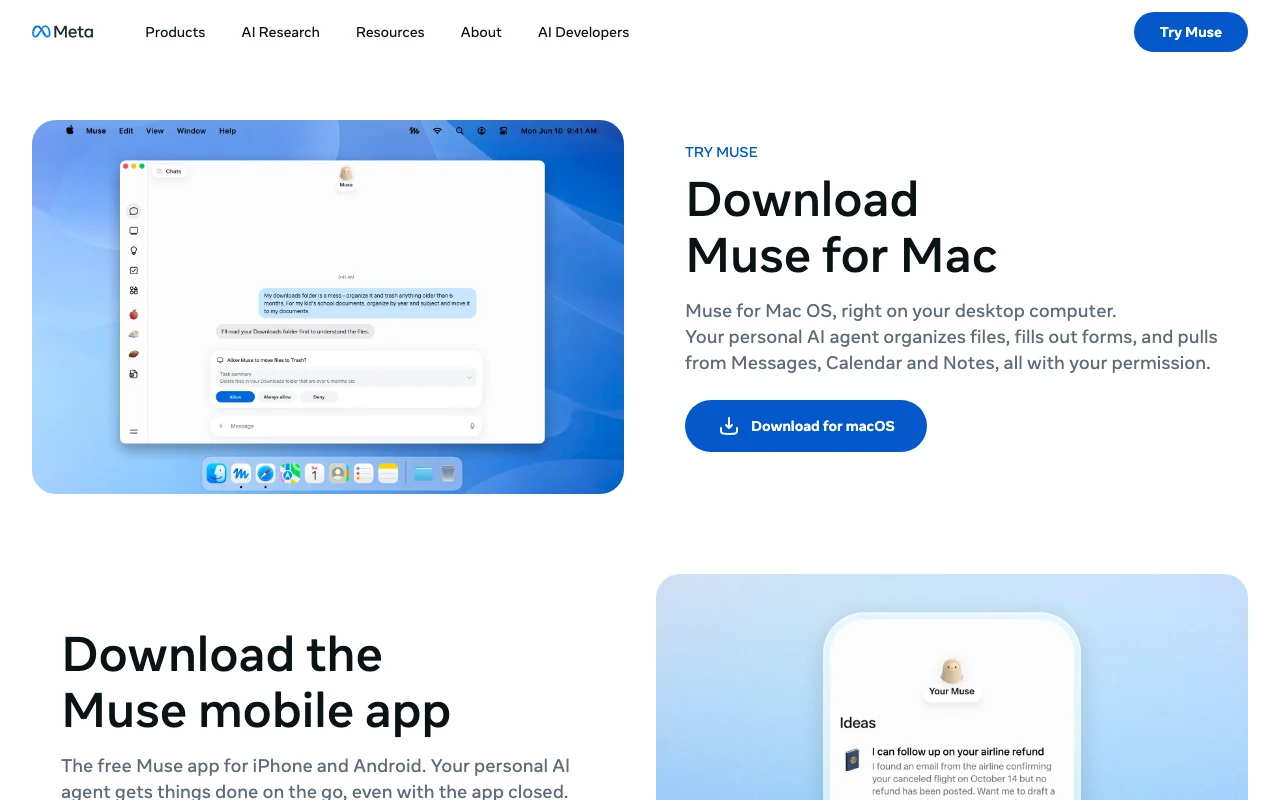
The official pages describe a Mac and mobile app that can organize files, handle tasks and connect Messages, Calendar and Notes. Muse asks permission before actions such as sending messages or making purchases, and you can allow once, always allow or deny. It is free with a usage limit; a paid subscription is offered if you reach it, with no price stated on the pages read.
Offizielle Website von Muse: So stellt sich das Produkt selbst dar. ai.meta.com, erfasst Oct 2, 2026
Was Sie liefern und was Sie erhalten
Was Sie Muse geben und was zurückkommt, laut Dokumentation
Sie liefern
Task instructions
Connected apps and permissions
Sie erhalten zurück
Completed multi-step tasks
Generated documents and images
Wo Sie es nutzen können
Plattformen
Desktop, Mobile
Konto
Erforderlich
Platforms
Mac, mobile
Permissions
Allow once, always, deny
Connectors
Third-party apps
Background
Yes
Wofür Muse genutzt wird
Die Szenarien erarbeiten unsere Redakteure anhand der Dokumentation; das tatsächliche Ergebnis hängt von Ihrer Eingabe und Ihrem Tarif ab.
Booking reservations and managing reminders
Wer
Busy individuals
Sie liefern
A booking request
Erwartetes Ergebnis
Muse completes the reservation and reminder you asked for after you approve the action.
Muse keeps watching the price or weather you named and sends alerts without you reopening the app.
Benötigter Tarif
Free
Einschränkung
The app must stay allowed to run in the background, and the work counts toward the free usage limit. Quelle (öffnet in neuem Tab)
Creating documents and generating images
Wer
Workers
Sie liefern
A document brief
Erwartetes Ergebnis
Muse produces a document from your brief, and can generate images, which you then review before using.
Benötigter Tarif
Free
Einschränkung
The quality of generated documents and images is unverified in the pages we could read. Quelle (öffnet in neuem Tab)
Wichtige Funktionen und ihre praktischen Grenzen
Funktionsüberblick auf der offiziellen Website. ai.meta.com, erfasst Oct 2, 2026
Browses the web and completes multi-step tasks
Browses sites, buys and creates content on your behalf. People who delegate errands can hand over a task with several steps, such as browsing and buying, instead of doing each step by hand.
Zugriff: Not statedLimit: Muse takes real actions on your behalf, so the results depend on the permissions you grant and should be checked.Quelle (öffnet in neuem Tab)
Connectors to third-party apps and services
Links your other apps so it can act inside them. Users can let Muse work inside their other apps, so a task does not stop at the edge of one service.
Zugriff: Not statedLimit: Each app needs its own permission, and the list of supported apps is not stated in the pages we could read.Quelle (öffnet in neuem Tab)
Background work after the app is closed
Keeps working after you close the app. Users can start a long task and leave, since Muse keeps working without the app open.
Zugriff: FreeLimit: Background work counts toward the usage limit that applies to the free tier.Quelle (öffnet in neuem Tab)
Permission prompts: allow once, always or deny
Asks before sensitive actions; you choose allow once, always or deny. Users keep control over sensitive steps because Muse asks first and they choose allow once, always allow or deny.
Zugriff: Not statedLimit: The prompts are manual, so a user who picks always allow gives up that check for that action.Quelle (öffnet in neuem Tab)
Muse: Stärken und Grenzen
Gründe für die Wahl von Muse
Free to use with a usage limit You can start without paying, though a usage limit applies, so you can judge whether the agent handles your tasks before any upgrade.dokumentiertQuelle (öffnet in neuem Tab)
Asks permission before sending messages or purchases Muse asks before actions such as sending messages or making purchases, so it should not complete those steps without your approval.dokumentiertQuelle (öffnet in neuem Tab)
Keeps working in the background Tasks can continue in the background after you close the app, so longer jobs do not need you to keep the window open.dokumentiertQuelle (öffnet in neuem Tab)
You can review its activity and manage permissions You can review what Muse did and manage its permissions, so you can check its actions and change what it is allowed to do.dokumentiertQuelle (öffnet in neuem Tab)
Vor dem Bezahlen bei Muse prüfen
Free tier has a usage limit The free tier has a usage limit, so heavy users may run into it and be offered a paid subscription.dokumentiertQuelle (öffnet in neuem Tab)
Paid subscription price not stated on the pages read The paid subscription price is not stated on the pages we could read, so you cannot work out the cost before reaching the limit.dokumentiertQuelle (öffnet in neuem Tab)
Can take real actions, so permissions need careful setup Because Muse can take real actions such as purchases and messages, you need to set permissions carefully to avoid unwanted results.dokumentiertQuelle (öffnet in neuem Tab)
So nutzen Sie Muse für delegating multi-step tasks to an agent
Muse einrichten
Download the Muse app for Mac or mobile.
Sign in.
Connect apps.
Beispiel: delegating multi-step tasks to an agent
Describe a task.
Approve prompts.
Review results.
Ergebnis prüfen und exportieren
Check actions in activity.
Revoke permissions.
Von unserer Redaktion vorgeschlagener Beispiel-Prompt (keine aufgezeichnete Ausgabe des Produkts)
Find a table for two on Friday and add it to my calendar.
Muse API
API-Zugang und separate Abrechnung
Muse hat laut offizieller Dokumentation keine öffentliche API.
Datenschutz, Datennutzung und kommerzielle Rechte
Zusammengefasst aus den aktuellen Richtlinien des Anbieters; dies ist keine Rechtsberatung, und das Badge eines Anbieters ersetzt kein unabhängiges Audit.
Wie Ihre Eingaben und Ausgaben verarbeitet werden
Tasks and connected app data
Not stated
Not stated
Kommerzielle Nutzung und Tarifbeschränkungen
Not stated
Not stated
Andere Tools statt Muse
„Besser geeignet“ beruht auf dokumentierten Funktionen und Preisen, nicht auf einem direkten Test.
Nicht verifiziert: Paid price; Mobile OS; Privacy terms; Official pages could not be read as text (client-rendered or empty fetch); facts come from the verified seed research.
Wie wir diese Seite dokumentiert haben und pflegen
Jede Angabe zu Muse oben stammt aus den 2 hier aufgeführten offiziellen Seiten, zuletzt verglichen am Oct 4, 2026; wir haben Muse nicht selbst getestet, daher gibt es keine redaktionelle Bewertung. Wie wir Seiten prüfen und erneut prüfen.
Artikel aktualisiert Oct 10, 2026; Preise geprüft Oct 4, 2026. Ausgehende Links zu Anbietern sind einfache Links; wir erhalten keine Provisionen. So testen wir · Fehler melden



 (in voller Größe in neuem Tab öffnen)
 (in voller Größe in neuem Tab öffnen)
 (in voller Größe in neuem Tab öffnen)