Cursor vs Devin Desktop (formerly Windsurf) in 2026: which one fits your work
Pick Cursor for an agent reachable from the editor, CLI, Slack and GitHub, with Bugbot review and a stated privacy-mode policy. Pick Devin Desktop (formerly Windsurf) for a full IDE on macOS, Windows and Linux with unlimited free Tab completions. Cursor and Devin Desktop both start at $20/month and have a free tier.
Team priceFrom $40/user/mo · $80/mo + $40/mo per full seatCursor · Devin Desktop (formerly Windsurf)
We based this on our verified profiles of Cursor (pricing checked 2026-09-29) and Devin Desktop, formerly Windsurf (checked 2026-10-01); we ran no benchmark, used no third-party benchmarks and took no vendor payments.
Ist Cursor besser als Devin Desktop (formerly Windsurf)? Die kurze Antwort
Cursor and Windsurf are both AI coding editors with a free tier and a $20/month paid plan, so the choice comes down to details. Cursor is documented with a CLI, Slack and GitHub surfaces, Bugbot code review and a stated privacy-mode training policy. Devin Desktop (formerly Windsurf) is documented for macOS, Windows and Linux, a JetBrains plugin, unlimited Tab completions on the free plan and a $200/month Max tier. Pick Cursor for review and privacy documentation, Devin Desktop for a full IDE with multi-agent management.
Based on our verified profiles of Cursor (pricing checked 2026-09-29) and Devin Desktop, formerly Windsurf (checked 2026-10-01); no benchmark was run.
Cursor oder Devin Desktop (formerly Windsurf): Was für welche Aufgabe passt
Wenn Sie nur die Antwort wollen, ist das die Tabelle. Alles darunter sind die Belege aus den beiden dokumentierten Profilen.
Direktvergleich
Sie möchten
Verwenden
Warum
Write or refactor code in a project
Either
Cursor edits code and shows diffs; Devin Desktop is a full IDE with agentic multi-file changes
Get code autocompleted while typing
Devin Desktop (formerly Windsurf)
Devin Desktop lists unlimited Tab completions and inline edits on every plan, including Free
Hand a long task to a cloud agent
Either
Cursor cloud agents on Individual and above; Devin Cloud agents on paid plans
Get automatic review on pull requests
Cursor
Cursor lists Bugbot agentic PR review, included on Teams and usage-billed on Individual
Run several agents and track their status
Devin Desktop (formerly Windsurf)
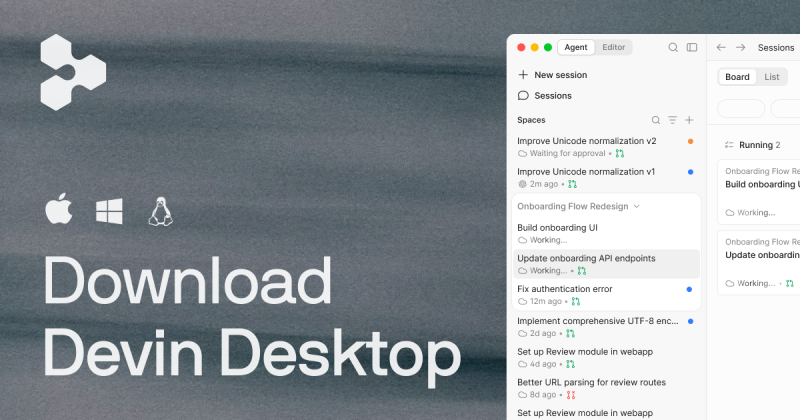
Devin Desktop's Agent Command Center has Spaces, Kanban and multi-agent management
Ask the agent from Slack or GitHub
Cursor
Cursor lists Slack and GitHub as surfaces beside the desktop app and CLI
Code on Windows or Linux
Devin Desktop (formerly Windsurf)
Devin Desktop lists macOS, Windows and Linux; Cursor's profile shows a macOS download
Use the editor inside JetBrains
Devin Desktop (formerly Windsurf)
Devin Desktop lists a JetBrains plugin; Cursor's docs mention JetBrains and Xcode integrations
Connect your own tools and conventions
Cursor
Cursor lists MCPs, skills, hooks, rules and subagents
Keep code out of model training
Cursor
Cursor states privacy mode keeps code from training; Devin Desktop's training use is not stated
Wer was wählen sollte
Which to pick: Cursor for review and privacy, Devin Desktop (formerly Windsurf) for a full IDE
Wählen Sie Cursor, wenn
You want a coding agent reachable from the editor, terminal, Slack and GitHub
You want Bugbot code review (usage-billed on Individual)
You need a documented training policy: with privacy mode on, code is not used for training by Cursor or model providers
Your team needs team-wide privacy mode and SAML/OIDC SSO on Teams, at $40 per user per month
Wählen Sie Devin Desktop (formerly Windsurf), wenn
You want unlimited Tab completions and inline edits on a free plan
You work on Windows or Linux, or want a JetBrains plugin alongside the desktop IDE
You want an Agent Command Center with Spaces, Kanban and multi-agent management
You want a higher self-serve tier: Max at $200/month with unlimited concurrent sessions
Was Cursor besser kann und was Devin Desktop (formerly Windsurf) besser kann
Cursor
Bugbot agentic code review on pull requests
Agent reachable from Slack and GitHub as well as the desktop app and CLI
MCPs, skills, hooks, rules and subagents for customization
A stated training policy and team-wide privacy mode on Teams
Devin Desktop (formerly Windsurf)
Unlimited Tab completions and inline edits on the free plan
Agent Command Center with Spaces, Kanban and multi-agent management
Desktop downloads for macOS, Windows and Linux, plus a JetBrains plugin
Fast Context, which finds the files and lines agents need
Cursor vs. Devin Desktop (formerly Windsurf) Preise: Tarife und kostenlose Stufen
Direktvergleich
Tarif
Tool
Preis
Limits
Cursor Hobby
Cursor
Free
Limited Agent requests
Cursor Individual (Pro)
Cursor
$20/mo
Extended limits on Agent; usage beyond included amount billed on demand
Cursor Individual (Pro+ / Ultra)
Cursor
Not stated
Pro+ recommended for daily agent users, Ultra for power users
Cursor Teams (Standard / Premium)
Cursor
$40/user/mo
Included usage plus on-demand billing
Cursor Enterprise
Cursor
Custom
Pooled usage
Devin Desktop Free
Devin Desktop (formerly Windsurf)
$0
Light agent quota resetting daily and weekly; limited models; up to 10 concurrent sessions
Devin Desktop Pro
Devin Desktop (formerly Windsurf)
$20/mo
Increased quotas; full model availability; up to 10 concurrent sessions
Devin Desktop Max
Devin Desktop (formerly Windsurf)
$200/mo
Significantly higher quotas than Pro; unlimited concurrent sessions
Entnommen aus den veröffentlichten Richtlinienseiten des jeweiligen Anbieters zum Zeitpunkt unserer Prüfung. Richtlinien ändern sich; die Quellenlinks stehen unten.
Wechsel zwischen Cursor und Devin Desktop (formerly Windsurf): was mitgenommen wird
Cursor oder Devin Desktop (formerly Windsurf): So treffen Sie die Wahl
Need a documented training policy and privacy mode? Choose Cursor.
Want unlimited Tab completions without paying? Choose Devin Desktop.
Review pull requests with an agent? Choose Cursor and its Bugbot.
Work on Windows or Linux, or inside JetBrains? Choose Devin Desktop.
Need a self-serve tier above $20/month? Devin Desktop lists Max at $200/month; Cursor's higher Individual prices were not shown.
If none of these applies, start on the Cursor and Windsurf free plans with one real task and keep the one whose diffs you trust.
Häufig gestellte Fragen
Is Windsurf the same as Devin Desktop?
Yes, Devin Desktop is the new name for Windsurf. Our profile lists Devin Desktop as the new name for Windsurf, from vendor Cognition AI. We keep the Windsurf name in this comparison because many people still search for it.
Which is cheaper for an individual developer, Cursor or Windsurf?
Neither is clearly cheaper: Cursor and Windsurf both list a paid individual plan at $20/month and a free plan. Windsurf's Max tier is $200/month. Cursor's Pro+ and Ultra prices were not shown in the pages we read.
Which has the better free plan, Cursor or Windsurf?
Neither free plan wins outright. Cursor's Hobby needs no credit card but has limited Agent requests. Windsurf's Free plan has unlimited Tab completions and inline edits but a light agent quota and limited models.
How do team prices compare for Cursor and Windsurf?
Cursor Teams is from $40 per user per month. Windsurf Teams is $80/month as a team base plus $40/month per full seat, for up to 200 users. Both list SAML/OIDC SSO, on Teams for Cursor and on Enterprise for Windsurf.