Nossa opinião: Best for sales teams and professionals in frequent video meetings who need automatic meeting transcription, speaker identification, and AI-powered summaries with CRM integration.
Principal limitação: Free plan limited to 3 lifetime file imports and 300 monthly transcription minutes; Pro plan capped at 1,200 minutes monthly and 90 minutes per meeting
Pela equipe editorial do AI Tool Atlas.
Com base na documentação oficial do fornecedor; não testamos este produto na prática. O que “visão geral documentada” significa
Quem deve usar Otter.ai
Best for sales teams and professionals in frequent video meetings who need automatic meeting transcription, speaker identification, and AI-powered summaries with CRM integration. Com base na documentação do fornecedor, fora de um teste prático.
Ideal para: Professionals in frequent video meetings
Também indicado para
Sales teams
Students and media professionals transcribing recordings
Considere outra ferramenta se free plan limited to 3 lifetime file imports
Ou se
Pro caps meetings at 90 minutes and 1,200 recording minutes
API access only on Enterprise
Otter.ai nas notícias
Manchetes de veículos dos EUA, selecionadas automaticamente. Não são recomendações. Atualizado Oct 2, 2026
Para: Large enterprises requiring custom integrations, API access, and compliance controls
Limites
Unlimited custom AI workflows
Unlimited concurrent meetings
1 mais
Custom retention and data controls
Inclui
Everything in Business
API and Webhooks
2 mais
SSO, SCIM, Domain Capture
HIPAA compliance (add-on)
API incluída
Limites de uso, créditos e custos extras
HIPAA compliance available as Enterprise add-on; RTMP stream input requires additional fees on Enterprise
O que é Otter.ai e como funciona?
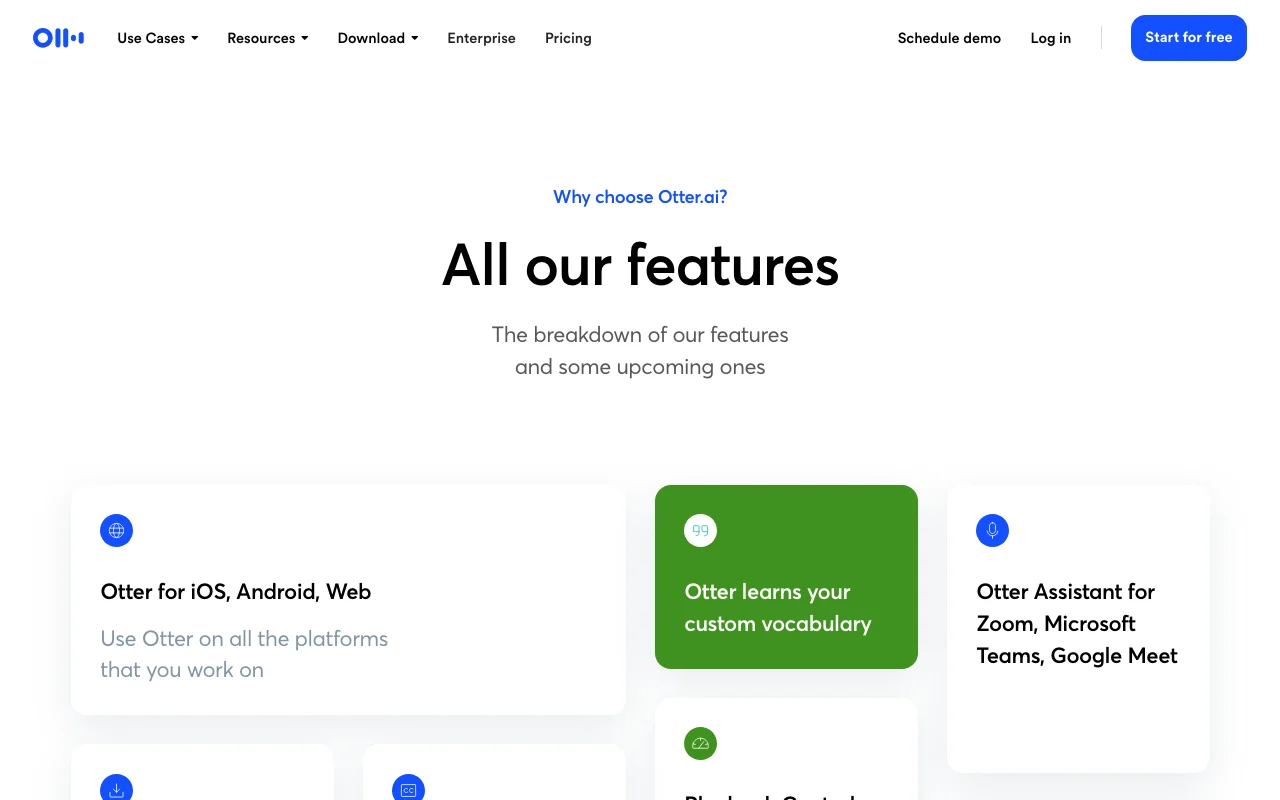
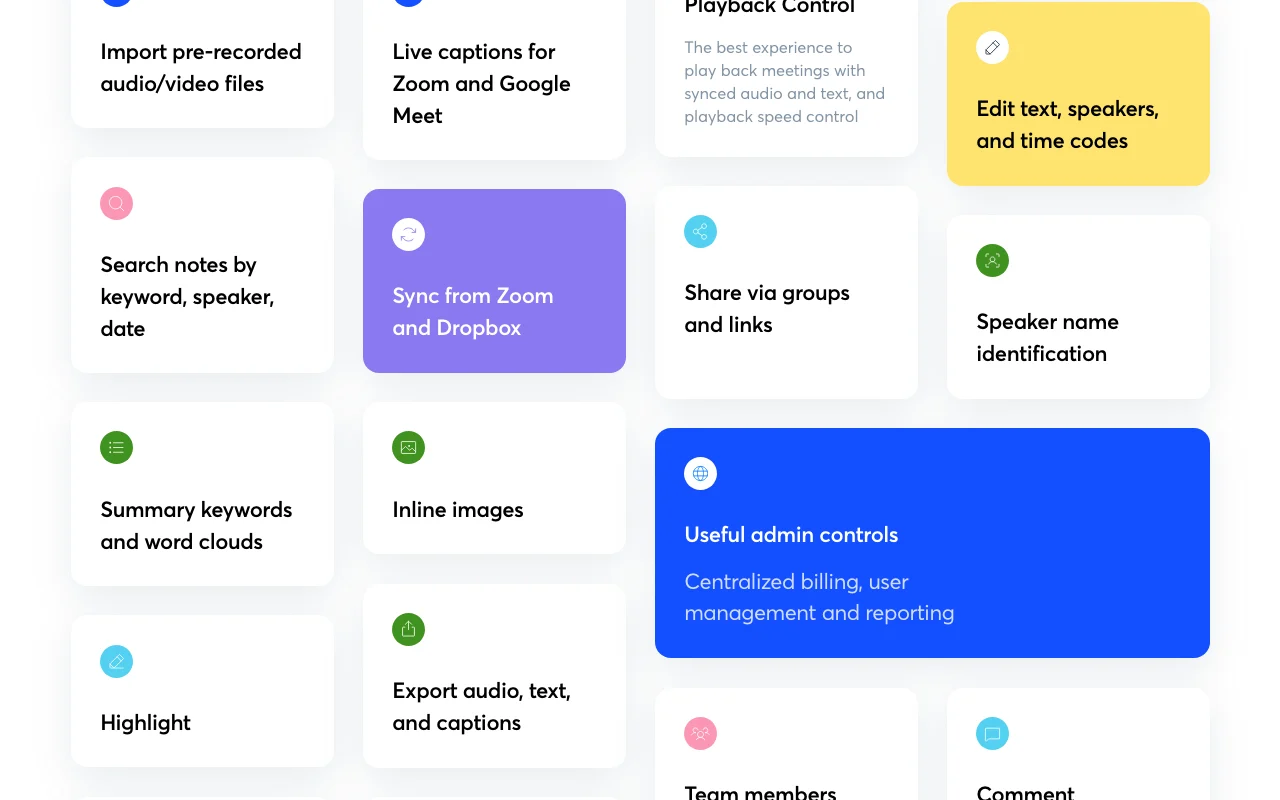
Otter.ai is an AI meeting notetaker that joins Zoom, Microsoft Teams and Google Meet calls to produce live transcripts with speaker identification, summaries and follow-ups. AI Chat lets users ask questions within and across meetings.
Otter offers desktop apps for Mac and Windows, iOS and Android apps and a Chrome extension, plus CRM integrations, an MCP server and, on Enterprise, an API and webhooks. Specialized agents cover sales and recruiting workflows.
O que você fornece e o que recebe de volta
O que você fornece a Otter.ai e o que recebe de volta, segundo a documentação
O que você fornece
Live Zoom, Microsoft Teams, Google Meet calls via bot join
Audio and video files uploaded for transcription
Desktop or mobile device recordings
RTMP stream input (Enterprise with additional fees)
O que você recebe de volta
Searchable transcripts with speaker identification in 6+ languages
Automated summaries with action items and decisions
Meeting-specific AI Chat responses and cross-meeting search
Exportable text, PDF, DOCX, MP3, SRT formats
Onde você pode usar
Plataformas
Web, Desktop (Mac, Windows), Mobile (iOS, Android), API (Enterprise only)
Conta
Obrigatório
6: English, Spanish, French, German, Japanese, Chinese
MP3, TXT, PDF, DOCX, SRT
Yes, for live meeting calls; imported files processed within 1-2 minutes
Web, Mac desktop, Windows desktop, iOS app, Android app, Chrome extension
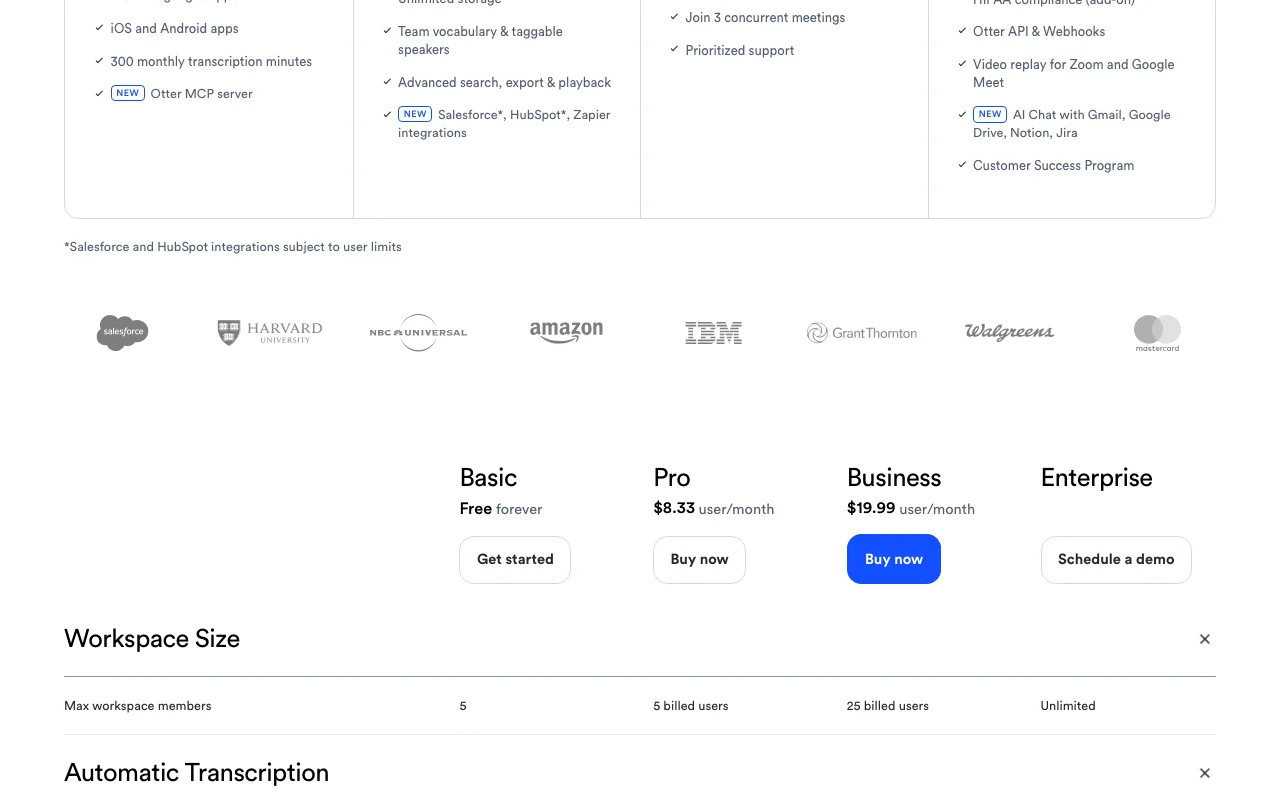
Basic/Pro: 5 max members; Business: 25 billed users; Enterprise: unlimited
Available as add-on on Enterprise plans only
Onde Otter.ai é mais útil
Os cenários são elaborados por nossos editores a partir da documentação; o resultado real depende da sua entrada e do seu plano.
Automatic meeting notes and summaries
Quem
Professionals in all industries
O que você fornece
Live meeting recording via Zoom, Teams, or Google Meet
Resultado esperado
Real-time transcript with speaker names, automated summary with action items and key decisions
Plano necessário
Basic (free) to Business
Limitação
Basic limited to 300 min/month and 30 min/meeting; Pro limited to 1,200 min/month and 90 min/meeting fonte (abre em uma nova guia)
Sales call capture with CRM sync
Quem
Sales teams and revenue operations
O que você fornece
Sales calls via Zoom, Teams, Meet, or desktop recording
Resultado esperado
Call transcript synced to Salesforce or HubSpot with extracted deal details, next steps, and insights
Plano necessário
Pro and Business
Limitação
CRM sync to Salesforce and HubSpot available on Pro and higher; custom integrations only on Enterprise fonte (abre em uma nova guia)
Lecture transcription
Quem
Students, educators, and media professionals
O que você fornece
Lecture recordings, podcasts, interviews, or production meetings
Resultado esperado
Searchable transcripts with timestamps and speaker tags for easy note-taking and content creation
Live transcription in multiple languages with speaker recognition
Converts live meeting audio to text in English, Spanish, French, German, Japanese, Chinese with automatic speaker identification by name Enables real-time note-taking without manual transcription; improves accessibility and searchability of meetings
Acesso: Available on all plans (Basic and higher)Limite: Some advanced speaker customization (team vocabulary) limited to Pro and Business plansfonte (abre em uma nova guia)
AI Chat within and across meetings
Allows users to ask questions about meeting content across single or multiple meetings using natural language Accelerates information retrieval and enables cross-meeting analysis without manual search
Acesso: All plans; query limits: Basic 20 per user/month (3 per conversation), Pro 50/month, Business/Enterprise 200/monthLimite: Query limits vary by plan; requires documented meeting historyfonte (abre em uma nova guia)
AI meeting workflows and templates
Provides pre-built templates for sales, recruiting, and other workflows; custom workflows on Business/Enterprise Standardizes meeting follow-ups and automates action item capture for team consistency
Acesso: Basic includes standard templates; Pro/Business/Enterprise include advanced templates with usage limits: Pro 15/user, Business 30/user, Enterprise unlimitedLimite: Custom workflows only on Business and Enterprise; template usage is per-userfonte (abre em uma nova guia)
Salesforce, HubSpot and Zapier integrations
Automatically syncs meeting transcripts, summaries, and extracted insights to CRM systems and workflow automation Eliminates manual data entry; keeps customer records current with latest call details
Acesso: Salesforce and HubSpot on Pro+ with user limits; Zapier available on all plansLimite: Subject to user limits on Salesforce/HubSpot; custom integrations only on Enterprisefonte (abre em uma nova guia)
Prós, contras e impeditivos
Onde Otter.ai é forte
Free Basic plan with 300 monthly transcription minutes No credit card required to start; lowest barrier to entry for individualsdocumentadofonte (abre em uma nova guia)
Apps for Mac, Windows, iOS, Android and Chrome Flexible recording options across all major platforms and devices without browser extension dependencydocumentadofonte (abre em uma nova guia)
Prices listed in USD with clear per-user-per-month billing Transparent, simple pricing without hidden costs or currency conversion surprisesdocumentadofonte (abre em uma nova guia)
HIPAA compliance available as Enterprise add-on Enables use in healthcare and regulated industries with audit trails and encryption controlsdocumentadofonte (abre em uma nova guia)
Limitações a conferir antes de pagar
Free plan limited to 3 lifetime file imports Free tier unsuitable for workflows requiring frequent file uploads; forces upgrade or work-arounddocumentadofonte (abre em uma nova guia)
Pro caps meetings at 90 minutes and 1,200 recording minutes monthly Pro plan insufficient for teams with long meetings or high meeting volume; requires Business plan ($30+/user/month)documentadofonte (abre em uma nova guia)
API access only on Enterprise Custom integrations and programmatic access require enterprise contract; blocks use cases requiring direct API accessdocumentadofonte (abre em uma nova guia)
SSO/SCIM require Enterprise Mid-market teams managing 5-25 users on Business plan must use manual user provisioningdocumentadofonte (abre em uma nova guia)
Como usar o Otter.ai para recording and transcribing a Zoom meeting with automatic summaries
Configurar Otter.ai
Create free Otter.ai account on https://otter.ai/ using email or sign-in
Download desktop app for Mac/Windows or install Chrome extension, or use web app
Connect Zoom account or enable calendar integration for automatic meeting invites
Grant Otter permission to join your Zoom, Teams, or Google Meet calls
Start your meeting; Otter bot joins automatically and begins recording
Exemplo: recording and transcribing a Zoom meeting with automatic summaries
Invite Otter bot to a scheduled Zoom call or manually add during live meeting
Let Otter record the full conversation (up to plan limits)
After meeting ends, review live transcript with speaker names and timestamps
Ask Otter AI Chat questions like 'What were the action items?' or 'Who said X?'
Export transcript as PDF, DOCX, or MP3 for sharing or archival
Revise e exporte o resultado
Confirm Otter joined your call by checking participant list in Zoom
Verify transcript appears in Otter.ai dashboard within 1-2 minutes post-meeting
Test AI Chat by asking a question about the meeting content and reviewing accuracy
Exemplo de prompt sugerido por nossos editores (não é uma saída registrada do produto)
What were the top 3 decisions made in this meeting and who is responsible for follow-up?
Otter.ai integrações e API
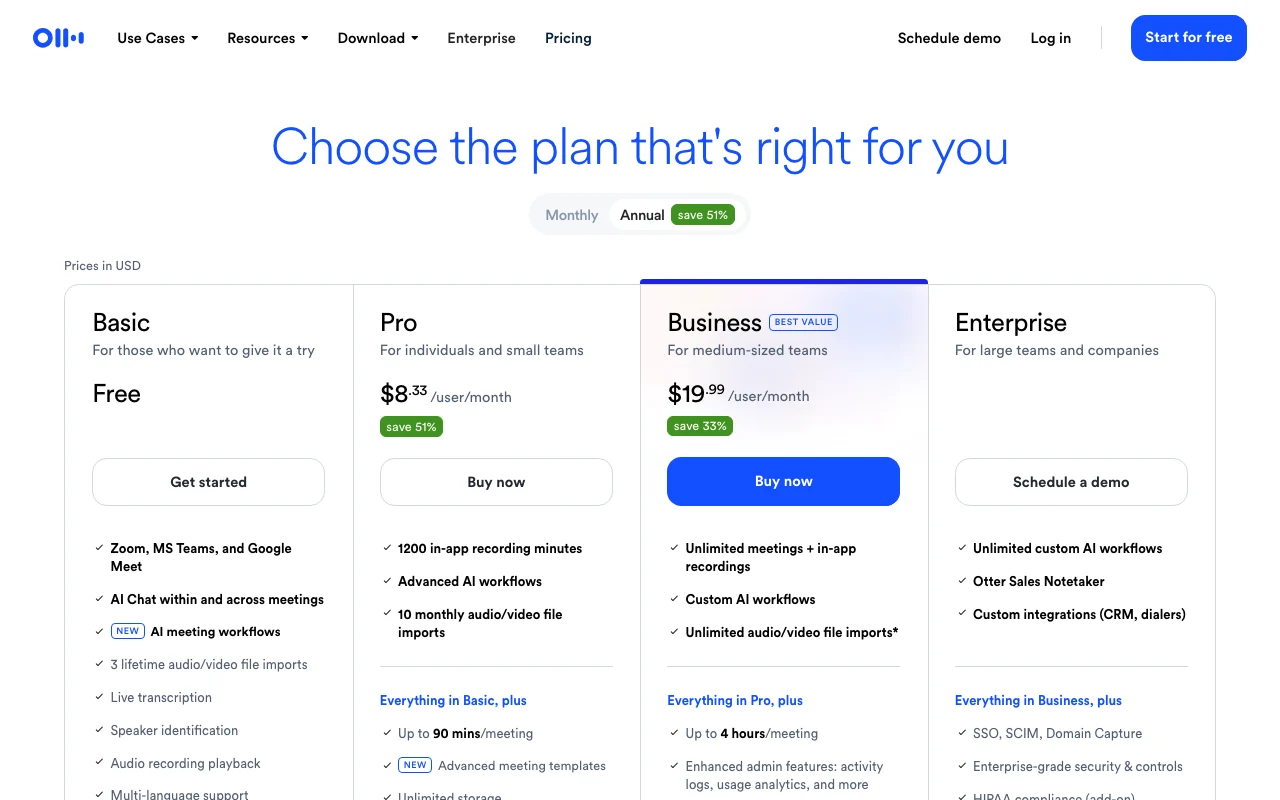
Comparação de planos na página oficial de preços. otter.ai, capturado Oct 1, 2026
Integrações nativas e formatos de exportação
Exportar: MP3 (audio), TXT (plain text), PDF (formatted), DOCX (editable), SRT (subtitles), Bulk export available on Business+
Acesso à API e cobrança separada
Otter.ai não tem API pública na documentação oficial. API and webhooks require Enterprise plan; no separate API-only tier
Privacidade, uso de dados e direitos comerciais
Resumido a partir das políticas atuais do fornecedor; não é aconselhamento jurídico, e o selo de um fornecedor não é uma auditoria independente.
Como suas entradas e saídas são tratadas
User audio recordings, meeting transcripts, and uploaded files are processed and stored; speaker information and meeting metadata are retained according to plan
Policy effective June 16, 2026 does not explicitly permit training on user content; audio and transcripts treated as user data subject to user controls
Custom retention settings available on Business and Enterprise plans; default retention not specified in available documentation
Uso comercial e restrições de plano
User retains rights to transcribed content; Otter retains right to use data for service improvement and analytics
Business and Enterprise plans include custom data retention and centralized management controls
Can I switch my account from Basic to a paid plan?
Yes. Log in to your Otter account, go to Settings, and select 'Upgrade to Business' or choose a plan. Follow the prompts to complete the upgrade. You can also upgrade to Pro from the Basic plan using the same method. fonte (abre em uma nova guia)
Do you offer student discounts?
Yes. Students and teachers using .edu email addresses receive a 20% discount on Otter Pro plans. Pro Annual discounted price is $6.67/month (billed $79.99 annually); Pro Monthly is $13.59/month. Sign up with your .edu email, then access the Student & Teacher Discount link from the upgrade page. fonte (abre em uma nova guia)
What payment methods are accepted?
Otter accepts credit and debit cards on the website and in-app purchases via Apple App Store or Google Play. PayPal is not currently accepted but is under consideration for future support. fonte (abre em uma nova guia)
Is there a maximum meeting length?
Yes. Basic plan supports up to 30 minutes per meeting; Pro supports 90 minutes; Business and Enterprise support up to 4 hours per meeting. Monthly transcription minute limits also apply per plan. fonte (abre em uma nova guia)
Can I use Otter with my CRM?
Yes. Pro and Business plans include native integrations with Salesforce and HubSpot that automatically sync meeting notes and extracted insights. Custom integrations are available on Enterprise plans. fonte (abre em uma nova guia)
Pricing | Otter.aipricing · verificado Oct 1, 2026 · Basic plan features and limits, Pro plan pricing ($16.99/mo, $8.49/mo annual) and limits, Business plan pricing ($30/mo, $19.99/mo annual) and limits, Enterprise plan features, File import limits by plan, Meeting duration limits, Concurrent meeting limits, Custom vocabulary limits, Integration availability, FAQ on student discounts, payment methods, plan upgrades
Otter Meeting Agent - AI Notetaker, Transcription, Insightshomepage · verificado Oct 1, 2026 · Product overview and use cases, Platform availability (Mac, Windows, iOS, Android, Chrome), Integration partners (Zoom, Teams, Google Meet, Slack, Salesforce, HubSpot, Zapier, Notion, Jira, Google Drive, Asana, Glean), Core features (transcription, AI Chat, summaries, CRM sync), Testimonials and trust indicators
Otter.ai Privacy Policy | Otter.aipolicy · verificado Oct 1, 2026 · Personal information collection practices, Data retention and usage, Commercial use of user data, Third-party data sharing (Stripe for payments), User rights and data controls
Não verificado: Business plan annual pricing not explicitly stated; inferred from pattern ($19.99/month when billed annually based on pricing page table); Custom data retention limits and default retention period for each plan; API documentation URL (docs not available; only mentioned as Enterprise feature); Specific SLA/uptime guarantees; Data center locations and geographic restrictions; Whether Business plan includes email support or phone support availability.
Como documentamos e mantemos esta página
Todos os fatos sobre Otter.ai acima vêm de 3 páginas oficiais listados aqui, comparados pela última vez em Oct 1, 2026; não executamos Otter.ai por conta própria, por isso ele não tem nota editorial. Como verificamos e reverificamos as páginas.
Artigo atualizado em Oct 2, 2026; preços verificados Oct 1, 2026. Os links para fornecedores são links comuns; não ganhamos comissões. Como avaliamos · Relatar um erro